
KEENSTAR ST-265TC
KEENSTAR ST-265TC Touch Screen 2-Slice Toaster
Model: ST-265TC
1. Маңызды қауіпсіздік шаралары
Электр құрылғыларын пайдаланған кезде, төмендегілерді қоса алғанда, негізгі қауіпсіздік шараларын әрқашан сақтау керек:
- Тостермен жұмыс істемес бұрын барлық нұсқауларды оқып шығыңыз.
- Ыстық беттерге қол тигізбеңіз. Тұтқаларды немесе тұтқаларды пайдаланыңыз.
- Электр тогының соғуынан қорғау үшін сымды, ашаны немесе тостерді суға немесе басқа сұйықтыққа батырмаңыз.
- Кез келген құрылғыны балалар немесе оның жанында пайдаланған кезде мұқият қадағалау қажет.
- Қолданбаған кезде және тазалау алдында розеткадан ажыратыңыз. Бөлшектерді киер немесе шешпес бұрын салқындатыңыз.
- Сым немесе аша зақымданған немесе құрылғы дұрыс жұмыс істемей қалғаннан кейін немесе қандай да бір жолмен зақымдалған құрылғыны пайдаланбаңыз.
- Сымның үстелдің немесе үстелдің шетінен салбырап тұруына немесе ыстық беттерге тиюіне жол бермеңіз.
- Ыстық газ немесе электр оттығының үстіне немесе жанына немесе қыздырылған пешке қоймаңыз.
- Тостерді тағайындаудан басқа мақсатта пайдаланбаңыз.
- Oversize foods, metal foil packages, or utensils must not be inserted into a toaster as they may involve a risk of fire or electric shock.
- Тостер жұмыс істеп тұрған кезде перделерді, перделерді, қабырғаларды және т.б. қоса алғанда, тұтанғыш материалмен жабылған немесе тиіп тұрса, өрт шығуы мүмкін.
- Тостер электр желісіне қосылған кезде тағамды шығаруға әрекеттенбеңіз.
- Бұл құрылғы тек үйде пайдалануға арналған.
2. Өнім аяқталдыview
The KEENSTAR ST-265TC is a modern 2-slice toaster featuring a touch screen interface for precise control over your toasting preferences. It includes wide slots to accommodate various bread types and a removable crumb tray for easy cleaning.
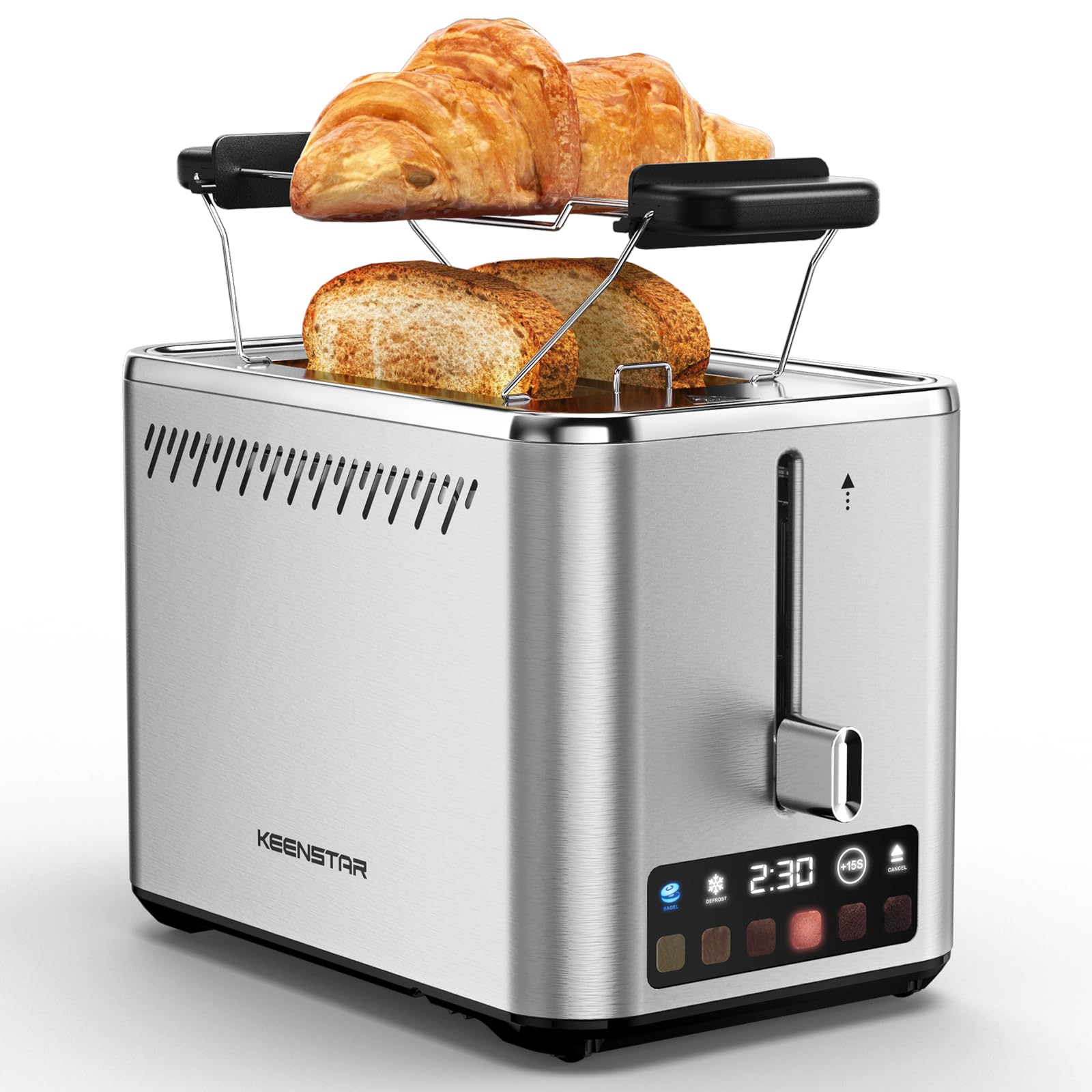
Image: KEENSTAR ST-265TC 2-Slice Toaster in silver stainless steel.
3. Орнату
Қаптаманы ашу
Carefully remove the toaster and all packaging materials from the box. Ensure all accessories, including the warming rack, are present.
Орналастыру
Тостерді перделер немесе қабырғалар сияқты жанғыш материалдардан алыс, тұрақты, тегіс, ыстыққа төзімді бетке қойыңыз. Құрылғының айналасында жеткілікті желдетуді қамтамасыз етіңіз.
Бірінші пайдалану
Before toasting food for the first time, operate the toaster without bread on the highest browning setting (level 6) to burn off any manufacturing residues. A slight odor or smoke may be present; this is normal and will dissipate.
4. Пайдалану нұсқаулары
Басқару тақтасы аяқталдыview

Image: The toaster's smart touch control display showing 6 browning levels and extra functions like Bagel, Defrost, +15S, and Cancel.
Негізгі тосттар
- Insert up to two slices of bread into the wide 1.5-inch slots.
- Select your desired browning level (1-6) by touching the corresponding icon on the display. Level 1 is the lightest, and Level 6 is the darkest.
- Press the lever down until it locks into place. The digital display will show a countdown timer.
- The toast will automatically pop up when the cycle is complete.

Image: Visual guide showing the steps for easy toaster operation: 1. Put bread in slots, 2. Select browning level and function, 3. Press the lever down, 4. Enjoy delicious bread.
Багель функциясы
This function is designed to toast the cut side of bagels while gently warming the outer side.
- Insert bagel halves into the slots with the cut side facing outwards.
- Қалаған қызару деңгейін таңдаңыз.
- түймесін түртіңіз БАГЕЛ button on the display. It will illuminate.
- Press the lever down until it locks.

Image: The toaster's display showing the illuminated BAGEL mode. BAGEL mode toasts one side only; place the cut side facing outward.
Жібіту функциясы
Use this function to toast frozen bread without pre-thawing.
- Мұздатылған нанды ойықтарға салыңыз.
- Қалаған қызару деңгейін таңдаңыз.
- түймесін түртіңіз ЖІБЕРУ button on the display. It will illuminate.
- Press the lever down until it locks.

Image: The toaster's display showing the illuminated DEFROST mode. This mode allows you to cook frozen breads easily without guesswork.
+15S Function
If your toast is not quite browned enough after a cycle, you can add an additional 15 seconds of toasting time.
- After a toasting cycle, if more browning is desired, touch the +15S түймесі.
- The toaster will initiate a 15-second toasting cycle.
Болдырмау функциясы
To stop the toasting cycle at any time, simply touch the БАС ТАРТУ button. The lever will automatically raise, and the heating elements will turn off.

Image: The toaster's display highlighting the +15S button to increase baking time by 15 seconds, and the Cancel button to stop heating.
Жылыту сөресі
The included warming rack can be used to warm pastries, croissants, or other items that cannot be placed directly into the toaster slots.
- Place the warming rack securely on top of the toaster, aligning it over the slots.
- Place the item to be warmed on the rack.
- Start a toasting cycle (without bread in the slots) to generate heat. The heat rising from the toaster will warm the item on the rack.
- Monitor the item closely to prevent over-warming or burning.

Image: The removable warming rack attached to the toaster, with a croissant placed on it for warming.
Өнім бейнелері
Video: Demonstrates the touchscreen and warming tray features of the KEENSTAR toaster.
Бейне: егжей-тегжейлі шолуview of the KEENSTAR Smart 2-Slice Toaster, highlighting its touch screen and various functions.
Video: Explores the key features and functionalities of the KEENSTAR toaster.
5. Техникалық қызмет көрсету және тазалау
Жалпы тазалау
Always unplug the toaster from the power outlet and allow it to cool completely before cleaning. Wipe the exterior with a soft, damp шүберек. Абразивті тазалағыштарды немесе металл қырғыштарды пайдаланбаңыз, себебі олар тот баспайтын болаттан жасалған бетті сызып тастауы мүмкін.
Ұсақталған науа
The removable crumb tray collects crumbs during toasting and should be emptied regularly to prevent fire hazards.
- Тостердің розеткадан ажыратылғанына және толығымен суығанына көз жеткізіңіз.
- Pull out the crumb tray located at the bottom rear of the toaster.
- Үсінділерді тастаңыз және науаны жарнамамен сүртіңізamp мата.
- Қалдық науасын мықтап шерткенше орнына сырғытыңыз.

Image: The toaster's convenient design showing the removable crumb tray being pulled out and the cord storage area on the bottom.
Сымды сақтау
For neat storage, the power cord can be wrapped around the designated area on the underside of the toaster.
6. Ақаулықтарды жою
- Тостер қосылмайды: Ensure the power cord is securely plugged into a working electrical outlet. Make sure the toast lever is fully pressed down.
- Біркелкі емес тосттар: Ensure bread slices are centered in the slots. Try adjusting the browning level. Different types of bread may require different settings.
- Bread stuck in slots: Unplug the toaster immediately and allow it to cool. Gently remove the bread using non-metallic tongs. Never use metal utensils.
- Тостерден шыққан түтін: Unplug the toaster immediately. Remove any food particles or crumbs that may be lodged inside the slots or on the heating elements. Ensure the crumb tray is clean.
7. Техникалық сипаттамалар
| Бренд | КИНСТАР |
| Үлгі | ST-265TC |
| Қуат | 900 ватт |
| Тtage | 120 вольт (AC) |
| Кесектер саны | 2 |
| Материал | Тот баспайтын болат |
| Өнім өлшемдері (D x W x H) | 10.39" x 7.1" x 6.1" |
| Слот ені | 1.5 дюйм |
| Арнайы мүмкіндіктер | Cancel Function, LED Indicator, Removable Crumb Tray, Touchscreen, Warming Rack |

Image: Diagram showing the dimensions of the KEENSTAR ST-265TC toaster: 9.4 inches (24cm) length, 6.1 inches (15.6cm) width, 7 inches (18cm) height, and 1.5 inch (3.8cm) wide slots.
8. Кепілдік және қолдау
Кепілдік
This KEENSTAR toaster comes with a 2-year warranty. Please refer to the warranty card included in the product packaging for detailed terms and conditions.
Тұтынушыларды қолдау
For any questions, technical assistance, or warranty claims, please contact KEENSTAR customer support. Contact information can typically be found on the warranty card or the official KEENSTAR webсайт.
Ask a question about this manual
Ask about setup, troubleshooting, compatibility, parts, safety, or missing instructions. Manuals+ will review the question and use this page’s manual context to help answer it.