
1. Кіріспе
Thank you for choosing the Duux Bora Smart Dehumidifier. This manual provides essential information for the safe and efficient operation of your device. Please read it thoroughly before use and retain it for future reference.
The Bora dehumidifier is designed to create a healthier indoor environment by effectively managing high humidity levels. It can remove up to 30 liters of moisture per day, helping to prevent mold and bacterial growth. Featuring an integrated hygrostat for automatic humidity regulation and an active carbon filter for odor removal, the Bora ensures cleaner air. Remote control is available via the Duux application.
2. Маңызды қауіпсіздік нұсқаулары
Өрт, электр тогының соғуы және жарақат алу қаупін азайту үшін электр құрылғыларын пайдалану кезінде әрқашан негізгі қауіпсіздік шараларын орындаңыз.
- Құралды қолданар алдында барлық нұсқауларды оқып шығыңыз.
- Қуат көзінің дыбыс деңгейіне сәйкес келетініне көз жеткізіңізtage рейтинг жапсырмасында көрсетілген.
- Зақымдалған сым немесе ашамен ылғалдандырғышты пайдаланбаңыз.
- Құрылғыны жылу көздерінен, тікелей күн сәулесінен және жанғыш материалдардан алыс ұстаңыз.
- Ауа кіретін немесе шығатын жерлерді жауып тастамаңыз.
- Құрылғыны әрқашан тұрақты, тегіс бетке қойыңыз.
- Құрылғыны тазалау, техникалық қызмет көрсету немесе пайдаланбаған кезде оны электр желісінен ажыратыңыз.
- Құрылғыны, қуат сымын, суға немесе басқа сұйықтықтарға батырмаңыз.
- Бұл құрылғы физикалық, сенсорлық немесе ақыл-ой қабілеттері шектеулі немесе тәжірибесі мен білімі жоқ адамдардың (соның ішінде балалар) пайдалануына арналмаған, егер олардың қауіпсіздігіне жауапты адамның қадағалауынсыз немесе құрылғыны пайдалану туралы нұсқау болмаса.
- Балалардың құрылғымен ойнамауын қадағалау керек.
3. Өнім аяқталдыview
Familiarize yourself with the components of your Duux Bora Dehumidifier.

3.1-сурет: Алдыңғы view of the Duux Bora Dehumidifier, showing its sleek design and a smartphone displaying the control app interface.

3.2-сурет: Артқы view of the dehumidifier, highlighting the removable air filter cover and the continuous drainage port.

3.3-сурет: Top panel of the dehumidifier, displaying the digital screen and touch controls for various functions.
Негізгі компоненттер:
- Басқару тақтасы: Located on the top, with digital display and touch buttons.
- Ауа кіріс/шығыс: Ауаны сорып алу және шығару үшін.
- Су ыдысы: 4-liter capacity, located at the bottom front.
- Белсенді көмір сүзгісі: Located behind the rear air inlet.
- Үздіксіз дренаж порты: For connecting a hose for continuous operation.
- Кастерлер: Оңай қозғалу үшін.
4. Орнату
- Қаптаманы ашу: Ылғалдандырғышты қаптамасынан абайлап алыңыз. Болашақта тасымалдау немесе сақтау үшін барлық орауыш материалдарын сақтаңыз.
- Орналастыру:
- Құрылғыны қатты, тегіс бетке қойыңыз.
- Ауа ағынының дұрыс болуы үшін ауа кіретін және шығатын тесіктердің айналасында кемінде 20 см (8 дюйм) бос орын бар екеніне көз жеткізіңіз.
- Құрылғыны жылу көздеріне жақын немесе тікелей күн сәулесі түсетін жерге қоймаңыз.
- The dehumidifier is suitable for various rooms up to 50 square meters, including basements, laundry rooms, and living areas.
- Қуат қосылымы: Қуат сымын жерге тұйықталған электр розеткасына қосыңыз. томды қамтамасыз етіңізtage құрылғының талаптарына сәйкес келеді (240 вольт).
- Су ыдысын орнату: Ensure the 4-liter water tank is correctly inserted into the unit.

4.1-сурет: The 4-liter water tank being pulled out from the dehumidifier for emptying or inspection.
- Үздіксіз дренаж (міндетті емес): For continuous operation without emptying the water tank, connect a suitable hose (not included) to the continuous drainage port at the back of the unit. Ensure the hose is sloped downwards to allow gravity drainage.
5. Пайдалану нұсқаулары
5.1. Басқару тақтасының жұмысы
5.1-сурет: Егжей-тегжейлі view of the control panel with digital display and function buttons.
The control panel allows you to manage all functions of the dehumidifier. Refer to the icons on the panel for specific functions.
- Қуат түймесі: Құрылғыны қосады немесе өшіреді.
- Режимді таңдау: Cycle through various operating modes (e.g., Auto, Continuous, Laundry Drying).
- Ылғалдылық параметрі: Adjust the desired humidity level using the up/down arrows. The integrated hygrostat will maintain this level.
- Таймер: Автоматты түрде өшіру үшін таймерді орнатыңыз.
- Желдеткіш жылдамдығы: Select between 2 fan speeds.
5.2. Smart Control via Duux App
The Duux Bora can be controlled remotely using the Duux application on your smartphone or tablet.

5.2-сурет: The Duux mobile application displaying current humidity and control options for the Bora dehumidifier.
- Download the Duux app from your device's app store.
- Follow the in-app instructions to pair your Bora dehumidifier.
- Once connected, you can power the unit on/off, adjust settings, and receive notifications (e.g., when the water tank is full) from anywhere.
5.3. Laundry Drying Mode
The innovative Laundry Drying Mode is designed to efficiently dry clothes indoors.
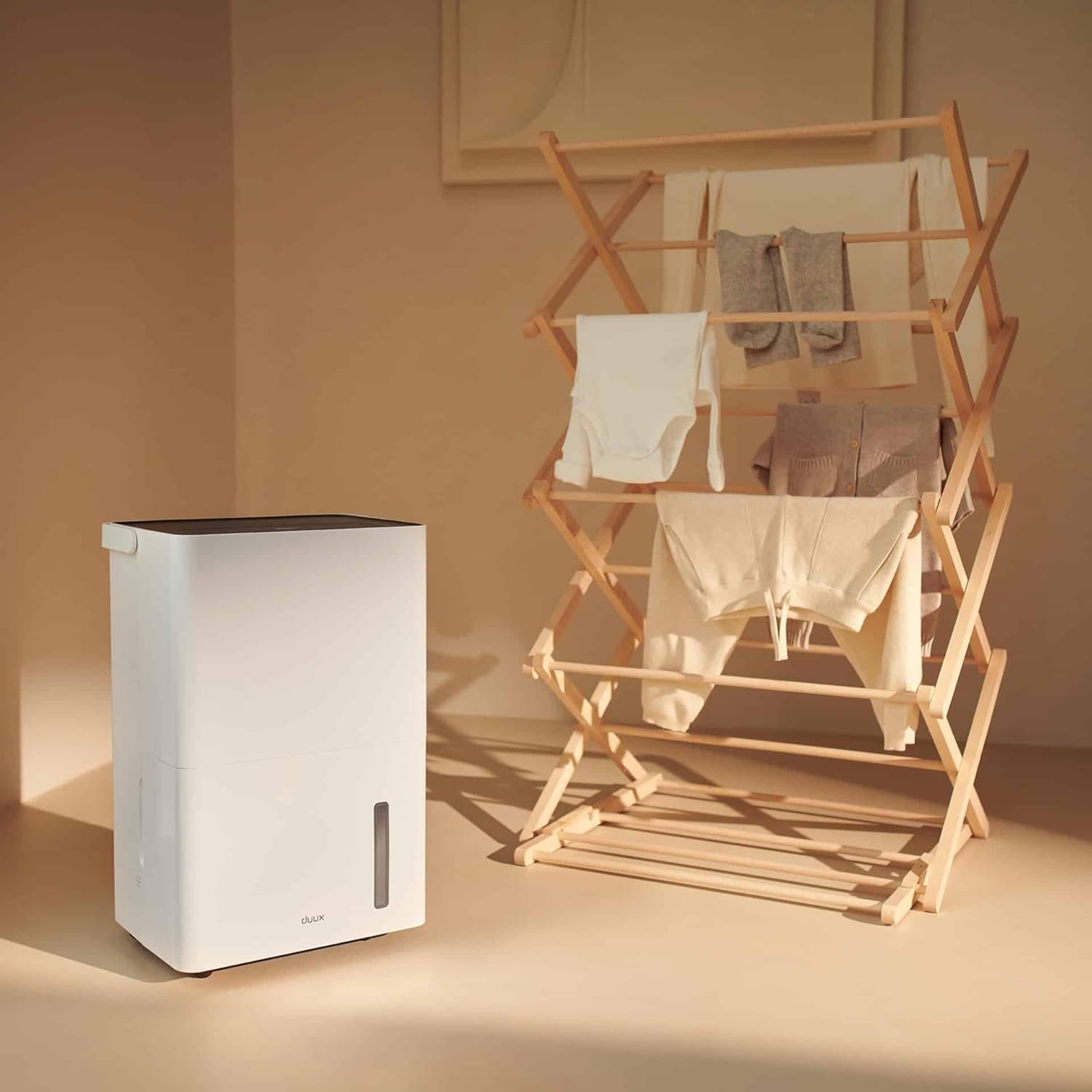
5.3-сурет: The dehumidifier positioned near a laundry rack, demonstrating its use in drying clothes.
- Activate this mode via the control panel or the Duux app.
- This mode operates continuously to remove moisture from the air, accelerating the drying process of laundry.
- It can significantly reduce energy consumption compared to traditional tumble dryers.
6. Техникалық қызмет көрсету
Тұрақты техникалық қызмет көрсету ылғалдандырғыштың оңтайлы өнімділігі мен ұзақ қызмет ету мерзімін қамтамасыз етеді.
6.1. Су ыдысын босату
- When the water tank is full, the unit will automatically shut off and an indicator light will illuminate.
- Құрылғының алдыңғы жағынан су ыдысын абайлап шығарыңыз.
- Жиналған суды раковинаға немесе канализацияға төгіңіз.

6.1-сурет: A user emptying the collected water from the dehumidifier's tank into a sink.
- Reinsert the empty water tank firmly into the unit until it clicks into place. The unit will resume operation.
6.2. Ауа сүзгісін тазалау
The active carbon filter should be cleaned regularly (e.g., every two weeks or as needed) to maintain air quality and dehumidifier efficiency.
- Ылғалдандырғышты розеткадан ажыратыңыз.
- Locate the filter cover at the back of the unit.
- Remove the filter cover and carefully pull out the active carbon filter.

6.2-сурет: A user demonstrating the removal of the active carbon filter from the rear of the dehumidifier.
- Clean the filter with a vacuum cleaner or wash it gently with lukewarm water. Allow it to air dry completely before reinstallation.
- Reinsert the dry filter and replace the filter cover.
6.3. Жалпы тазалау
- Құрылғының сыртын жұмсақ шүберекпен сүртіңіз, damp мата. Абразивті тазартқыштарды немесе еріткіштерді қолданбаңыз.
- Тазалау алдында құрылғының желіден ажыратылғанына көз жеткізіңіз.
7. Ақаулықтарды жою
Тұтынушыларды қолдау қызметіне хабарласпас бұрын келесі жалпы мәселелер мен шешімдерді қараңыз:
| Мәселе | Ықтимал себебі | Шешім |
|---|---|---|
| Құрылғы қосылмайды. | Қуат көзі жоқ; Қуат сымы қосылмаған; Су ыдысы толы немесе дұрыс салынбаған. | Қуат қосылымын тексеріңіз; Су ыдысын босатып, дұрыстап қайта салыңыз. |
| Ылғалдандырғыш суды жинамайды. | Room temperature too low; Humidity level already low; Air filter clogged; Unit in fan-only mode. | Ensure room temperature is above 5°C (41°F); Check desired humidity setting; Clean air filter; Select dehumidification mode. |
| Құрылғы шулы. | Құрылғы тегіс жерде емес; Ауа сүзгісі бітеліп қалды; Ішкі компоненттер дірілдейді. | Тегіс жерге қойыңыз; Таза ауа сүзгісі; Шу жойылмаса, қолдау қызметіне хабарласыңыз. |
| Қолданбаға қосылу мәселелері. | Wi-Fi signal weak; Incorrect pairing procedure; App requires update. | Ensure strong Wi-Fi signal; Re-attempt pairing as per app instructions; Update Duux app. |
| Құрылғыдан жағымсыз иіс. | Active carbon filter needs cleaning or replacement. | Clean or replace the active carbon filter. |
8. Техникалық сипаттамалар
| Ерекшелік | Мәлімет |
|---|---|
| Бренд | Duux |
| Үлгі нөмірі | DXDH30 |
| Түс | Ақ |
| Ылғалсыздандыру мүмкіндігі | Күніне 30 литрге дейін |
| Су ыдысының сыйымдылығы | 4 литр |
| Тtage | 240 вольт |
| Өнім өлшемдері (L x W x H) | 24.7 x 33.7 x 51 см |
| Элемент салмағы | 16.5 келі |
| Жылдамдықтардың саны | 2 |
| Автоматты өшіру | Yes (when water tank is full) |
| Арнайы мүмкіндіктер | Integrated Hygrostat, Active Carbon Filter, Laundry Drying Mode, Smart App Control |
| Ұсынылатын еден ауданы | 50 шаршы метрге дейін |
| Қосылған құрамдас бөліктер | 1 белсенді көмір сүзгісі |
9. Warranty and Spare Parts
Duux products are manufactured to high-quality standards. While specific warranty details are not provided in this manual, please refer to your purchase documentation or the official Duux webКепілдік туралы толық ақпарат алу үшін сайт.
Қосалқы бөлшектердің болуы: Spare parts for the Duux Bora Dehumidifier are available for up to 10 years from the date of purchase, ensuring long-term usability and repairability.
10. Тұтынушыларға қолдау көрсету
If you encounter any issues not covered in the troubleshooting section or require further assistance, please contact Duux customer support.
- Visit the official Duux webЖиі қойылатын сұрақтарға, қолдау ресурстарына және байланыс ақпаратына арналған сайт.
- Utilize the Duux app for remote monitoring and potential in-app support features.