
1. Кіріспе
Thank you for choosing the AromaTech Ambience Scent Diffuser. This waterless nebulizing diffuser is designed to disperse essential oil blends and fragrances efficiently, covering areas up to 1000 sq ft. Featuring Bluetooth connectivity for app control and ambient LED lighting, the Ambience diffuser provides a consistent and enjoyable scenting experience without heat or water. Please read this manual thoroughly before operation to ensure proper use and maintenance.

Image: The AromaTech Ambience Diffuser positioned on a coffee table in a living room, demonstrating typical placement.
2. Қауіпсіздік туралы ақпарат
- Құралды қолданар алдында барлық нұсқауларды оқып шығыңыз.
- Диффузорды балалар мен үй жануарларының қолы жетпейтін жерде сақтаңыз.
- Use only AromaTech essential oil blends or fragrances. Other oils may damage the device.
- Do not immerse the diffuser in water or any other liquid.
- Қуат адаптерінің жергілікті қуат көзімен үйлесімді екеніне көз жеткізіңіз.
- Unplug the diffuser from the power outlet before cleaning or when not in use for extended periods.
- Жұмыс кезінде ауа саңылауларын жаппаңыз.
- Avoid placing the diffuser on unstable surfaces.
3. Пакет мазмұны
Барлық элементтер пакетте бар екенін тексеріңіз:
- AromaTech Ambience Scent Diffuser (White Stone Resin)
- Қуат адаптері
- Empty 60ml Diffuser Oil Bottle (for your chosen fragrance oil, not included)
- Пайдаланушы нұсқаулығы (бұл құжат)
4. Өнім аяқталдыview
Familiarize yourself with the components of your AromaTech Ambience Scent Diffuser.
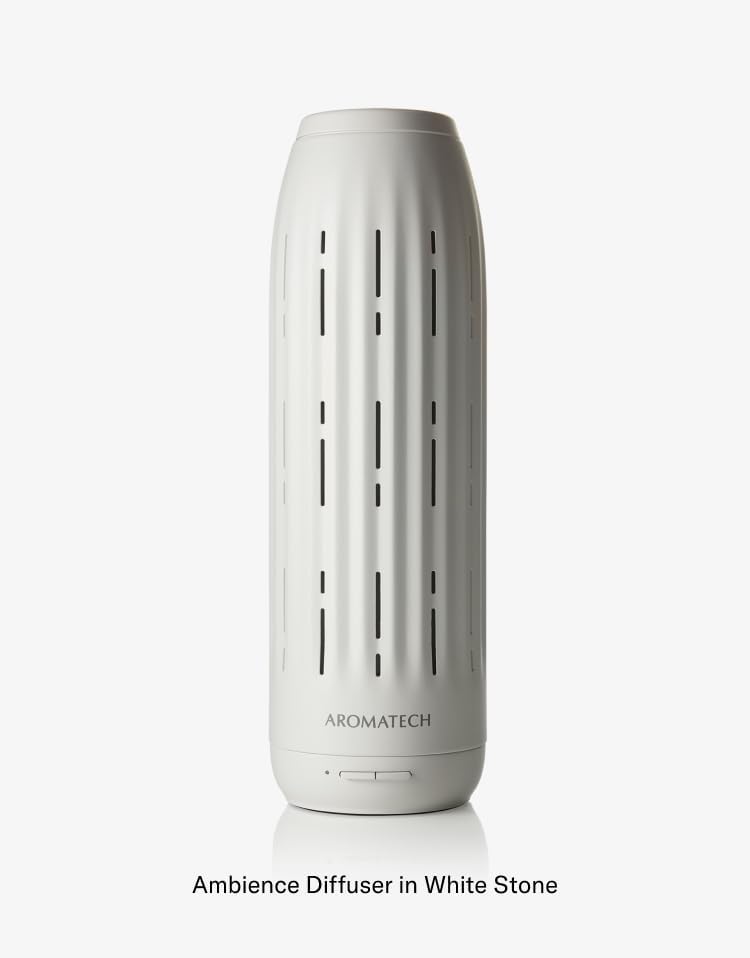
Сурет: егжей-тегжейлі view of the Ambience Diffuser, highlighting its design and the AromaTech logo.
- Diffuser Body: The main unit housing the nebulizing technology.
- Басқару түймелері: Located at the base for basic operation (e.g., power, LED).
- Oil Compartment: Area where the essential oil bottle is inserted.
- Желдеткіштер: Openings for scent dispersion.
- Қуат порты: Қуат адаптерін қосу үшін.
5. Орнату
- Қаптамадан шығару: Қаптамадан барлық компоненттерді мұқият алып тастаңыз.
- Орналастыру: Place the diffuser on a flat, stable surface in your desired area. Ensure it is away from direct sunlight, heat sources, and out of reach of children and pets.
- Prepare Oil Bottle: Unscrew the cap from your AromaTech essential oil blend or fragrance bottle. If using the empty 60ml bottle, fill it with your chosen AromaTech oil.
- Май бөтелкесін салыңыз: Locate the oil compartment on the diffuser. Carefully screw the oil bottle into the designated port until secure. Do not overtighten.
- Қуатты қосу: Plug the power adapter into the diffuser's power port, then plug the adapter into a suitable electrical outlet.
6. Пайдалану нұсқаулары
6.1 Қуатты қосу/өшіру
- To power on the diffuser, press the power button located at the base of the unit.
- Қуатты өшіру үшін қуат түймесін қайта басыңыз.
6.2 Bluetooth Connectivity and AromaTech App
The AromaTech Ambience diffuser can be controlled via the AromaTech App on your smartphone (compatible with Apple and Android devices).
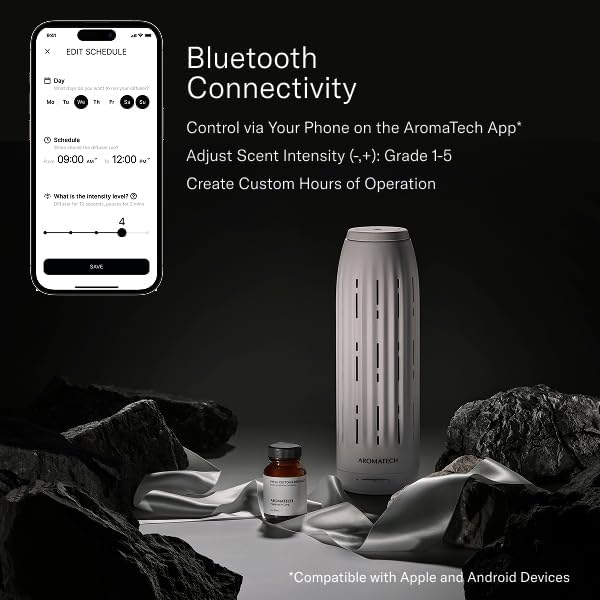
Image: A smartphone displaying the AromaTech App's scheduling and intensity control interface, alongside the Ambience diffuser and a bottle of fragrance oil.
- Қолданбаны жүктеу: Download the "AromaTech" app from your device's app store (Apple App Store or Google Play Store).
- Bluetooth қосу: Смартфонда Bluetooth қосылғанына көз жеткізіңіз.
- Құрылғыны жұптау: Open the AromaTech App and follow the on-screen instructions to pair with your Ambience diffuser.
- Иіс қарқындылығын реттеу: Within the app, you can adjust the scent intensity from Grade 1 to 5.
- Кестелерді құру: Set custom operating hours and days for the diffuser to automatically turn on and off.
6.3 Ambient LED Lighting
The diffuser features ambient LED lighting. Refer to the AromaTech App for specific controls to turn the LED light on/off or adjust its settings, if available.
7. Техникалық қызмет көрсету
7.1 Cleaning the Diffuser
Үнемі тазалау диффузордың оңтайлы жұмысын қамтамасыз етеді және қызмет ету мерзімін ұзартады.
- Қуатты өшіру және ажырату: Тазалау алдында диффузорды өшіріп, розеткадан ажыратыңыз.
- Remove Oil Bottle: Carefully unscrew and remove the essential oil bottle.
- Сыртын сүрту: Жұмсақ пайдаланыңыз, damp cloth to wipe the exterior of the diffuser. Do not use abrasive cleaners or solvents.
- Clean Nozzle (if necessary): If you notice reduced scent output or clogging, you may need to clean the nebulizing nozzle. Consult AromaTech support for specific instructions or use a small amount of rubbing alcohol on a cotton swab to gently clean the nozzle opening. Ensure it is completely dry before reassembling.
- Мұқият құрғатыңыз: Ensure all parts are completely dry before reassembling and reconnecting power.
7.2 Refilling/Replacing Oil
- When the oil bottle is empty, power off and unplug the diffuser.
- Carefully unscrew the empty bottle.
- Screw in a new bottle of AromaTech essential oil blend or fragrance.
- Reconnect power and resume operation.
8. Ақаулықтарды жою
| Мәселе | Ықтимал себебі | Шешім |
|---|---|---|
| Diffuser does not turn on. | No power; Power adapter not connected properly. | Ensure the power adapter is securely plugged into both the diffuser and a working electrical outlet. |
| No scent or weak scent output. | Oil bottle empty; Oil bottle not inserted correctly; Nozzle clogged; Incorrect intensity setting. | Check oil level and replace if empty. Ensure bottle is securely screwed in. Clean the nebulizing nozzle as per maintenance instructions. Adjust scent intensity via the AromaTech App. |
| Bluetooth байланысы мәселелері. | Bluetooth not enabled on phone; Diffuser too far from phone; App not updated. | Ensure Bluetooth is active on your device. Move closer to the diffuser. Restart the AromaTech App or reinstall it. |
| Diffuser making unusual noise. | Diffuser not on a flat surface; Internal component issue. | Place the diffuser on a stable, flat surface. If noise persists, contact AromaTech customer support. |
9. Техникалық сипаттамалар
- Бренд: AromaTech
- Модель атауы: Атмосфера
- Қамту: 1000 шаршы футқа дейін
- Технология: Waterless Nebulizing
- Қосылу мүмкіндігі: Bluetooth (AromaTech App)
- Материал: Resin (White Stone finish)
- Арнайы мүмкіндіктер: Timer Setting, Ambient LED Lighting
- Мұнай сыйымдылығы: Compatible with 60ml AromaTech oil bottles
10. Кепілдік және қолдау
For warranty information, technical support, or customer service inquiries, please visit the official AromaTech webсайтына кіріңіз немесе олардың тұтынушыларды қолдау тобына тікелей хабарласыңыз.
AromaTech Official Webсайт: www.aromatech.com