
1. Кіріспе
The Radtel RT16 FRS Two Way Radio is designed for reliable, license-free communication across 16 channels. Featuring a durable build, USB-C charging, and VOX functionality, it is suitable for various environments from outdoor activities to commercial settings.
Пакет мазмұны
Your Radtel RT16 package includes:
- 2x Radtel RT16 Two Way Radios
- 2x Rechargeable Lithium-Ion Batteries (2000mAh)
- 2x белбеу қысқыштары
- 2x USB-C Charger Cables
- 2x Earpieces
- 1x Пайдаланушы нұсқаулығы
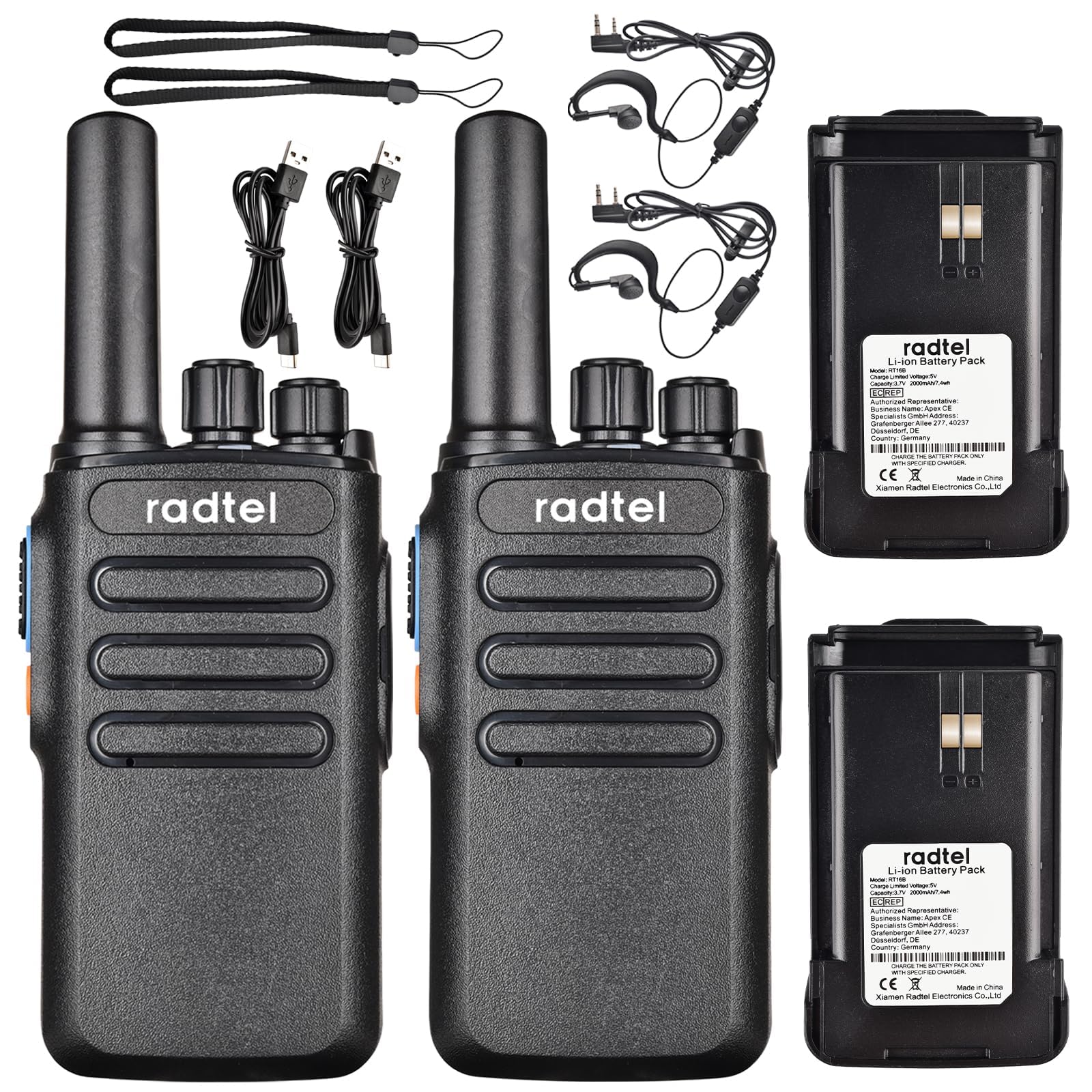
Image 1.1: Radtel RT16 Two Way Radios and included accessories.
2. Орнату
2.1 Батареяны орнату
- Радионың өшірілгеніне көз жеткізіңіз.
- Радионың артқы жағындағы батарея бөлімін табыңыз.
- Батареяны орнына сенімді түрде сырт еткенше сырғытыңыз.

Image 2.1: Battery compartment and belt clip attachment.
2.2 Belt Clip Attachment
- Белдік қыстырғышын радионың артқы жағындағы белгіленген ұяшықтармен туралаңыз.
- Push the clip firmly until it locks into position.
2.3 Батареяны зарядтау
The RT16 radios feature convenient USB-C charging. Use the provided USB-C cable to charge the radio. The charging port is located at the bottom of the radio.
- Connect the USB-C cable to the charging port on the radio.
- Connect the other end of the cable to a compatible USB power source (e.g., phone charger, power bank, car adapter).
- The indicator light on the radio will show charging status (refer to the LED indicator section for details).

Image 2.2: USB-C charging options for the RT16.
3. Пайдалану нұсқаулары
3.1 Қуатты қосу/өшіру және дыбыс деңгейін басқару
To power on the radio, rotate the top-left knob clockwise until you hear a click and a voice prompt indicating the current channel. Continue rotating to adjust the volume. To power off, rotate the knob counter-clockwise until it clicks off.
3.2 Арнаны таңдау
The RT16 has 16 available channels. To select a channel, rotate the top-right knob. The radio will announce the selected channel number.

3.1-сурет: Жоғарғы view of the RT16 showing power/volume and channel knobs.
3.3 Басу-сөйлесу (PTT) түймесі
To transmit your voice, press and hold the large button on the side of the radio. Release the button to listen.
3.4 Құлаққапты қосу
The radio supports a 2-pin K-connector headset for hands-free operation. Open the rubber cover on the side of the radio and plug in the headset connectors.

Image 3.2: Headset connection port on the RT16.
3.5 Voice Operated Exchange (VOX) Function
The VOX function allows for hands-free transmission without pressing the PTT button. The radio will automatically transmit when it detects your voice. This feature requires software activation for first use and offers 9 adjustable levels.

Image 3.3: Illustration of VOX function for hands-free use.
Activating VOX Mode
To activate VOX mode, hold down the small side button while powering on the radio. Continue holding until you hear a beep indicating activation.
Video 3.1: Demonstrates how to activate the voice control (VOX) mode on the Radtel RT16 radio.
Deactivating VOX Mode
To deactivate VOX mode, hold down the small side button while powering on the radio. Continue holding until you hear two beeps, confirming deactivation.
Video 3.2: Demonstrates how to deactivate the voice control (VOX) mode on the Radtel RT16 radio.
3.6 Language Switch Operation
The radio supports both Chinese and English voice prompts. To switch the language, turn the channel knob to channel 16. Then, power off the radio. While powering on, hold down the small side button until you hear a beep. This will switch the language mode.
Video 3.3: Instructions for switching between Chinese and English voice prompts on the Radtel RT16 radio.
4. Техникалық қызмет көрсету
- Keep the radio clean by wiping it with a soft, damp мата. Қатты химиялық заттарды немесе еріткіштерді пайдаланбаңыз.
- Do not immerse the radio in water as it is not water resistant.
- Радионы пайдаланбаған кезде салқын, құрғақ жерде сақтаңыз.
- Ensure the USB-C port cover is securely closed to prevent dust and moisture ingress.
5. Ақаулықтарды жою
| Мәселе | Ықтимал себебі | Шешім |
|---|---|---|
| Қуат жоқ | Батарея заряды аз немесе дұрыс орнатылмаған. | Charge the battery or re-install it securely. |
| Басқа радиолармен байланыса алмайды | Радиолар басқа арналарда немесе ауқымнан тыс жерде. | Ensure both radios are on the same channel. Move closer to the other radio. Check for obstructions. |
| Аудио сапасы нашар | Weak signal, interference, or low volume. | Adjust volume. Move to an area with fewer obstructions. Change channel if interference is present. |
| VOX жұмыс істемейді | VOX not activated or sensitivity too low. | Activate VOX mode (see Section 3.5). Adjust VOX sensitivity level via programming software. |
6. Техникалық сипаттамалар
| Ерекшелік | Мәлімет |
|---|---|
| Бренд | Радтель |
| Үлгі нөмірі | RT16 |
| Арналар саны | 16 |
| Жиілік диапазоны | 462/467 MHz (FRS Band) |
| Сөйлесу ауқымы максимум | Up to 5 Kilometers (open outdoor areas) |
| Шығу қуаты | 2W |
| Батарея Түрі | Литий-ион (2000 мАч) |
| Зарядталуда | USB-C |
| Арнайы мүмкіндіктер | Long Range, Type-C rechargeable battery, VOX Function, Channel Scan |
| Суға төзімділік деңгейі | Суға төзімді емес |
| Өнім өлшемдері | 1.37"D x 2.16"W x 5.9"H |
| Элемент салмағы | 0.39 фунт |
| Үйлесімді құрылғылар | Other FRS two-way radios, Standard earpieces |
7. Кепілдік
The Radtel RT16 FRS Two Way Radio comes with a 1-Year Warranty from the manufacturer, Xiamen Radtel Electronics Co.,Ltd.
8. Қолдау
For further assistance or to explore other Radtel products, please visit the official Radtel Store: