
LIECTROUX M7S PRO
LIECTROUX M7S Pro робот шаңсорғышының пайдаланушы нұсқаулығы
Model: M7S Pro
1. Кіріспе
Сатып алғаныңыз үшін рахметasing the LIECTROUX M7S Pro Robot Vacuum Cleaner. This manual provides essential information for the safe operation, maintenance, and troubleshooting of your device. Please read this manual thoroughly before using the product and retain it for future reference.
Қауіпсіздік нұсқаулары
- Бірінші пайдалану алдында роботтың толық зарядталғанына көз жеткізіңіз.
- Роботты ылғалды ортада немесе сұйықтықтардың жанында пайдаланбаңыз.
- Keep loose cables, curtains, and small objects out of the robot's path to prevent entanglement.
- Робот жұмыс істеп тұрған кезде балалар мен үй жануарларын қадағалаңыз.
- Роботты үлкен қоқысты, өткір заттарды немесе жанып жатқан материалдарды жинау үшін пайдаланбаңыз.
- Роботпен бірге берілген түпнұсқа зарядтау қондырғысы мен қуат адаптерін ғана пайдаланыңыз.
- Turn off the robot and unplug it from the charging dock before performing any maintenance.
2. Пакет мазмұны
Барлық элементтер пакетте бар екенін тексеріңіз:
- LIECTROUX M7S Pro Robot Vacuum Cleaner
- Зарядтау қондырғысы
- Қуат адаптері
- Side Brushes (set)
- HEPA сүзгісі (алдын ала орнатылған немесе қосалқы)
- Тазалау құралы
- Қашықтан басқару құралы
- Пайдаланушы нұсқаулығы
3. Өнім аяқталдыview
Familiarize yourself with the components of your LIECTROUX M7S Pro robot vacuum cleaner.

3.1-сурет: The LIECTROUX M7S Pro robot vacuum cleaner, showcasing its sleek black design, along with its remote control and a smartphone displaying the cleaning map via the app.
Негізгі компоненттер:
- Жоғарғы панель: Power button, Wi-Fi indicator, charging indicator.
- Алдыңғы бампер: Obstacle detection sensors.
- Бүйірлік щеткалар: Collect dust and debris from edges and corners.
- Жүргізу доңғалақтары: Allow movement across various floor types.
- Қоқыс жинағыш: Құрғақ қалдықтарды жинайды.
- Су ыдысы (шаш жууға арналған): Holds water for wet cleaning.
- Зарядтау контактілері: Зарядтау станциясына қосылады.
- Жартас сенсорлары: Detects drops and prevents falls.
4. Орнату
4.1 Зарядтау қондырғысын орналастыру
Зарядтау қондырғысын қабырғаға ашық жерге қойыңыз, доктың бүйірлерінен 1 метр (3 фут) және алдындан 2 метр (6 фут) қашықтықта ешқандай кедергі жоқ екеніне көз жеткізіңіз. Қуат адаптерін зарядтау қондырғысына қосып, розеткаға қосыңыз.
4.2 Бастапқы зарядтау
Place the robot onto the charging dock, ensuring the charging contacts align. The robot will begin charging automatically. For first use, allow the robot to charge completely (approximately 4-5 hours) before operation.

4.1-сурет: The robot vacuum cleaner automatically returning to its charging dock when its battery is low, ensuring it is always ready for the next cleaning cycle.
4.3 App Connection (TUYA App)
- Download the "TUYA Smart" app from your smartphone's app store (iOS or Android).
- TUYA тіркелгіңізге тіркеліңіз немесе кіріңіз.
- Ensure your robot is charged and powered on.
- Follow the in-app instructions to add your LIECTROUX M7S Pro robot vacuum cleaner. This typically involves pressing and holding a button on the robot to enter pairing mode and connecting to your home Wi-Fi network.
- Қосылғаннан кейін сіз роботты басқара аласыз, view cleaning maps, and set schedules via the app.
4.4 Voice Assistant интеграциясы
The LIECTROUX M7S Pro supports voice control via Amazon Alexa and Google Home. Refer to the respective app (Alexa app or Google Home app) for instructions on how to link your TUYA Smart account and control your robot with voice commands.
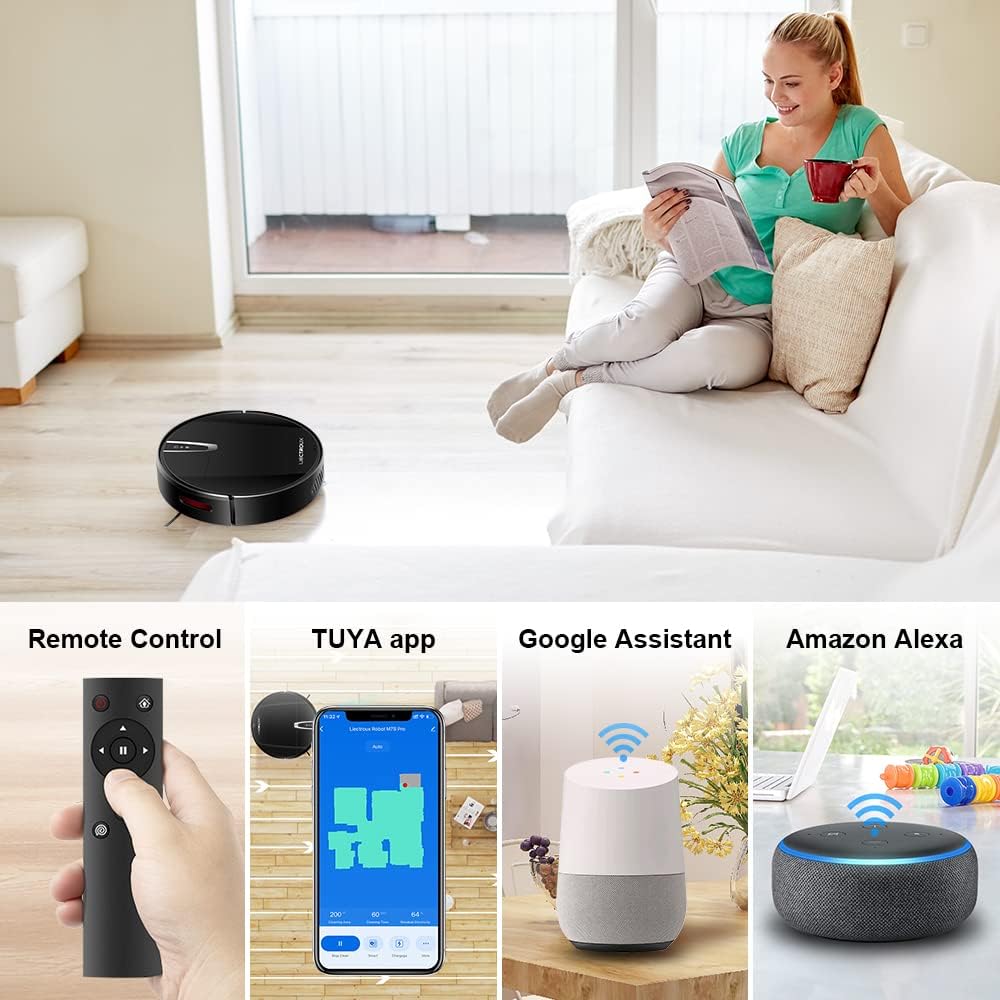
4.2-сурет: Various control methods for the robot vacuum, including a physical remote control, the TUYA smartphone application displaying a cleaning map, and integration with voice assistants like Google Assistant and Amazon Alexa.
5. Пайдалану нұсқаулары
5.1 Тазалау режимдері
The robot offers multiple cleaning modes to suit different needs, accessible via the app, remote control, or voice commands:
- Автоматты тазалау: Робот ақылды түрде жылжып, еденнің бүкіл аумағын тазартады.
- Дақтарды тазарту: Белгілі бір лас аймаққа назар аударады, спираль түрінде тазалау.
- Жиектерді тазалау: Қабырғалар мен жиһаз жиектерін тазартады.
- Шаю режимі: For wet cleaning, attach the water tank and mopping cloth.

5.1-сурет: The robot vacuum cleaner operating on a floor with scattered debris, illustrating its powerful suction and various cleaning modes: Scheduled Cleaning, Auto Cleaning, Edge Cleaning, and Spot Cleaning.
5.2 Навигация және картаға түсіру
The M7S Pro utilizes smart gyroscope navigation to create a 2D map of your environment, allowing for precise positioning and efficient route planning. This ensures comprehensive coverage and minimizes missed spots.

5.2-сурет: The robot vacuum cleaner navigating a room, with a grid overlay illustrating its smart gyroscope navigation system for precise positioning and thorough cleaning.

5.3-сурет: A visual comparison showing the efficient, systematic cleaning path generated by the LIECTROUX M7S Pro's gyroscope navigation versus a less organized common route planning method, highlighting intelligent route planning.
5.3 Автоматты зарядтау
When the battery level is low or a cleaning task is complete, the robot will automatically return to its charging dock to recharge. Ensure the charging dock is always powered on and accessible.
5.4 Anti-Drop System
The robot is equipped with cliff sensors to detect stairs and elevated surfaces, preventing it from falling. It also intelligently detects different floor types and adjusts its direction within 10 milliseconds.
6. Техникалық қызмет көрсету
Тұрақты техникалық қызмет көрсету робот шаңсорғыштың оңтайлы өнімділігін қамтамасыз етеді және қызмет ету мерзімін ұзартады.
6.1 Қоқыс жәшігін босату
Empty the dustbin after each cleaning cycle or when the 'full' indicator appears. Open the top cover, remove the dustbin, and dispose of the collected debris.
6.2 Сүзгіні тазалау
The HEPA filter should be cleaned regularly (e.g., weekly) using the provided cleaning tool or a soft brush. Replace the HEPA filter every 3-6 months, depending on usage, to maintain suction efficiency.
6.3 Бүйірлік щеткаларды тазалау
Inspect and clean the side brushes regularly. Remove any tangled hair or debris. If brushes are worn or damaged, replace them with new ones.
6.4 Датчиктерді және зарядтау контактілерін тазалау
Wipe the cliff sensors and charging contacts on both the robot and the charging dock with a clean, dry cloth to ensure proper function and charging.
6.5 Brush-less Suction Nozzle
The M7S Pro features an advanced brush-less suction nozzle designed to minimize hair entanglement, reducing the frequency of cleaning the main suction path.

6.1-сурет: An illustration of the robot vacuum's underside, highlighting the advanced brush-less suction nozzle designed to prevent hair entanglement and ensure consistent cleaning performance.
7. Ақаулықтарды жою
Робот шаңсорғышқа қатысты мәселелерге тап болсаңыз, келесі жалпы мәселелер мен шешімдерді қараңыз:
| Мәселе | Ықтимал себебі | Шешім |
|---|---|---|
| Робот қосылмайды. | Төмен батарея; өшіру. | Charge the robot; ensure the main power switch is on. |
| Робот зарядтамайды. | Charging contacts dirty; charging dock not powered. | Clean charging contacts; ensure charging dock is plugged in. |
| Робот жиі тұрып қалады. | Obstacles (cables, rugs); narrow spaces. | Clear the cleaning area; use virtual walls if available. |
| Нашар тазалау өнімділігі. | Қоқыс жәшігі толып кеткен; сүзгі бітелген; щеткалар шатасып қалған. | Empty dustbin; clean/replace filter; clean brushes. |
| Қолданбаға қосылу мәселелері. | Incorrect Wi-Fi password; robot not in pairing mode; 5GHz Wi-Fi network. | Verify Wi-Fi details; re-enter pairing mode; ensure 2.4GHz Wi-Fi is used. |
8. Техникалық сипаттамалар
| Ерекшелік | Мәлімет |
|---|---|
| Бренд | LIECTROUX |
| Модель атауы | M7S PRO |
| Түс | Қара |
| Өнім өлшемдері | 32L x 32W x 7.8H см |
| Элемент салмағы | 4 келі |
| Максималды сору қуаты | 4000Па |
| Батарея сыйымдылығы | 2500 мАс-литий-ион |
| Орындалу уақыты | 120 минутқа дейін |
| Сүзгі түрі | HEPA |
| Контроллер түрі | App Control, Touchpad Control, Voice Control |
| Дауыстық көмекшінің үйлесімділігі | Google Home, Amazon Alexa |
| Навигация түрі | Gyroscope Navigation (2D Map) |
| Арнайы мүмкіндік | Anti-drop system, Brush-less suction nozzle |
| Беттік ұсыныс | Low-pile carpet, hard floors, ceramic tiles |
9. Кепілдік және қолдау
The LIECTROUX M7S Pro Robot Vacuum Cleaner comes with a standard manufacturer's warranty. Please refer to the warranty card included in your package for specific terms and conditions, including the warranty period and coverage details.
For technical support, troubleshooting assistance, or warranty claims, please contact the seller or LIECTROUX customer service. Contact information can typically be found on the product packaging, the seller's website, or within the TUYA Smart app.
When contacting support, please have your product model number (M7S Pro) and purchase details readily available.