
1. Кіріспе
This manual provides detailed instructions for the setup, operation, and maintenance of your Dpofirs 5G Router with SIM Card Slot. This device offers high-speed 5G cellular network access, dual-band Wi-Fi (2.4G and 5.8G), and supports up to 32 users, making it suitable for indoor home and office environments.
2. Өнім аяқталдыview
Familiarize yourself with the components and features of your 5G router.
2.1 Пакет мазмұны
- 1 x Dpofirs 5G Router
- 1 х қуат сымы
- 1 x Нұсқаулық (осы құжат)
- 1 x Желілік кабель
2.2 Router Components and Indicators
The router features various ports and indicator lights for easy monitoring and connectivity.
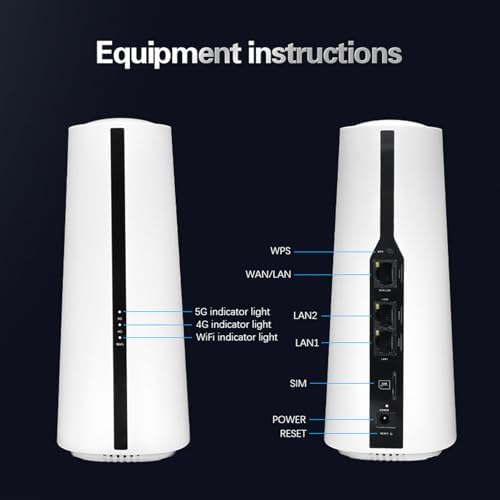
Сурет: Алдыңғы және артқы view of the Dpofirs 5G Router. The front shows indicator lights for 5G, 4G, and WiFi. The back panel includes ports for WPS, WAN/LAN, LAN2, LAN1, SIM card slot, Power input, and a Reset button.
- 5G индикатор шамы: 5G желісінің күйін көрсетеді.
- 4G индикатор шамы: 4G желісінің күйін көрсетеді.
- WiFi Indicator Light: Wi-Fi белсенділігін көрсетеді.
- WPS түймесі: Wi-Fi қорғалған орнату үшін.
- WAN/LAN порты: Сыртқы модемге қосылады немесе LAN порты ретінде әрекет етеді.
- LAN1/LAN2 Ports: Connects to wired devices.
- SIM картасы ұясы: 5G/4G SIM картаңызды осы жерге салыңыз.
- Қуат кірісі: Қуат адаптерін қосыңыз.
- Қалпына келтіру түймесі: Press and hold to restore factory settings.
2.3 Өнімнің өлшемдері мен салмағы
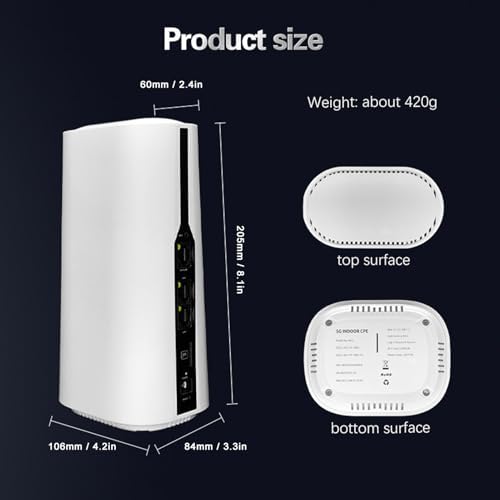
Сурет: Diagram showing the physical dimensions of the Dpofirs 5G Router. The router measures approximately 60mm (2.4in) at the top, 108mm (4.2in) at the base, 205mm (8.1in) in height, and 84mm (3.3in) in depth. Its weight is approximately 420g.
3. Орнату нұсқаулары
Follow these steps to set up your 5G router.
3.1 SIM картасын салу
- Маршрутизатордың өшірілгеніне көз жеткізіңіз.
- Locate the SIM card slot on the back of the router.
- Insert your activated 5G/4G SIM card into the slot until it clicks into place. Ensure the correct orientation as indicated on the device.
- Do not force the SIM card. If it does not fit, check the orientation or SIM card size.
3.2 Қуатты қосу
- Connect the provided power adapter to the Power Input port on the router.
- Plug the other end of the power adapter into a standard electrical outlet (100-240V).
- The router will power on automatically. Wait for the indicator lights to stabilize.
3.3 Initial Network Configuration (Optional)
For advanced settings or initial setup, you can access the router's web интерфейс.
- Connect a computer to one of the LAN ports using the provided network cable, or connect wirelessly to the default Wi-Fi network (SSID and password usually found on a sticker on the router's bottom).
- ашу а web шолғышты таңдап, әдепкі IP мекенжайын енгізіңіз (мысалы, 192.168.1.1) мекенжай жолағына.
- Log in using the default username and password (refer to the sticker on the router or the quick start guide).
- Follow the on-screen prompts for initial setup, such as changing the default Wi-Fi name and password.
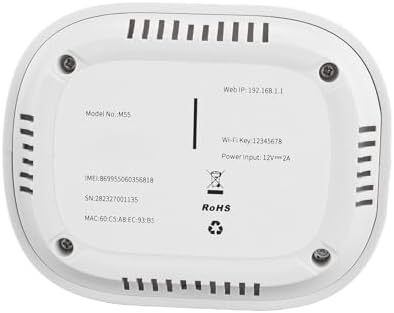
Сурет: The bottom surface of the Dpofirs 5G Router, displaying important information such as Model No.: M55, Web IP: 192.168.1.1, Wi-Fi Key: 12345678, and Power Input: 12V=2A. This information is crucial for initial setup and access.
4. Пайдалану нұсқаулары
Once set up, your router provides internet access to multiple devices.
4.1 Құрылғыларды қосу
- Сымсыз қосылым: On your Wi-Fi enabled device (smartphone, laptop, tablet), search for available Wi-Fi networks. Select your router's SSID (network name) and enter the Wi-Fi password.
- Сымды қосылым: Connect devices like desktop computers, gaming consoles, or smart TVs to the LAN1 or LAN2 ports using an Ethernet cable.
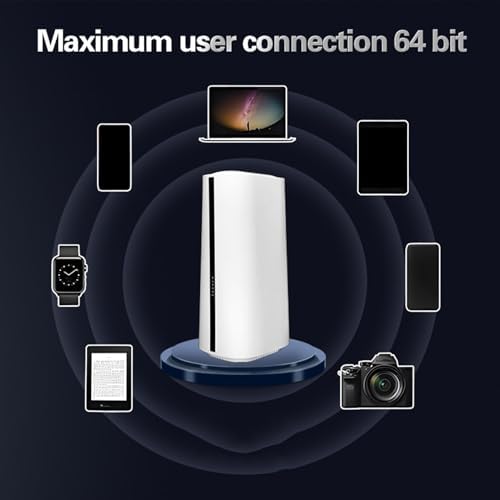
Сурет: Illustration demonstrating the Dpofirs 5G Router's capability to connect to multiple devices simultaneously. Devices shown include a laptop, smartphones, tablets, a smartwatch, and a camera, indicating support for up to 32 users.
4.2 Индикатор шамдарын түсіну
- Solid Green (5G/4G): Connected to the respective cellular network.
- Blinking Green (5G/4G): Data activity on the respective cellular network.
- Solid Blue (WiFi): Wi-Fi қосулы.
- Blinking Blue (WiFi): Wi-Fi data activity.
- Жарық жоқ: Network not connected or feature is off.
5. Техникалық қызмет көрсету
Дұрыс күтім маршрутизатордың оңтайлы жұмысын және ұзақ мерзімділігін қамтамасыз етеді.
5.1 Жалпы күтім
- Keep the router in a cool, dry place, away from direct sunlight and heat sources.
- Құрылғының айналасында тиісті желдетуді қамтамасыз етіңіз.
- Сыртқы бетін жұмсақ, құрғақ шүберекпен тазалаңыз. Сұйық тазартқыштарды қолданбаңыз.
- Маршрутизаторға ауыр заттарды қоймаңыз.
5.2 Микробағдарлама жаңартулары
Маршрутизаторды мезгіл-мезгіл тексеріп отырыңыз web interface for available firmware updates. Firmware updates can improve performance, add new features, and enhance security. Follow the instructions provided within the web interface for safe updating.
5.3 Маршрутизаторды қалпына келтіру
If you encounter persistent issues or forget your login credentials, you may need to reset the router to factory default settings. To do this, with the router powered on, use a paperclip or similar pointed object to press and hold the Reset button for approximately 10 seconds until the indicator lights flash. The router will then restart with default settings.
6. Ақаулықтарды жою
Жалпы мәселелердің шешімдері үшін осы бөлімді қараңыз.
6.1 Интернет қосылымы жоқ
- SIM картасын тексеру: SIM картасының деректер жоспарымен дұрыс салынғанына және белсендірілгеніне көз жеткізіңіз.
- Сигнал күші: Verify the 5G/4G indicator light. If it's off or blinking slowly, the signal might be weak. Try repositioning the router.
- Маршрутизатор күйі: Check if the router is powered on and all necessary indicator lights are active.
- Қайтадан қосу: Power cycle the router by unplugging it for 30 seconds and then plugging it back in.
- APN параметрлері: Маршрутизаторға қол жеткізіңіз web interface and verify that the Access Point Name (APN) settings are correct for your mobile carrier.
6.2 Wi-Fi қосылымының ақаулары
- Құпия сөз қате: Wi-Fi құпия сөзін екі рет тексеріңіз.
- Сигнал диапазоны: Құрылғыңыздың маршрутизатордың Wi-Fi ауқымында екеніне көз жеткізіңіз.
- Интерференция: Other electronic devices can cause interference. Try changing the Wi-Fi channel in the router's settings.
- Құрылғы шегі: The router supports up to 32 users. If too many devices are connected, performance may degrade.
6.3 Интернет жылдамдығының төмендігі
- Сигнал күші: A weak 5G/4G signal will result in slower speeds.
- Желі кептелісі: During peak hours, cellular network speeds may decrease.
- Пайдаланушылар саны: More connected devices sharing bandwidth can reduce individual speeds.
- Маршрутизаторды орналастыру: Place the router in a central location, away from obstructions.
7. Техникалық сипаттамалар
Detailed technical specifications for the Dpofirs 5G Router.
| Ерекшелік | Мәлімет |
|---|---|
| Модель атауы | Dpofirsei2sngv1m5-12 |
| Бренд | Дпофирлер |
| Қосылу технологиясы | Ethernet, 5G Cellular |
| Сымсыз байланыс стандарты | 802.11ac, 802.11n |
| Жиілік диапазонының класы | Қос жолақты (2.4 ГГц, 5.8 ГГц) |
| Деректерді тасымалдау жылдамдығы | 1800 Мбит/с дейін |
| Порттардың саны | 1 WAN/LAN, 2 LAN |
| Үйлесімді құрылғылар | Personal Computer, Laptop, Smartphone, Tablet, Gaming Console |
| Қауіпсіздік хаттамасы | WPA2-PSK, WPA3 |
| Түс | Ақ |
| Қуат кірісі | 100-240 В (АҚШ ашасы) |
| Max Users Supported | 32 |
8. Кепілдік және қолдау
This product comes with a manufacturer's warranty and support resources.
8.1 Өндірушінің кепілдігі
The Dpofirs 5G Router is covered by a 90 күндік өндірушінің кепілдігі from the date of purchase. This warranty covers defects in materials and workmanship under normal use. It does not cover damage caused by misuse, accidents, unauthorized modifications, or external factors.
8.2 Тұтынушыларды қолдау қызметі
For technical assistance, troubleshooting beyond this manual, or warranty claims, please contact Dpofirs customer support. Refer to the contact information provided with your purchase or visit the official Dpofirs webқолдау туралы мәліметтер алу үшін сайт.
Ескертпе: Сатып алу түбіртегін кепілдік мақсаттары үшін сатып алудың дәлелі ретінде сақтаңыз.