
1. Кіріспе
This manual provides detailed instructions for the setup, operation, and maintenance of your BPXX Bluetooth Thermal Shipping Label Printer, Model D463B. This printer is designed for efficient and clear printing of various thermal labels, including 4x6 inch shipping labels, with a resolution of 203 DPI. It supports both Bluetooth connectivity via the 'Ezlabel' mobile application and USB connection to computers.
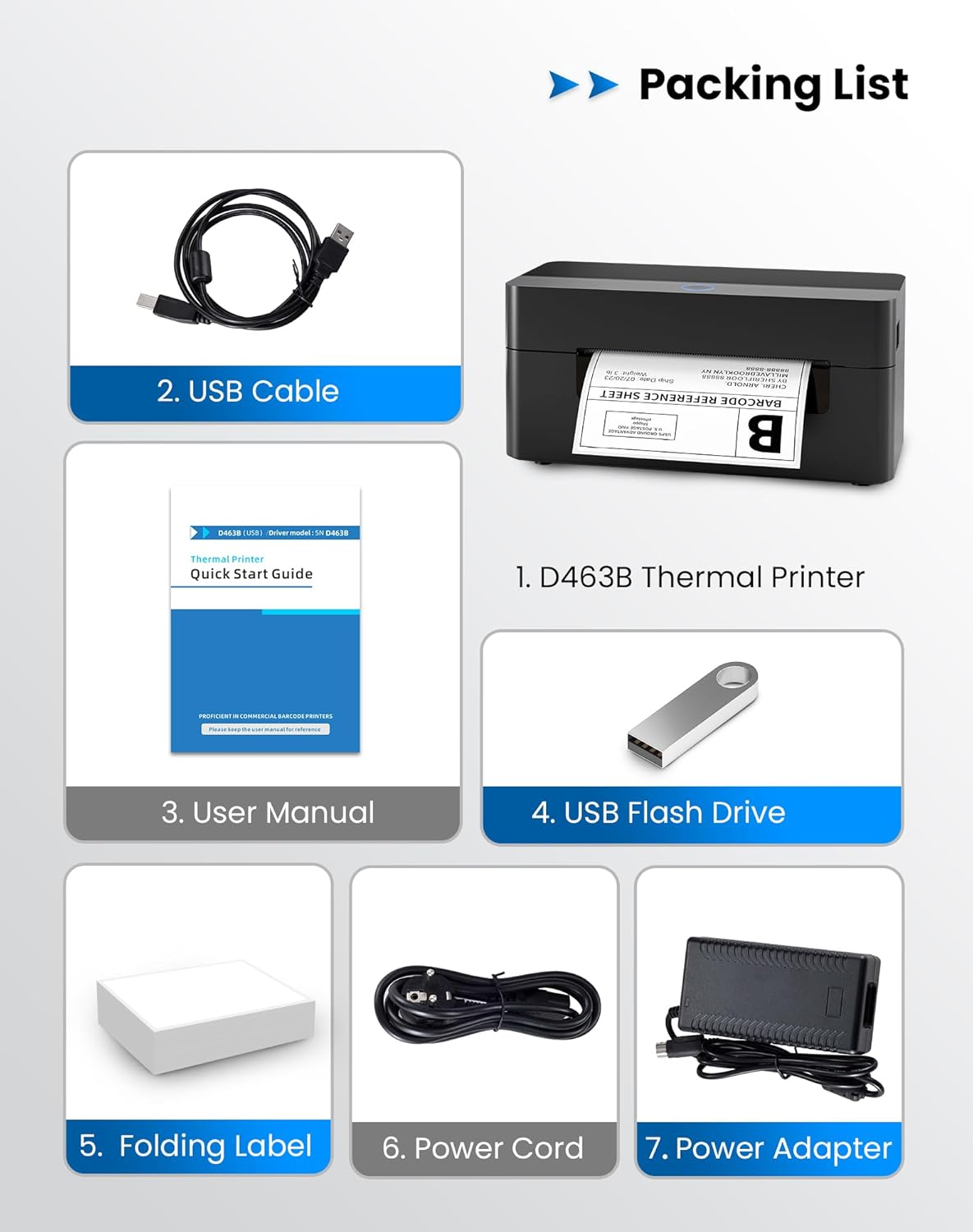
2. Қаптама тізімі
Төменде тізімделген заттардың барлығы сіздің пакетіңізге қосылғанын тексеріңіз:
- 1 x BPXX D463B Thermal Printer
- 1 x USB кабелі
- 1 x Пайдаланушы нұсқаулығы
- 1 x USB Flash Drive (containing drivers)
- 1 x Folding Label (sample roll)
- 1 х қуат сымы
- 1 x қуат адаптері
3. Орнату нұсқаулығы
3.1 Жабдыққа қосылу
- Connect the power adapter to the printer's power port and plug the power cord into an electrical outlet.
- Open the printer cover and load the thermal labels. Ensure the labels are facing the correct direction for printing and are properly aligned within the guide rails.
- Принтер қақпағын мықтап жабыңыз.

3.2 Бағдарламалық құрал мен драйверді орнату
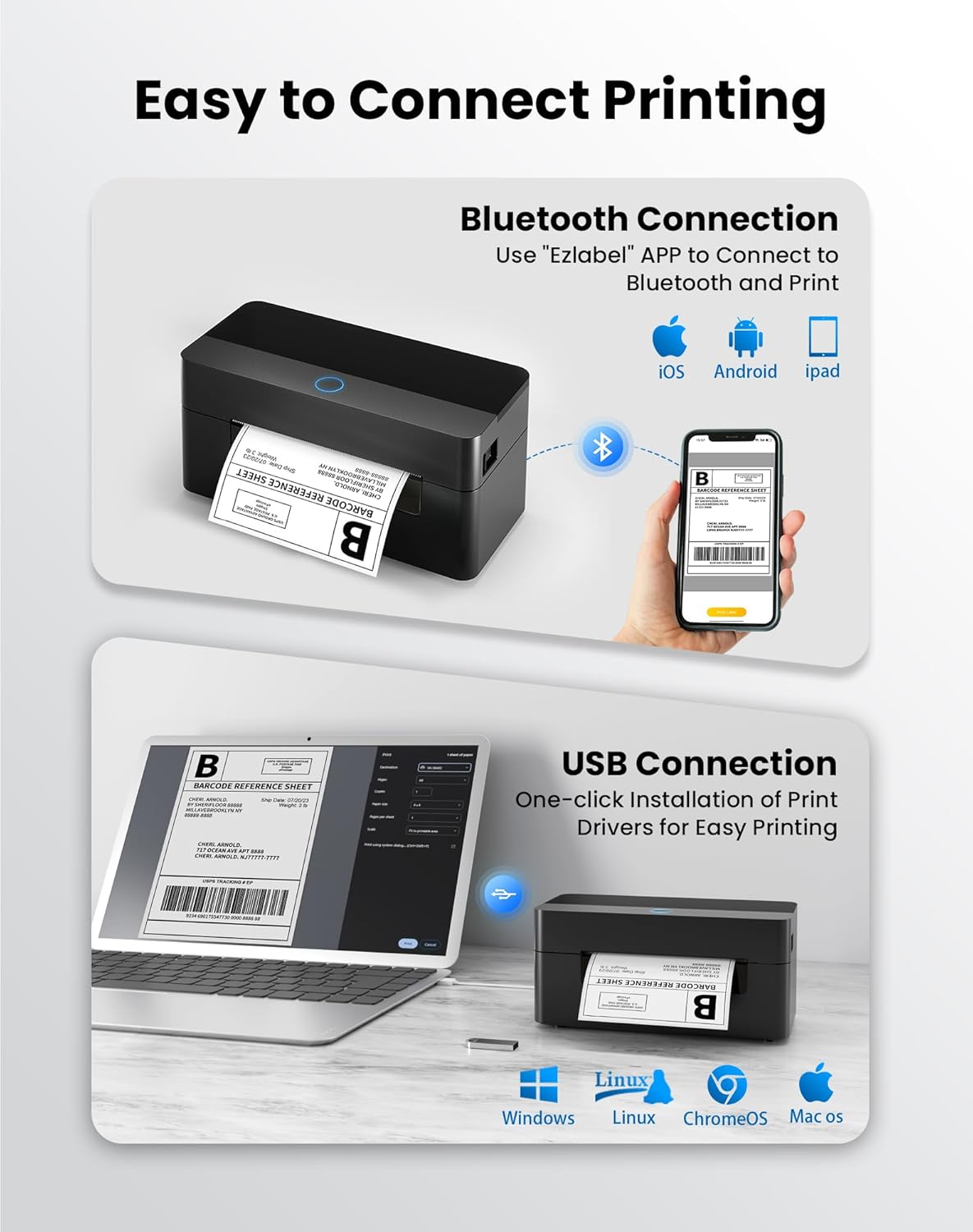
3.2.1 Mobile App (Bluetooth Connection)
For mobile printing, download the 'Ezlabel' application from your device's app store (available for iOS and Android).
- Іздеу 'Ezlabel' in the App Store (iOS) or Google Play Store (Android).
- Қолданбаны жүктеп алып, орнатыңыз.
- Мобильді құрылғыда Bluetooth қосыңыз.
- Open the 'Ezlabel' app and follow the in-app instructions to connect to your BPXX D463B printer via Bluetooth.
3.2.2 Computer Driver (USB Connection)
For computer printing, install the appropriate drivers for your operating system (Windows, Mac OS, Linux, ChromeOS). Drivers are provided on the included USB flash drive or can be downloaded from the official webсайт.
- Insert the provided USB flash drive into your computer.
- Locate and run the installer for your operating system.
- Драйверді орнатуды аяқтау үшін экрандағы нұсқауларды орындаңыз.
- Alternatively, download drivers from: BPXX Driver Download
4. Пайдалану нұсқаулары
4.1 Жапсырмаларды жүктеу
Ensure the thermal labels are loaded correctly for optimal printing. The printer supports thermal labels with widths ranging from 1 to 4.5 inches, including standard 4x6 inch shipping labels.
- Принтердің жоғарғы қақпағын ашыңыз.
- Place the roll of thermal labels into the label compartment, ensuring the printable side faces upwards.
- Feed the first label through the printer's output slot until it is slightly extended.
- Adjust the label guides to fit the width of your labels snugly, without being too tight.
- Close the top cover. The printer will automatically detect the label size and calibrate.

4.2 Printing via Bluetooth (Mobile App)
- Ensure the printer is powered on and connected to the 'Ezlabel' app via Bluetooth.
- Open the 'Ezlabel' app on your mobile device.
- Select or create your desired label design. The app includes preset templates for various label sizes.
- Confirm print settings such as label size and quantity.
- Қолданбадан басып шығару командасын іске қосыңыз.
4.3 Printing via USB (Computer)
- Принтерді берілген USB кабелі арқылы компьютерге қосыңыз.
- Ensure the printer drivers are correctly installed.
- Open the document or application from which you wish to print (e.g., a PDF viewer, shipping software).
- Select the BPXX D463B printer from your printer options.
- Adjust print settings as needed (e.g., paper size to 4x6 inches for shipping labels).
- Send the print command.
4.4 Supported Platforms and Print Quality
The BPXX D463B printer is compatible with major shipping carriers and e-commerce platforms, facilitating the printing of shipping labels, return labels, and postage labels.
- Shipping Carriers: FedEx, UPS, USPS, DHL, EasyPost, etc.
- E-commerce Platforms: Amazon, Shopify, Etsy, eBay, Walmart, etc.
The printer utilizes a high-quality thermal print head and advanced algorithms to deliver clear and sharp barcodes and text at 203 DPI resolution. It achieves a high-speed output of 152mm/s, capable of printing approximately 72 4x6 inch shipping labels per minute.


5. Техникалық қызмет көрсету
Тұрақты техникалық қызмет көрсету принтердің оңтайлы жұмысын қамтамасыз етеді және оның қызмет ету мерзімін ұзартады.
- Басып шығару механизмін тазалау: Басып шығару басын ақырын сүрту үшін спиртті мақтаны немесе арнайы термиялық принтерді тазалау қаламын пайдаланыңыз. Тазалау алдында принтердің өшірілгеніне және суығанына көз жеткізіңіз.
- Сыртын тазалау: Принтердің сыртын жұмсақ шүберекпен сүртіңіз, damp мата. Қатты химиялық заттарды немесе абразивті материалдарды пайдаланбаңыз.
- Шаңды кетіру: Periodically use compressed air to clear any dust or paper debris from inside the label compartment.
6. Ақаулықтарды жою
If you encounter issues with your BPXX D463B printer, refer to the following common problems and solutions:
- Принтер жауап бермейді:
- Ensure the power cord is securely connected and the printer is turned on.
- For Bluetooth connection, verify that Bluetooth is enabled on your device and the printer is paired within the 'Ezlabel' app.
- For USB connection, check the USB cable connection and ensure drivers are correctly installed. Try a different USB port or cable.
- Баспа сапасының нашарлығы (бұлдыр/жолақты баспалар):
- Басып шығару механизмін Техникалық қызмет көрсету бөлімінде сипатталғандай тазалаңыз.
- Жоғары сапалы термиялық жапсырмаларды пайдаланғаныңызға көз жеткізіңіз.
- Check print density settings in the 'Ezlabel' app or printer preferences on your computer.
- Белгілер дұрыс берілмейді:
- Verify that labels are loaded correctly and aligned with the guide rails.
- Ensure there are no obstructions in the label path.
- Perform a label calibration from the printer settings or app if available.
- Printer Offline Error:
- Принтерді де, компьютерді/мобильді құрылғыны да қайта іске қосыңыз.
- Re-establish the Bluetooth or USB connection.
- Check printer status in your operating system's printer settings.
7. Өнімнің техникалық сипаттамалары
| Модель атауы | D463B |
| Бренд | BPXX |
| Баспа технологиясы | Жылулық |
| Қосылу технологиясы | Bluetooth, USB |
| Максималды басып шығару ажыратымдылығы | 203 x 203 Dots Per Inch (DPI) |
| Максималды басып шығару жылдамдығы | 152 mm/s (72 labels per minute) |
| Ең үлкен медиа өлшемі | 4 x 6 дюйм |
| Қолдау көрсетілетін жапсырма ені | 1 - 4.5 дюйм |
| Үйлесімді құрылғылар | PC (Windows, Mac OS, Linux, ChromeOS), Smartphones (iOS, Android) |
| Бақылау әдісі | App ('Ezlabel'), USB |
| Өнім өлшемдері | 7.3"D x 3.3"W x 3.3"H |
| Элемент салмағы | 1.6 фунт |
| Қосылған құрамдас бөліктер | Printer, USB Cable, User Manual, USB Flash Drive, Sample Labels, Power Cord, Power Adapter |
8. Кепілдік және қолдау
The BPXX D463B Thermal Shipping Label Printer comes with a limited warranty. For specific warranty terms and conditions, please refer to the documentation included with your product or contact BPXX customer support.
For technical assistance, troubleshooting, or any inquiries regarding your product, please contact BPXX customer support through the official webсайтында немесе өнім қаптамасында берілген байланыс ақпаратында.