
TORRAS PB2C
TORRAS 10,000mAh Qi2 Certified Portable Charger
Model: PB2C | Brand: TORRAS
1. Өнім аяқталдыview
The TORRAS 10,000mAh Qi2 Certified Portable Charger is a high-capacity magnetic power bank designed for efficient and convenient charging of compatible devices. Featuring the latest Qi2 wireless charging technology, it supports 15W fast wireless charging and 20W wired charging via USB-C. Its compact design includes a versatile 360° rotating stand, making it ideal for various uses on the go.
This power bank is equipped with advanced safety features, including protection against overcharge, over-discharge, and overheating, ensuring reliable and safe operation. It is also certified for air travel, providing a dependable power solution for your journeys.

Image: The TORRAS 10,000mAh Qi2 Portable Charger magnetically attached to the back of a smartphone, showcasing its compact form factor and integrated stand.
2. Қорапта не бар
Қораптан шығарған кезде пакеттің мазмұнын тексеріңіз:
- 1 x TORRAS 10,000mAh Power Bank (Black)
- 1 x PD3.0 USB-C to USB-C Cable (1.6ft, Black)
- 1 x Қауіпсіздік нұсқаулығы
- 1 x Жылдам нұсқаулық
3. Техникалық сипаттамалар
| Үлгі нөмірі | PB2C |
| Батарея сыйымдылығы | 10,000 мАч |
| Сымсыз зарядтау шығысы | 15 Вт дейін (Qi2 сертификатталған) |
| Сымды зарядтау шығысы/кірісі | Up to 20W (USB-C PD3.0) |
| Өнім өлшемдері | 4.01 x 2.76 x 0.65 дюйм |
| Элемент салмағы | 7.2 унция |
| Түс | Қара |
| Арнайы мүмкіндіктер | Heat Dissipation System, Intelligent Circuit Management, Pocket Size, Fast Charging, Wireless Charging, 360° Rotating Stand |
| Сертификаттар | FCC, UL, TUV, RoHS, Air Travel Certified |

Image: The power bank held in hand, illustrating its compact size and light weight, suitable for air travel.
4. Орнату
4.1 Қуат банкін бастапқы зарядтау
Before first use, fully charge your TORRAS portable charger. Connect the included USB-C to USB-C cable to the power bank's USB-C port and the other end to a compatible USB-C power adapter (not included). The LED indicators on the power bank will illuminate to show the charging progress. All four LEDs will be solid when fully charged.
4.2 Жарық диодты индикаторларды түсіну
The power bank features four LED indicators to display the remaining battery level:
- 4 жарықдиодты шамдар: 75% - 100% Battery
- 3 жарықдиодты шамдар: 50% - 75% Battery
- 2 жарықдиодты шамдар: 25% - 50% Battery
- 1 жарық диоды: 0% - 25% Battery
- Жыпылықтайтын жарық диоды: Charging in progress or low battery warning.
5. Пайдалану нұсқаулары
5.1 Wireless Charging (Qi2 MagSafe-Compatible)
For optimal wireless charging, ensure your device is Qi2 compatible (e.g., iPhone 12 series and newer). Align your device's MagSafe area with the magnetic ring on the power bank. The strong magnetic hold will securely attach the power bank to your device, initiating 15W fast wireless charging.

Image: A graphic illustrating the 15W fast charging capability and a comparison showing 2X faster charging in 1 hour.
5.2 Сымды зарядтау (USB-C)
Connect your device to the power bank using the provided USB-C to USB-C cable or another compatible USB-C cable. The power bank supports up to 20W wired charging for fast power delivery to your device.
5.3 Using the 360° Rotating Stand
The integrated 360° rotating stand allows for versatile viewing angles. Simply pull out the ring stand from the back of the power bank and rotate it to your desired position. This feature is useful for watching videos, video calls, or hands-free use while charging.
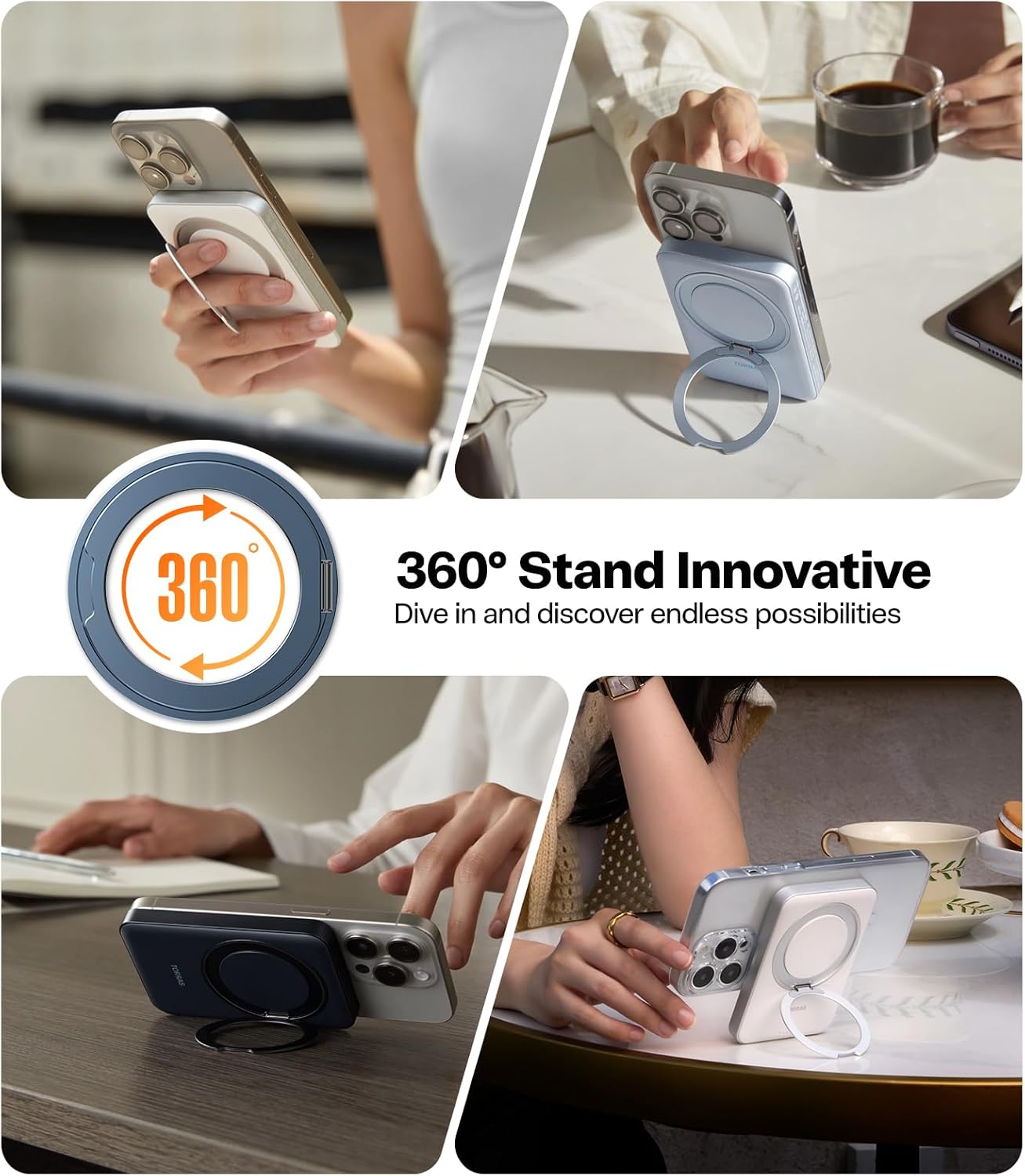
Image: A collage of images demonstrating the power bank's 360° rotating stand in different orientations and usage scenarios, such as propping up a phone for viewing.
5.4 Зарядтау
The power bank supports pass-through charging, allowing you to charge both your device and the power bank simultaneously when the power bank is connected to a power source.
5.5 Төмен ток режимі
For charging low-power devices such as wireless earbuds or smartwatches, the power bank automatically adjusts its output to a low current mode to prevent overcharging and protect the device's battery.

Image: Illustrations showing the power bank's versatility, including charging two devices simultaneously, pass-through charging, and a low current mode for smaller accessories like earbuds.
6. Техникалық қызмет көрсету
- Тазалау: Қуат банкінің бетін тазалау үшін жұмсақ, құрғақ шүберекті пайдаланыңыз. Қатты химиялық заттарды немесе абразивті материалдарды пайдаланбаңыз.
- Сақтау орны: Қуат банкін салқын, құрғақ жерде, тікелей күн сәулесінен және төтенше температурадан алыс жерде сақтаңыз.
- Батареяға күтім жасау: Батареяның қызмет ету мерзімін ұзарту үшін қуат банкін тұрақты пайдаланбасаңыз, кемінде үш айда бір рет толық зарядтаңыз. Батареяны жиі толық зарядсыздандырудан аулақ болыңыз.
- Физикалық зақымданудан аулақ болыңыз: Қуат банкін өзіңіз түсіріп алмаңыз, бөлшектемеңіз немесе жөндеуге тырыспаңыз. Бұл кепілдікті жарамсыз етуі және қауіпсіздікке қатер төндіруі мүмкін.
7. Ақаулықтарды жою
- Issue: Power bank is not charging or charging slowly.
- USB-C кабелінің қуат банкіне де, қуат адаптеріне де сенімді жалғанғанын тексеріңіз.
- Verify that the power adapter is functioning correctly and provides sufficient power (e.g., a PD-compatible adapter for faster charging).
- Басқа USB-C кабелін немесе қуат адаптерін қолданып көріңіз.
- Issue: Device is not charging wirelessly.
- Ensure your device is Qi2 compatible and supports MagSafe-style magnetic alignment.
- Check for any obstructions between the power bank and your device (e.g., thick phone cases, metal objects).
- Қуат банкінің заряды жеткілікті екеніне көз жеткізіңіз.
- Note: This power bank is optimized for iPhone 12/13/14/15/16 Pro/Pro Max series. Compatibility with other devices, especially non-Qi2 Android phones, may vary and might result in slower charging or heat generation.
- Issue: Power bank or device gets warm during charging.
- It is normal for charging devices to generate some heat. The power bank features a heat dissipation system to manage this.
- If the device becomes excessively hot, disconnect it immediately. Ensure proper ventilation and avoid charging in confined spaces or direct sunlight.
Мұнда қарастырылмаған мәселелерге тап болсаңыз, байланыс ақпаратын алу үшін Кепілдік және қолдау бөлімін қараңыз.
8. Қауіпсіздік туралы ақпарат
Please read all safety instructions before using this product to ensure safe and proper operation.
- Қуат банкін төтенше температураларға (45°C/113°F жоғары немесе 0°C/32°F төмен), тікелей күн сәулесіне немесе жоғары ылғалдылыққа шығармаңыз.
- Қуат банкін суға немесе басқа сұйықтықтарға батырмаңыз.
- Балалардың қолы жетпейтін жерде сақтаңыз.
- Қуат банкін бөлшектемеңіз, сындырмаңыз, теспеңіз немесе қысқа тұйықтамаңыз.
- Қуат банкін жергілікті ережелерге сәйкес жауапкершілікпен тастаңыз. Оны тұрмыстық қоқыспен бірге тастамаңыз.
- The product is certified for air travel, adhering to relevant safety standards.

Сурет: жарылған view of the power bank highlighting its internal safety components, including nano silicone, integrated smart chip, thermal-conductive metal, fire-resistant PC material, and aviation aluminum alloy.
9. Кепілдік және қолдау
Your TORRAS 10,000mAh Qi2 Portable Charger comes with an 18 айлық кепілдік сатып алған күннен бастап өндірістік ақауларды жабады.
TORRAS also provides lifetime professional support өнімдері үшін.
Тұтынушыларды қолдау қызметіне хабарласу:
For any issues, questions, or warranty claims, please contact TORRAS customer support directly. You can typically find contact information on the official TORRAS website or through your purchase platform (e.g., Amazon's "Contact Seller" option).
To contact via Amazon:
- Go to 'Your Orders'.
- Элементті таңдаңыз.
- Tap 'Contact Seller'.