
FONGWAH U1-CU-71
FONGWAH UHF RFID Reader/Writer Model U1-CU-71 Instruction Manual
Model: U1-CU-71 | Brand: FONGWAH
1. Кіріспе
This manual provides comprehensive instructions for the FONGWAH UHF RFID Reader/Writer, Model U1-CU-71. This device is designed for efficient reading and writing of UHF RFID tags, supporting both keyboard emulation and advanced read-write integration modes. It is compliant with ISO18000-6C and EPC C1 Gen 2 protocols, making it suitable for various applications such as inventory management, asset tracking, and access control.
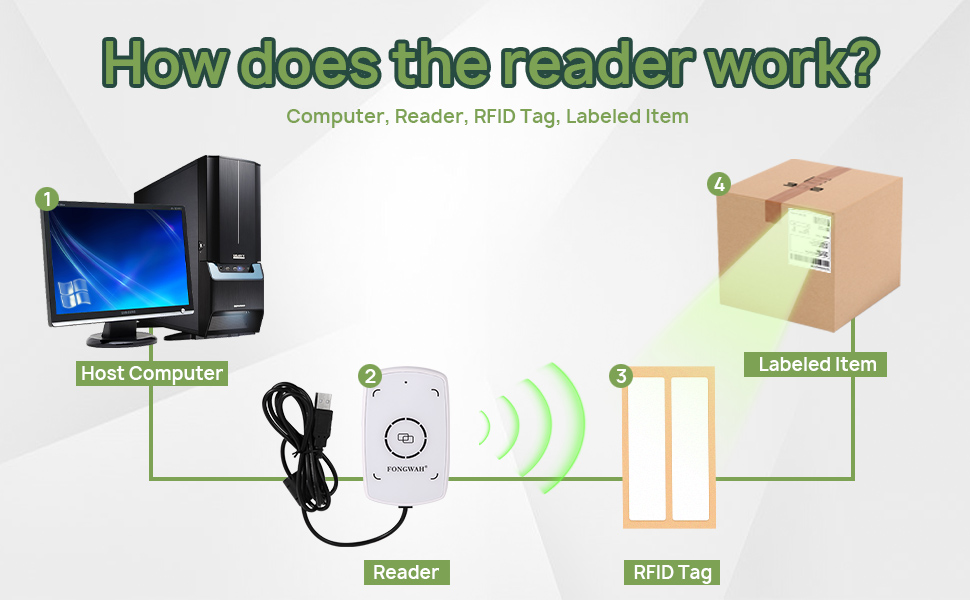
Figure 1: Basic operation diagram of the FONGWAH UHF RFID Reader/Writer.
2. Өнімнің ерекшеліктері
- Plug-and-Play Keyboard Emulation: Automatically recognized by Windows and Linux as a Human Interface Device (HID), allowing direct data input into applications like Excel or Notepad without driver installation.
- Exceptional 50cm Long-Range Reading: Equipped with a high-gain antenna for a reading distance of up to 50cm (approximately 20 inches).
- Flexible Modes & Software Support: Easily switch between Keyboard Emulator and Read-Write Integration modes using the provided configuration tool. Technical libraries and SDK are available for developers.
- Adjustable Power for Precision: Output power is adjustable from 0 to 20dBm with 1dB accuracy, enabling fine-tuning of detection range to prevent interference.
- Wide Protocol Support: Fully compatible with ISO18000-6C and EPC Gen2 (C1G2) protocols, supporting reading and writing of various UHF tags.

Figure 2: The FONGWAH UHF RFID Reader/Writer demonstrating its 50cm reading distance.
3. Орнату нұсқаулары
3.1 Пакет мазмұны
Жалғастырмас бұрын барлық компоненттердің бар екеніне көз жеткізіңіз:
- FONGWAH UHF RFID Reader/Writer (Model U1-CU-71)
- USB кабелі (біріктірілген)
- Sample UHF RFID Tags (typically 2)
- Mini CD with Configuration Tool and Drivers (or download link)
3.2 Құрылғыны қосу
- Connect the USB cable from the U1-CU-71 reader to an available USB port on your computer (Windows or Linux).
- The operating system should automatically detect the device and install necessary drivers for keyboard emulation mode. No manual driver installation is typically required for this mode.
- For advanced features or Read-Write Integration mode, install the provided configuration tool and SDK from the mini CD or the manufacturer's webсайт.

Figure 3: FONGWAH UHF RFID Reader/Writer connected via USB.
4. Пайдалану нұсқаулары
4.1 Keyboard Emulation Mode (Default)
In this mode, the reader acts like a keyboard, inputting the RFID tag's data directly into any active text field.
- Ensure the reader is connected to your computer.
- Open any text-editing application (e.g., Notepad, Microsoft Excel, Word).
- Place an RFID tag within the reading range (up to 50cm) of the device. The tag's data will automatically appear in the active text field.
Video 1: Demonstration of the Fongwah UHF Reader U1-CU-71 in keyboard emulation mode, showing RFID tag data being entered into an Excel spreadsheet.
4.2 Read-Write Integration Mode
For advanced operations like writing data to tags or integrating with custom software, you need to switch to Read-Write Integration mode using the configuration tool.
- Install and launch the FONGWAH Configuration Tool on your Windows computer.
- In the software interface, navigate to the 'Settings' section.
- Locate the 'Read card mode' options. To disable keyboard emulation, uncheck the 'Auto' checkbox and click 'Set'. This will enable the device for command-based read/write operations.
- Refer to the SDK documentation for programming instructions to interact with the reader in this mode.

Figure 4: Disabling Keyboard Emulation in the Configuration Tool.
4.3 Adjusting UHF RFID Power
The output power can be adjusted to control the reading range and minimize interference in dense environments.
- In the FONGWAH Configuration Tool, navigate to the 'Settings' section.
- Find the 'Set UHF RFID Power' option.
- Adjust the power value (0-20dBm) as needed and click 'Set' to apply the changes. Lower power reduces read range, higher power increases it.
5. Техникалық қызмет көрсету
To ensure optimal performance and longevity of your FONGWAH UHF RFID Reader/Writer, follow these simple maintenance guidelines:
- Тазалау: Use a soft, dry, lint-free cloth to clean the device. Do not use abrasive cleaners, solvents, or harsh chemicals, as these can damage the surface or internal components.
- Сақтау орны: Құрылғыны салқын, құрғақ жерде, тікелей күн сәулесінен және төтенше температурадан алыс жерде сақтаңыз.
- Өңдеу: Құрылғыны түсіріп алмаңыз немесе қатты соққыларға ұшырамаңыз.
6. Ақаулықтарды жою
| Мәселе | Ықтимал себебі | Шешім |
|---|---|---|
| Құрылғыны компьютер танымады. | USB қосылымының бостығы, ақаулы USB порты немесе драйвер мәселесі. | Ensure the USB cable is securely connected. Try a different USB port. Restart your computer. For advanced modes, ensure the configuration tool/SDK is correctly installed. |
| No data output in keyboard emulation mode. | No active text field, tag out of range, or device in Read-Write Integration mode. | Click into a text field (e.g., Notepad). Ensure the RFID tag is within 50cm of the reader. Check the configuration tool to ensure keyboard emulation ('Auto' in 'Read card mode') is enabled. |
| Cannot write data to RFID tags. | Device in keyboard emulation mode, incorrect software usage, or incompatible tag. | Switch the device to Read-Write Integration mode using the configuration tool. Refer to the SDK documentation for proper writing procedures. Ensure the tag is a writable UHF tag compatible with ISO18000-6C/EPC Gen2. |
| Reading range is shorter than expected. | Low output power setting, environmental interference, or tag бағдарлау. | Increase the UHF RFID power setting in the configuration tool. Minimize electromagnetic interference from other devices. Adjust the orientation of the RFID tag relative to the reader. |
7. Техникалық сипаттамалар
| Атрибут | Мәлімет |
|---|---|
| Үлгі | U1-CU-71 |
| Бренд | FONGWAH |
| Үйлесімді құрылғылар | Desktop (Windows, Linux) |
| Қуат көзі | USB арқылы қуат алады |
| Қосылу технологиясы | USB кабелі |
| Өндіруші | Shenzhen Fongwah Technology Company |
| Қолдау көрсетілетін протоколдар | ISO18000-6C, EPC Global C1 Gen 2 |
| Жиілік | 860-960 МГц |
| Оқу қашықтығы | 50 см-ге дейін (20 дюйм) |
| Жазу қашықтығы | 0-20 cm (depending on tag және қоршаған орта) |
| Шығу қуаты | Adjustable 0-20dBm (1dB accuracy) |

Figure 5: FONGWAH U1-CU-71 Key Specifications.
8. Кепілдік және қолдау
FONGWAH products are designed for reliability and performance. For technical support, SDK inquiries, or any questions regarding your U1-CU-71 reader/writer, please contact the manufacturer directly. Information regarding specific warranty terms may be available through your point of purchase or the official FONGWAH webсайт.
For SDK files and programming examples, please refer to the resources provided on the manufacturer's website or the included mini CD.
Қатысты құжаттар - U1-CU-71
 |
Quick Guide for Fongwah Desktop UHF Reader (U6-CU-91 & U1-CU-71) A comprehensive quick start guide for the Fongwah Desktop UHF Reader models U6-CU-91 and U1-CU-71, covering installation, configuration, tag reading, and writing. |
 |
Fongwah U1-CU-71 UHF Reader Test Report Comprehensive test report for the Fongwah U1-CU-71 UHF Reader, detailing RF performance characteristics including conducted and radiated emissions, peak output power, occupied bandwidth, carrier frequency separation, hopping channel number, dwell time, and antenna requirements, conducted by Shenzhen CTB Testing Technology Co., Ltd. according to FCC CFR Title 47 Part 15 Subpart C and ANSI C63.10 standards. |
 |
TOSHIBA B-SX4T 系列热转印打印机用户手册 - 安装、操作与维护指南 获取 TOSHIBA B-SX4T 系列热转印打印机的官方用户手册。本指南提供详细的安装步骤、操作说明、维护技巧和故障排除方法,帮助您充分利用打印机功能。 |
 |
Mitsubishi Electric SUZ-AA Series Outdoor Unit Technical & Service Manual Comprehensive technical and service manual for Mitsubishi Electric SUZ-AA series outdoor air conditioning units, covering specifications, safety protocols for R454B refrigerant, troubleshooting, and maintenance procedures. |
 |
Mitsubishi Electric Split-Type Heat Pump Air Conditioner Service Manual OB275 Comprehensive service manual (OB275) for Mitsubishi Electric Split-Type Heat Pump Air Conditioners, covering MSH, MUH, and MXZ series. Details features, technical changes, parts, specifications, wiring, troubleshooting, and disassembly for service technicians. |
Ask a question about this manual
Ask about setup, troubleshooting, compatibility, parts, safety, or missing instructions. Manuals+ will review the question and use this page’s manual context to help answer it.