
1. Кіріспе және одан әріview
The Infinity Smart Watch for Women is designed to seamlessly integrate into your daily life, offering a blend of elegance and advanced functionality. Featuring a vibrant AMOLED 1.1" screen, this smartwatch provides comprehensive health and fitness tracking, communication features, and smart notifications. It is compatible with both iOS and Android phones.

1-сурет: Алдыңғы view of the Infinity Smart Watch for Women, showcasing its elegant design and vibrant AMOLED display.
2. Қорапта не бар
- Infinity Smart Watch (Model WS_BLK)
- Зарядтау кабелі
- Пайдаланушы нұсқаулығы
3. Орнату
3.1 Бастапқы зарядтау
Before first use, fully charge your smartwatch. Connect the magnetic charging cable to the charging points on the back of the watch and plug the USB end into a compatible power adapter (not included) or computer USB port. The watch display will indicate charging status.

Figure 2: The smartwatch connected to its magnetic charging cable, showing the battery charging indicator.
3.2 Қолданбаны орнату және жұптастыру
- Scan the QR code provided in the manual or on the watch screen (if available) to download the companion app. Alternatively, search for the app name (e.g., 'VeryFit' or 'FitCloudPro' as seen in related videos) in your smartphone's app store (iOS App Store or Google Play Store).
- Қолданбаны смартфонға орнатыңыз.
- Қолданбаны ашып, тіркелгі жасау және кәсіби қызметіңізді орнату үшін экрандағы нұсқауларды орындаңызfile.
- Смартфонда Bluetooth қосылғанына көз жеткізіңіз.
- In the app, navigate to the device pairing section and select your Infinity Smart Watch from the list of available devices.
- Смартфонда да, смарт сағатта да жұптастыру сұрауын растаңыз.
Video 1: Official product video demonstrating the Infinity Smart Watch for Women, including its features and design. This video provides a visual guide to the watch's capabilities.
4. Пайдалану нұсқаулары
4.1 Негізгі шарлау
- Жоғары қарай сырғытыңыз: View recent notifications/messages.
- Төмен сырғытыңыз: Access quick settings (brightness, Do Not Disturb, flashlight, phone finder, settings).
- Солға/оңға сырғытыңыз: Scroll through main features like activity data, heart rate, sleep tracking, and weather.
- Бүйірлік түймені басыңыз: Сағат бетіне оралыңыз немесе негізгі мәзірге кіріңіз.
4.2 Қоңырау шалу және жауап беру
Смартфоныңызбен жұптастырылғаннан кейін, сіз ақылды сағатыңыздан тікелей қоңырау шалып, жауап бере аласыз.
- Қоңырау шалу үшін: Access the phone function from the main menu, use the dial pad or select a contact from your synced phonebook.
- Қоңырауға жауап беру үшін: Қоңырау келгенде, сағат қоңырау шалушының идентификаторын көрсетеді. Жауап беру үшін жасыл белгішені, ал қабылдамау үшін қызыл белгішені түртіңіз.
4.3 Смарт хабарландырулар
Receive alerts for incoming calls, text messages, and app notifications directly on your wrist. Configure notification preferences within the companion app.

Figure 3: The smartwatch interface showing options for Bluetooth calls, smart notifications, and voice assistant.
4.4 Сағат беттерін теңшеу
The smartwatch offers a variety of customizable watch faces to suit your style. You can change them directly on the watch or through the companion app, which provides over 200 options.
5. Денсаулықты бақылау мүмкіндіктері
The Infinity Smart Watch is equipped with a comprehensive suite of health and fitness tracking features:
- Жүрек соғу жиілігін бақылау: Күні бойы жүрек соғу жиілігін бақылайды.
- Қан қысымын бақылау: Provides on-demand blood pressure readings.
- Ұйқының мониторингі: Ұйқы үлгілерін, соның ішінде терең ұйқыны, жеңіл ұйқыны және ояту уақытын талдайды.
- Педометр: Counts your steps, distance traveled, and calories burned.
- Бірнеше спорт режимдері: Supports over 100 sports modes, allowing you to track specific workouts like walking, running, cycling, and swimming.
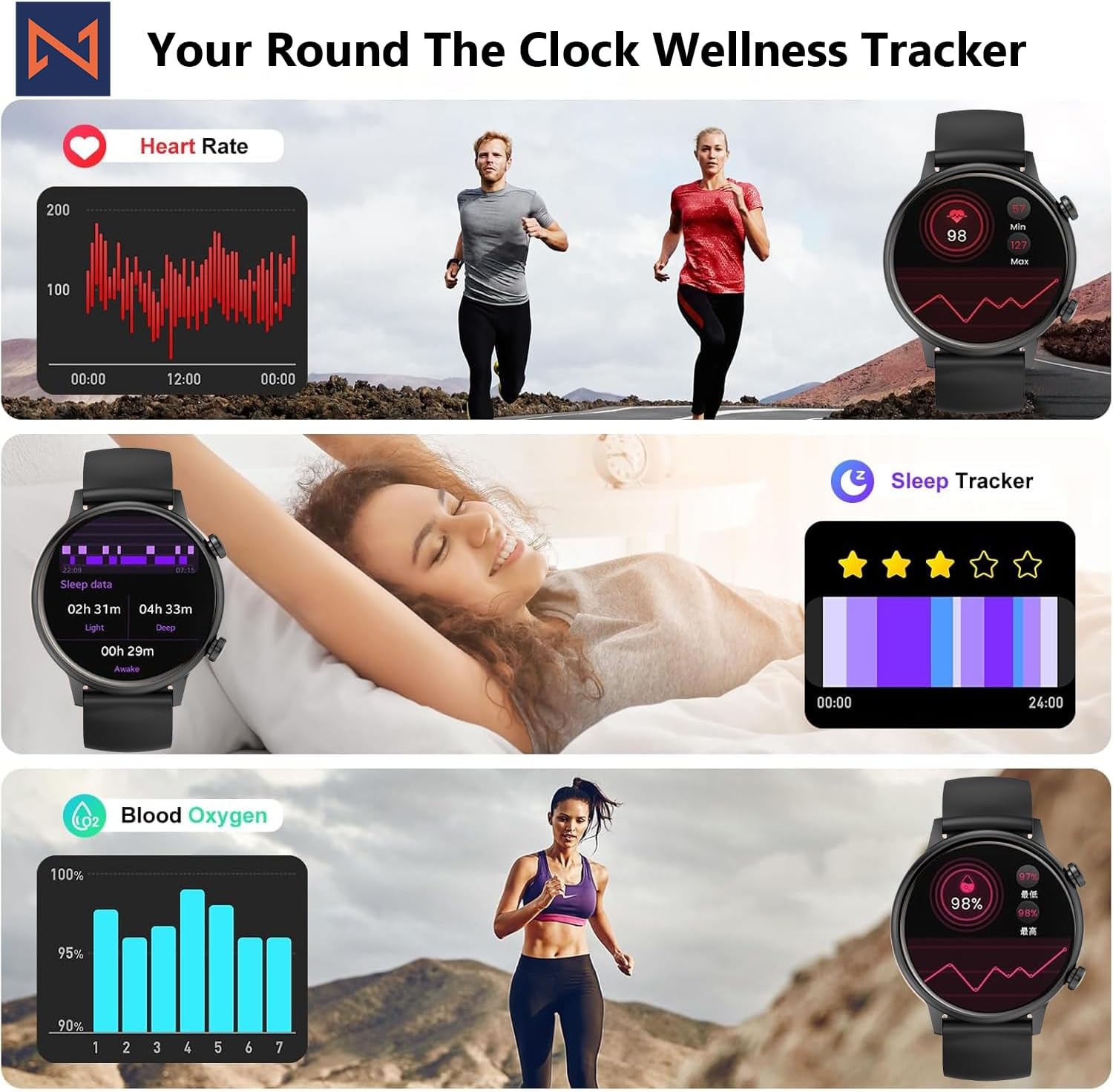
Figure 4: The smartwatch interface showing real-time heart rate, sleep tracking, and blood oxygen levels.

Figure 5: The smartwatch showing a selection of its multiple sports tracking modes.
6. Суға төзімділік
The Infinity Smart Watch has an IP68 waterproof rating, making it resistant to dust, sweat, and water. It is suitable for daily wear, including hand washing, face washing, and swimming. Ескерту: Avoid using the watch in hot water (e.g., hot showers, saunas) or for deep-sea diving, as extreme temperatures or high-pressure water may compromise its water resistance.

Figure 6: The smartwatch demonstrating its IP68 waterproof capability during water exposure.
7. Батарея және зарядтау
The smartwatch features a 200 mAh Lithium Polymer battery. A full charge typically takes approximately 2 hours, providing 3-5 days of working time and up to 30 days of standby time, depending on usage.
8. Техникалық сипаттамалар
| Ерекшелік | Мәлімет |
|---|---|
| Үлгі нөмірі | WS_BLK |
| Экран өлшемі | 1.1 дюймдік AMOLED |
| Су өткізбейтін рейтинг | IP68 |
| Батарея сыйымдылығы | 200 млнamp Сағат (литий полимер) |
| Қосылу мүмкіндігі | Блютез |
| Операциялық жүйе | Android (iOS жүйесімен үйлесімді) |
| Жад сақтау сыйымдылығы | 128 МБ |
| Элемент салмағы | 5 унция |
| Өндіруші | Kizzy Enterprises Inc |
9. Ақаулықтарды жою
- Сағат қосылмайды: Ensure the watch is fully charged. Long-press the side button to power on.
- Телефонмен жұптастыру мүмкін емес: Ensure Bluetooth is enabled on your phone and the watch is within range. Restart both devices and try pairing again through the app.
- Хабарландырулар алынбады: Check app settings on your phone to ensure notification permissions are granted for the smartwatch app. Also, verify that 'Do Not Disturb' mode is not active on the watch.
- Дұрыс емес денсаулық көрсеткіштері: Ensure the watch is worn snugly on your wrist, not too tight or too loose. Clean the sensors regularly. Note that the blood pressure monitor may not be medically accurate and is for reference only.
- Экранның қатуы: Restart the smartwatch by long-pressing the side button until it powers off, then power it back on. If the issue persists, check for app updates.
10. Кепілдік және қолдау
For warranty information, technical support, or service inquiries, please refer to the contact details provided on the product packaging or the manufacturer's official webсайт. Сатып алу түбіртегін кепілдік талаптары үшін сатып алудың дәлелі ретінде сақтаңыз.