
1. Кіріспе
The Wellue 24-Hour Ambulatory Blood Pressure Monitor (ABPM) is designed for continuous, automatic blood pressure measurement over a 24-hour period. This device helps to provide a comprehensive overview of blood pressure fluctuations, including during sleep, and can assist in identifying conditions such as white coat hypertension or masked hypertension. It is a clinically accurate device, certified by ESH IP 2010, and recommended by the European Society of Hypertension (ESH) and the British and Irish Hypertension Society (BIHS).

Image 1.1: The Wellue ABPM device enables continuous blood pressure monitoring throughout the day and night.
2. Не кіреді
Барлық элементтердің бар екеніне көз жеткізу үшін пакеттің мазмұнын тексеріңіз:
- 24-Hour Ambulatory Blood Pressure Monitor Unit
- USB Disk (containing ABPM software and user manual)
- Құрылғы клипі
- Adult Cuff (22-36 cm)
- Extra Large Cuff (33-43 cm)
- Силикон қақпағы
- Disposable Sweat-Absorbing Inner Cuff
- USB деректер кабелі
- Fast Charger (EU standard)

2.1-сурет: аяқталдыview of all items included in the Wellue ABPM package.
3. Орнату
3.1 Құрылғыны зарядтау
Before first use, fully charge the monitor using the provided USB data cable and fast charger. Connect the USB cable to the monitor and the charger, then plug the charger into a power outlet. A full charge takes approximately 2.5 hours and supports up to 200 measurements.
3.2 Installing the Cuff
- Select the appropriate cuff size (22-36 cm or 33-43 cm) for your arm. The cuff should fit snugly but not too tightly.
- Attach the cuff to the monitor's air tube connector.
- Wrap the cuff around your upper arm, ensuring the artery mark on the cuff aligns with your brachial artery. The bottom edge of the cuff should be approximately 2-3 cm above the elbow joint.
- Secure the cuff firmly using the hook-and-loop fastener.
3.3 Бағдарламалық құралды орнату
The ABPM software is provided on the included USB disk. Insert the USB disk into your PC and follow the on-screen instructions to install the software. The software is compatible with Microsoft Windows operating systems (Win2003/WinXP/Win7/Win10/Win11).
3.4 Компьютерге қосылу
To transfer data or program the device, connect the monitor to your PC using the provided USB data cable. Ensure the software is running on your PC.

Image 3.1: Connecting the ABPM device to a PC for data transfer and programming.
4. Құрылғыны пайдалану
4.1 Starting a Measurement Session
Once the cuff is correctly applied and the device is charged, press the power button to turn on the monitor. The device will automatically begin measurements according to the programmed schedule. You can also initiate a manual measurement by pressing the designated button on the device.
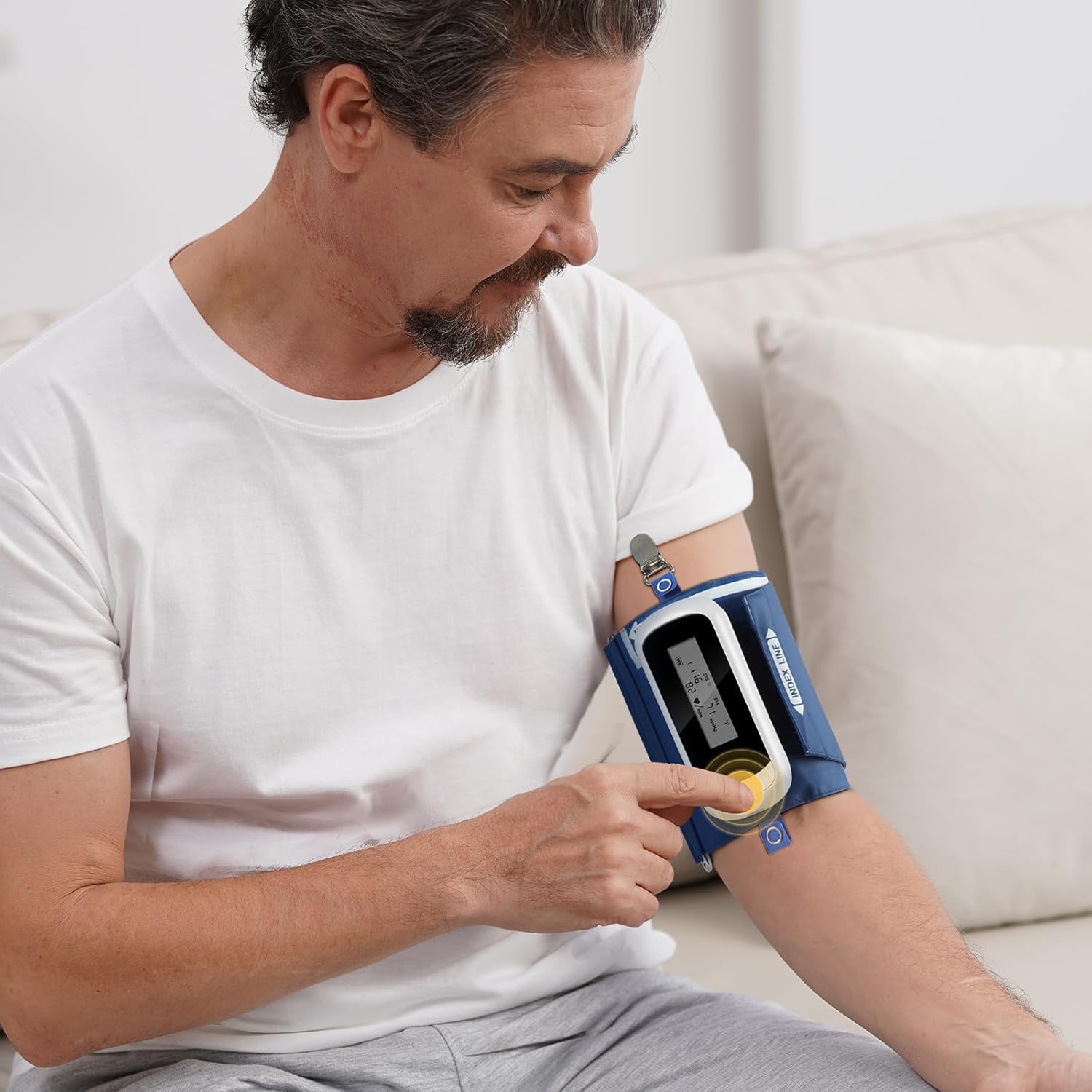
Image 4.1: Initiating a measurement on the Wellue ABPM device.
4.2 Programming Measurement Intervals
The device can be programmed via the PC software to take measurements at various intervals:
- Standard intervals: 5, 10, 15, 20, 30, 45, 60, 90, 120 minutes.
- You can define specific wake and sleep periods, as well as three special periods, for customized measurement schedules.
4.3 Data Transfer and Analysis with PC Software
After completing a monitoring session, connect the device to your PC to transfer the stored data. The software allows for comprehensive analysis:
- Advanced ABPM Analysis: Gain insights into nocturnal hypertension, morning surges, and correlations between DIA vs SYS and HR vs SYS. The Ambulatory Arterial Stiffness Index (AASI) can also be analyzed.
- Trend Graphs: Visualize up to 72 hours of data, showing blood pressure variations over time.
- Customizable Reports: Generate professional PDF reports. You can define report content, set hospital logos, and include signatures.
- Деректерді басқару: User-defined data saving paths, patient search function, and comparison of BP between different measurements for the same patient.
- Visual Customization: Set colors for systolic, diastolic, sleep period, and BP limits to suit individual preferences.
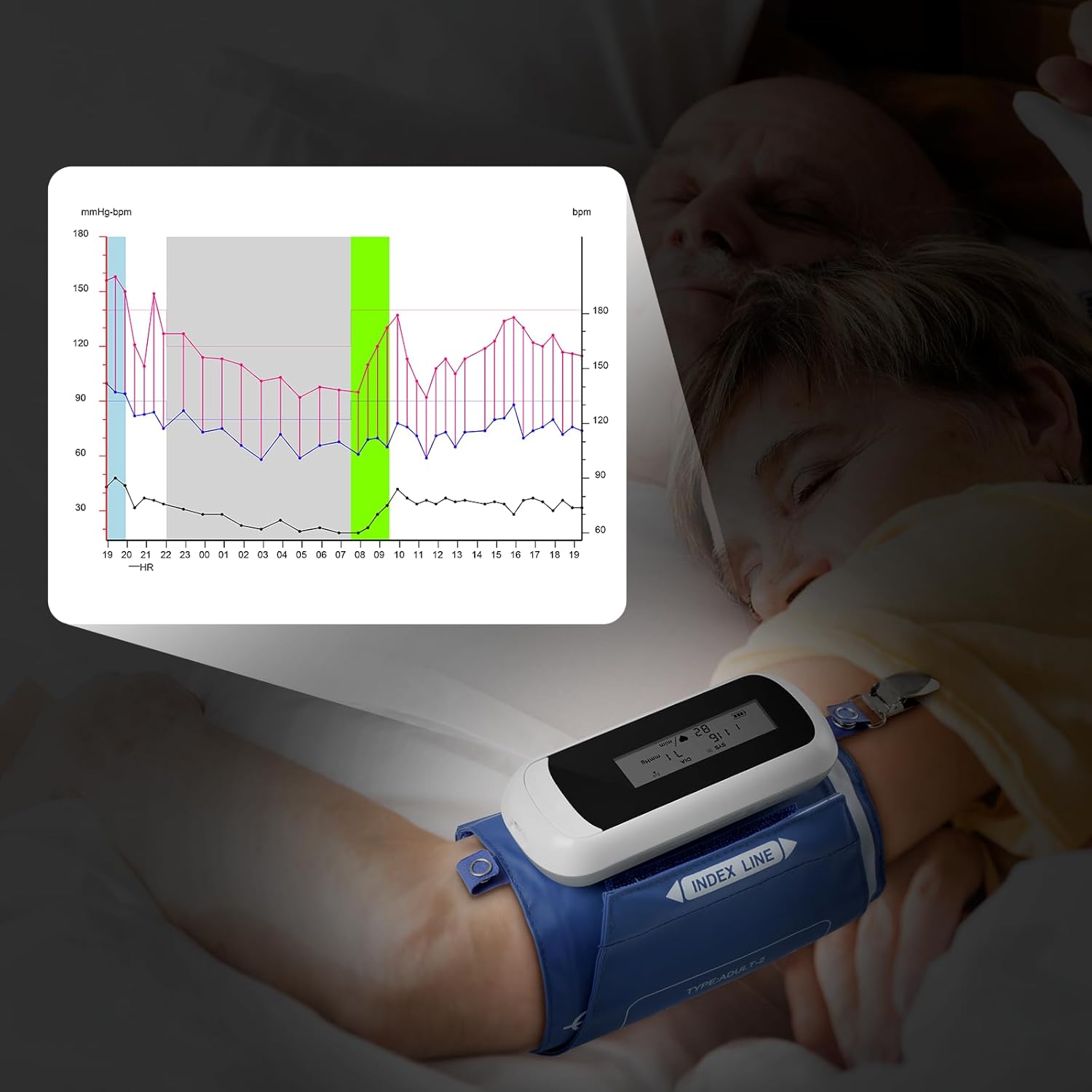
Image 4.2: Monitoring blood pressure during sleep and visualizing data trends.

Image 4.3: Analyzing comprehensive blood pressure data with the Wellue PC software.
5. Техникалық қызмет көрсету
5.1 Cleaning the Device and Cuffs
Wipe the monitor and cuffs with a soft, dry cloth. For disinfection, use a cloth lightly dampened with a mild disinfectant. Do not immerse the device in water or use abrasive cleaners.
5.2 Батареяға күтім жасау
The device uses a rechargeable Li-ion battery. To prolong battery life, avoid fully discharging the battery frequently. Recharge the device when the battery indicator is low. Store the device with a partial charge if not used for extended periods.
5.3 Калибрлеу
For continued accuracy, the device requires calibration at least once every two years. Please contact Wellue customer support for calibration services.
5.4 Сақтау шарттары
Store the device in a clean, dry place away from direct sunlight and extreme temperatures. Ensure the storage area is well-ventilated and free from corrosive gases. Recommended storage temperature: -20℃ to +55℃; Relative humidity: below 95%; Atmospheric pressure: 70KPa to 106KPa.
6. Ақаулықтарды жою
If you encounter issues with your Wellue ABPM, please refer to the following common problems and solutions:
- Құрылғы қосылмайды: Батареяның зарядталғанына көз жеткізіңіз. Құрылғыны зарядтағышқа қосып, қайталап көріңіз.
- Cuff not inflating or deflating: Check that the cuff is securely connected to the monitor and that there are no kinks in the air tube. Ensure the cuff is correctly applied to the arm.
- Дұрыс емес көрсеткіштер: Ensure the cuff size is correct and applied properly. Avoid movement or talking during measurements. Consult a healthcare professional if readings consistently seem incorrect.
- Software not detecting device: Verify the USB cable connection. Ensure the ABPM software is installed correctly and running. Try a different USB port on your PC.
- Көрсетілетін қате туралы хабарламалар: Refer to the detailed user manual on the USB disk for specific error code explanations and troubleshooting steps.
If problems persist, please contact Wellue customer support for assistance.
7. Техникалық сипаттамалар
| Ерекшелік | Техникалық сипаттама |
|---|---|
| Үлгі | WBP02A |
| Өлшемдері | 119 x 52 x 21 мм (4.7 дюйм x 2.1 дюйм x 0.8 дюйм) |
| Салмағы | 105 g (3.7 oz) (including battery) |
| Манжет өлшемдері | Adult: 22-36 cm (8”-14”); Extra Large: 33-43 cm (13”-17”) |
| ДК талаптары | USB port; Microsoft Win2003/WinXP/Win7/Win10/Win11 |
| Дисплей | LED экран |
| Жұмыс жағдайлары | Temperature: 5℃~40℃; RH: 10%~95%; Atmospheric Pressure: 70KPa~106KPa |
| Сақтау шарттары | Temperature: -20℃~+55℃; RH: <95%; Atmospheric Pressure: 70KPa~106KPa |
| Максималды инфляция қысымы | 290 мм рт.ст |
| Өлшеу әдісі | Осцилометрия |
| Жұмыс режимі | Automatic continuous operation |
| Measurement Intervals | 5, 10, 15, 20, 30, 45, 60, 90, 120 min (programmable) |
| Measurement Range (Systolic) | 40-260 мм сын.бағ |
| Measurement Range (Diastolic) | 20-210 мм сын.бағ |
| Өлшеу диапазоны (қысым) | 0-290 мм сын.бағ |
| Measurement Range (Heart Rate) | 40 соққы-200 айн / мин |
| Measurement Accuracy (Pressure) | ± 3 мм с.б. |
| Measurement Accuracy (Pulse) | ± 3 соққы / мин |
| Ішкі жад | 300 XNUMX оқуға дейін |
| Деректер қосылымы | USB деректер кабелі |
| Шу деңгейі | 45 дБ |
| Кіруден қорғау | IP22 |
| Батареяның қызмет ету мерзімі | Supports 200 measurements per charge |
| Зарядтау уақыты | 2.5 сағат |
| Номиналды сыйымдылық | 1000 мАч |
| Нәр беруші | 3.7V Li battery |

Image 7.1: Clinical accuracy certifications for the Wellue ABPM.
8. Кепілдік және қолдау
8.1 Кепілдік туралы ақпарат
The Wellue 24-Hour Ambulatory Blood Pressure Monitor comes with a three-year warranty from the date of purchase. This warranty covers manufacturing defects and ensures reliable operation under normal use. Please retain your proof of purchase for warranty claims.
8.2 Тұтынушыларды қолдау қызметі
For technical assistance, troubleshooting, calibration services, or warranty inquiries, please contact Wellue customer support. Contact details can typically be found on the Wellue official website or within the full user manual provided on the USB disk.