
1. Кіріспе
This manual provides detailed instructions for the installation, operation, and maintenance of the Yitouniu EWeLink 2-Channel Smart WiFi Switch Relay. This device enables remote control of household appliances and electronic devices via a mobile application, RF remote control, and voice commands through smart assistants like Alexa and Google Home. It supports various operating modes and timing functions to enhance smart home automation.
2. Қауіпсіздік туралы ақпарат
- Ensure power is disconnected before installation or maintenance to prevent electric shock.
- Installation should be performed by qualified personnel or under strict adherence to electrical safety guidelines.
- Максималды ток пен көлемді асырмаңызtagқұрылғы үшін көрсетілген e рейтингтері.
- Құрылғыны судан, ылғалдан және төтенше температурадан алыс ұстаңыз.
- Verify all wiring connections are secure and correct before restoring power.
3. Өнім аяқталдыview
The Yitouniu EWeLink Smart WiFi Switch Relay is a compact, 2-channel device designed for integrating traditional appliances into a smart home system. It features WiFi and Bluetooth connectivity for app control and supports RF 433MHz for remote control.

3.1-сурет: Алдыңғы view of the Yitouniu EWeLink Smart WiFi Switch Relay. The device is white with branding and connection labels visible.

3.2-сурет: жақыннан view of the Yitouniu EWeLink Smart WiFi Switch Relay, showing input terminals (N, L), output terminals (NO, COM, NC), and model information.

Image 3.3: The compact size of the Yitouniu EWeLink Smart WiFi Switch Relay, held in a hand for scale.
4. Техникалық сипаттамалар
| Параметр | Мән |
|---|---|
| Кіріс көлеміtage | AC/DC 85-250V, Micro USB 5V input |
| Максималды ток | 10A |
| Максималды қуат | 2200 Вт |
| WiFi стандарты | WiFi 2.4GHz b/n/g + Bluetooth (IEEE 802.11b/g/n) |
| Жұмыс температурасы | -20°C - 70°C |
| Материал | АВС жалынға қарсы құрал |
| Өнім өлшемдері | 2.76 x 1.77 x 1.1 дюйм |
| Элемент салмағы | 1.76 унция |
| Байланыс түрі | Әдетте ашық |
| Халықаралық қорғау рейтингі | IP65 |
| Сертификаттау | FCC |
5. Орнату және орнату
5.1 Сымдарды қосу нұсқаулары
The device supports both AC/DC 85-250V input and Micro USB 5V input. Ensure correct wiring based on your application. The relay has Normally Open (NO), Common (COM), and Normally Closed (NC) contacts for controlling external devices.
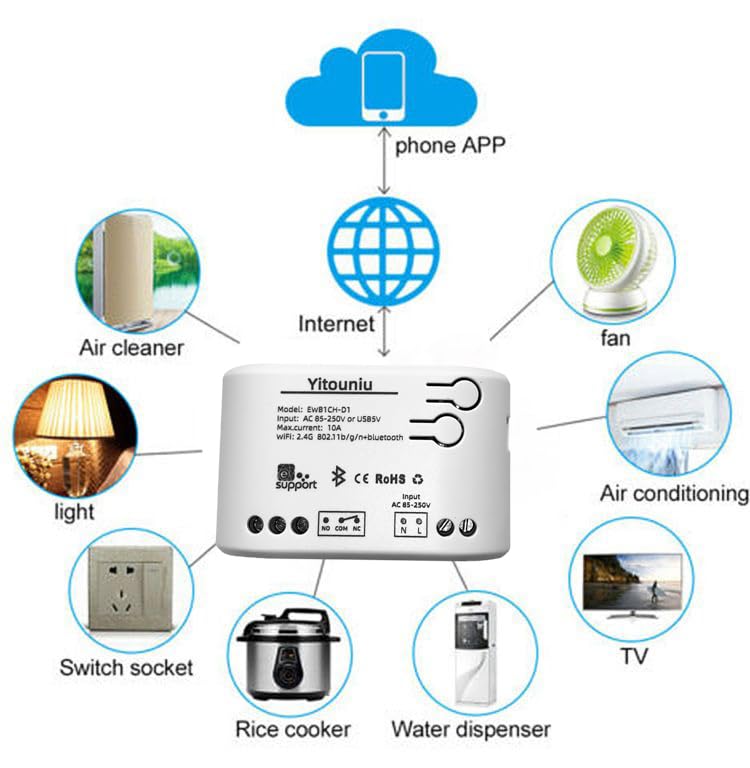
Image 5.1: Diagram illustrating the connectivity of the Yitouniu EWeLink Smart WiFi Switch Relay to various household appliances like lights, fans, and air conditioners, all controlled via a phone app and the internet.
5.2 Қолданбаны жүктеп алу және жұптастыру
- жүктеп алыңыз eWeLink Apple App Store немесе Google Play дүкенінен қолданба.
- Тіркелгіні тіркеп, жүйеге кіріңіз.
- Power on the Smart WiFi Switch Relay.
- Open the eWeLink app, tap the '+' icon to add a device.
- Follow the on-screen instructions to connect the device to your 2.4GHz WiFi network.

Image 5.2: Screenshots of the eWeLink app interface, showing controls for a garage door (ON/OFF) and a scheduling function for setting specific times.
6. Жұмыс режимдері
The device supports three operating modes: self-locking, interlocking, and inching (micromotion). These modes can typically be configured within the eWeLink app or via physical buttons on the device, depending on the specific model variant.
- Өздігінен құлыптау режимі: Each channel operates independently. Pressing the button (or app control) turns the relay ON, pressing it again turns it OFF.
- Interlocking Mode: When one channel is turned ON, all other channels are automatically turned OFF. This is useful for applications where only one device should be active at a time.
- Inching (Micromotion) Mode: The relay turns ON for a set duration (e.g., 0.5 seconds to 1 hour) and then automatically turns OFF. This is suitable for momentary actions like garage door openers or pulse controls.
7. App Control and Voice Control
7.1 eWeLink App Features
The eWeLink app provides comprehensive control over your Smart WiFi Switch Relay:
- Қашықтан қосу/өшіру: Интернетке қосылған кез келген жерден қосылған құрылғыларды басқарыңыз.
- Уақыт функциялары: Set schedules, countdowns, or recurring timers for automatic on/off operations.
- Тәуелсіз бақылау: Each of the two channels can be controlled independently.
- Құрылғыны ортақ пайдалану: Share control of your devices with family members.
- Топтық бақылау: Organize multiple smart devices into groups for simultaneous control.

Image 7.1: A user remotely controlling home lighting via the eWeLink mobile application, demonstrating the convenience of app-based control.

Image 7.2: Illustration of the eWeLink app's group control and sharing functions, allowing multiple users to manage devices across different rooms.

Image 7.3: The timing function interface within the eWeLink app, enabling users to set specific on/off times for connected appliances.
7.2 Дауыспен басқаруды біріктіру
The Yitouniu Smart WiFi Switch Relay is compatible with popular voice assistants, including Amazon Alexa and Google Home/Nest. To enable voice control:
- Ensure your Smart WiFi Switch Relay is successfully paired with the eWeLink app.
- Alexa немесе Google Home қолданбасын ашыңыз.
- «Дағдылар» немесе «Google-мен жұмыс істейді» бөліміне өтіңіз.
- Іздеу and enable the 'eWeLink Smart Home' skill/service.
- Link your eWeLink account when prompted.
- Discover devices. Your Smart WiFi Switch Relay should now be controllable via voice commands.
Example командалары:
- - Alexa, қонақ бөлменің жарығын қосыңыз.
- "Эй, Google, желдеткішті өшір."

Image 7.4: A user interacting with voice assistants like Amazon Alexa and Google Home to control smart devices, highlighting the voice control capability of the relay.
8. Техникалық қызмет көрсету
The Yitouniu Smart WiFi Switch Relay requires minimal maintenance. Follow these guidelines:
- Тазалау: Wipe the device with a dry, soft cloth. Do not use liquid cleaners or solvents.
- Қосылымды тексеру: Сымдарды мезгіл-мезгіл тексеріп, олардың сенімді екеніне көз жеткізіңіз.
- Микробағдарламаны жаңарту: Keep the eWeLink app updated to receive the latest firmware for the device, which may include performance improvements and new features.
9. Ақаулықтарды жою
- Device not connecting to WiFi:
- Ensure your WiFi network is 2.4GHz. The device does not support 5GHz networks.
- Check if the WiFi password entered in the app is correct.
- Move the device closer to your WiFi router.
- Құрылғыны және маршрутизаторды қайта іске қосыңыз.
- Device offline in app:
- Үйдегі интернет байланысының белсенді екеніне көз жеткізіңіз.
- Құрылғының қуаты бар-жоғын тексеріңіз.
- Құрылғыны қайта іске қосыңыз.
- Дауыспен басқару жұмыс істемейді:
- Confirm the eWeLink skill/service is enabled and linked in your Alexa or Google Home app.
- Ensure the device is named clearly in the eWeLink app and discovered by your voice assistant.
- Интернет байланысын тексеріңіз.
- Device not responding to RF remote:
- Ensure the RF remote is paired with the switch. Refer to the RF pairing instructions (if applicable to your specific remote).
- Check the battery in the RF remote.
10. Қорапта не бар
Өнімнің қаптамасын ашқан кезде келесі элементтерді табу керек:
- 1 x Yitouniu Wifi 2-Channel Relay Switch
- 1 x Нұсқаулық (осы құжат)
11. Кепілдік және қолдау
This product comes with a standard manufacturer's warranty. For specific warranty terms, conditions, and duration, please refer to the documentation included with your purchase or contact Yitouniu customer support. For technical assistance or further inquiries, please visit the official Yitouniu webсайтына немесе тұтынушыларға қызмет көрсету арналарына хабарласыңыз.