
1. Кіріспе
Сатып алғаныңыз үшін рахметasing the Edifier R990BT Bluetooth Computer Speakers. These 2.0 active bookshelf speakers are designed to provide high-quality audio for your PC, smartphone, tablet, and other compatible devices. Featuring Bluetooth V5.4 connectivity and dual RCA inputs, the R990BT offers versatile audio options in a classic MDF enclosure. Please read this manual thoroughly to ensure proper setup and optimal performance of your speakers.
2. Пакет мазмұны
Пакетте барлық элементтер бар екеніне көз жеткізіңіз:
- Edifier R990BT Active Bookshelf Speakers (1 Pair)
- Динамикті қосу кабелі
- RCA to RCA Audio Cable
- 3.5 мм-ден RCA аудио кабеліне дейін
- Қуат кабелі
- Жылдам бастау нұсқаулығы
3. Орнату
3.1 Динамикті орналастыру
Place the speakers on a stable, flat surface such as a desk or shelf. For optimal stereo imaging, position the speakers equidistant from your listening position, forming an equilateral triangle. Ensure there is adequate space behind the speakers for cable connections and ventilation.

Image: Edifier R990BT speakers positioned on a desk, demonstrating typical placement for computer use.
3.2 Динамиктерді қосу
- Connect the Passive Speaker: Use the included speaker connection cable to link the active speaker (with controls) to the passive speaker. Ensure the correct polarity (+ to + and - to -) for proper sound reproduction.
- Қуатқа қосылу: Plug the power cable into the active speaker's power input and then into a wall outlet.
3.3 Дыбыс көздерін қосу
The R990BT speakers support both wired (RCA) and wireless (Bluetooth) connections.
Wired Connection (RCA)
The speakers feature two sets of RCA input ports (Line In 1 and Line In 2) for connecting two different wired audio devices simultaneously.
- Use the RCA to RCA cable to connect devices with RCA outputs (e.g., CD player, turntable with pre-amp).
- Use the 3.5mm to RCA cable to connect devices with a 3.5mm audio jack (e.g., computer, smartphone, tablet).

Image: Close-up of the rear panel of the active speaker, highlighting the dual RCA input ports (Line In 1 and Line In 2) and the power input.
Bluetooth қосылымы
The R990BT features Bluetooth V5.4 for wireless audio streaming.
- Динамиктерді қосыңыз.
- Press the volume/input knob on the rear panel to select the Bluetooth input. The indicator light will flash blue.
- Дыбыстық құрылғыңызда (смартфон, планшет, компьютер) Bluetooth функциясын қосып, қолжетімді құрылғыларды іздеңіз.
- Select "EDIFIER R990BT" from the list to pair. The indicator light will turn solid blue once connected.

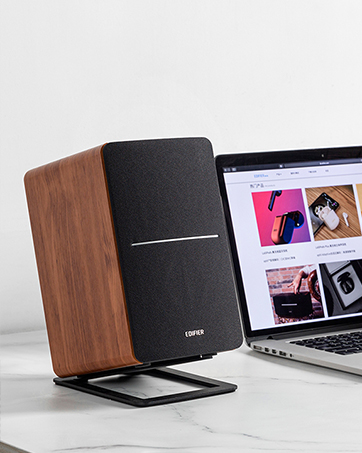
Image: A single Edifier R990BT speaker on a desk next to a laptop, symbolizing the ease of Bluetooth connectivity.
4. Пайдалану нұсқаулары
4.1 Қуатты қосу/өшіру
The power switch is located on the rear panel of the active speaker. Flip the switch to the 'ON' position to power on the speakers. Flip to 'OFF' to power off.
4.2 Дыбыс деңгейін басқару
The large knob on the rear panel of the active speaker controls the master volume. Rotate clockwise to increase volume and counter-clockwise to decrease volume.
Сурет: егжей-тегжейлі view of the multi-function control knob on the rear of the speaker, used for volume adjustment and input selection.
4.3 Енгізуді таңдау
Press the volume/input knob on the rear panel to cycle through the available audio inputs: Line In 1, Line In 2, and Bluetooth. The indicator light will change color or flash to indicate the selected input mode.
- Line In 1 / Line In 2: Solid green or red indicator (depending on model/firmware).
- Блютез: Flashing blue (pairing mode) or solid blue (connected).
4.4 Using the Edifier ConneX App
For enhanced control and customization, download the Edifier ConneX mobile application. The app allows you to adjust equalization settings and access additional features for your R990BT speakers.
- Download the Edifier ConneX app from your device's app store.
- Ensure your speakers are powered on and connected via Bluetooth to your mobile device.
- Open the app and follow the on-screen instructions to connect to your R990BT speakers.

Image: The official logo for the Edifier ConneX mobile application.
5. Техникалық қызмет көрсету
5.1 Тазалау
Динамиктердің сыртқы түрі мен өнімділігін сақтау үшін:
- Wipe the speaker cabinets with a soft, dry cloth.
- Сұйық тазалағыштарды, аэрозольдерді немесе абразивті химиялық заттарды пайдаланбаңыз, себебі олар әрлеуді немесе ішкі компоненттерді зақымдауы мүмкін.
- Gently brush dust from the speaker grilles using a soft brush or vacuum cleaner with a brush attachment.
5.2 Сақтау
If storing the speakers for an extended period, ensure they are powered off and disconnected from the power source. Store them in a cool, dry place away from direct sunlight and extreme temperatures.
6. Ақаулықтарды жою
If you encounter any issues with your Edifier R990BT speakers, please refer to the following common problems and solutions:
| Мәселе | Ықтимал себебі | Шешім |
|---|---|---|
| Дыбыс жоқ |
|
|
| Бұрмаланған дыбыс |
|
|
| Bluetooth not connecting/disconnecting |
|
|
| Difficulty switching inputs |
|
|
7. Техникалық сипаттамалар
Detailed technical specifications for the Edifier R990BT speakers:
- Модель атауы: R990BT
- Динамик түрі: Кітап сөресі
- Монтаждау түрі: Shelf Mount/Tabletop Mount
- Материал: MDF (орта тығыздықтағы талшықты тақта)
- Қосылу технологиясы: Bluetooth V5.4, Wired (Dual RCA)
- Аудио шығыс режимі: Стерео (2.0)
- Динамиктің максималды шығыс қуаты: 24 Ватт (RMS)
- Вуфердің диаметрі: 4 дюйм
- Твитер диаметрі: 1 дюйм
- Жиілік жауабы: 18 KHz (Upper limit, typical for compact speakers)
- Шу-шу арақатынасы: 85 дБ
- Бақылау әдісі: Touch (via rear knob)
- Қуат көзі: Corded Electric (100-240V ~ 50/60Hz)
- Өнім өлшемдері: 11.5"D x 7.5"W x 17"H (per speaker, approximate)
- Элемент салмағы: 7.94 Pounds (per speaker, approximate)
- Түсі: Қара
- Үйлесімді құрылғылар: Devices with Bluetooth technology, devices with RCA or 3.5mm audio output.
8. Кепілдік және қолдау
8.1 Кепілдік туралы ақпарат
The Edifier R990BT speakers come with a Limited Warranty. Please refer to the warranty card included in your package or visit the official Edifier webөніміңіздің кепілдікті қамтуына қатысты егжей-тегжейлі шарттар мен талаптарға арналған сайт.
8.2 Тұтынушыларды қолдау қызметі
For technical assistance, troubleshooting, or general inquiries, please contact Edifier customer support. Contact details can typically be found on the official Edifier website or in your product's Quick Start Guide.
Желідегі қолдау: бару www.edifier.com Жиі қойылатын сұрақтар, қолдау ресурстары және байланыс ақпараты үшін.