
1. Кіріспе
This manual provides essential instructions for the setup, operation, and maintenance of your HelloBaby HB6339 Baby Monitor Camera and the compatible Twist Mount Bracket. The HB6339 camera is designed to function as an additional unit for the HelloBaby HB6339 Video Baby Monitor system, allowing for expanded monitoring capabilities. The flexible twist mount offers versatile, tool-free installation options.
2. Өнімнің құрамдас бөліктері
The product package includes the HelloBaby HB6339 Baby Monitor Camera and the HelloBaby Monitor Twist Mount Bracket.
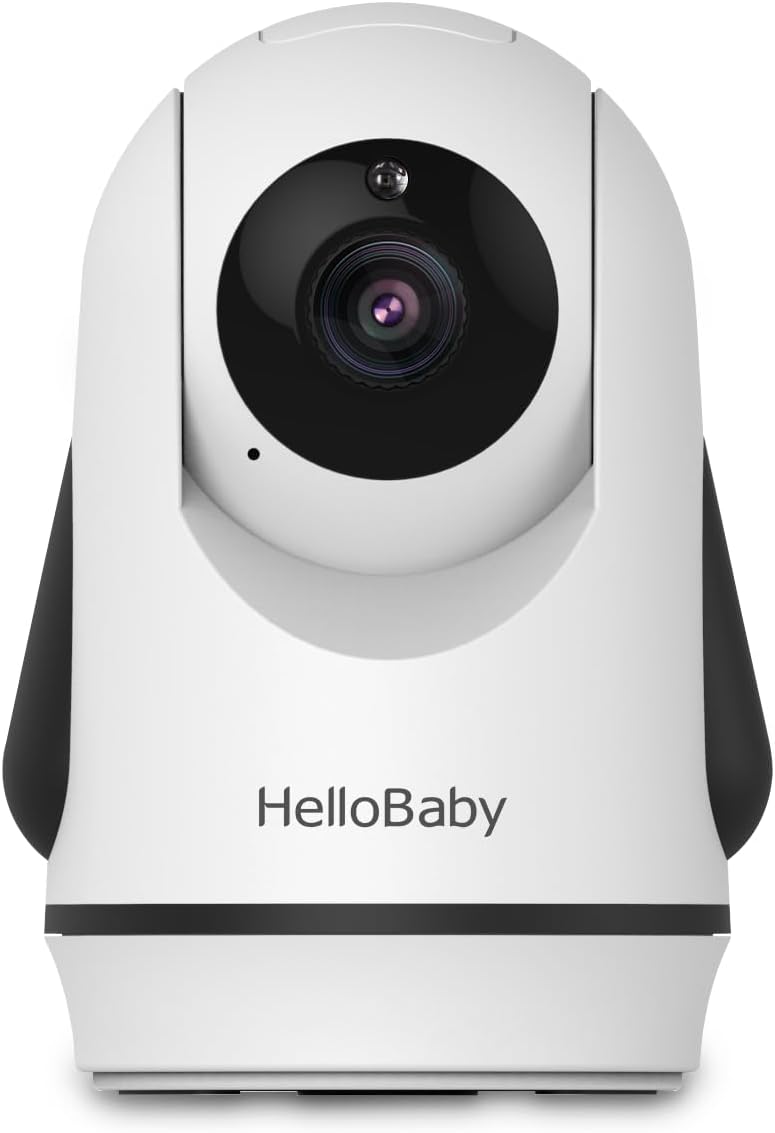
2.1-сурет: HelloBaby HB6339 Baby Monitor Camera. This image shows the front view of the white and black camera unit, featuring the lens and the 'HelloBaby' logo.
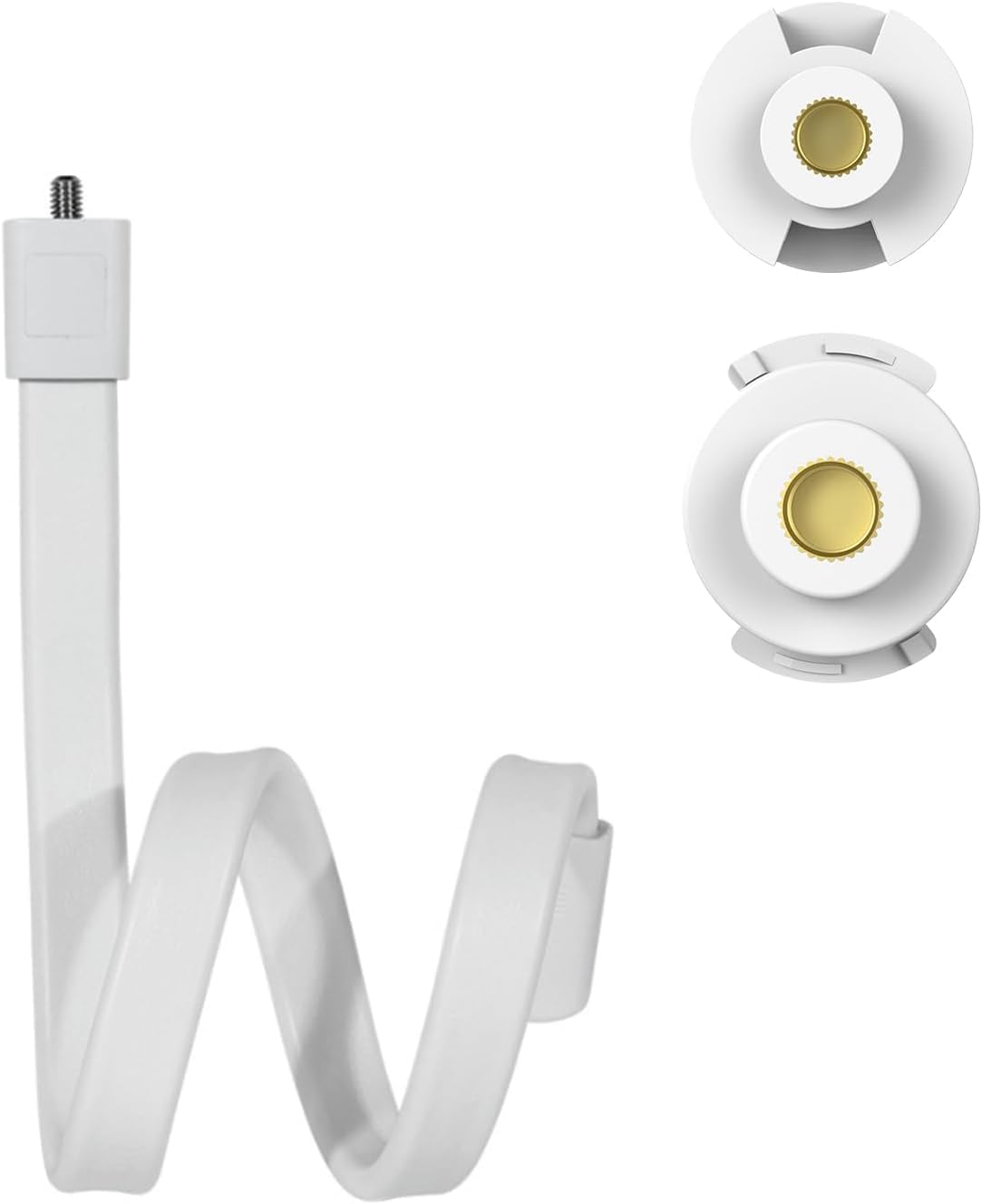
2.2-сурет: HelloBaby Monitor Twist Mount Bracket. This image displays the flexible white twist mount, designed for tool-free installation, with a threaded screw at one end for camera attachment.
3. Орнату
3.1 Камераны орнату
- Үйлесімділік: The HB6339 camera unit is only compatible with the HelloBaby HB6339 Video Baby Monitor system. It cannot be used as a standalone Wi-Fi camera with a smartphone app.
- Қуат қосылымы: Connect the camera to a power source using the provided power adapter. Ensure the adapter is securely plugged into both the camera and a wall outlet.
- Pairing with Monitor Unit: Refer to your HelloBaby HB6339 Video Baby Monitor's main instruction manual for detailed steps on how to pair an additional camera unit. Typically, this involves accessing the monitor unit's menu, selecting the 'Add Camera' option, and following the on-screen prompts.
- Бірнеше камералар: Up to 4 cameras can be added to the HB6339 system. When two or more cameras are connected, the monitor unit offers a "Camera Scan" mode, which automatically cycles through each paired camera's view әр 10 секунд сайын.
3.2 Mount Setup
The twist mount bracket provides a flexible and secure way to position your baby monitor camera without the need for tools or wall damage.
- Үйлесімділік: This mount is designed for HelloBaby monitors such as HB6550, HB6339, HB6550pro, HB65, HB40, and other baby cameras featuring a standard 1/4-inch threaded port. Verify your camera's compatibility before attachment.
- Attachment to Camera: Screw the camera onto the threaded bolt at the end of the twist mount until it is secure.
- Орнату орны: Identify a suitable location such as a crib rail, shelf, or other furniture. The mount's flexible design allows it to be twisted and bent around various objects.
- Қауіпсіз позициялау: Twist and bend the mount firmly around the chosen object to ensure the camera is stable and securely held in place. Ensure the camera has a clear view қалаған аумақтың.
- Реттеу бұрышы: Once mounted, gently adjust the flexible arm to achieve the optimal viewing angle for your monitoring needs.

3.1-сурет: Mount compatibility. This image shows the threaded screw of the mount and various camera bases with compatible 1/4-inch threaded ports, indicated by green checkmarks.

3.2-сурет: Camera mounted in a nursery. This image illustrates the HB6339 camera attached to the twist mount, which is secured to a crib rail, providing a view of a sleeping baby.
4. Камераны пайдалану
Once the camera is set up and paired with your HB6339 monitor unit, you can utilize its features for effective monitoring.
- Remote PAN/TILT/ZOOM: The HB6339 camera supports remote pan, tilt, and zoom functions, allowing you to adjust the camera's view directly from your monitor unit. Refer to your monitor unit's manual for specific controls.
- Camera Scan Mode: If you have multiple cameras connected, activate the "Camera Scan" mode on your monitor unit to automatically switch between camera views every 10 seconds, providing comprehensive coverage of different areas.
- Түнгі көру: The camera is equipped with automatic infrared night vision, enabling clear viewаз жарық жағдайында.
- Екі жақты әңгіме: Use the two-way talk feature on your monitor unit to communicate with your baby or anyone near the camera.
5. Техникалық қызмет көрсету
Proper maintenance ensures the longevity and optimal performance of your HelloBaby HB6339 camera and mount.
- Камераны тазалау: Use a soft, dry cloth to gently wipe the camera lens and body. Avoid using abrasive cleaners, solvents, or aerosol sprays, as these can damage the device.
- Монтажды тазалау: The twist mount can be wiped clean with a damp cloth. Ensure it is completely dry before reattaching the camera.
- Сақтау орны: When not in use for extended periods, store the camera and mount in a cool, dry place, away from direct sunlight and extreme temperatures.
- Кабельге күтім жасау: Regularly inspect power cables for any signs of damage. Do not use damaged cables. Keep cables out of reach of children.
6. Ақаулықтарды жою
If you encounter issues with your HelloBaby HB6339 camera or mount, refer to the following common problems and solutions.
| Мәселе | Ықтимал себебі | Шешім |
|---|---|---|
| No image/signal from camera | Camera not powered on; Camera out of range; Camera not paired. | Ensure camera is plugged in and powered. Move camera closer to the monitor unit. Re-pair the camera with the monitor unit as per the main manual. |
| Суреттің сапасы нашар | Low light conditions; Obstructions; Dirty lens. | Ensure adequate lighting or verify night vision is active. Remove any objects blocking the camera's view. Clean the camera lens with a soft, dry cloth. |
| Mount is not stable | Mount not securely twisted; Object too thin/thick for secure grip. | Re-twist the mount more firmly around the object. Ensure the object provides sufficient surface area for the mount to grip. Consider an alternative mounting location. |
| Remote PAN/TILT/ZOOM not working | Camera not responding; Monitor unit issue. | Ensure the camera is powered and paired. Restart both the camera and the monitor unit. Refer to the main monitor unit manual for specific control troubleshooting. |
If the problem persists after attempting these solutions, please contact HelloBaby customer support.
7. Техникалық сипаттамалар
| Ерекшелік | Техникалық сипаттама |
|---|---|
| Үлгі | HB6339 (Camera Unit) |
| Бренд | Сәлем балақай |
| Ұсынылатын пайдаланулар | Нәрестелерді бақылау |
| Ішкі/сыртқы пайдалану | Ішкі, Сыртқы |
| Форма факторы | Күмбез |
| Бақылау әдісі | Remote (via HB6339 monitor unit) |
| Монтаждау түрі | Wall Mount (via Twist Mount Bracket) |
| Сымсыз байланыс технологиясы | Wi-Fi (for internal system communication, not direct smartphone connection for this specific camera unit) |
| Қосылу протоколы | Сымсыз дәлдiк |
| Үйлесімді құрылғылар | HelloBaby HB6339 Video Baby Monitor (primary), other cameras with 1/4" threaded port (for mount) |
| Бейне түсіру пішімі | MPEG H |
| Бөлме түрі | Балабақша |
8. Кепілдік және қолдау
HelloBaby provides a one-year warranty for this product. For any questions, technical assistance, or warranty claims, please contact the HelloBaby professional customer service team. Details for contacting support can typically be found on the HelloBaby official webсайты немесе сатып алу платформасы арқылы.