
Кіріспе
This manual provides detailed instructions for the TECPHILE iPad Keyboard Case, Model T5509D. It covers setup, operation, maintenance, and troubleshooting to ensure optimal use of your device. Please read this manual thoroughly before using the product.
Үйлесімділік
The TECPHILE iPad Keyboard Case (Model T5509D) is specifically designed for the following iPad Pro 12.9-inch models:
- iPad Pro 12.9-inch (6th Generation, 2022): A2436, A2764, A2437, A2766 модельдері
- iPad Pro 12.9-inch (5th Generation, 2021): A2378, A2379, A2461, A2462 модельдері
- iPad Pro 12.9-inch (4th Generation, 2020): A2233, A2229, A2069, A2232 модельдері
- iPad Pro 12.9-inch (3rd Generation, 2018): A1876, A2014, A1895, A1983 модельдері
This case is not compatible with any other iPad models.

Image: Compatibility chart for TECPHILE iPad Keyboard Case. Please verify your iPad model number on the back of your device to ensure compatibility.
Пакет мазмұны
Пакетті ашқан кезде барлық заттардың бар екеніне көз жеткізіңіз:
- TECPHILE iPad Keyboard Case (with integrated kickstand and pencil holder)
- Detachable Wireless Backlit Keyboard
- USB-C зарядтау кабелі
- Пайдаланушы нұсқаулығы (бұл құжат)
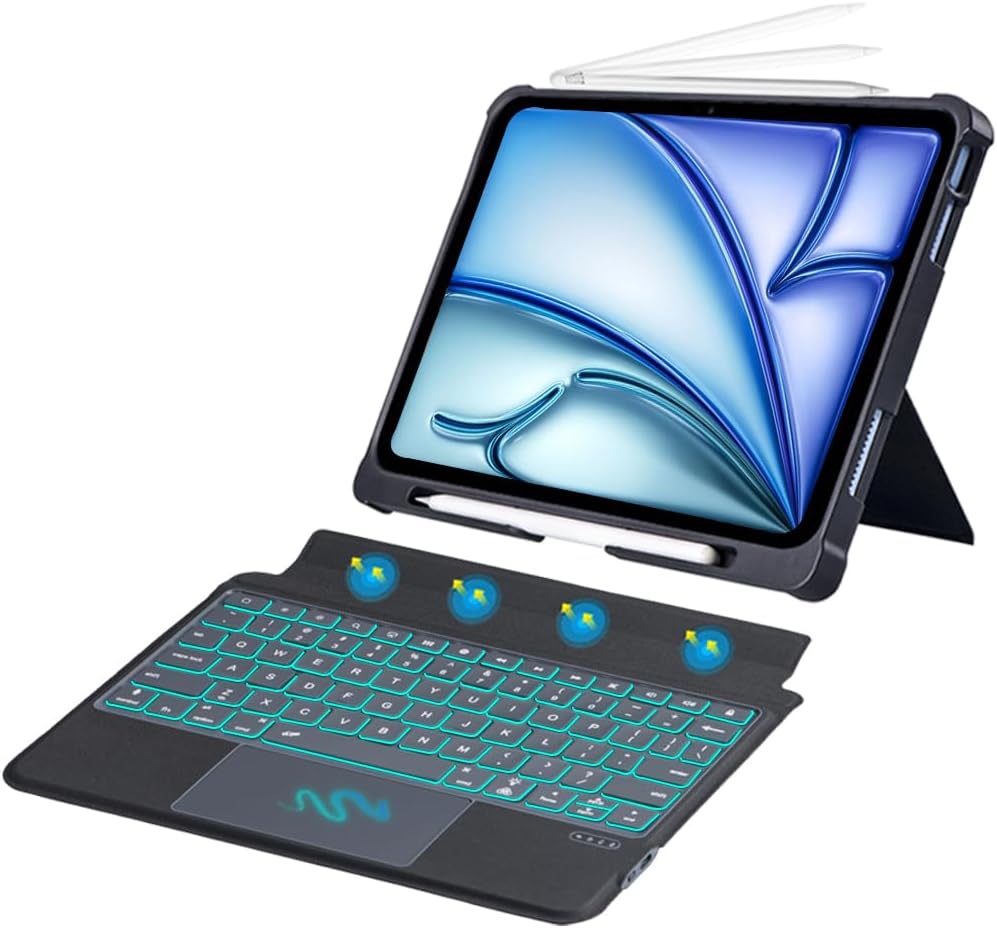
Сурет: аяқталдыview of the TECPHILE iPad Keyboard Case components, including the case with an iPad and the detached wireless keyboard.
Орнату нұсқаулығы
1. Attaching Your iPad to the Case
- Gently align your iPad Pro 12.9-inch with the case.
- Insert the iPad into the protective shell, ensuring all corners are securely fitted. The case provides full protection and features honeycomb heat release design.
- The case includes a dedicated pencil holder and supports wireless charging for your Apple Pencil.
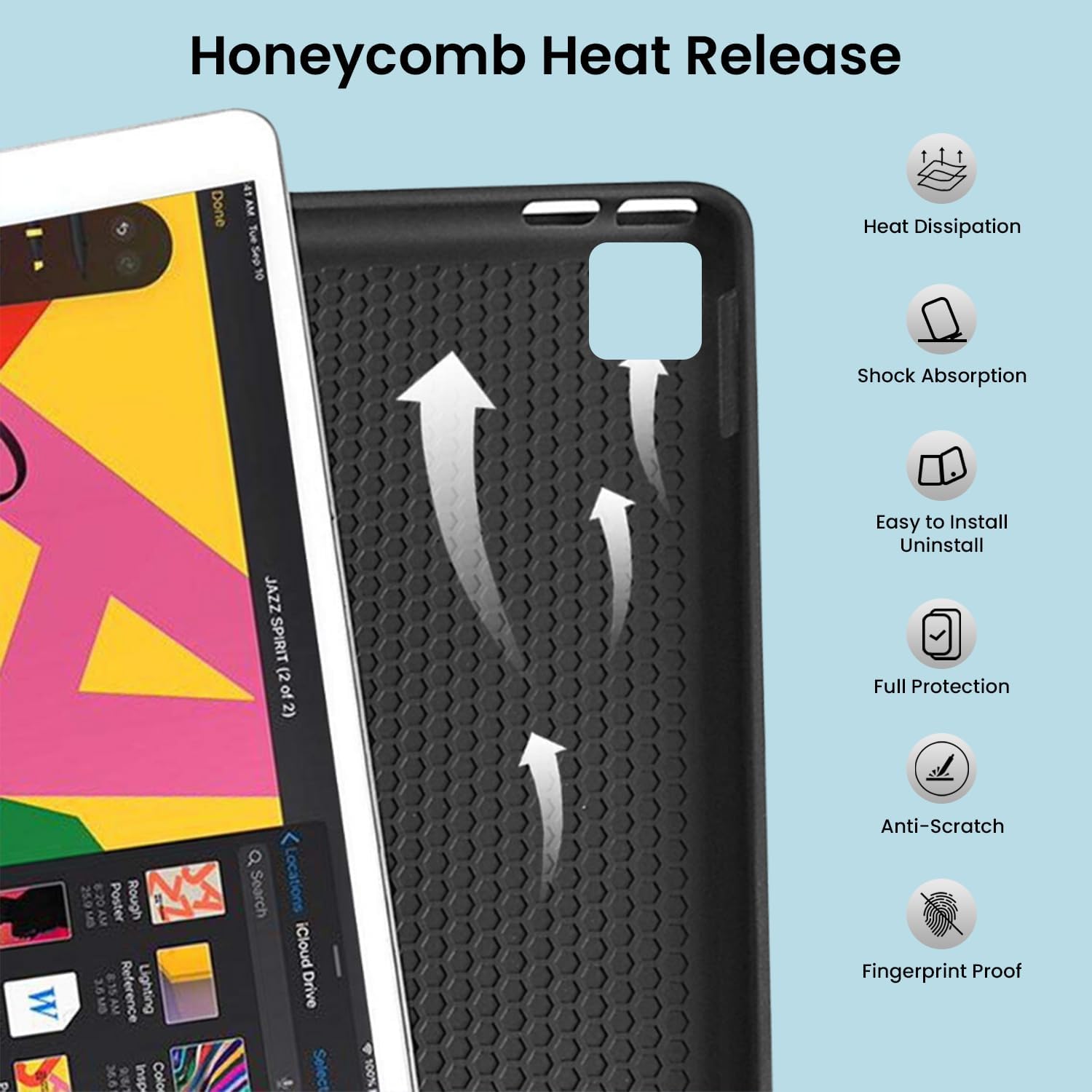
Image: Detail of the case's honeycomb structure for heat dissipation and protective features.

Image: Illustrates the wireless charging capability for the Apple Pencil and the integrated pencil holder.
2. Пернетақтаны зарядтау
Before initial use, fully charge the keyboard. The keyboard has a 500mAh battery capacity.
- Пернетақтаның бүйіріндегі USB-C зарядтау портын табыңыз.
- Connect the provided USB-C cable to the keyboard and a power source (e.g., USB wall adapter, computer USB port).
- The charging indicator light will illuminate. Once fully charged, the light may change or turn off.
A full charge provides approximately 80 hours of use without backlight or 5 hours with backlight enabled.

Image: Keyboard charging port and battery performance details.
3. Connecting the Keyboard via Bluetooth
The keyboard connects wirelessly to your iPad via Bluetooth.
- Пернетақтаның зарядталғанын және қосылғанын тексеріңіз.
- Пернетақтада түймесін басыңыз Fn+Z keys simultaneously. The Bluetooth indicator light will start blinking, indicating it's in pairing mode.
- iPad құрылғыңызда келесіге өтіңіз Параметрлер > Bluetooth.
- Turn on Bluetooth. Your iPad will search for available devices.
- Locate and tap "Bluetooth Keyboard" (or similar name) in the list of devices to connect.
- Қосылғаннан кейін пернетақтадағы Bluetooth индикатор шамы жыпылықтауын тоқтатады.

Image: Visual guide for Bluetooth pairing process.
Пайдалану нұсқаулары
Пернетақта функциялары
The detachable keyboard features a QWERTY layout with additional function keys for iPad control.
- Артқы жарықты басқару: түймесін басыңыз Fn + 💡 (light bulb icon) to turn on/off the backlight and cycle through 7 different colors. Press Fn + ☀️ (sun icon) to adjust the 3 levels of brightness.
- Full Shortcut Row: Access common iPad functions directly from the top row of keys.
- Intelligent Voice Input Function: Utilize the dedicated key for voice input.

Сурет: егжей-тегжейлі view of the keyboard's backlit keys and function controls.
Smart Multi-Gesture Trackpad
The integrated large trackpad supports multi-touch gestures for enhanced navigation.
- Негізгі навигация: Саусақты сенсорлық тақтада сырғыту арқылы курсорды жылжытыңыз.
- Click Functions: Supports right and left click functions.
- Multi-Finger Gestures: Utilize native iPad multi-finger gestures for scrolling, swiping, and other actions. Refer to your iPad's settings for a full list of supported gestures.
- Turn On/Off Trackpad: түймесін басыңыз Fn + 🖱️ (trackpad icon) to enable or disable the trackpad.
Adjustable Kickstand and Usage Modes
The case features an adjustable kickstand that allows for multiple viewбұрыштар және пайдалану режимдері.
- Түр режимі: Position the iPad upright with the keyboard attached for a laptop-like experience.
- View Режим: Adjust the kickstand to a comfortable angle for watching videos or presentations without the keyboard.
- Оқу режимі: Fold the keyboard behind the iPad for a tablet-like reading experience.
- Эскиз режимі: Lower the angle for drawing or writing with the Apple Pencil.
The kickstand offers a seamless range of angles, smoothly reclining from 30° to 160° while maintaining stability.

Image: Various usage modes enabled by the adjustable kickstand and detachable keyboard.
Автоматты ояту/ұйқы функциясы
The keyboard case includes an auto wake/sleep function to conserve battery life. Closing the case will put your iPad to sleep, and opening it will wake it up.
Техникалық қызмет көрсету
- Тазалау: Жұмсақ пайдаланыңыз, damp cloth to wipe the exterior of the case and keyboard. Avoid harsh chemicals or abrasive materials.
- Сақтау орны: When not in use for extended periods, store the keyboard case in a cool, dry place. Ensure the keyboard is turned off to preserve battery life.
- Батареяға күтім жасау: To prolong battery life, avoid fully discharging the keyboard frequently. Charge it regularly.
Ақаулықтарды жою
Пернетақта қосылмайды
- Қуатты тексеру: Ensure the keyboard is turned on and has sufficient battery charge.
- Bluetooth жұптауын қайталаңыз:
- iPad құрылғыңызда келесіге өтіңіз Параметрлер > Bluetooth.
- Forget or unpair the "Bluetooth Keyboard" if it appears in "My Devices".
- IPad құрылғысын қайта іске қосыңыз.
- Put the keyboard into pairing mode (press Fn+Z).
- Іздеу and connect to the keyboard again on your iPad.
- Интерференция: Кедергі тудыруы мүмкін басқа сымсыз құрылғылардан алыстаңыз.
Кілттер жауап бермейді
- Батарея деңгейі: Пернетақтаны толығымен зарядтаңыз.
- Bluetooth қосылымы: Пернетақтаның Bluetooth арқылы дұрыс қосылғанына көз жеткізіңіз.
- Қайтадан қосу: Пернетақтаны өшіріп, қайта қосыңыз.
Бақылау тақтасы жұмыс істемейді
- Enable Trackpad: Ensure the trackpad is enabled by pressing Fn + 🖱️ (trackpad icon).
- iPad параметрлері: Check iPad accessibility settings for pointer control.
- Таза сенсорлық тақта: Ensure the trackpad surface is clean and free of debris.
Техникалық сипаттамалар
| Модель атауы | T5509D |
| Үйлесімділік | iPad Pro 12.9" (6th, 5th, 4th, 3rd Gen) |
| Қосылу мүмкіндігі | Блютез |
| Пернетақта орналасуы | QWERTY |
| Артқы жарық | 7 Colors, 3 Brightness Levels |
| Бақылау тақтасы | Large Multi-Gesture Trackpad |
| Батарея сыйымдылығы | 500 мАч (литий-ион) |
| Battery Life (Non-backlight) | 80 сағатқа дейін |
| Battery Life (Backlight) | 5 сағатқа дейін |
| Зарядтау порты | USB-C |
| Өнім өлшемдері | 29 x 24 x 2 см |
| Элемент салмағы | 735 г |
| Материал | Leatherite and ABS Plastic |
| Арнайы мүмкіндіктер | Adjustable Kickstand (30°-160°), Detachable Keyboard, Pencil Holder, Wireless Pencil Charging Support, Auto Wake/Sleep, Honeycomb Heat Release |
Кепілдік және қолдау
For warranty information or technical support, please refer to the documentation included with your purchase or contact TECPHILE customer service through the retailer where the product was purchased. Please have your model number (T5509D) and purchase details ready when contacting support.