
SENTRY HPXBTA1000
SENTRY BT Pro Sq Headset User Manual
Model: HPXBTA1000
1. Кіріспе
Welcome to the user manual for your new SENTRY BT Pro Sq Headset with Active Noise Canceling. This manual provides essential information on setting up, operating, maintaining, and troubleshooting your headset to ensure optimal performance and longevity. Please read this manual thoroughly before using the product.
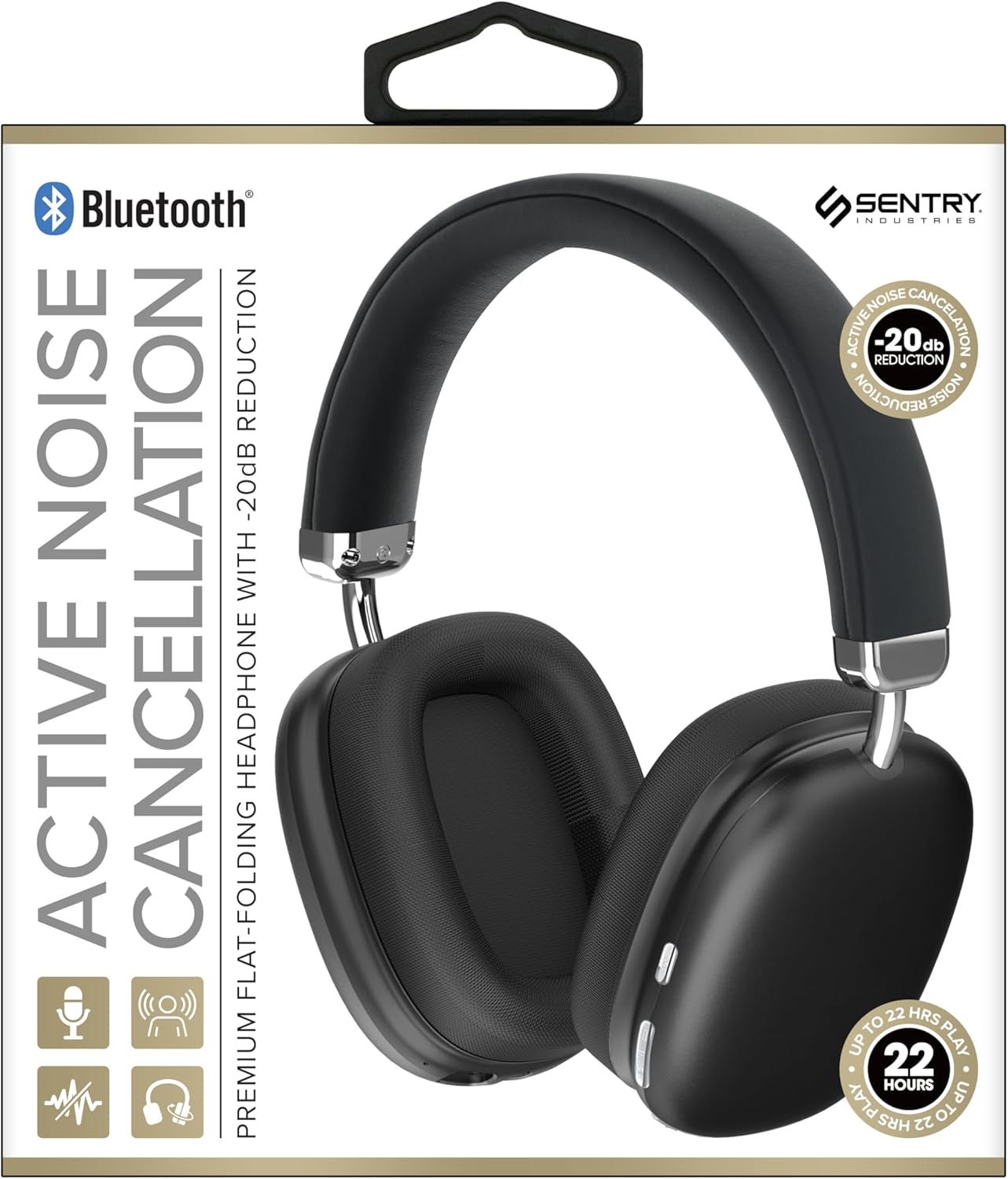
This image displays the SENTRY BT Pro Sq Headset in black, highlighting its over-ear design, adjustable headband, and the control buttons located on the earcups. The packaging indicates features such as Bluetooth connectivity, Active Noise Cancellation with -20dB reduction, and up to 22 hours of play time.
2. Қауіпсіздік туралы маңызды ақпарат
Қауіпсіз және дұрыс жұмыс істеу үшін келесі нұсқауларды орындаңыз:
- Гарнитураны шектен тыс температураға, ылғалдылыққа немесе коррозиялық заттардың әсеріне ұшыратпаңыз.
- Гарнитураны құлатып алудан немесе қатты әсер етуден аулақ болыңыз.
- Гарнитураны өзіңіз бөлшектемеңіз немесе жөндеуге әрекет жасамаңыз. Бұл кепілдіктің күшін жояды.
- Clean the headset with a soft, dry cloth only. Do not use liquid cleaners.
- Жоғары дыбыс деңгейінде ұзақ тыңдау есту қабілетінің бұзылуына әкелуі мүмкін. Дыбыс деңгейін қауіпсіз деңгейге реттеңіз.
- Do not use the headset in situations where inability to hear ambient sounds could be dangerous (e.g., driving, cycling, walking in traffic).
3. Пакет мазмұны
Пакетте келесі элементтердің бар-жоғын тексеріңіз:
- SENTRY BT Pro Sq Headset
- USB зарядтау кабелі
- Пайдаланушы нұсқаулығы
4. Өнім аяқталдыview
The SENTRY BT Pro Sq Headset features an over-ear design with soft ear pads for comfort and noise isolation. It includes an adjustable folding headband for portability. Key components include:
- Құлаққаптар: House the audio drivers and provide passive noise isolation.
- Бас таңбасы: Adjustable for a comfortable fit, designed to fold for compact storage.
- Басқару түймелері: Located on the earcups for power, volume, track control, and Active Noise Cancellation (ANC).
- Микрофон: Хэндсфри қоңыраулар үшін кірістірілген.
- Зарядтау порты: USB зарядтау кабелін қосуға арналған.
Refer to the product image in the Introduction section for visual identification of these components.
5. Орнату
5.1 Гарнитураны зарядтау
- USB зарядтау кабелінің кішкентай ұшын гарнитурадағы зарядтау портына қосыңыз.
- USB зарядтау кабелінің үлкен ұшын USB қуат адаптеріне (жинаққа кірмейді) немесе компьютердің USB портына жалғаңыз.
- The LED indicator on the headset will illuminate to show charging status. It will change color or turn off when fully charged.
- Толық зарядтау әдетте шамамен 2-3 сағатты алады.
5.2 Pairing with Bluetooth Devices
Before using the headset wirelessly, you must pair it with your Bluetooth-enabled device (smartphone, laptop, tablet, smart speaker, gaming console).
- Гарнитураның толық зарядталғанына көз жеткізіңіз.
- With the headset powered off, press and hold the Power button for approximately 5-7 seconds until the LED indicator flashes rapidly, indicating pairing mode.
- Bluetooth құрылғысында Bluetooth қосыңыз және жаңа құрылғыларды іздеңіз.
- Select "SENTRY BT Pro Sq" (or similar name) from the list of available devices.
- Once paired, the LED indicator on the headset will stop flashing and may turn solid blue or off, depending on the model.
- Гарнитура қосылған кезде соңғы жұптастырылған құрылғыға автоматты түрде қайта қосылуға әрекет жасайды.
6. Пайдалану нұсқаулары
6.1 Қуатты қосу/өшіру
- Қуат қосулы: Press and hold the Power button for 2-3 seconds. The LED indicator will light up.
- Қуат көзін өшіру: Press and hold the Power button for 3-4 seconds. The LED indicator will turn off.
6.2 Белсенді шуды жою (ANC)
Гарнитура қоршаған ортадағы шуды азайту үшін белсенді шуды басу функциясымен жабдықталған.
- ANC белсендіру: Locate the ANC button (if separate) or press the designated control. The ANC indicator light will turn on.
- ANC өшіру: ANC түймесін қайтадан басыңыз. ANC индикатор шамы сөнеді.
6.3 Media Control (Touch Control)
Control your audio playback directly from the headset:
- Ойнату/кідірту: Single tap the multi-function button.
- Дыбыс деңгейі: Tap the Volume Up button.
- Дыбыстың төмендеуі: Tap the Volume Down button.
- Келесі трек: Double tap the multi-function button.
- Алдыңғы трек: Triple tap the multi-function button.
6.4 Қоңырауларды басқару
Manage phone calls with the built-in microphone:
- Қоңырауға жауап беру: Single tap the multi-function button when a call comes in.
- Қоңырауды аяқтау: Single tap the multi-function button during a call.
- Қоңырауды қабылдамау: Қоңырау түскен кезде көп функциялы түймені 2 секунд басып тұрыңыз.
7. Техникалық қызмет көрсету және күту
- Тазалау: Wipe the headset with a soft, dry, lint-free cloth. Do not use abrasive cleaners, alcohol, or chemical solvents.
- Сақтау орны: When not in use, store the headset in a cool, dry place, away from direct sunlight and extreme temperatures. Utilize the folding headband feature for compact storage.
- Батареяға күтім жасау: To preserve battery life, charge the headset regularly, even if not used for extended periods. Avoid fully discharging the battery frequently.
- Судан аулақ болыңыз: The headset is not waterproof. Keep it away from water and moisture.
8. Ақаулықтарды жою
Егер гарнитураңызбен проблемалар туындаса, келесі жиі кездесетін мәселелер мен шешімдерді қараңыз:
| Мәселе | Мүмкін шешім |
|---|---|
| Гарнитура қосылмайды. | Ensure the headset is fully charged. Connect to a power source and allow it to charge for at least 30 minutes before attempting to power on again. |
| Bluetooth құрылғысымен жұптастыру мүмкін емес. | Ensure the headset is in pairing mode (LED flashing rapidly). Make sure Bluetooth is enabled on your device and it is within range (10 meters). Try restarting both the headset and your device. |
| Құлаққаптан дыбыс жоқ. | Check the volume level on both the headset and your connected device. Ensure the headset is properly paired and connected. Try playing audio from a different application or device. |
| Active Noise Cancellation (ANC) is not effective. | Ensure ANC is activated. Make sure the earcups are properly sealed around your ears. ANC is most effective against low-frequency, constant noise. |
| Микрофон жұмыс істемейді. | Ensure the headset is connected and selected as the input device on your computer or smartphone. Check privacy settings on your device that might restrict microphone access. |
9. Техникалық сипаттамалар
| Ерекшелік | Мәлімет |
|---|---|
| Модель атауы | HPXBTA1000 |
| Қосылу технологиясы | Сымсыз (Bluetooth) |
| Шуды бақылау | Белсенді шуды жою |
| Құлақтың орналасуы | Құлақ үстінде |
| Форма факторы | Құлақ үстінде |
| Басқару түрі | Медиа басқару, түртіңіз |
| Жиілік диапазоны | 20 Гц - 20,000 Гц |
| Аудио драйвер түрі | Динамикалық драйвер |
| Үйлесімді құрылғылар | Smartphones, Laptops, Tablets, Smart Speakers, Gaming Consoles |
| Түс | Қара |
| Элемент салмағы | 1.2 фунт |
| UPC | 080068501503 |
| Өндіруші | СЕНТРИЯ |
10. Кепілдік және қолдау
SENTRY products are designed and manufactured to the highest quality standards. For information regarding warranty coverage, technical support, or service inquiries, please refer to the warranty card included with your product or visit the official SENTRY webсайт. Кепілдік шағымдары үшін сатып алуды растайтын құжатты сақтаңыз.
Ask a question about this manual
Ask about setup, troubleshooting, compatibility, parts, safety, or missing instructions. Manuals+ will review the question and use this page’s manual context to help answer it.