
1. Өнім аяқталдыview
The waveshare Industrial USB to TTL Serial Adapter Cable is a robust converter designed for data communication between a PC or other devices and TTL logic level devices such as microcontrollers and sensors. It features an original FT232RNL chip for stable and compatible high-speed communication.

Image 1: The waveshare Industrial USB to TTL Serial Adapter Cable, showcasing its USB connector and the multi-colored jumper wires for TTL connections.
This adapter supports 3.3V/5V voltage level switching, includes built-in self-recovery fuse, ESD, and IO protection diode circuits, ensuring reliable and safe operation. Its compact design makes it ideal for serial port debugging of industrial equipment and direct connection to devices like the Raspberry Pi 5.
Бейне 1: Шенеунік аяқталдыview of the Waveshare USB-TTL Converter, highlighting its features and applications.
2. Орнату нұсқаулары
The waveshare USB to TTL Serial Adapter Cable is designed for plug-and-play compatibility with various operating systems including Windows 7/8/8.1/10/11, Mac, Linux, and Android. Drivers for the FT232RNL chip are typically installed automatically by your operating system. If not, they can be downloaded from the FTDI webсайт.
2.1. Connecting to Raspberry Pi 5
This adapter is suitable for UART debugging on Raspberry Pi devices. You can connect it using two primary methods:
- Via SH1.0 3PIN cable: Connect to the Raspberry Pi 5 UART Debug Connector.
- Via Separated 4PIN Header: Connect to the Raspberry Pi 40PIN GPIO UART Interface.

Image 2: Visual guide demonstrating two methods for connecting the USB to TTL adapter to a Raspberry Pi 5 for UART debugging.
2.2. Pinout Definition and Voltage Level Switching
The adapter features a TTL serial port with a 3.3V/5V level translation circuit, allowing you to switch the communication level as needed for your target device. The pinouts are clearly defined:
- VCC: 3.3V or 5V output, configured by a switch on the adapter.
- GND: Жерге қосу.
- TXD: Transmit Data. Connects to the MCU.RXD (signal direction: MCU.RX <-- FT232 <-- PC.TX).
- RXD: Receive Data. Connects to the MCU.TXD (signal direction: MCU.TX --> FT232 --> PC.RX).
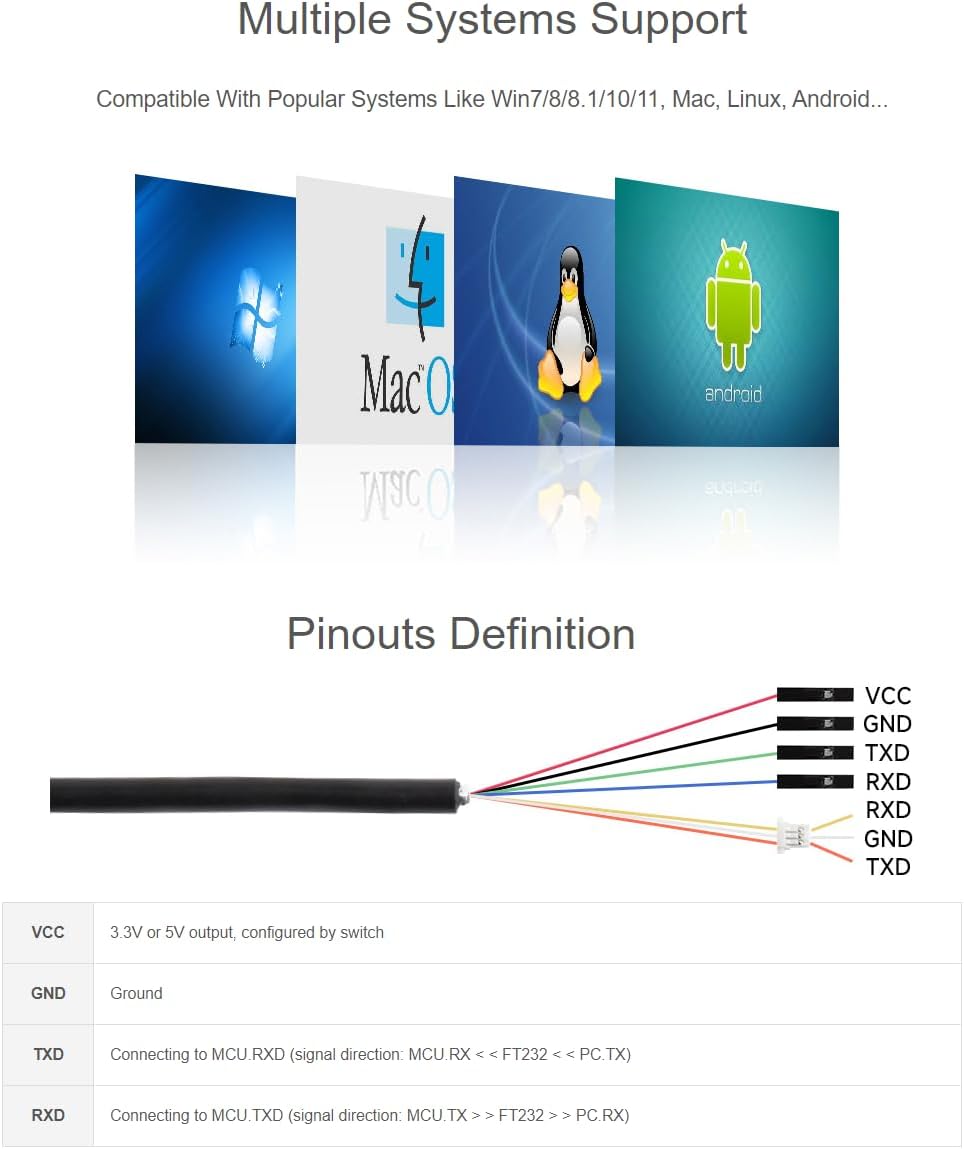
Image 3: Detailed diagram illustrating the pinout definitions (VCC, GND, TXD, RXD) and the 3.3V/5V operating level switch on the adapter.
3. Құрылғыны пайдалану
Once connected to your computer's USB port and your target device, the adapter will begin operation. The onboard LED indicators provide visual feedback on the device's status.
3.1. Жарықдиодты индикаторлар
The adapter features three LED indicators for easy monitoring of its operating status:
- PWR (Power Indicator): Turns on when there is a USB connection and voltage анықталады.
- TXD (Transmit Indicator): Turns on while the USB port is sending data.
- RXD (Receive Indicator): Turns on while the device port is sending data back.

4-сурет: жақыннан view of the adapter highlighting the PWR, TXD, and RXD LED indicators, along with the 3.3V/5V operating level switch.

Image 5: The waveshare USB to TTL adapter connected to a laptop, demonstrating a typical usage scenario.
4. Техникалық қызмет көрсету
The waveshare USB to TTL Serial Adapter Cable features a robust plastic case with a sandblasting process finish, designed for long-lasting durability. To ensure optimal performance and longevity:
- Құрылғыны таза және шаң мен қоқыстан таза ұстаңыз.
- Құрылғыны шектен тыс температураға немесе ылғалға ұшыратпаңыз.
- Handle the cable and connectors gently to prevent damage.
5. Ақаулықтарды жою
If you encounter issues with your USB to TTL Serial Adapter Cable, consider the following:
- No Power Indicator (PWR LED off): Ensure the USB cable is securely connected to both the computer and the adapter. Try a different USB port or computer.
- Деректер берілмейді (TXD/RXD жарық диодтары жыпылықтамайды): Verify that the TXD and RXD pins are correctly connected to your target device's RXD and TXD pins, respectively. Check the voltage level switch (3.3V/5V) to ensure it matches your device's requirements. Confirm that the drivers are correctly installed on your operating system.
- Қосылым мәселелері: Ensure your target device is powered on and functioning correctly. Check for any loose connections in the jumper wires.
For persistent issues, please refer to the 'Warranty and Support' section for technical assistance.
6. Техникалық шарттар
Below are the detailed specifications for the waveshare Industrial USB to TTL Serial Adapter Cable:

Image 6: A table detailing the product specifications, including chip scheme, data rate, and port types.
| Ерекшелік | Мәлімет |
|---|---|
| Бренд | толқын бөлісу |
| Модель атауы | USB TO TTL (D) Serial Adapter Cable |
| Қосқыш түрі | USB |
| Кабель түрі | USB |
| Үйлесімді құрылғылар | Personal Computer, Microcontrollers, Sensors, Raspberry Pi 5 |
| Арнайы мүмкіндік | High Speed, 3.3V/5V Voltage Level Switching, FT232RNL Chip, Self-recovery Fuse, ESD Protection, IO Protection |
| Ұсынылатын пайдаланулар | Serial Port Debugging for Raspberry Pi and Industrial Equipments |
| Түс | Қара |
| Қосқыштың жынысы | Еркектен әйелге |
| Істікшелер саны | 4 |
| Максималды көлемtage | 5 вольт |
| Сыртқы материал | Пластмасса |
| Элемент салмағы | 2.11 унция (0.06 килограмм) |
| Пакет өлшемдері | 6.26 x 4.33 x 1.26 дюйм |
| ASIN | B0CYGL421W |
| UPC | 788046388596 |
| Бірінші қол жетімді күн | 19 жылдың 2024 наурызы |
6.1. Контур өлшемдері
Image 7: Diagram showing the outline dimensions of the USB to TTL adapter in millimeters.
7. Кепілдік және қолдау
waveshare provides technical support for this product. If you encounter any problems or have questions regarding the setup, operation, or functionality of your Industrial USB to TTL Serial Adapter Cable, please contact waveshare customer service directly. Please have your product model and purchase information ready when contacting support.