
Кіріспе
Thank you for choosing the VTech ES2051 Digital Cordless Phone. This manual provides comprehensive instructions for setting up, operating, and maintaining your new phone system. The ES2051 is designed for ease of use, featuring a digital answering machine, call blocking capabilities, volume amplification, and an antibacterial plastic construction for enhanced hygiene.
Please read this manual thoroughly before using your phone to ensure proper operation and to take full advantagоның ерекшеліктерінің e.
Қауіпсіздік туралы ақпарат
Өрт, электр тогының соғуы және адамдардың жарақат алу қаупін азайту үшін осы өнімді пайдаланған кезде әрқашан негізгі қауіпсіздік шараларын орындаңыз.
- Бұл өнімді судың жанында немесе дымқыл болған кезде пайдаланбаңыз.
- Avoid using the phone during a thunderstorm. There may be a remote risk of electric shock from lightning.
- Бұл өнімді ағып кету маңында газдың ағып кетуі туралы хабарлау үшін пайдаланбаңыз.
- Use only the power adapter and batteries provided with this product.
- Батареяларды отқа тастамаңыз. Олар жарылуы мүмкін. Арнайы жою нұсқауларын жергілікті кодтармен тексеріңіз.
- Тазалау алдында бұл өнімді қабырға розеткасынан ажыратыңыз. Сұйық немесе аэрозольді тазартқыштарды қолданбаңыз. Жарнаманы пайдаланыңызamp тазалауға арналған шүберек.
Пакет мазмұны
Пакетте барлық элементтер бар екеніне көз жеткізіңіз:
- Main Base Unit with Digital Answering Machine
- Cordless Handset(s) (typically two for this model)
- Handset Charger(s) (for additional handsets)
- Қуат адаптері(лері)
- Телефон сымы
- NiMH AAA Rechargeable Batteries (4 included)
- Пайдаланушы нұсқаулығы (бұл құжат)
Орнату
1. Негізгі құрылғыны қосу
- Plug the small end of the power adapter into the power jack on the back of the base unit.
- Plug the large end of the power adapter into a wall outlet not controlled by a wall switch.
- Plug one end of the telephone line cord into the telephone jack on the back of the base unit.
- Телефон сымының екінші ұшын қабырғадағы телефон ұясына қосыңыз.
2. Installing and Charging Batteries
- Телефон тұтқасының артқы жағындағы батарея бөлімінің қақпағын ашыңыз.
- Insert the supplied NiMH AAA batteries, observing the correct polarity (+ and -).
- Батарея бөлігінің қақпағын жабыңыз.
- Place the handset in the base unit or charger to charge. The handset will beep, indicating it is charging.
- Allow the handset to charge for at least 16 hours before initial use. For optimal battery performance, keep the handset in the charger when not in use.

Image: The VTech ES2051 Digital Cordless Phone system, showing the main base with one handset and a charging cradle for the second handset, ready for setup.
Пайдалану нұсқаулары
Қоңырау шалу және қабылдау
- Қоңырау шалу үшін: түймесін басыңыз Сөйлесу / жарқыл or СПИКЕР, содан кейін телефон нөмірін теріңіз.
- Қоңырауға жауап беру үшін: түймесін басыңыз Сөйлесу / жарқыл or СПИКЕР телефон шырылдаған кезде.
- Қоңырауды аяқтау үшін: түймесін басыңыз ӨШІРУЛІ/ТАЗАЛАУ or place the handset back in the base/charger.
Сандық жауап беру құрылғысы
The integrated digital answering machine can record up to 30 minutes of messages. It automatically answers calls when you are unavailable.
- Хабарларды ойнату: түймесін басыңыз ОЙНАТУ/ТОҚТАТУ негізгі блокта.
- Хабарларды жою: түймесін басыңыз ЖОЮ хабарды ойнату кезінде.
- Хабарландыруды жазу: Follow the instructions in the full manual for custom outgoing message recording.

Image: A woman interacting with the VTech ES2051 phone, highlighting the digital message counter on the base unit, which indicates the number of new messages.
Қоңырауды блоктаушы
The selective call blocking feature allows you to block up to 100 unwanted numbers, preventing them from ringing your phone.
- To Block a Number: During a call or from the Caller ID log, press the ҚОҢЫРАУ БЛОКЫ button (often represented by a specific icon) and follow the on-screen prompts to add the number to the blacklist.
- Блокталған нөмірлерді басқару: Access the call block list through the handset menu to review or remove blocked numbers.

Image: A visual representation of the call blocker feature, showing a family in a kitchen setting with an icon indicating unwanted calls are being blocked.
Көлемі Ampқұтқарушы
Көлемі amplification feature enhances incoming sounds and voices, improving clarity and volume in the handset earpiece. This is particularly useful for users with hearing impairments or those who prefer a louder audio experience.
- Activating/Adjusting: Қоңырау кезінде арнайы түймені басыңыз Дыбыс деңгейін арттыру button (often indicated by a speaker icon with a plus sign) or use the volume up/down keys to increase the earpiece volume.
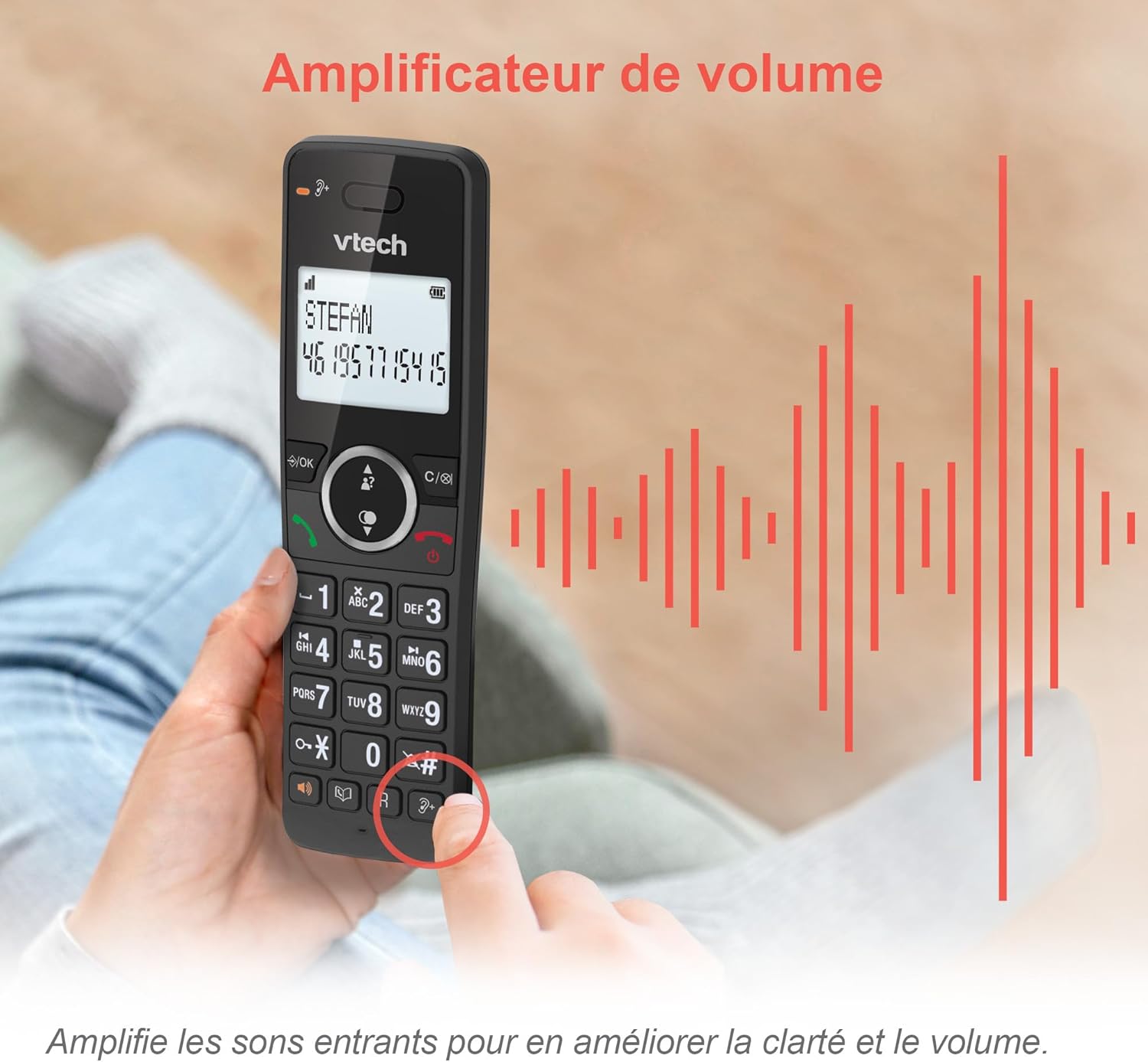
Image: A hand holding the VTech ES2051 handset, with graphic sound waves emanating from the earpiece, illustrating the volume amplification feature.
Conference Function
The conference function allows multiple users to participate in a single conversation. You can set up a three-way conference call with two internal callers (handsets) and one external caller.
- Конференциялық қоңырауды бастау: Refer to the detailed instructions in the full manual for specific steps on how to add a third party to an ongoing call.

Image: Three people engaged in a conversation, visually representing the three-way conference call capability of the VTech ES2051 phone system.
Домофон функциясы
The intercom feature allows you to communicate between handsets within your home without using the landline. This is useful for calling family members in different rooms.
- Домофонды пайдалану: түймесін басыңыз КІРІС button (if available) or access the intercom function through the handset menu, then select the desired handset to call.
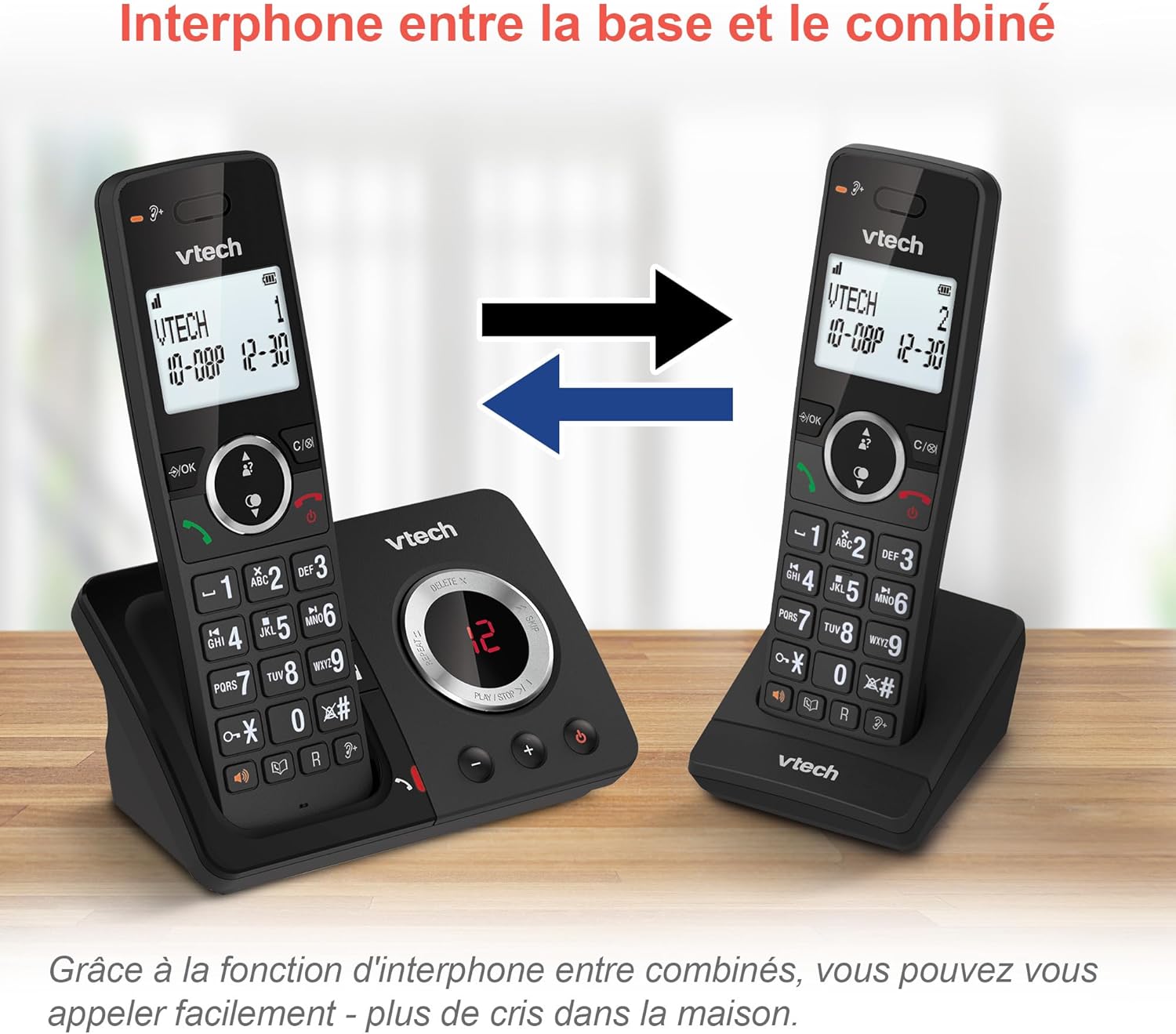
Image: A diagram showing two VTech ES2051 handsets with arrows indicating communication between them, illustrating the intercom feature.
Phonebook and Call Features
The phone includes a 100-name and number phonebook, 8 speed dial keys, and a backlit screen and keypad for easy visibility.
- Контактілерді сақтау: Navigate to the phonebook menu to add, edit, or delete contacts.
- Жылдам теру: Assign frequently called numbers to the 8 speed dial keys for quick access.
- Caller ID Log: Review the last 20 incoming calls with Caller ID information.
- Қайта теру: Access the list of the last 10 dialed numbers for quick redialing.

Кескін: Суреттердің коллажы showcasing various VTech ES2051 phone features, including the 100-entry phonebook, call display, redial function, and an 18-hour talk time battery life indicator.
ECO режимі
The ECO mode automatically adjusts and minimizes the radio frequency power based on the distance between the handset and the base unit. This feature helps conserve energy and reduce power consumption.
Техникалық қызмет көрсету
Телефонды тазалау
The VTech ES2051 is made with antibacterial plastic and features a seamless, easy-to-clean design. To clean your phone:
- Unplug the base unit from the wall outlet and telephone line.
- Телефон беттерін жұмсақ, d шүберекпен сүртіңізamp шүберек. Сұйық немесе аэрозоль тазалағыштарды қолданбаңыз.
- Ensure the phone is completely dry before plugging it back in.
Батареяға күтім жасау
- Use only the supplied rechargeable NiMH AAA batteries.
- Батареяларды отқа тастамаңыз.
- Телефон ұзақ уақыт бойы пайдаланылмаса, ағып кетпеу үшін батареяларды алып тастаңыз.
Ақаулықтарды жою
If you experience any issues with your VTech ES2051 phone, try the following troubleshooting steps:
| Мәселе | Шешім |
|---|---|
| Теру дыбысы жоқ | Ensure the telephone line cord is securely plugged into both the base unit and the wall jack. Check if other phones on the same line are working. |
| Қоңырау шалу немесе қабылдау мүмкін емес | Check the power connection to the base unit. Ensure the handset batteries are charged. If using a DSL service, you may need a DSL filter. |
| Handset displays "Out of Range" or "No Power at Base" | Move the handset closer to the base unit. Ensure the base unit's power adapter is securely plugged in. |
| Жауап беру құрылғысы хабарламаларды жазбайды | Check if the answering machine is turned ON. Ensure there is enough recording time available (max 30 minutes). |
| Аудио сапасы нашар немесе статикалық | Move the handset closer to the base unit. Avoid placing the base unit near other electronic devices (e.g., microwaves, Wi-Fi routers) that may cause interference. |
If the problem persists after trying these steps, please refer to the VTech support webсайтына немесе қосымша көмек алу үшін тұтынушыларға қызмет көрсетуге хабарласыңыз.
Техникалық сипаттамалар
| Ерекшелік | Мәлімет |
|---|---|
| Бренд | VTech |
| Үлгі нөмірі | ES2051 |
| Түс | қара |
| Телефон түрі | Сымсыз |
| Жауап беру жүйесінің түрі | Сандық |
| Жауап беру құрылғысының жазу уақыты | 30 минутқа дейін |
| Үйлесімді құрылғылар | Landlines, Answering Machine |
| Батареялар | 4 AAA - қосылған |
| Батареяның құрамы | NiMH |
| Қуат көзі | Батареядан қуат алады |
| Материал | Пластик (антибактериалды) |
| Теру түрі | Қарапайым пернетақта |
| Элемент өлшемдері (L x W x H) | 18.3 x 13.5 x 11 сантиметр |
| Шығу елі | Қытай |
Кепілдік және қолдау
VTech products are manufactured to high-quality standards. For information regarding warranty coverage, please refer to the warranty card included with your product or visit the official VTech webаймағыңызға арналған сайт.
For technical support, frequently asked questions, or to download the full user manual, please visit the VTech support section online or contact their customer service helpline. Contact details can typically be found on the VTech webсайтында немесе өнімнің қаптамасында.