
1. Кіріспе
The OSD Audio DAC-X200 is a powerful 2-channel Class D stereo amplifier designed to deliver high-fidelity audio. It features a built-in Hi-Res 24bit/192khz DAC, offering superior digital audio conversion. With versatile input options including USB, Optical, and RCA, and A/B speaker switching, this amplifier is suitable for various home audio setups, from driving bookshelf speakers to powering floorstanding units.
2. Қауіпсіздік нұсқаулары
- Қуат көзі: Құрылғыны тек көрсетілген қуат көзіне қосыңызtage.
- Желдету: Жеткілікті желдетуді қамтамасыз етіңіз. Желдету саңылауларын жаппаңыз.
- Су және ылғал: Құрылғыны жаңбырға, ылғалға немесе шамадан тыс ылғалдылыққа ұшыратпаңыз.
- Жылу көздері: Құрылғыны радиаторлар, жылытқыштар, пештер немесе басқа жылу шығаратын құрылғылар сияқты жылу көздерінен алыс ұстаңыз.
- Тазалау: Тек құрғақ шүберекпен тазалаңыз.
- Қызмет көрсету: Бұл өнімге өзіңіз қызмет көрсетуге тырыспаңыз. Барлық қызмет көрсетуді білікті қызмет көрсетуші қызметкерлерге тапсырыңыз.
- Орналастыру: Place the unit on a stable, flat surface. Avoid placing heavy objects on top of the ampқұтқарушы.
3. Пакет мазмұны
Барлық элементтер пакетте бар екенін тексеріңіз:
- OSD Audio DAC-X200 Ampқұтқарушы
- Жылдам бастау нұсқаулығы
- Қуат кабелі
- Қашықтан басқару пульті (егер сіздің моделіңізбен бірге берілген болса)
4. Өнім аяқталдыview
4.1 Алдыңғы панель
The front panel provides access to essential controls for daily operation.

4.1-сурет: Алдыңғы view of the DAC-X200 amplifier, showing the power button, speaker selectors, balance, and volume controls.

4.2-сурет: Detail of the front panel, highlighting the Power button and Speaker A/B selection buttons.

4.3-сурет: Detail of the front panel, showing the Balance and Volume control knobs.
4.2 Артқы панель
The rear panel houses all input and output connections for audio sources and speakers.
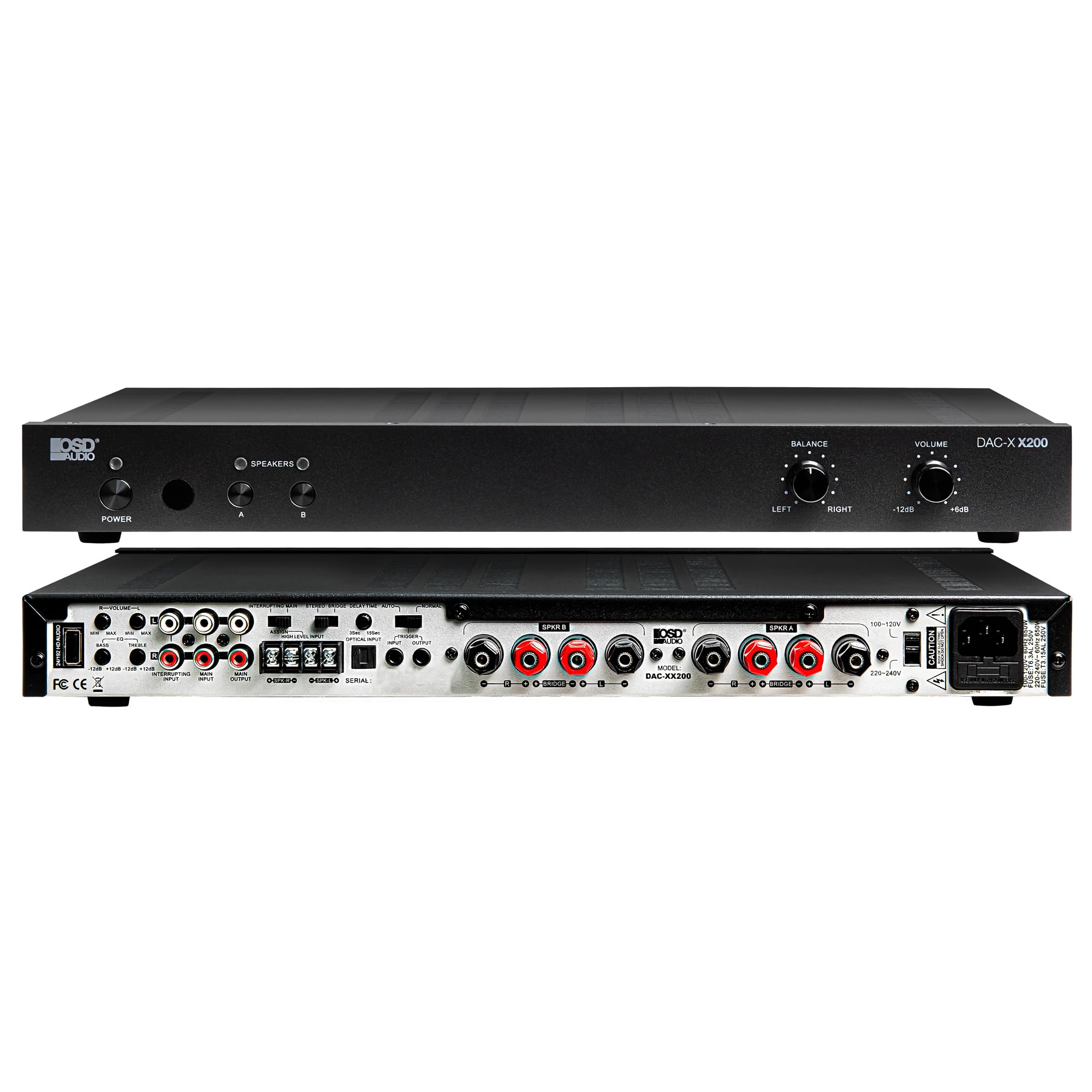
4.4-сурет: Артқы view of the DAC-X200 amplifier, displaying various audio inputs (USB, Optical, RCA), speaker outputs, and power input.

4.5-сурет: Detail of the rear panel inputs, including USB, Optical, and RCA connections.

4.6-сурет: Detail of the rear panel speaker output terminals for Speaker A and Speaker B.
5. Орнату
5.1 Орналастыру
Place the DAC-X200 on a flat, stable surface with adequate space around it for ventilation. Avoid enclosed cabinets or areas with poor airflow to prevent overheating.
5.2 Үндеткіштерді қосу
- қамтамасыз етіңіз ampкөтергіш өшірілген және желіден ажыратылған.
- Пассивті динамиктерді келесіге қосыңыз SPEAKER A және/немесе SPEAKER B terminals on the rear panel. Observe correct polarity (+ to + and - to -).
- For optimal performance, use high-quality speaker wire.
5.3 Дыбыс көздерін қосу
The DAC-X200 supports multiple input types:
- USB кірісі: Connect a computer or other USB audio source using a Type A to Type A USB 2.0 cable.
- Оптикалық кіріс: Connect digital audio sources like TVs or CD players using an optical cable.
- RCA кірістері: Connect analog audio sources such as music streamers, turntables (with a pre-amp), or other devices using RCA cables.
5.4 Қуат қосылымы
After all audio and speaker connections are made, connect the supplied power cable to the ampкөтергіштің қуат кірісіне, содан кейін тиісті айнымалы ток розеткасына қосыңыз.
6. Пайдалану нұсқаулары
6.1 Қуатты қосу/өшіру
түймесін басыңыз ҚУАТ бұру үшін алдыңғы панельдегі түймені басыңыз ampкөтергішті қосу немесе өшіру. Құрылғы қосулы кезде қуат индикатор шамы жанады.
6.2 Енгізуді таңдау
The DAC-X200 features smart source switching, automatically detecting and switching to an active input. If multiple inputs are active, you may need to manually select the desired input using the remote control (if applicable) or by cycling through inputs.
6.3 Дыбыс деңгейін басқару
көмегімен жалпы шығыс дыбыс деңгейін реттеңіз DOLUM knob on the front panel. Rotate clockwise to increase volume and counter-clockwise to decrease it.
6.4 Дыбысты басқару элементтері
пайдаланыңыз БАЛАНС knob to adjust the left/right channel balance. The DAC-X200 also includes bass and treble adjustment knobs (located on the rear panel or accessible via remote, depending on model variation) to fine-tune the sound to your preference or room acoustics.
6.5 A/B Speaker Switching
түймесін басыңыз A or B buttons on the front panel to select which set of speakers (Speaker A, Speaker B, or both) are active. This allows for multi-room audio configurations.
7. Техникалық қызмет көрсету
- Тазалау: Сыртын тазалау үшін жұмсақ, құрғақ шүберекті пайдаланыңыз ampкөтергіш. Сұйық тазартқыштарды немесе аэрозольдерді қолданбаңыз.
- Желдету: Желдету саңылауларының шаң мен қоқыстан таза екенін мезгіл-мезгіл тексеріп отырыңыз.
- Сақтау орны: Құрылғыны ұзақ уақыт сақтасаңыз, оны розеткадан ажыратып, салқын, құрғақ жерде сақтаңыз.
8. Ақаулықтарды жою
| Мәселе | Ықтимал себебі | Шешім |
|---|---|---|
| Қуат жоқ | Power cable not connected; Power outlet not active; Ampөмірден тыс. | Check power cable connection; Test power outlet; Press the Power button. |
| Дыбыс жоқ | Incorrect input selected; Speaker cables loose; Volume too low; Speakers A/B not selected. | Select correct input; Check speaker connections; Increase volume; Ensure Speaker A or B is active. |
| Бұрмаланған дыбыс | Input signal too high; Speaker impedance mismatch; Faulty cable. | Reduce source volume; Verify speaker impedance (8̣ or 4̣); Replace audio cables. |
| Input not switching automatically | Multiple active sources; Specific source not detected. | Manually select input; Ensure only one source is playing if auto-switching is desired. |
9. Техникалық сипаттамалар
- Үлгі: DAC-X200
- Шығу қуаты: 100W RMS per channel at 8̣; 225W RMS per channel at 4̣; 450W bridged mono
- Арналар саны: 2
- DAC: Hi-Res 24bit/192khz, DSD formats supported
- Кірістері: USB, Optical, RCA
- Speaker Zones: A/B Switching
- Өлшемдері (L x W x H): 16.7 x 10 x 2 дюйм
- Материал түрі: Пластмасса
- UPC: 810074881173
10. Кепілдік туралы ақпарат
OSD Audio products are designed for reliability and performance. This product is covered by a limited warranty against defects in materials and workmanship. Please refer to the official OSD Audio webсайтында немесе сатып алу құжаттамасында нақты кепілдік шарттары мен мерзімі, соның ішінде ұзақтығы мен қамту мәліметтері. Кепілдік шағымдары үшін сатып алуды растайтын құжатты сақтаңыз.
11. Қолдау
For technical assistance, troubleshooting not covered in this manual, or service inquiries, please contact OSD Audio customer support. You can find contact information, FAQs, and additional resources on the official OSD Audio webсайт.
Webсайт: www.osdaudio.com