
Кіріспе
This manual provides essential instructions for the proper setup, operation, and maintenance of your 3nStar PTA0157-432 All-in-One POS System. Please read this manual thoroughly before using the device to ensure optimal performance and longevity.
Қауіпсіздік туралы ақпарат
Құрылғының зақымдалуын немесе өзіңіз бен басқалардың жарақат алуын болдырмау үшін келесі қауіпсіздік шараларын сақтаңыз:
- Құрылғыны суға немесе шамадан тыс ылғалға ұшыратпаңыз.
- Құрылғыны жылу көздеріне жақын немесе тікелей күн сәулесі түсетін жерге қоймаңыз.
- Тек берілген айнымалы ток адаптерін пайдаланыңыз.
- Құрылғыны өзіңіз ашуға немесе жөндеуге әрекеттенбеңіз. Барлық қызмет көрсетуді білікті мамандарға тапсырыңыз.
- Жұмыс кезінде құрылғының айналасында дұрыс желдетуді қамтамасыз етіңіз.
Пакет мазмұны
Барлық элементтер пакетте бар екенін тексеріңіз:
- 3nStar PTA0157-432 All-in-One POS System
- Айнымалы ток адаптері
- Пайдаланушы нұсқаулығы (бұл құжат)
Өнім аяқталдыview
The 3nStar PTA0157-432 is a 15.6-inch All-in-One Point of Sale system designed for various business environments. It features a 10-point capacitive touchscreen, runs on Android 11, and is powered by a Quad-Core processor with 4GB RAM and 32GB storage. Integrated Wi-Fi and Bluetooth connectivity are also included.

1-сурет: Алдыңғы view of the 3nStar PTA0157-432 All-in-One POS System, showcasin15.6 дюймдік дисплей және кіріктірілген тіреуіш.

Figure 2: A user interacting with the 10-point capacitive touchscreen of the POS system, demonstrating its touch responsiveness.

3-сурет: Артқы view of the 3nStar POS System, showing the ventilation slots and the sturdy integrated stand.
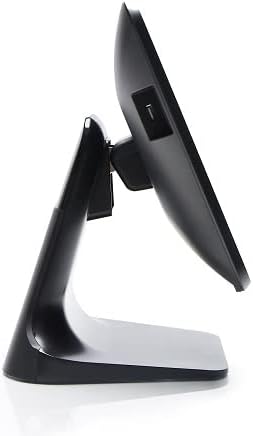
4-сурет: Side profile of the 3nStar POS System, highlighting its slim design and adjustable screen angle.
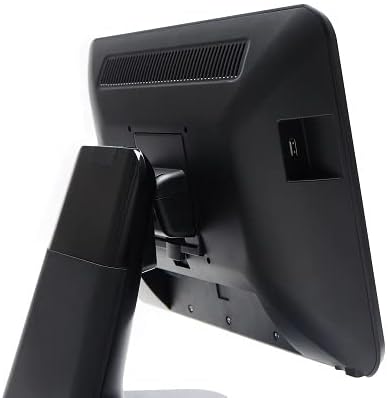
5-сурет: артқы жағы view of the 3nStar POS System, illustrating the location of various connectivity ports for peripherals.
Орнату
- Жүйені қаптамадан шығару: Carefully remove the POS system and all accessories from the packaging.
- Position the System: Place the POS system on a stable, flat surface, ensuring adequate ventilation around the device.
- Қуатты қосу: Connect the AC adapter to the power input port on the back of the POS system, then plug the adapter into a standard electrical outlet.
- Бастапқы қуат қосулы: Press the power button, usually located on the side or back of the display. The system will boot up to the Android 11 operating system.
- Бастапқы конфигурация: Follow the on-screen prompts to complete the initial Android setup, including language selection, Wi-Fi connection, and Google account setup (optional).
- Перифериялық құрылғыларды қосу: Connect any necessary peripherals such as barcode scanners, receipt printers, or cash drawers to the available USB or other designated ports. Refer to the peripheral's manual for specific connection instructions.
Пайдалану нұсқаулары
The 3nStar PTA0157-432 operates on Android 11, providing a familiar and intuitive user experience.
Негізгі навигация
- Сенсорлық экран: Use your fingers to tap, swipe, pinch, and zoom on the 15.6-inch capacitive display.
- Негізгі экран: Access your installed applications and widgets from the main home screen.
- Қолданба тартпасы: Swipe up from the bottom of the screen or tap the app drawer icon to view барлық орнатылған қолданбалар.
- Хабарландырулар: Хабарландырулар мен жылдам параметрлерге қол жеткізу үшін экранның жоғарғы жағынан төмен сырғытыңыз.
Wi-Fi желісіне қосылу
- өтіңіз Параметрлер > Желі және интернет > Сымсыз дәлдiк.
- Wi-Fi қосу/өшіру On.
- Тізімнен қалаған желіні таңдап, сұралса, құпия сөзді енгізіңіз.
Bluetooth құрылғыларын қосу
- өтіңіз Параметрлер > Қосылған құрылғылар > Қосылым теңшелімдері > Блютез.
- Bluetooth қосу/өшіру On.
- Bluetooth құрылғысының жұптау режимінде екеніне көз жеткізіңіз.
- Жұптау үшін тізімнен құрылғыны таңдаңыз.
Using POS Software
The system is designed to run various Android-compatible Point of Sale applications. Install your preferred POS software from the Google Play Store or other trusted sources. Refer to your specific POS software's documentation for detailed usage instructions.
Техникалық қызмет көрсету
Құрылғыны тазалау
- Экран: Аздап жұмсақ, түксіз матаны пайдаланыңыз dampened with water or a screen cleaner specifically designed for electronic displays. Do not spray cleaner directly onto the screen.
- Дене: Wipe the exterior surfaces with a soft, dry cloth. Avoid abrasive cleaners or solvents.
- Желдету: Ensure ventilation slots are free from dust and debris to prevent overheating. Use compressed air if necessary.
Бағдарламалық құрал жаңартулары
Regularly check for and install system updates for Android 11 to ensure optimal performance, security, and compatibility. Go to Параметрлер > Жүйе > Жүйені жаңарту.
Сақтауды басқару
Monitor the 32GB internal storage to ensure sufficient space for applications and data. Delete unnecessary files or uninstall unused applications to free up space. Go to Параметрлер > Сақтау.
Ақаулықтарды жою
| Мәселе | Ықтимал себебі | Шешім |
|---|---|---|
| Құрылғы қосылмайды. | Power cable not connected properly; AC adapter malfunction. | Ensure the AC adapter is securely connected to the device and a working power outlet. Test the outlet with another device. |
| Сенсорлық экран жауап бермейді. | Software glitch; screen dirty; physical damage. | Restart the device. Clean the screen with a soft cloth. If the issue persists, contact support. |
| Wi-Fi байланысы мәселелері. | Қате пароль; ауқымнан тыс; маршрутизатор мәселесі. | Verify Wi-Fi password. Ensure the device is within range of the router. Restart the router and the POS system. |
| Peripheral (e.g., printer) not detected. | Incorrect connection; driver issue; peripheral not powered on. | Check physical connections. Ensure the peripheral is powered on. Install necessary drivers or apps for the peripheral. Restart the POS system. |
Техникалық сипаттамалар
| Ерекшелік | Мәлімет |
|---|---|
| Үлгі нөмірі | PTA0157-432 |
| Операциялық жүйе | Android 11 |
| Экран өлшемі | 15.6 дюйм |
| Экран ажыратымдылығы | 1920 x 1080 пиксель |
| Сенсорлық экран | 10-point Capacitive |
| Процессор | Quad-Core (Rockchip 3568, 2 GHz) |
| Жедел Жадтау Құрылғысы | 4 ГБ LPDDR4 |
| Сақтау | 32GB SSD (Flash Memory) |
| Графика | Біріктірілген графика |
| Қосылу мүмкіндігі | Wi-Fi, Bluetooth |
| Өнім өлшемдері (LxWxH) | 10 x 13 x 16 дюйм |
| Элемент салмағы | 11 фунт |
| Түс | Қара |
Кепілдік және қолдау
For warranty information, technical support, or service inquiries, please refer to the official 3nStar webсайтына кіріңіз немесе уәкілетті сатушыңызға хабарласыңыз. Кепілдік талаптары үшін сатып алуды растайтын құжат ретінде сатып алу түбіртегін сақтаңыз.
Online resources and frequently asked questions may be available on the manufacturer's support page: 3nStar Support