
1. Кіріспе
Сатып алғаныңыз үшін рахметasing the Edifier QR65 Active Monitor Speakers. This manual provides detailed instructions for setting up, operating, and maintaining your speakers. Please read this manual thoroughly before use to ensure proper function and to maximize your listening experience.
The Edifier QR65 speakers feature 70W RMS output, Hi-Res 24bit wireless audio, a subwoofer output, and integrated 65W GaN fast charging capabilities. They are designed to deliver high-quality sound for various applications.
Қауіпсіздік туралы маңызды ақпарат: Өрт, электр тогының соғуы және жарақат алу қаупін азайту үшін осы өнімді пайдаланған кезде әрқашан негізгі қауіпсіздік шараларын сақтаңыз. Бұл нұсқаулықты болашақта анықтама алу үшін сақтаңыз.
2. Пакет мазмұны
Барлық элементтердің бар екеніне көз жеткізу үшін қораптың ішіндегісін тексеріңіз:
- Edifier QR65 Active Monitor Speakers (1 pair)
- Speaker stands (1 pair)
- Қуат кабелі
- Динамикке қосылу кабелі
- USB-A - USB-C кабелі
- RCA - RCA аудио кабелі
- Пайдаланушы нұсқаулығы
3. Өнім аяқталдыview
The Edifier QR65 speakers are equipped with advanced audio components and user-friendly controls.
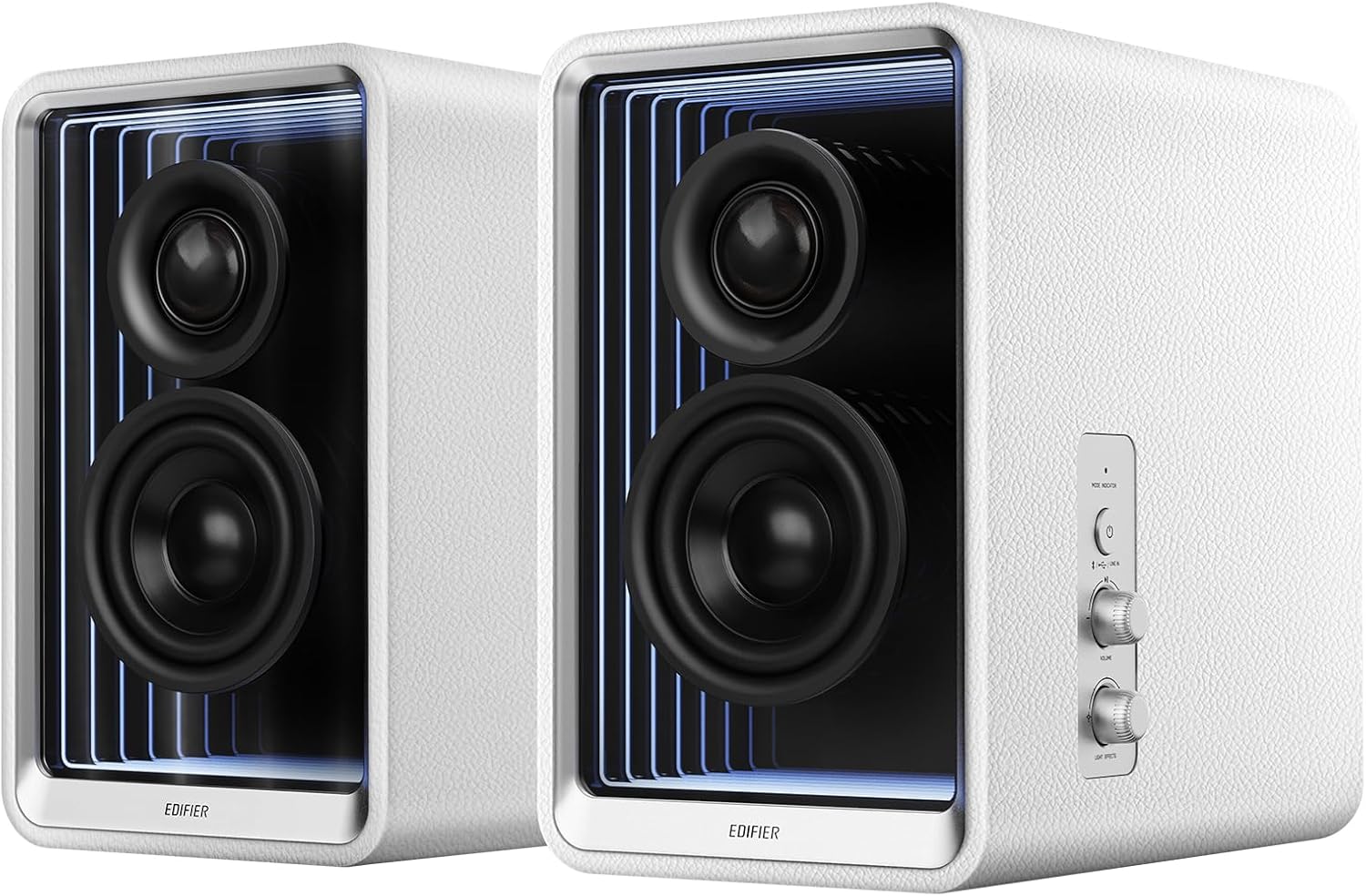
3.1-сурет: Алдыңғы view of Edifier QR65 speakers, highlighting the drivers and side controls.
3.1 Front and Side Panel Controls
- Қуат / режим түймесі: Press to power on/off. Short press to cycle through input modes (Bluetooth, USB, Line In).
- Дыбыс қаттылығы: Негізгі дыбыс деңгейін реттеу үшін бұраңыз.
- Light Effects Button: Press to cycle through various lighting modes.
3.2 Артқы панель қосылымдары

Figure 3.2: Rear panel connections of the Edifier QR65 speaker.
- LINE IN (RCA): RCA кабельдері арқылы сыртқы дыбыс көздерін қосуға арналған.
- USB кірісі: For connecting to a computer for digital audio playback.
- ШЫҒУ: Output for connecting an external active subwoofer.
- СӨЙЛЕГЕН: Connects to the passive speaker.
- Қуат қосқышы: Негізгі қуат қосқышы.
- Қуат кірісі: Connects to the AC power cable.
- USB-C 1, USB-C 2, USB-A: GaN fast charging ports.
4. Орнату
4.1 Динамикті орналастыру
Place the active speaker (with controls) and the passive speaker on a stable, flat surface. For optimal sound, position them at ear level and equidistant from your listening position. The included speaker stands are designed to angle the speakers at 10 degrees, which helps to reduce sound coloration and improve soundstage дәлдігі.

Figure 4.1: Optimal speaker placement with included stands for improved soundstage.
4.2 Динамиктерді қосу
- Connect the speaker connection cable from the 'SPEAKER OUT' port on the active speaker to the corresponding input on the passive speaker. Ensure a secure connection.
4.3 Қуат қосылымы
- Connect the power cable to the 'Power Input' port on the active speaker.
- Қуат кабелінің екінші ұшын қабырғадағы розеткаға қосыңыз.
- Toggle the 'Power Switch' to the ON position.
5. Пайдалану нұсқаулары
5.1 Қуатты қосу/өшіру
To power on the speakers, ensure the rear power switch is ON, then press the 'Power/Mode' button on the side panel. Press and hold the 'Power/Mode' button to power off.
5.2 Енгізуді таңдау
Short press the 'Power/Mode' button to cycle through available input modes: Bluetooth, USB, and Line In. The indicator light will change color to indicate the selected mode.
5.3 Bluetooth жұптастыру
- Select Bluetooth mode using the 'Power/Mode' button. The indicator light will flash rapidly.
- On your device (smartphone, tablet, computer), enable Bluetooth and search for 'EDIFIER QR65'.
- Select 'EDIFIER QR65' to pair. Once connected, the indicator light will glow steadily.
- The QR65 supports Bluetooth V5.3 with LDAC for high-resolution wireless audio streaming.
5.4 USB аудио ойнату
Connect the active speaker to your computer using a USB cable. Select USB input mode on the speakers. Your computer should recognize the speakers as an audio output device. The USB input supports 24bit/96kHz resolution signals.
5.5 Line In Connection
Connect your audio source (e.g., CD player, TV) to the 'LINE IN' (RCA) ports on the rear panel using an RCA audio cable. Select Line In mode on the speakers. The Line In input also supports 24bit/96kHz resolution signals.
5.6 Сабвуфер шығысы
To enhance bass performance, connect an external active subwoofer to the 'SUB OUT' port on the rear panel. The speakers will automatically adjust their frequency response when a subwoofer is detected.
5.7 Light Effects (TempoAbyss)
The QR65 speakers feature customizable light effects. Press the 'Light Effects' button on the side panel to cycle through various preset lighting modes. For advanced customization and access to over 16 million colors, use the Edifier ConneX App.

Figure 5.1: Edifier QR65 light effects and app control.
5.8 Edifier ConneX қолданбасы
Download the Edifier ConneX App from your device's app store or by scanning the QR code below. The app allows for seamless customization of sound effects, light effects, and playback control.

5.2-сурет: Теңшеуге арналған Edifier ConneX қолданбасының интерфейсі.
Download the Edifier ConneX App: https://foreign-app.edifier.com/index.php/edifier_provider/public/appDownload.html?appTag=EdifierConneX
6. GaN Fast Charging Function
The Edifier QR65 speakers integrate TurboGaN fast charging technology, providing convenient power delivery for your devices.

Figure 6.1: GaN fast charging ports and power distribution.
- USB Type-C Ports (USB-C 1 & USB-C 2): Offer up to 65W charging power individually.
- USB Type-A порты: Offers up to 60W charging power.
- Supports various fast charging protocols.
- Total combined output for multiple devices will be distributed across the ports. Refer to the diagram on the speaker's rear panel for specific power distribution scenarios.
7. Күтім және техникалық қызмет көрсету
- Тазалау: Динамик беттерін тазалау үшін жұмсақ, құрғақ шүберекті пайдаланыңыз. Абразивті тазартқыштарды, балауыздарды немесе еріткіштерді пайдаланбаңыз.
- Қоршаған орта: Avoid placing the speakers in direct sunlight, near heat sources, or in areas with high humidity or dust.
- Өңдеу: Handle the speakers with care. Do not drop them or expose them to strong impacts.
- Қуат: Disconnect the power cable from the wall outlet if the speakers will not be used for an extended period.
8. Ақаулықтарды жою
If you encounter any issues with your Edifier QR65 speakers, please refer to the following table for common problems and solutions:
| Мәселе | Ықтимал себебі | Шешім |
|---|---|---|
| Қуат жоқ | Power cable not connected; Rear power switch off; Wall outlet not working. | Ensure power cable is securely connected. Turn on the rear power switch. Test the wall outlet with another device. |
| Дыбыс жоқ | Incorrect input mode selected; Volume too low; Audio cable not connected; Device not playing audio. | Press 'Power/Mode' to select correct input. Increase volume. Check audio cable connections. Ensure source device is playing audio. |
| Bluetooth жұптау сәтсіз аяқталды | Speakers not in pairing mode; Device too far; Interference. | Ensure speakers are in Bluetooth pairing mode (flashing indicator). Move device closer. Restart speakers and device. |
| Light effects not working or flickering | Incorrect setting; Speaker connection cable issue. | Check light effect settings via the side button or Edifier ConneX App. Ensure the speaker connection cable between active and passive speakers is fully inserted and undamaged. |
| GaN charging not working | Cable issue; Device not compatible; Overload. | Try a different charging cable. Ensure your device supports fast charging. Disconnect other devices if multiple are charging. |
9. Техникалық шарттар
Below are the key technical specifications for the Edifier QR65 Active Monitor Speakers:
| Ерекшелік | Техникалық сипаттама |
|---|---|
| Динамик түрі | Active Monitor / Bookshelf |
| Жалпы шығыс қуаты | 70 Вт RMS |
| Твитер | 1.25 дюймдік жібек күмбезі |
| Mid-low Driver | 2.75 inch Aluminum Diaphragm |
| Қосылу мүмкіндігі | Bluetooth V5.3 (LDAC), USB, LINE IN (RCA) |
| USB аудио ажыратымдылығы | 24бит/96кГц дейін |
| Bluetooth диапазоны | 10 метр (33 фут) |
| GaN Fast Charging | USB-C (up to 65W), USB-A (up to 60W) |
| Өнім өлшемдері (әр динамик) | 14"D x 10.5"W x 11.3"H (шамамен) |
| Элемент салмағы | 11.68 фунт (шамамен) |
| Қуат көзі | Corded Electric (AC 1.2E+2 Volts) |
| Қосылған құрамдас бөліктер | Спикер тұрады |
10. Кепілдік және қолдау
10.1 Кепілдік туралы ақпарат
Edifier products are manufactured with high-quality standards. This product comes with a limited warranty. Please refer to the warranty card included in your package or visit the official Edifier webаймағыңызға тән егжей-тегжейлі кепілдік талаптары мен шарттарын алуға болатын сайт.
10.2 Тұтынушыларды қолдау қызметі
For technical assistance, product inquiries, or warranty claims, please contact Edifier customer support through their official website or the contact information provided in your product documentation. Please have your product model (QR65) and serial number ready when contacting support.


