
Deeyaple S207
Deeyaple S207 Cell Phone Stand with Wireless Bluetooth Speaker and 12H Time Display User Manual
Кіріспе
This manual provides comprehensive instructions for the Deeyaple S207 Cell Phone Stand with Wireless Bluetooth Speaker and 12H Time Display. Please read this manual thoroughly before using the product to ensure proper operation and to maximize its features. Keep this manual for future reference.
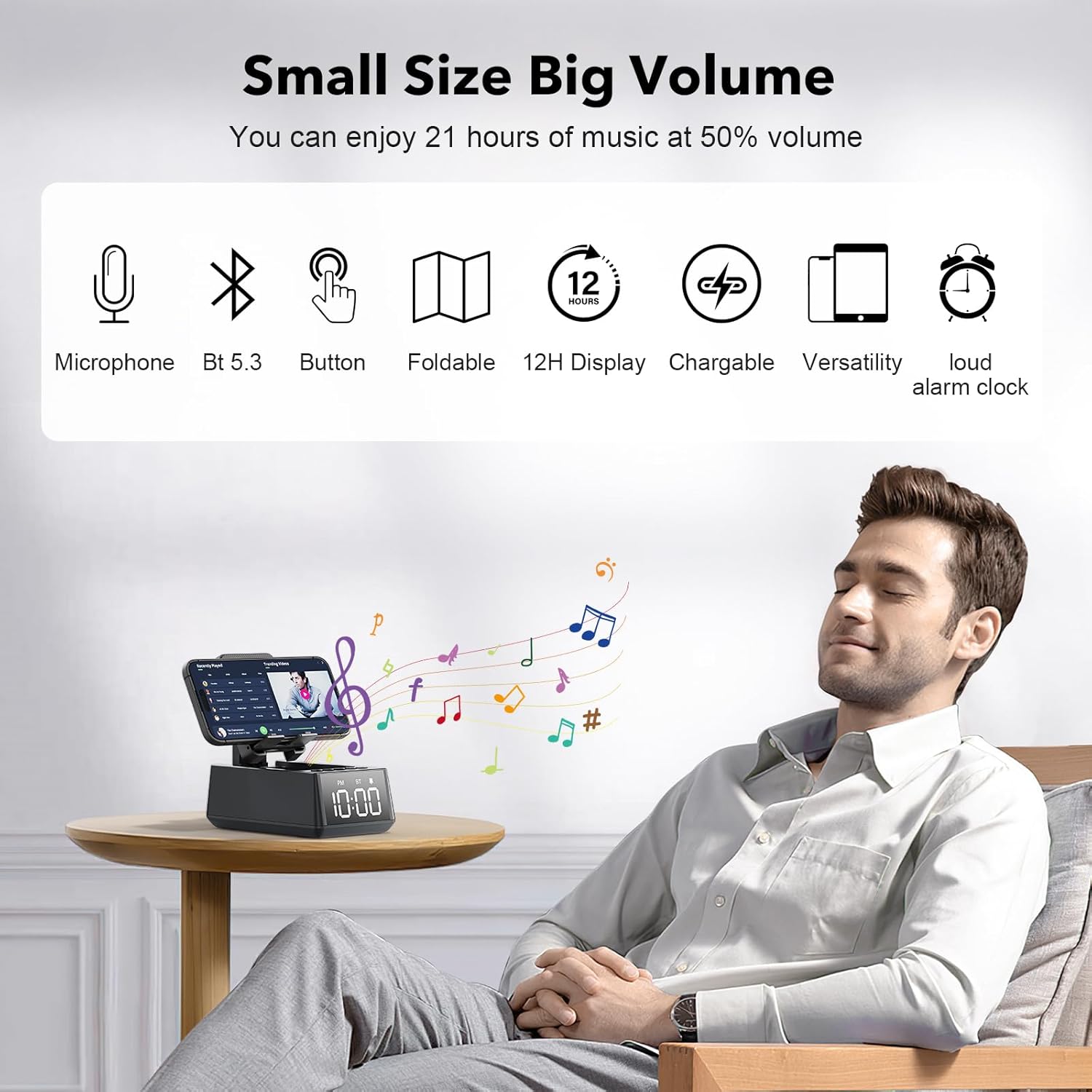
1-сурет: The Deeyaple S207 multi-functional device.
Өнім аяқталдыview
The Deeyaple S207 is a versatile device combining a cell phone stand, a wireless Bluetooth speaker, and a 12-hour time display. It is designed for convenience and enhanced audio experience.

2-сурет: The Deeyaple S207 functions as a stand, speaker, and digital clock.
Негізгі ерекшеліктері:
- Көп функционалды дизайн: Integrates a Bluetooth speaker, phone stand, and time display.
- Bluetooth 5.3 қосылу мүмкіндігі: Ensures quick and stable connection to smartphones, tablets, and laptops.
- HD көлемді дыбыс: Delivers clear and powerful audio with low distortion across all frequencies.
- Жиналмалы стенд: Adjustable angle for optimal viewing of mobile phones and tablets.
- 12 сағаттық уақыт дисплейі: Clear LED digital display.
- Кірістірілген микрофон: Хэндсфри қоңырау шалуды қолдайды.
- TF картасын оқу құрылғысы: Музыканы жад картасынан тікелей ойнату үшін.
- Қатты оятқыш: Gradually increases volume up to 100 decibels.
- Қайта зарядталатын батарея: 1200mAh battery provides 12-21 hours of use at 50% volume.
- Type-C зарядтау порты: Convenient charging for the device.
- USB шығыс порты: Allows charging of external devices like mobile phones.

3-сурет: Біттіview of Deeyaple S207 features, including battery capacity, charging ports, audio capabilities, and stand design.
Пакет мазмұны
Пакетте келесі элементтердің бар-жоғын тексеріңіз:
- Deeyaple S207 Cell Phone Stand with Wireless Bluetooth Speaker
- USB зарядтау кабелі
- Пайдаланушы нұсқаулығы
Басқару элементтері және индикаторлар
Familiarize yourself with the device's buttons and display:

4-сурет: Егжей-тегжейлі view of the device's adjustable bracket, base, and non-slip mat.
- Қуат түймесі: Press and hold to turn on/off. Short press to switch modes.
- Дыбыс деңгейін төмендету/алдыңғы трек: Дыбыс деңгейін төмендету үшін қысқа басыңыз, алдыңғы трек үшін ұзақ басыңыз.
- Play/Pause / Answer Call: Short press to play/pause, short press to answer/end call.
- Дыбыс деңгейін жоғарылату / келесі трек: Дыбыс деңгейін көтеру үшін қысқа басыңыз, келесі трекке ұзақ басыңыз.
- Режим түймесі: Short press to cycle through Bluetooth, TF Card, and AUX modes.
- Уақытты көрсету: LED screen shows current time and mode indicators (PM, BT).
Орнату
Құрылғыны зарядтау:
- Connect the provided USB charging cable to the Type-C port on the side of the Deeyaple S207.
- USB кабелінің екінші ұшын үйлесімді USB қуат адаптеріне (жинаққа кірмейді) немесе компьютердің USB портына жалғаңыз.
- The LED display will indicate charging status. A full charge typically takes approximately 2-3 hours.
Видео 1: Demonstration of the Deeyaple S207 speaker's display and basic operation, including volume adjustment and mode switching.
Операция
Bluetooth жұптастыру:
- Turn on the Deeyaple S207 by pressing and holding the Power button. The device will enter Bluetooth pairing mode, indicated by a flashing "BT" on the display.
- Смартфонда, планшетте немесе ноутбукте Bluetooth қосыңыз және қолжетімді құрылғыларды іздеңіз.
- Select "Deeyaple S207" from the list of devices.
- Once paired, the "BT" indicator will stop flashing and remain solid. You can now play audio through the speaker.

5-сурет: Bluetooth 5.3 technology allows quick and easy connection to smart devices.
Уақыт пен дабылды орнату:
- The device features a 12-hour time display. For iPhone users, the clock will automatically sync with your phone's time upon Bluetooth connection.
- To manually adjust the time or set an alarm, refer to the specific button functions described in the "Controls and Indicators" section. (Note: Detailed manual time setting steps are not provided in the product data.)

6-сурет: The LED digital display shows the current time.
Using as a Phone/Tablet Stand:
- The integrated stand is foldable and adjustable. Gently pull the stand upwards to deploy it.
- Place your smartphone or tablet (4-13 inches) onto the stand.
- Adjust the angle of the stand for optimal viewing.
- A small hole at the bottom of the phone holder allows for charging your device while it is on the stand.

7-сурет: The stand is highly adaptable for various mobile phones and tablets.

8-сурет: A small hole at the base of the stand allows for charging your phone while in use.
TF картасын ойнату:
- Музыкасы бар TF (MicroSD) картасын салыңыз files белгіленген ұяшыққа салыңыз.
- Press the Mode button to switch to TF Card mode. The device will automatically begin playing music from the card.
- Use the Volume/Track buttons to control playback.
Қолсыз қоңырау шалу:
- When connected via Bluetooth to your phone, incoming calls can be answered by pressing the Play/Pause button.
- Speak into the built-in microphone for your conversation.
- Қоңырауды аяқтау үшін Ойнату/Үзіліс түймесін қайтадан басыңыз.
Техникалық сипаттамалар
| Ерекшелік | Мәлімет |
|---|---|
| Модель атауы | S207 |
| Бренд | Deeyaple |
| Қосылу технологиясы | Bluetooth 5.3 |
| Динамик түрі | Көлемді дыбыс |
| Арнайы мүмкіндік | Built-in Microphone, 12H Time Display, Foldable Stand, TF Card Reader |
| Өнім өлшемдері | 6.61"D x 2.46"W x 3.54"H |
| Элемент салмағы | 15.8 унция (0.45 килограмм) |
| Батарея | 1 литий-ионды батарея (жинаққа кіреді), 1200 мАч |
| Батареяның қызмет ету мерзімі | 12% көлемде 21-50 сағат |
| Үйлесімді құрылғылар | Smartphones (iPhone 4S to 15 Pro Max), Tablets (iPad, iPad Air, iPad Mini, iPad Pro, Microsoft Surface series), e-readers (Kindle) |
| UPC | 728990656310 |
Ақаулықтарды жою
| Мәселе | Мүмкін шешім |
|---|---|
| Құрылғы қосылмайды. | Ensure the device is fully charged. Connect to a power source using the USB charging cable. |
| Bluetooth арқылы жұптау мүмкін емес. | Make sure the device is in Bluetooth pairing mode (flashing "BT"). Ensure your phone's Bluetooth is enabled and within range. Forget previous pairings on your phone and try again. |
| Дыбыс жоқ немесе төмен дыбыс. | Check the volume levels on both the Deeyaple S207 and your connected device. Ensure the device is not muted. |
| Уақытты көрсету дұрыс емес. | For iPhones, ensure Bluetooth is connected for automatic sync. Manual adjustment steps are not detailed in product information, refer to device buttons for potential setting options. |
| Bluetooth байланысы жиі үзіледі. | Ensure there are no obstructions between the speaker and your device. Move closer to the speaker. Reduce interference from other wireless devices. |
Техникалық қызмет көрсету
- Құрылғыны жұмсақ, құрғақ шүберекпен тазалаңыз. Абразивті тазартқыштарды немесе еріткіштерді қолданбаңыз.
- Құрылғыны судан, ылғалдан және төтенше температурадан алыс ұстаңыз.
- Ұзақ уақыт бойы пайдаланбаған кезде салқын, құрғақ жерде сақтаңыз.
- Құрылғыны түсіріп алмаңыз немесе қатты соққыларға ұшырамаңыз.
Кепілдік және қолдау
For warranty information or technical support, please contact Deeyaple customer service through the retailer where the product was purchased. Please retain your proof of purchase for warranty claims.
Ask a question about this manual
Ask about setup, troubleshooting, compatibility, parts, safety, or missing instructions. Manuals+ will review the question and use this page’s manual context to help answer it.