
typecase KB206129
typecase Keyboard Case for iPad Pro 12.9 (6th, 5th, 4th, 3rd Gen) Instruction Manual
Үлгі: KB206129
Кіріспе
This manual provides detailed instructions for the setup, operation, maintenance, and troubleshooting of your typecase Keyboard Case for iPad Pro 12.9. Please read this manual thoroughly before using the product to ensure optimal performance and longevity.
The typecase Keyboard Case is designed to enhance your iPad Pro 12.9 experience, offering a versatile keyboard with a trackpad and backlit keys. It is compatible with iPad Pro 12.9-inch (6th, 5th, 4th, 3rd Generation) models.
Пакет мазмұны
- 1 x typecase Keyboard Case (for iPad Pro 12.9 6th/5th/4th/3rd Gen)
- 1 x USB-C зарядтау кабелі
- 1 x Пайдаланушы нұсқаулығы
Орнату
1. Пернетақтаны зарядтау
Before initial use, fully charge the keyboard. Connect the provided USB-C charging cable to the charging port on the side of the keyboard and to a USB power adapter (not included). The charging indicator light will show the charging status.
- Charging Port Location: Typically on the right side of the keyboard.
- Батареяның қызмет ету мерзімі: The keyboard features a built-in rechargeable lithium polymer battery. Battery level can be checked on your iPad (like other connected Bluetooth devices) or via a shortcut key (Fn + Spacebar, if available, to show 1/3, 2/3, 3/3 battery life).
2. iPad Pro құрылғыңызды қосу
The keyboard case features a magnetic attachment system. Align your iPad Pro 12.9 with the magnetic panel on the case. The magnets will securely hold the iPad in place.
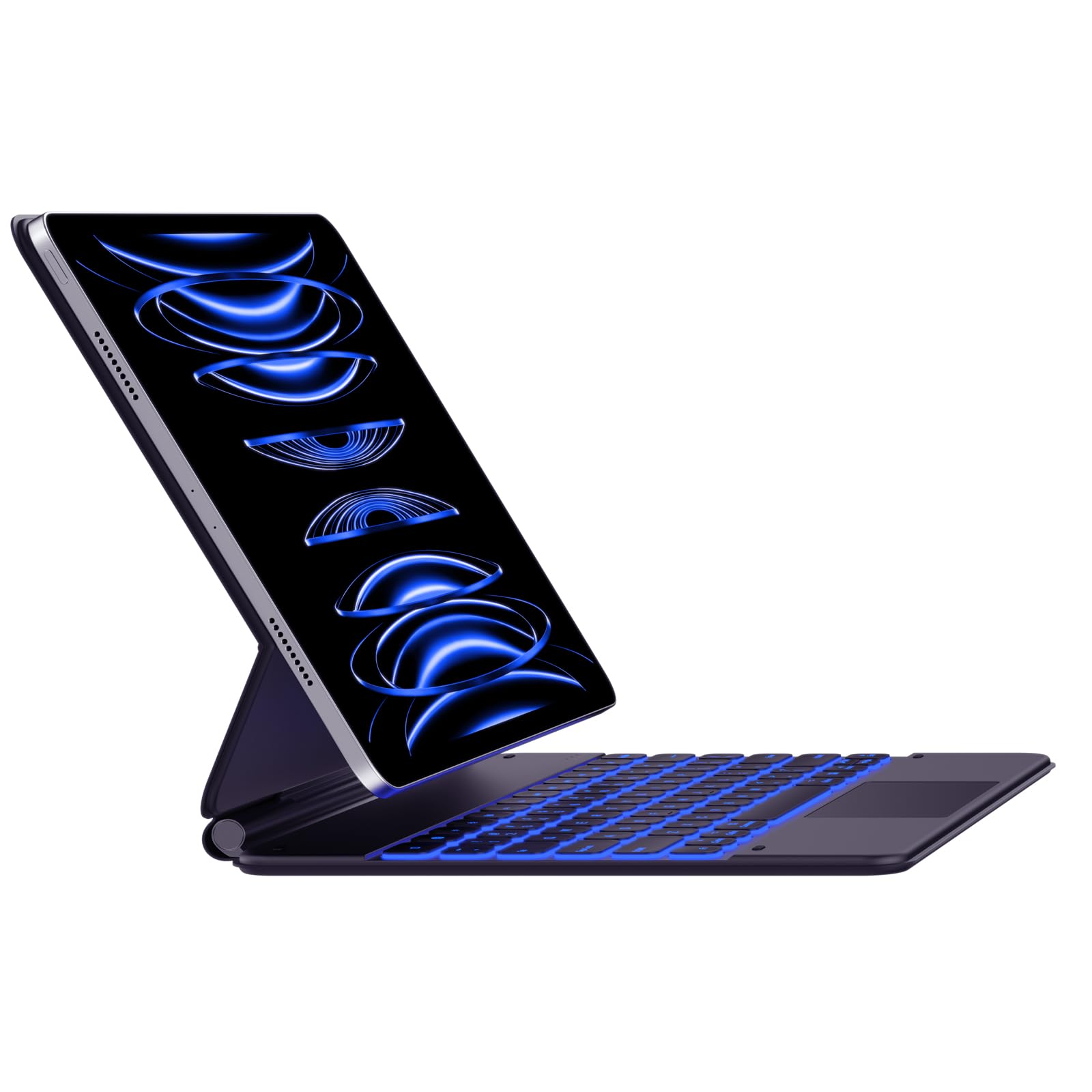
Image: The typecase Keyboard Case with an iPad Pro magnetically attached, displaying blue backlit keys and a vibrant screen.
- Ensure the camera cutout on the case aligns with your iPad's camera.
- The magnetic connection is designed to be strong, but always handle with care.
3. Pairing with Your iPad (Bluetooth Connection)
- Қуат қосулы: Пернетақтаның бүйіріндегі қуат қосқышын тауып, оны «ҚОСУЛЫ» күйіне сырғытыңыз.
- Жұптастыру режимін қосу: түймесін басып тұрыңыз Қосылу button (or a similar Bluetooth pairing key, often indicated by a Bluetooth icon) on the keyboard. The Bluetooth indicator light will start blinking, indicating it's in pairing mode.
- On Your iPad: өтіңіз Параметрлер > Блютез.
- Құрылғыны таңдаңыз: In the Bluetooth devices list, you should see "typecase Keyboard" or a similar name. Tap on it to connect.
- Растау: Once paired, the Bluetooth indicator light on the keyboard will stop blinking and remain solid (or turn off), and your iPad will show the keyboard as "Connected."
Note: The keyboard will automatically attempt to reconnect to the last paired device when powered on. If connection issues occur, repeat the pairing steps.
Пайдалану нұсқаулары
Keyboard Layout and Function Keys
The keyboard features a standard QWERTY layout with an additional row of function keys at the top for quick access to iPad features.
- Escape (Esc): Functions as a Home button.
- Brightness Keys: Adjust iPad screen brightness.
- Keyboard Backlight Keys: Adjust backlight color and brightness.
- Медиа басқару пернелері: Ойнату/Үзіліс, Алдыңғы трек, Келесі трек.
- Дыбыс деңгейі пернелері: Дыбысты өшіру, Дыбысты азайту, Дыбысты жоғарылату.
- Құлыптау кілті: Locks the iPad screen.
- Globe Key: Used for switching between keyboard languages or emoji keyboard (functionality may vary based on iPadOS settings).
Артқы жарықты басқару
The keyboard offers 11 backlight colors and 3 levels of brightness. Use the dedicated backlight keys (often marked with a light bulb icon or similar) in the function row to cycle through colors and adjust brightness.
- Press the backlight key once to change color.
- Press the brightness key (often combined with backlight key or separate) to cycle through brightness levels.
Trackpad пайдалану
The integrated trackpad supports multi-touch gestures, similar to a laptop trackpad. Ensure your iPadOS is updated to support trackpad functionality.
| Қимыл | Әрекет |
|---|---|
| Бір саусақпен түрту | Click, select item. |
| Two Fingers Swipe | Жоғары/төмен/солға/оңға айналдырыңыз. |
| Екі саусақты қысу | Кішірейту/кішірейту. |
| Үш саусақпен жоғары сырғытыңыз | Go to Home Screen. |
| Үш саусақпен солға/оңға сырғытыңыз | Ашық бағдарламалар арасында ауысу. |
Note: Trackpad precision and responsiveness are optimized for general use. For specific settings or advanced gestures, refer to your iPad's accessibility settings.
Автоматты ұйқы функциясы
The keyboard case is designed with an auto-sleep feature to conserve battery. If inactive for a period, the keyboard will enter sleep mode. Press any key to wake it up and reconnect to your iPad.
Техникалық қызмет көрсету
- Тазалау: Жұмсақ пайдаланыңыз, damp, lint-free cloth to clean the keyboard and case. Avoid harsh chemicals or abrasive materials.
- Сақтау орны: When not in use, close the case to protect both the iPad and the keyboard. Store in a cool, dry place away from direct sunlight.
- Батареяға күтім жасау: Батареяның қызмет ету мерзімін ұзарту үшін пернетақтаны жиі толығымен зарядсыздандырмаңыз. Толығымен зарядталмаса да, оны үнемі зарядтаңыз.
- Magnetic Clasp: Ensure the magnetic clasp is free from debris to maintain a secure closure.
Ақаулықтарды жою
- Пернетақта қосылмайды:
- Пернетақтаның қосулы және зарядталғанын тексеріңіз.
- iPad құрылғыңызда Bluetooth қосылғанын тексеріңіз.
- Forget the device in your iPad's Bluetooth settings and re-pair it.
- Пернетақтаны да, iPad-ты да қайта іске қосыңыз.
- Жауап бермейтін пернелер:
- Verify the keyboard is connected via Bluetooth.
- Ensure the keyboard is not in sleep mode.
- Пернелердің астындағы кез келген физикалық кедергілерді тексеріңіз.
- Сенсорлық тақта мәселелері:
- Confirm the keyboard is connected.
- Check iPadOS settings for trackpad functionality.
- Сенсорлық тақтаның бетін тазалаңыз.
- iPad Slipping from Magnetic Mount:
- Ensure the iPad is correctly aligned with the magnetic panel.
- Check for any debris between the iPad and the magnetic surface.
- Avoid excessive force or sudden movements that could dislodge the iPad.
Техникалық сипаттамалар
| Ерекшелік | Мәлімет |
|---|---|
| Үлгі нөмірі | KB206129 |
| Үйлесімділік | iPad Pro 12.9-inch (6th, 5th, 4th, 3rd Gen) |
| Қосылу мүмкіндігі | Блютез |
| Батарея Түрі | Литий полимері (жинаққа кіреді) |
| Зарядтау порты | USB-C |
| Артқы жарық | 11 Colors, 3 Brightness Levels (RGB support) |
| Арнайы мүмкіндіктер | Backlit, Lightweight, Integrated Trackpad, Magnetic Clasp |
| Материал | Акрилонитрилді бутадиен стиролы |
| Элемент салмағы | 1.13 келі |
| Пакет өлшемдері | 30.48 x 25.4 x 3.56 см |
Кепілдік және қолдау
Your typecase Keyboard Case is covered by a limited warranty against manufacturing defects. For specific warranty terms and conditions, please refer to the documentation included with your purchase or visit the official typecase webсайт.
For technical support, troubleshooting assistance, or warranty claims, please contact typecase customer service through their official support channels. Contact information can typically be found on the product packaging or the brand's webсайт.
Ask a question about this manual
Ask about setup, troubleshooting, compatibility, parts, safety, or missing instructions. Manuals+ will review the question and use this page’s manual context to help answer it.