
1. Өнім аяқталдыview
The Keyscaper Star Wars Darth Vader Wireless Mouse is designed for comfort and precision, featuring a distinctive Darth Vader color block design. This wireless mouse connects via a USB nano-receiver and is powered by two AAA batteries. It offers laser-optical precision and an auto-sleep function to maximize battery life.

Figure 1: Keyscaper Star Wars Darth Vader Wireless Mouse
Негізгі ерекшеліктері:
- Officially licensed Star Wars product.
- Easy plug & play functionality via included USB nano-receiver.
- Laser-optical precision for accurate and responsive tracking.
- Auto-sleep feature to conserve battery power.
- Durable full-color printed logo.
2. Орнату нұсқаулары
2.1 Қорапта не бар
- Keyscaper Star Wars Darth Vader Wireless Mouse
- USB нано-қабылдағышы
- 2 AAA батареясы (алдын ала орнатылған немесе бөлек кіреді)
2.2 Батареяны орнату
- Тінтуірдің астыңғы жағындағы батарея бөлімінің қақпағын табыңыз.
- Бөлімді ашу үшін қақпақты жайлап сырғытыңыз немесе көтеріңіз.
- Бөлімнің ішінде көрсетілгендей полярлықтың дұрыстығын (+/-) қамтамасыз ете отырып, екі AAA батареясын салыңыз.
- Батарея бөлігінің қақпағын орнына мықтап кіріскенше ауыстырыңыз.

Figure 2: Mouse components and battery installation
2.3 Connecting the USB Nano-Receiver
- Locate the USB nano-receiver, typically stored within a slot in the battery compartment for convenience.
- Remove the nano-receiver from its storage slot.
- Plug the USB nano-receiver into an available USB-A port on your computer or laptop.
- Сіздің компьютеріңіз қажетті драйверлерді автоматты түрде тауып, орнатуы керек. Бұл бірнеше минут алуы мүмкін.

Figure 3: USB nano-receiver storage
2.4 Қуатты қосу/өшіру
- On the underside of the mouse, locate the ON/OFF switch.
- Тінтуірді іске қосу үшін қосқышты «ҚОСУЛЫ» күйіне жылжытыңыз.
- To conserve battery life when not in use, slide the switch to the "OFF" position.
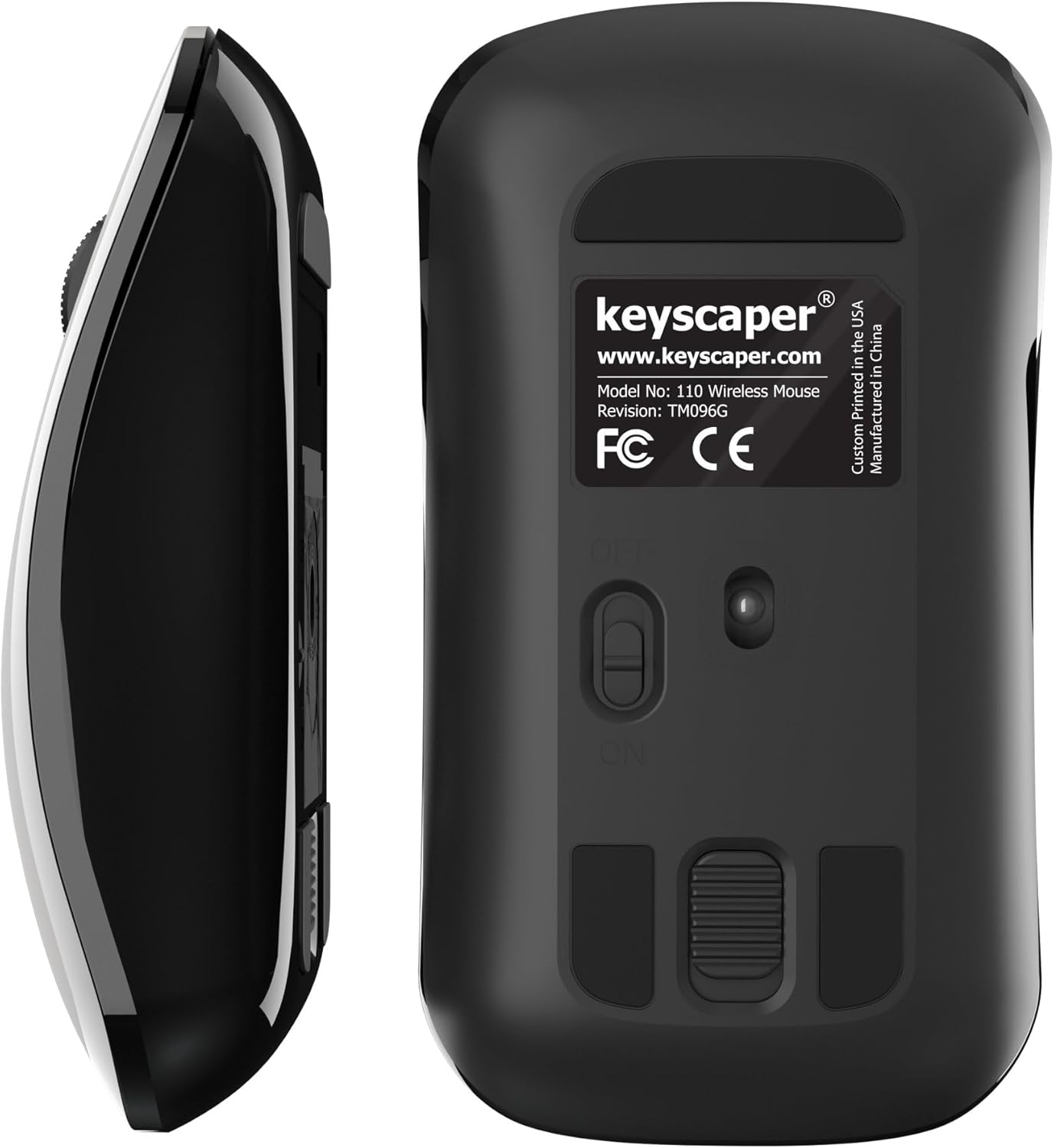
Figure 4: Underside of the mouse
3. Пайдалану нұсқаулары
3.1 Негізгі қолдану
- Сол жақ түймені басыңыз: Press the left button for primary actions (selecting, opening).
- Тінтуірдің оң жақ түймешігі: Press the right button for secondary actions (context menus).
- Айналдыру дөңгелегі: Құжаттар арасында жылжу үшін дөңгелекті жоғары немесе төмен айналдырыңыз немесе web pages. Press the scroll wheel for middle-click functionality (e.g., opening links in new tabs).
3.2 Автоматты ұйқы функциясы
The mouse is equipped with an auto-sleep feature. If inactive for a period, it will enter a low-power sleep mode to save battery. To wake the mouse, simply move it or click any button.
4. Техникалық қызмет көрсету
4.1 Батареяны ауыстыру
When the mouse performance degrades or it stops responding, it's time to replace the AAA batteries. Follow the steps in Section 2.2 for battery installation.
4.2 Тазалау
To maintain optimal performance, periodically clean your mouse:
- Ensure the mouse is turned OFF.
- Жұмсақ, түксіз матаны жеңіл пайдаланыңыз dampсыртын сүрту үшін сумен немесе жұмсақ тазалау ерітіндісімен жабыңыз.
- Кез келген саңылауларға ылғалдың түсуін болдырмаңыз.
- Use a dry cotton swab to gently clean the optical sensor on the underside.
5. Ақаулықтарды жою
5.1 Тінтуір жауап бермейді
- Тінтуірдің ҚОСУЛЫ екеніне көз жеткізіңіз.
- Батареяларды тексеріңіз. Егер олар аз немесе таусылған болса, оларды ауыстырыңыз.
- Verify that the USB nano-receiver is securely plugged into a working USB-A port on your computer. Try a different USB port if necessary.
- Move the mouse closer to the USB nano-receiver to rule out range issues.
- Компьютеріңізді қайта іске қосыңыз.
5.2 Курсордың тұрақсыз қозғалысы
- Clean the optical sensor on the underside of the mouse (refer to Section 4.2).
- Ensure you are using the mouse on a suitable surface. Highly reflective or uneven surfaces may cause issues. A mouse pad is recommended for best performance.
6. Техникалық сипаттамалар
- Модель нөмірі: 110WL
- Өнім өлшемдері: 2 x 1 x 0.1 дюйм
- Элемент салмағы: 4 унция
- Қосылу технологиясы: Radio Frequency (via USB nano-receiver)
- Қозғалысты анықтау технологиясы: Оптикалық
- Батареялар: 2 AAA батареясы (жинаққа кіреді)
- Түсі: Darth Vader (Color Block)
- Өндіруші: Dongguan Togran Electronic Technology Co, Ltd.
7. Кепілдік және қолдау
For warranty information or technical support, please refer to the official Keyscaper webсайтына немесе тұтынушыларға қызмет көрсетуге хабарласыңыз. Кепілдік шағымдары үшін сатып алу түбіртегін сақтаңыз.
This product is designed and printed by Keyscaper in Tualatin, Oregon, USA, and manufactured by Dongguan Togran Electronic Technology Co, Ltd.