
1. Өнім аяқталдыview
The DollaTek DC Buck Boost Converter is a versatile power module designed for precise voltage and current regulation. It features a digital LCD for real-time monitoring and offers a wide range of adjustable output parameters. This module is equipped with advanced protection mechanisms to ensure safe and reliable operation.
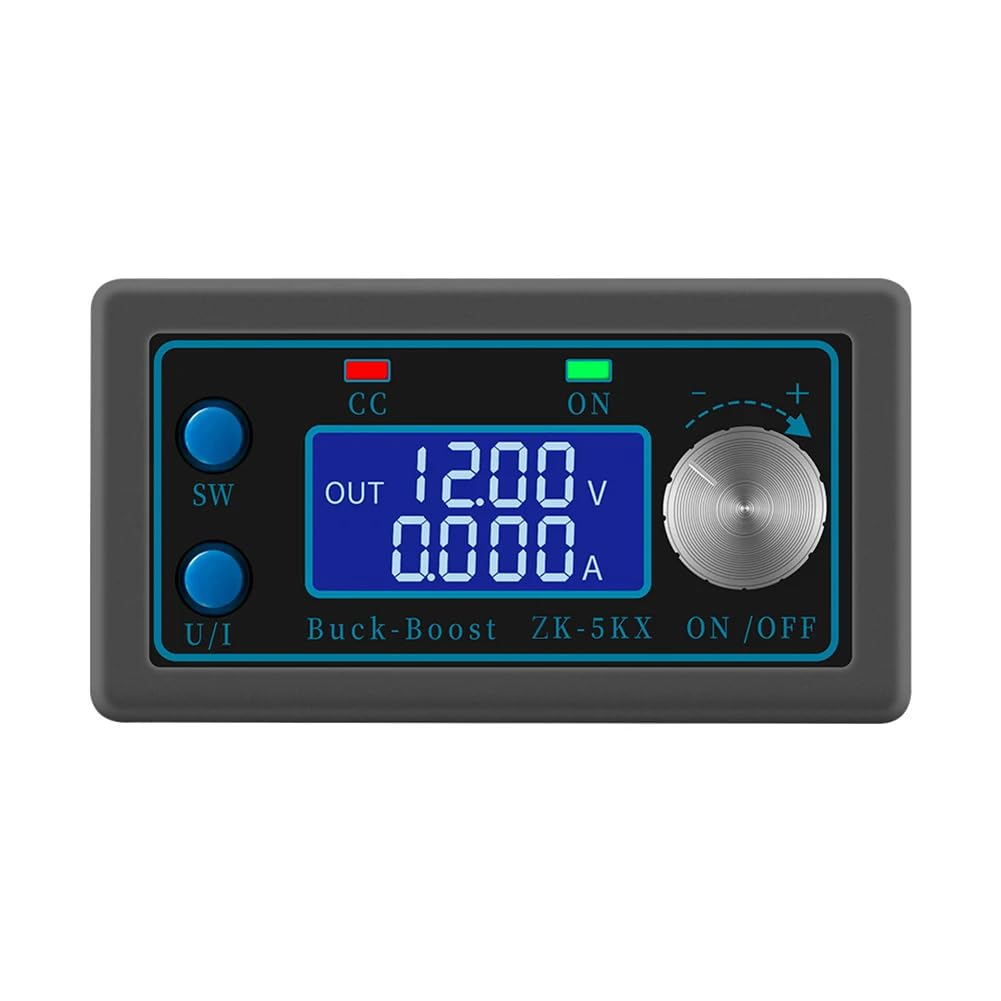
1.1-сурет: The DollaTek DC Buck Boost Converter with its clear liquid crystal display showing output voltage and current. The display provides precise and fast readings for monitoring.
2. Негізгі мүмкіндіктер
- СКД дисплей: Shows input/output voltage, output current/power, output capacity, and output time.
- Сандық басқару: Precise and fast adjustment of output voltage (0.6-36V) and current limit (0-5A).
- Кірістің кері полярлығын қорғау: Prevents damage from incorrect input wiring.
- Comprehensive Software Protections: Adjustable thresholds for undervoltage, шамадан тыс кернеуtage, overcurrent, overpower, overtemperature, timed output, and overcapacity. Output automatically disables if thresholds are exceeded.
- Intelligent Temperature-Controlled Fan: Automatically starts when temperature exceeds 50°C or current exceeds 1A, ensuring efficient heat dissipation.
- Low Output Ripple: Features T-type filtration for stable output.
- Enhanced Heat Sink: Thicker heat sink with bidirectional ventilation for improved cooling performance.

2.1-сурет: Бірнеше views of the converter, highlighting its compact design and various components including the display, control buttons, and connection terminals.
3. Техникалық сипаттамалар
| Параметр | Мән |
|---|---|
| Кіріс көлеміtage | 6.0В - 36В |
| Шығу көлеміtage | 0.6V - 36V (Adjustable) |
| Шығыс тогы | Макс 5А |
| Шығу қуаты | Ең көбі 80 Вт |
| Тtage Дисплей ажыратымдылығы | 0.01В |
| Current Indicator Resolution | 0.001A |
| Түрлендіру тиімділігі | Шамамен. 88% |
| Жұмсақ бастау | Yes (May fail with high power load) |
| Үлгі нөмірі | CP028911 |
| Өлшемдері (L x W x H) | 8 см x 4.2 см x 2.5 см (шамамен) |
| Өндіруші | DollaTek |
| Шығу елі | Қытай |

3.1-сурет: Physical dimensions of the converter module.
4. Компоненттерді сәйкестендіру

4.1-сурет: Front panel controls and indicators. The 'SW' key switches display modes, 'U/I' key selects voltage/current adjustment, 'CC' indicates constant current mode, 'ON' indicates output enabled, and the rotary encoder adjusts values.

4.2-сурет: Internal components and connection points. The input terminals are labeled IN+ and IN-, while the output terminals are OUT+ and OUT-. The fan and heat sink are visible for thermal management.
5. Орнату нұсқаулары
- Қуат көзін өшіру: Ensure all power sources are disconnected before making any connections.
- Кіріс қосылымы: Connect your DC power source (6.0V-36V) to the IN+ және IN- terminals. Observe polarity: IN+ for positive, IN- for negative. The module has reverse polarity protection, but correct wiring is always recommended.
- Шығыс қосылымы: Connect your load to the OUT+ және OUT- terminals. Observe polarity: OUT+ for positive, OUT- for negative.
- Қауіпсіз қосылымдар: Ensure all wire connections are tight and secure to prevent loose contacts and potential damage.
- Бастапқы қуат қосулы: After verifying all connections, apply power to the input. The LCD display should illuminate.
6. Пайдалану нұсқаулары
6.1. Дисплей режимдері
- түймесін басыңыз SW key to cycle through different display modes: input voltage, шығыс көлеміtage, output current, output power, output capacity (Ah), and output time (h).
- The display will show 'IN' for input parameters and 'OUT' for output parameters.
6.2. Шығу көлемін реттеуtage және Current
- Тtage Реттеу: түймесін басыңыз U/I key until the voltage value on the display starts blinking. Rotate the rotary encoder clockwise to increase the voltage and counter-clockwise to decrease it. Press U/I again to confirm the setting or wait a few seconds for it to auto-confirm.
- Current Limit Adjustment: түймесін басыңыз U/I key until the current value on the display starts blinking. Rotate the rotary encoder to set the desired current limit. Press U/I again to confirm. The 'CC' indicator will light up when the module operates in constant current mode.
6.3. Output Enable/Disable
- түймесін басыңыз ҚОСУ/ӨШІРУ button (often integrated with the rotary encoder or a separate button) to enable or disable the output. The 'ON' indicator light will show the output status.
7. Қорғаныс механизмдері
The module incorporates several software protection features with adjustable thresholds. If any operating parameter exceeds its set threshold, the output will automatically be disabled to protect the module and the connected load.
- Input Anti-Reverse Protection: Prevents damage from incorrect input polarity.
- Output Anti-Reverse Protection: Protects the module if a reverse voltage is applied to the output.
- Undervoltage Қорғау (UVP): Adjustable from 5.8V to 36V (default 5.8V).
- Шығару шамадан тысtage Қорғау (OVP): Adjustable from 0.6V to 36V (default 36V).
- Output Overcurrent Protection (OCP): Adjustable from 0A to 5A (default 5A).
- Output Overpower Protection (OPP): Adjustable from 0W to 80W (default 80W).
- Overtemperature Protection (OTP): Adjustable from 80°C to 110°C (default 110°C).
- Timed Protection (OHP): Adjustable from 0 to 100 hours (default off).
- Overcapacity Protection (OAP): Adjustable from 0 to 60Ah (default off).
To adjust protection thresholds, refer to the detailed instructions provided with the product packaging or manufacturer's website, as the exact button sequence may vary slightly.
8. Техникалық қызмет көрсету
- Тазалау: Keep the module clean and free from dust. Use a soft, dry cloth for cleaning. Do not use liquids or abrasive cleaners.
- Желдету: Ensure the fan and ventilation openings are not obstructed to maintain proper airflow and cooling. Periodically check for dust buildup on the fan blades and heat sink.
- Сақтау орны: Модульді құрғақ, салқын жерде, тікелей күн сәулесінен және жоғары температурадан алыс сақтаңыз.
- Қосылымдар: Барлық электр қосылымдарының тығыздығын және тозу немесе коррозия белгілерін мезгіл-мезгіл тексеріп отырыңыз.
9. Ақаулықтарды жою
- Дисплей жоқ/қуат жоқ:
- Check input power source and connections. Ensure input voltage 6.0V-36V ішінде.
- Verify correct input polarity.
- Шығару жоқ:
- Ensure the output is enabled (check 'ON' indicator).
- Check for active protection (e.g., OVP, OCP, OTP indicators). If a protection is triggered, the output will be disabled. Address the cause (e.g., reduce load, check temperature) and re-enable output.
- Verify output connections and load.
- Шығу көлеміtage/Current Not Stable:
- Ensure input power is stable and sufficient for the desired output.
- Бос қосылымдарды тексеріңіз.
- If operating near maximum power (80W) or current (5A), ensure adequate cooling. The intelligent fan should activate.
- Желдеткіш жұмыс істемейді:
- The fan is temperature-controlled. It will only activate if the internal temperature exceeds 50°C or the output current exceeds 1A. This is normal operation.
- If the module is hot and current is high, but the fan is not running, check for obstructions or fan malfunction.
10. Кепілдік және қолдау
Information regarding product warranty and customer support for the DollaTek DC Buck Boost Converter (Model CP028911) is not available in this manual. Please refer to the product packaging, the retailer's website, or contact DollaTek customer service directly for details on warranty coverage and technical assistance.
For further inquiries or support, please visit the official DollaTek webсайтына немесе сатып алу нүктесіне хабарласыңыз.