
IPEVO CDCU-06IP
IPEVO VC-Z4K UHD 4K PTZ камерасының пайдаланушы нұсқаулығы
Model: CDCU-06IP
Бренд: IPEVO
1. Кіріспе
This user manual provides comprehensive instructions for the setup, operation, and maintenance of your IPEVO VC-Z4K UHD 4K PTZ Camera. The VC-Z4K is designed to enhance educational and worship spaces with its 4K UHD resolution and 8.29-MP Sony CMOS sensor. It features advanced pan-tilt-zoom capabilities, AI auto-tracking, and a powerful 12X Optical + 15X Digital Zoom, making it ideal for capturing detailed and engaging remote sessions. Its AI functionality helps minimize the need for additional personnel, and its easy setup allows seamless integration with popular platforms like YouTube, OBS, and Zoom.
2. Қауіпсіздік туралы ақпарат
Please read and understand all safety instructions before using the IPEVO VC-Z4K camera to prevent injury or damage to the device. Keep this manual for future reference.
- Қуат көзі: Use only the provided power adapter. Ensure the power outlet meets the camera's voltage талаптар.
- Желдету: Желдету саңылауларын жаппаңыз. Қызып кетудің алдын алу үшін камераның айналасында ауа айналымының жеткілікті екеніне көз жеткізіңіз.
- Қоршаған орта: Avoid exposing the camera to water, moisture, extreme temperatures, or direct sunlight. Operate in a clean, dry environment.
- Өңдеу: Handle the camera with care. Do not drop or subject it to strong vibrations.
- Тазалау: Тазалау алдында электр қуатын ажыратыңыз. Жұмсақ, құрғақ шүберекті пайдаланыңыз. Сұйық немесе аэрозольді тазартқыштарды қолданбаңыз.
- Қызмет көрсету: Камераны өзіңіз бөлшектеуге немесе жөндеуге әрекеттенбеңіз. Барлық қызмет көрсетуді білікті мамандарға тапсырыңыз.
3. Пакет мазмұны
Төменде тізімделген заттардың барлығы пакетіңізге қосылғанын тексеріңіз:
- IPEVO VC-Z4K Camera
- Power adapter (8.2 ft / 2.5 m)
- USB 3.0 cable (4.9 ft / 1.5 m)
- RS232 cable (6.5 ft / 2 m)
- Қашықтан басқару пульті (батарея кірмейді)
- Пайдаланушы нұсқаулығы (осы құжат)
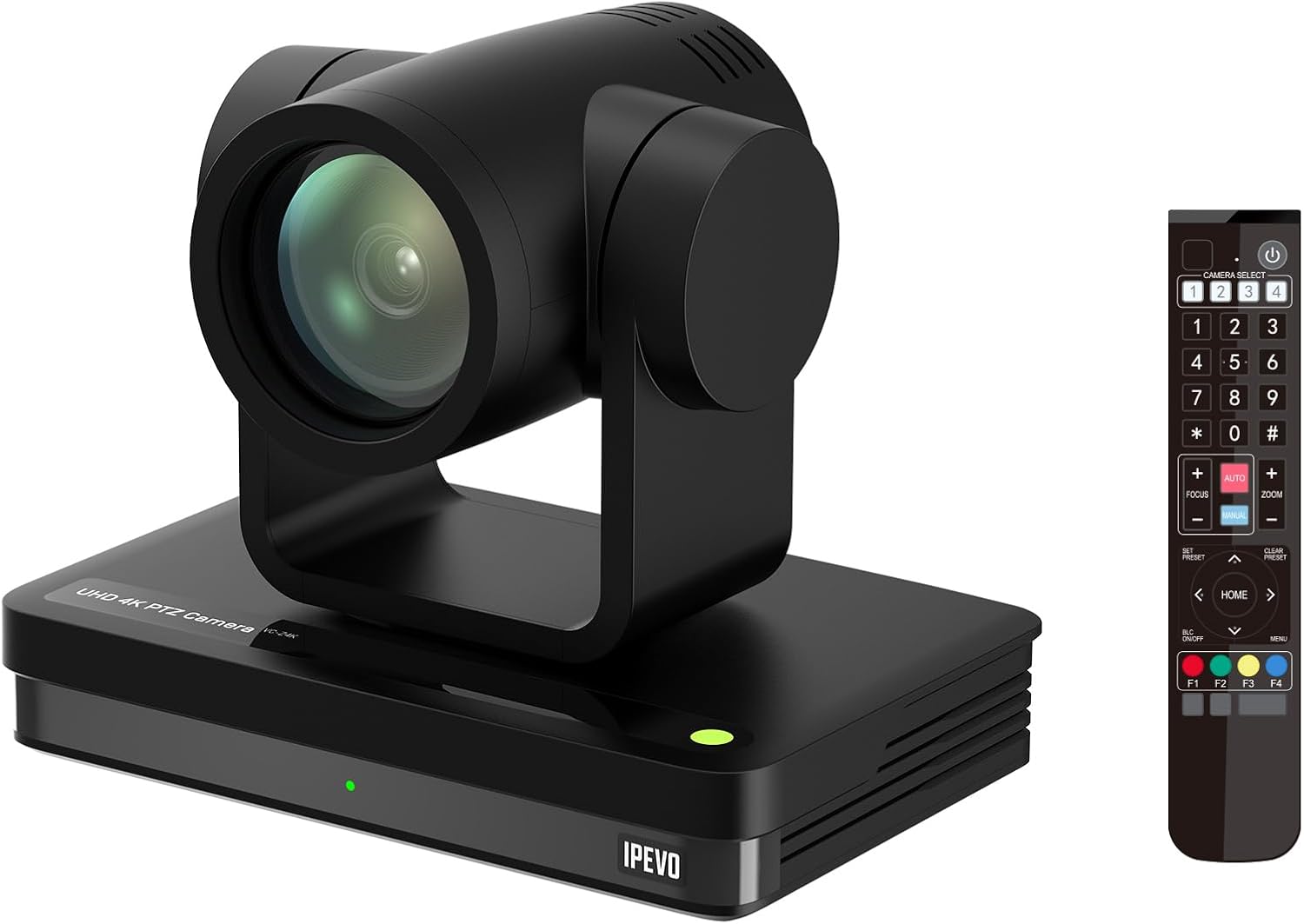
Image: The IPEVO VC-Z4K camera unit shown alongside its remote control, illustrating the main components included in the package.
4. Өнім аяқталдыview
4.1 Негізгі мүмкіндіктер
- 4K Ultra HD ажыратымдылығы: Equipped with a 1/2.8" HD CMOS sensor for stunning 4K video output.
- 12X оптикалық масштабтау: Provides clear, detailed close-ups without loss of quality.
- AI Auto Tracking: Automatically follows speakers or presenters, ensuring they remain in frame.
- Икемді қосылым: Features HDMI, USB-C, LAN (PoE), and SDI outputs for versatile integration.
- Wide Pan and Tilt Range: Offers 340° pan and 120° tilt for comprehensive room coverage.
- Жетілдірілген шуды азайту: 2D/3D noise reduction ensures clear video in various lighting conditions.
4.2 Camera Components and Ports

Сурет: артқы view of the IPEVO VC-Z4K camera showing its various connectivity ports including USB 3.0, HDMI, SDI, LAN (PoE), and power input.
The VC-Z4K camera features a range of ports for diverse connectivity options:
- HDMI шығысы: For high-definition video output to displays or capture devices.
- USB-C порты: For direct connection to computers for video and control.
- LAN (PoE) Port: For network connectivity and Power over Ethernet, simplifying installation.
- SDI шығысы: For professional video workflows requiring longer cable runs.
- RS232 порты: For serial control via external control systems.
- Қуат кірісі: For connecting the included power adapter.
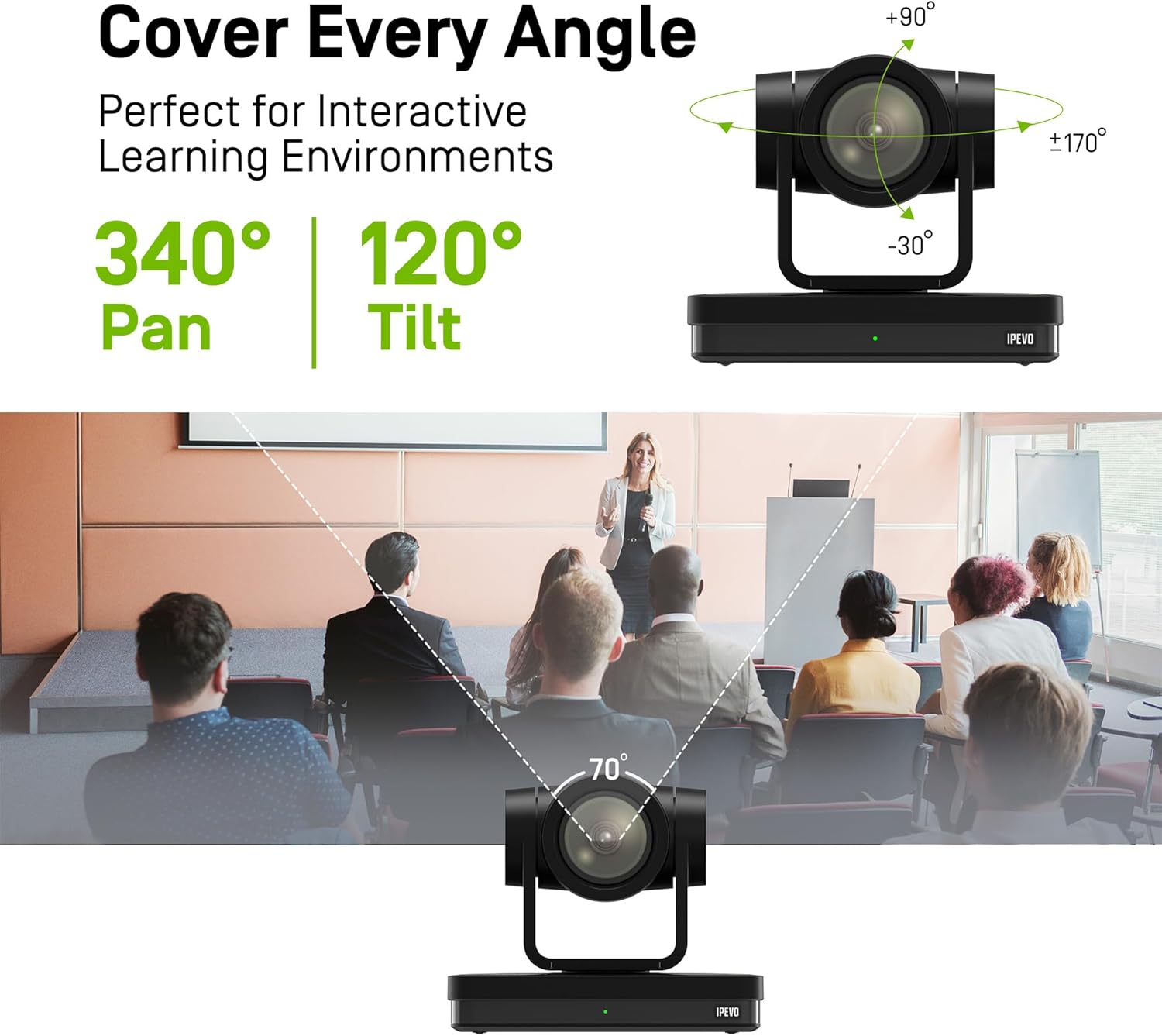
Image: Diagram illustrating the IPEVO VC-Z4K camera's pan (340°) and tilt (120°) ranges, highlighting its ability to cover a wide area.
The camera's motorized head allows for precise pan and tilt movements, enabling comprehensive coverage of your space. The pan range is 340 degrees, and the tilt range is 120 degrees (-30° to +90°).
5. Орнату
Follow these steps for the initial setup of your IPEVO VC-Z4K camera:
- Орналастыру: Choose a stable surface or mount the camera securely in your desired location. Ensure it has a clear line of sight to the area you wish to capture.
- Қуат қосылымы:
- Қуат адаптерін пайдалану: Connect the provided power adapter to the camera's power input port and then plug it into a wall outlet.
- PoE (Ethernet арқылы қуат) пайдалану: If your network switch supports PoE, connect an Ethernet cable from the PoE-enabled switch to the camera's LAN (PoE) port. This will provide both power and network connectivity.
- Video Output Connection (Choose one or more):
- HDMI: Connect an HDMI cable from the camera's HDMI output to a display, projector, or video capture card.
- USB-C: Connect the USB 3.0 cable from the camera's USB-C port to a USB 3.0 port on your computer. This enables the camera as a webбейнеконференция қолданбаларына арналған камера.
- LAN: Connect an Ethernet cable from the camera's LAN port to your network router or switch for IP streaming and control.
- SDI: Connect an SDI cable from the camera's SDI output to a professional video switcher or recorder.
- Қашықтан басқару құралын орнату: Insert two AAA batteries (not included) into the remote control. The remote control is essential for initial configuration and operation.
- Қуат қосулы: Once all connections are secure, power on the camera. The indicator light will illuminate.
6. Пайдалану нұсқаулары
6.1 Basic Camera Control (via Remote Control)
- Панорама/еңкейту: Use the directional arrows on the remote control to move the camera horizontally (pan) and vertically (tilt).
- Масштабтау: Use the 'ZOOM +' and 'ZOOM -' buttons to adjust the optical zoom.
- Фокус: Press 'AUTO FOCUS' for automatic focus. Use 'FOCUS +' and 'FOCUS -' for manual adjustment if needed.
- Алдын ала орнатылған: The camera supports up to 255 presets. You can save and recall up to 10 presets directly from the remote control using the number buttons (0-9). To save a preset, position the camera, then press 'PRESET' followed by a number (e.g., '1'). To recall, press the number button.

Image: The IPEVO VC-Z4K camera demonstrating its 12X optical zoom capability, highlighting its 8.29-MP Sony CMOS sensor for high-quality video.
6.2 AI Auto Tracking
The VC-Z4K features advanced AI auto-tracking to keep a presenter or subject automatically in frame.
- Enabling Tracking: Refer to the remote control or camera's web interface for specific buttons or settings to activate AI tracking.
- Zone Tracking: Configure specific zones within the camera's view where tracking should occur.
- Баяндамашыны қадағалау: The camera can identify and follow a designated presenter as they move within the defined area.

Image: A visual representation of the IPEVO VC-Z4K's AI auto-tracking and auto-focus features, showing how it maintains focus on a moving subject in a classroom setting.
6.3 Integration with Platforms
The VC-Z4K seamlessly integrates with various video conferencing and streaming platforms:
- USB қосылымы: When connected via USB-C, the camera will be recognized as a standard webcam by applications like Zoom, OBS Studio, Microsoft Teams, Google Meet, GoTo Meeting, and Skype. Select "IPEVO VC-Z4K" as your video input device within the application settings.
- LAN/IP Streaming: For advanced streaming setups, use the LAN connection to stream video via RTSP/RTMP protocols to platforms like YouTube Live or OBS Studio. Refer to the camera's web interface for IP configuration and streaming settings.
7. Техникалық қызмет көрсету
Proper maintenance ensures the longevity and optimal performance of your IPEVO VC-Z4K camera.
- Линзаны тазалау: Оптикалық линзаларға арналған жұмсақ, мамықсыз шүберекті пайдаланыңыз. Шаңды немесе дақтарды кетіру үшін линзаны ақырын сүртіңіз. Абразивті материалдарды немесе қатты химиялық заттарды пайдаланудан аулақ болыңыз.
- Денені тазарту: Камера корпусын жұмсақ, құрғақ шүберекпен сүртіңіз. Қатты кір үшін, аздап dampen the cloth with water, then wipe dry immediately. Do not allow liquids to enter the camera.
- Сақтау орны: Ұзақ уақыт бойы пайдаланбаған кезде фотокамераны салқын, құрғақ жерде, тікелей күн сәулесінен және төтенше температурадан алыс жерде сақтаңыз.
- Микробағдарламаны жаңарту: Periodically check the IPEVO official website for firmware updates. Keeping your camera's firmware up-to-date can improve performance and add new features.
8. Ақаулықтарды жою
If you encounter issues with your IPEVO VC-Z4K camera, refer to the following common problems and solutions:
| Мәселе | Ықтимал себебі | Шешім |
|---|---|---|
| Қуат жоқ/камера қосылмайды | Power adapter not connected or faulty; no PoE connection. | Ensure power adapter is securely connected and plugged into a working outlet. If using PoE, verify the network switch is PoE-enabled and the Ethernet cable is functional. |
| Бейне шығысы жоқ | Incorrect cable connection; wrong input selected on display; software issue. | Check HDMI, USB-C, LAN, or SDI cable connections. Ensure the display is set to the correct input source. Restart the computer/application if connected via USB. |
| Қашықтан басқару пульті жұмыс істемейді | Batteries are dead or inserted incorrectly; IR sensor blocked. | Replace batteries (AAA). Ensure batteries are inserted with correct polarity. Point the remote directly at the camera's IR receiver. |
| AI tracking not functioning | Tracking feature not enabled; subject out of tracking range; poor lighting. | Activate AI tracking via remote or web interface. Ensure the subject is within the optimal tracking area. Improve lighting conditions if too dark. |
| Poor video quality (blurry, noisy) | Lens is dirty; focus issue; low light conditions; network bandwidth. | Clean the lens. Adjust focus manually or use auto-focus. Ensure adequate lighting. For IP streaming, check network bandwidth and camera's streaming settings. |
9. Техникалық сипаттамалар
Detailed technical specifications for the IPEVO VC-Z4K UHD 4K PTZ Camera:
| Өнім өлшемдері | 7.1 x 5.9 x 4.5 дюйм |
| Элемент салмағы | 2.64 фунт |
| Элемент үлгі нөмірі | CDCU-06IP |
| Фото сенсор технологиясы | CMOS (1/2.8" HD CMOS Sensor) |
| Бейне түсіру рұқсаты | 4K UHD |
| Оптикалық масштабтау | 12X |
| Сандық масштабтау | 15X |
| Максималды апертура | 2.8 миллиметр |
| Қосылу технологиясы | USB, HDMI, LAN (PoE), SDI, RS232 |
| Арнайы мүмкіндіктер | AI Tracking and Auto Focus, Low Noise and High SNR, Multiple Presets (up to 255) |
| Түс | Қара |
| Өндіруші | IPEVO |
10. Кепілдік және қолдау
IPEVO products are designed for reliability and performance. For warranty information, technical support, or service inquiries, please visit the official IPEVO webсайтына немесе тұтынушыларға қолдау көрсетуге тікелей хабарласыңыз. Сатып алу түбіртегін кепілдік талаптары үшін сатып алудың дәлелі ретінде сақтаңыз.
Қосымша көмек алу үшін мына сайтқа кіріңіз: www.ipevo.com