
1. Кіріспе
This user manual provides detailed instructions for the setup, operation, and maintenance of your BL Android TV Box 11.0. Designed for an enhanced home entertainment experience, this device transforms your television into a smart hub, offering access to a wide range of streaming content, applications, and multimedia features. Please read this manual carefully before using the product to ensure optimal performance and longevity.
2. Пакет мазмұны
Төменде тізімделген заттардың барлығы сіздің пакетіңізге қосылғанын тексеріңіз:
- Android TV Box (1 unit)
- Қашықтан басқару пульті (1 бірлік)
- Қуат адаптері (1 бірлік)
- HDMI кабелі (1 дана)
- Пайдаланушы нұсқаулығы (1 бірлік)

Image: All components included in the BL Android TV Box 11.0 package.
3. Орнату
Follow these steps to set up your BL Android TV Box:
- HDMI кабелін жалғаңыз: Insert one end of the HDMI cable into the HDMI OUT port on the TV Box and the other end into an available HDMI input on your television.
- Қуат адаптерін қосыңыз: Plug the power adapter into the DC IN port on the TV Box, then plug the other end into a power outlet.
- Желіге қосылу: Once powered on, connect the TV Box to your network. You can use either Wi-Fi (2.4G/5G Dual Band) or an Ethernet cable for a wired connection. Navigate to 'Settings' > 'Network' to configure your connection.
- Бастапқы орнату: Тілді таңдау, уақыт белдеуі және Google тіркелгісіне кіру сияқты бастапқы орнатуды аяқтау үшін экрандағы нұсқауларды орындаңыз.
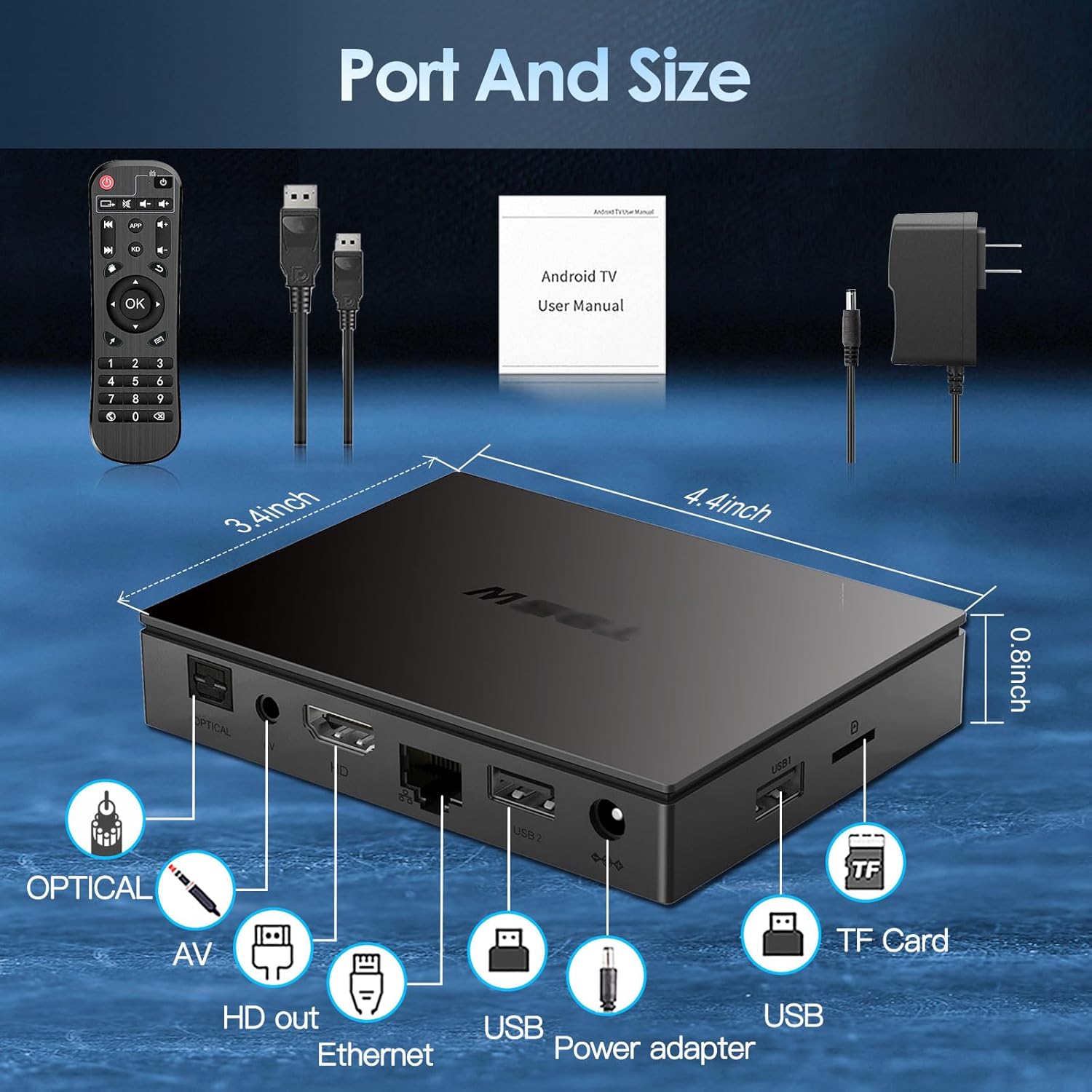
Image: Visual guide for connecting the BL Android TV Box to your television and power.
4. Пайдалану нұсқаулары
Once set up, you can begin using your BL Android TV Box to access various features:
- Навигация: Use the included remote control to navigate through the Android 11.0 interface. The directional pad and 'OK' button are used for selection, while 'Back' and 'Home' buttons provide quick navigation.
- Қолданбаға кіру: The home screen displays pre-installed applications like YouTube, Netflix, Google Play Store, and Chrome. You can download additional apps from the Google Play Store.
- Медиа ойнату: Жергілікті медианы ойнату files from USB drives or TF cards connected to the TV Box. The device supports various video and audio formats.
- Экранды көрсету: Utilize the wireless screen mirroring function to cast content from your smartphone or tablet to your TV. This feature supports Airplay, DLNA, and Miracast protocols.

Image: The user interface of the Android 11.0 operating system on the TV Box.

Image: Demonstration of wireless screen mirroring from mobile devices to the TV.
5. Ерекшеліктер
The BL Android TV Box 11.0 is equipped with advanced features for a superior entertainment experience:
- Powerful Amlogic S905W2 CPU: Powered by a Quad-Core Cortex-A35 processor, ensuring smooth performance, efficient image processing, and broad app compatibility.
- Ultra-High Definition Viewing: Supports 4K HDR10+ technology and the latest AV1 encoding, delivering realistic visuals, efficient video compression, and enhanced picture quality.
- Dual-Band Wi-Fi & Bluetooth 5.0: Features 2.4G/5G dual-band Wi-Fi for stable and fast wireless connectivity, and Bluetooth 5.0 for connecting peripherals like headphones, speakers, keyboards, and gamepads.
- Сымсыз экран айнасы: Allows you to mirror content from your mobile devices to your TV, facilitating easy sharing of photos and videos.

Сурет: аяқталдыview of the Amlogic S905W2 processor.
Image: Highlighting 4K HDR10+ video decoding capabilities.

Image: Connectivity options including Dual Wi-Fi and Bluetooth 5.0.
6. Техникалық қызмет көрсету
To ensure the longevity and optimal performance of your BL Android TV Box, follow these maintenance guidelines:
- Тазалау: Құрылғының сыртын тазалау үшін жұмсақ, құрғақ шүберекті пайдаланыңыз. Сұйық тазалағыштарды немесе абразивті материалдарды пайдаланбаңыз.
- Желдету: Ensure the TV Box is placed in a well-ventilated area to prevent overheating. Do not block the ventilation openings.
- Бағдарламалық құрал жаңартулары: Periodically check for system updates in the 'Settings' menu to ensure you have the latest features and security patches.
- Қуатты дұрыс өшіру: Always power off the device correctly before unplugging it to prevent data corruption.
7. Ақаулықтарды жою
If you encounter issues with your BL Android TV Box, refer to the following common troubleshooting steps:
- Қуат жоқ: Ensure the power adapter is securely connected to both the TV Box and a working power outlet. Try a different outlet if necessary.
- Сурет/сигнал жоқ: Verify that the HDMI cable is correctly connected to both the TV Box and your television. Ensure your TV is set to the correct HDMI input source.
- Wi-Fi қосылымы жоқ: Check your router and ensure it is working correctly. Re-enter your Wi-Fi password in the TV Box settings. If issues persist, try restarting both the TV Box and your router.
- Қашықтан басқару пульті жауап бермейді: Check the batteries in the remote control and replace them if needed. Ensure there are no obstructions between the remote and the TV Box.
- Қолданбаның қатып қалуы/бұзылуы: Try clearing the cache of the problematic app in 'Settings' > 'Apps'. If the issue persists, uninstall and reinstall the app.
- Баяу өнімділік: Close unused applications running in the background. Consider performing a factory reset if performance issues are severe and persistent (Note: This will erase all data and settings).
8. Техникалық сипаттамалар
| Ерекшелік | Техникалық сипаттама |
|---|---|
| Үлгі нөмірі | BL-Android-TV-Box-11.0 |
| Операциялық жүйе | Android 11.0 |
| CPU | Amlogic S905W2 Quad-Core Cortex-A35 |
| Жедел Жадтау Құрылғысы | 4 ГБ |
| ROM | 32 ГБ |
| Бейне шығысы | 4Kx2K@60fps (HDMI 2.1) |
| Бейнені декодтау | AV1, HDR10+, H.265, H.264, etc. |
| Wi-Fi қосылымы | 2.4G/5G Dual-Band Wi-Fi |
| Блютез | Bluetooth 5.0 |
| Ethernet | 10/100M |
| Порттар | HDMI 2.1*1, USB 2.0*2, Optical, AV, Ethernet, TF Card Slot, Power Adapter Port |
| Өлшемдері | 11.2L x 8.6W x 2.1H см |

Image: Port layout and dimensions of the BL Android TV Box.
9. Кепілдік және қолдау
Your BL Android TV Box 11.0 comes with a standard manufacturer's warranty. For specific warranty terms and conditions, please refer to the documentation provided with your purchase or contact the seller directly. If you require technical assistance or have questions not covered in this manual, please reach out to the customer support team of the brand BL. Contact information can typically be found on the product packaging or the brand's official webсайт.