
1. Өнім аяқталдыview
The Dioche 1080P HD Smart Camera is designed for home security and monitoring, offering high-definition video, motion detection, and night vision capabilities. This manual provides essential information for setting up, operating, and maintaining your camera.

1.1-сурет: Алдыңғы view of the Dioche 1080P HD Smart Camera.
1.1-бейне: аяқталдыview of the Dioche 1080P HD Smart Camera's design and features.
2. Негізгі мүмкіндіктер
- 1080P HD бейне: Captures clear, high-definition video for detailed monitoring.
- Жетілдірілген түнгі көру: Provides clear images in low-light conditions, extending visibility up to 40ft.
- Қозғалысты анықтау: Automatically detects movement and sends alerts to your mobile device.
- Екі жақты аудио: Allows for communication through the camera via the mobile application.
- Қашықтан бақылау: Тікелей бейне арнасына және жазылған фолға қол жеткізіңізtage from anywhere using your smartphone.
- Бұлтты сақтау: Offers an option for secure storage of surveillance footage.
- Оңай орнату: Жылдам және қарапайым орнатуға арналған.
3. Пакет мазмұны
Пакетте барлық элементтердің бар екенін тексеріңіз:
- 1 x Dioche 1080P HD Smart Camera
- 1 x зарядтау кабелі
- 1 x Нұсқаулық (осы құжат)
- 2 x кеңейту түтіктері
- 2 x бұрандалар

3.1-сурет: Өнім пакетіне кіретін барлық компоненттер.
4. Өнім диаграммасы
Familiarize yourself with the different parts of your Dioche Smart Camera:
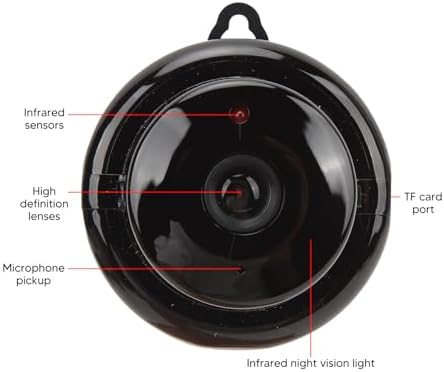
Image 4.1: Labeled diagram of the camera's components.
- Инфрақызыл сенсорлар: Detect ambient light levels for automatic night vision activation.
- High Definition Lenses: Capture 1080P resolution video.
- Микрофонды қабылдау: Records audio and enables two-way communication.
- TF картасы порты: Slot for inserting a MicroSD card (not included) for local storage.
- Infrared Night Vision Light: Emits infrared light for clear viewқараңғы жағдайда.
5. Орнату нұсқаулары
Follow these steps to set up your Dioche Smart Camera:
- Қуат қосулы: Connect the camera to a power source using the provided charging cable. The camera will power on automatically.
- Қолданбаны жүктеу: Download the recommended mobile application (e.g., "V380 Pro" or similar, refer to packaging for specific app name) from your smartphone's app store (Android or iOS).
- Аккаунт ашу: Қолданбаны ашып, жаңа тіркелгіні тіркеңіз немесе бұрыннан бар болса жүйеге кіріңіз.
- Құрылғыны қосу: Follow the in-app instructions to add your new camera. This typically involves scanning a QR code on the camera or manually selecting the device type and connecting to its Wi-Fi hotspot.
- Wi-Fi желісіне қосылу: Configure the camera to connect to your home 2.4GHz Wi-Fi network. Ensure your smartphone is also connected to the same network during setup.
- Камераны орнату: Choose a suitable location for your camera. It can be placed on a flat surface or mounted to a wall or ceiling using the included screws and expansion tubes. Ensure the camera has a clear view бақылағыңыз келетін аумақтың.

Сурет 5.1: Мысалыample of mounting the camera to a surface.
6. Пайдалану нұсқаулары
Once set up, you can control and monitor your camera using the mobile application:
- Тірі View: Open the app and select your camera to view тікелей бейне арнасы.
- Қозғалысты анықтау ескертулері: Enable motion detection in the app settings to receive push notifications on your phone when movement is detected. Adjust sensitivity as needed.
- Түнгі көру: The camera automatically switches to night vision mode in low light. You can typically toggle this feature manually within the app if desired.
- Екі жақты аудио: Use the microphone and speaker icons in the app to listen to the camera's environment or speak through the camera.
- Жазу және ойнату: Жазылған footage from the cloud storage or MicroSD card (if installed) through the app's playback feature.
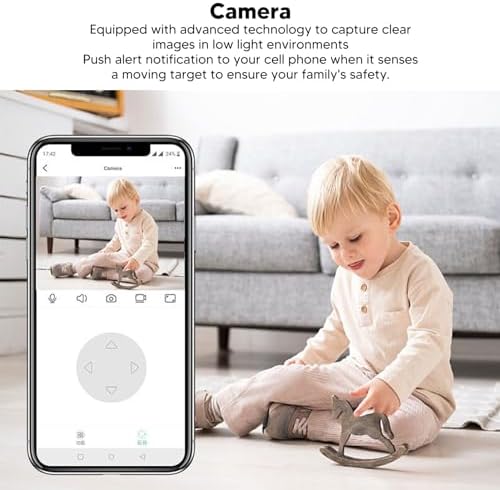
Image 6.1: Using the mobile application for live monitoring.
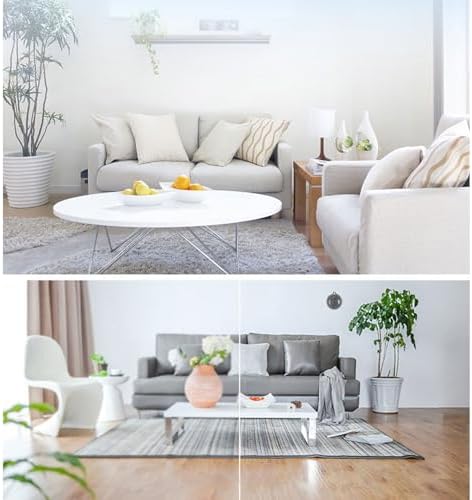
Image 6.2: Demonstration of the camera's night vision capability.
7. Техникалық қызмет көрсету
To ensure optimal performance and longevity of your camera:
- Тазалау: Камера объективі мен корпусын жұмсақ, құрғақ шүберекпен ақырын сүртіңіз. Қатты химиялық заттарды немесе абразивті материалдарды пайдаланбаңыз.
- Орналастыру: Камераның тұрақты жерде, тікелей күн сәулесінен, жоғары температурадан және ылғалдан алыс орналасқанына көз жеткізіңіз.
- Бағдарламалық құрал жаңартулары: Regularly check the mobile application for firmware updates for your camera to ensure you have the latest features and security enhancements.
8. Ақаулықтарды жою
Камераға қатысты мәселелерге тап болсаңыз, келесі жалпы мәселелер мен шешімдерді қараңыз:
| Мәселе | Мүмкін шешім |
|---|---|
| Камера желіден тыс/Қосылу мүмкін емес | Ensure the camera is powered on. Check your Wi-Fi connection and signal strength. Restart the camera and your router. Re-add the camera in the app if necessary. |
| Қозғалысты анықтау ескертулері жоқ | Verify motion detection is enabled in the app settings. Adjust sensitivity. Check app notification settings on your phone. |
| Бейне сапасы нашар | Ensure the lens is clean. Check your internet connection speed. Adjust video quality settings in the app if available. |
| Екі жақты аудио жұмыс істемейді | Телефоныңыздағы қолданбаның микрофон мен динамик рұқсаттарын тексеріңіз. Дыбыс деңгейінің екі ұшында да жоғары екеніне көз жеткізіңіз. |
Мәселе шешілмесе, тұтынушыларды қолдау қызметіне хабарласыңыз.
9. Техникалық сипаттамалар
Detailed technical specifications for the Dioche 1080P HD Smart Camera:

Image 9.1: Camera dimensions.
| Ерекшелік | Мәлімет |
|---|---|
| Модель атауы | Diocherkmcdyn6vq |
| Бейне түсіру рұқсаты | 1080p |
| Қосылу протоколы | Wi-Fi (2.4 ГГц) |
| Арнайы мүмкіндік | Motion Sensor, Night Vision, Two-Way Audio |
| Үйлесімді құрылғылар | Смартфон (Android, iOS) |
| Монтаж түрі | Қабырғаға аспа |
| Қоршау материалы | Акрилонитрил бутадиен стироны (ABS) |
| Ұсынылатын пайдаланулар | Baby Monitoring, Home Security, Pet Monitoring |
| Батареялар қажет пе | No (Powered via USB cable) |
10. Кепілдік және қолдау
For warranty information and technical support, please refer to the product packaging or contact the retailer where you purchased the Dioche 1080P HD Smart Camera. Keep your proof of purchase for warranty claims.