
Кіріспе
This manual provides comprehensive instructions for the safe and efficient use of your DOOGEE N50PRO smartphone. Please read this manual thoroughly before operating your device and retain it for future reference. The DOOGEE N50PRO is an Android 13 smartphone equipped with an Octa-Core processor, a 6.52-inch HD+ display, a 50MP main camera, a 4200mAh battery, and supports 4G Dual SIM, Face ID, and Fingerprint ID.
Пакет мазмұны
Өнім бумасында келесі элементтердің барлығы бар екенін тексеріңіз:
- DOOGEE N50PRO Smartphone
- Қаптама қорабы
- Зарядтағыш (9V / 2A)
- USB түрі-C кабелі
- SIM картасының пин
- Pre-applied TP Protective Film
- Пайдаланушы нұсқаулығы (бұл құжат)
Орнату
1. SIM картасы мен TF картасын орнату
The DOOGEE N50PRO supports dual Nano SIM cards or one Nano SIM card and one TF (MicroSD) card for expandable storage up to 1TB. Ensure the device is powered off before inserting or removing cards.
- Телефонның бүйіріндегі SIM картасының науасын табыңыз.
- Insert the SIM card pin into the small hole next to the tray to eject it.
- Науаны абайлап шығарыңыз.
- Nano SIM картасын(лар)ын және/немесе TF картасын науадағы белгіленген ұяшықтарға салыңыз. Алтын түйіспелердің төмен қарағанына көз жеткізіңіз.
- Науаны телефонға орнына түскенше ақырын итеріңіз.
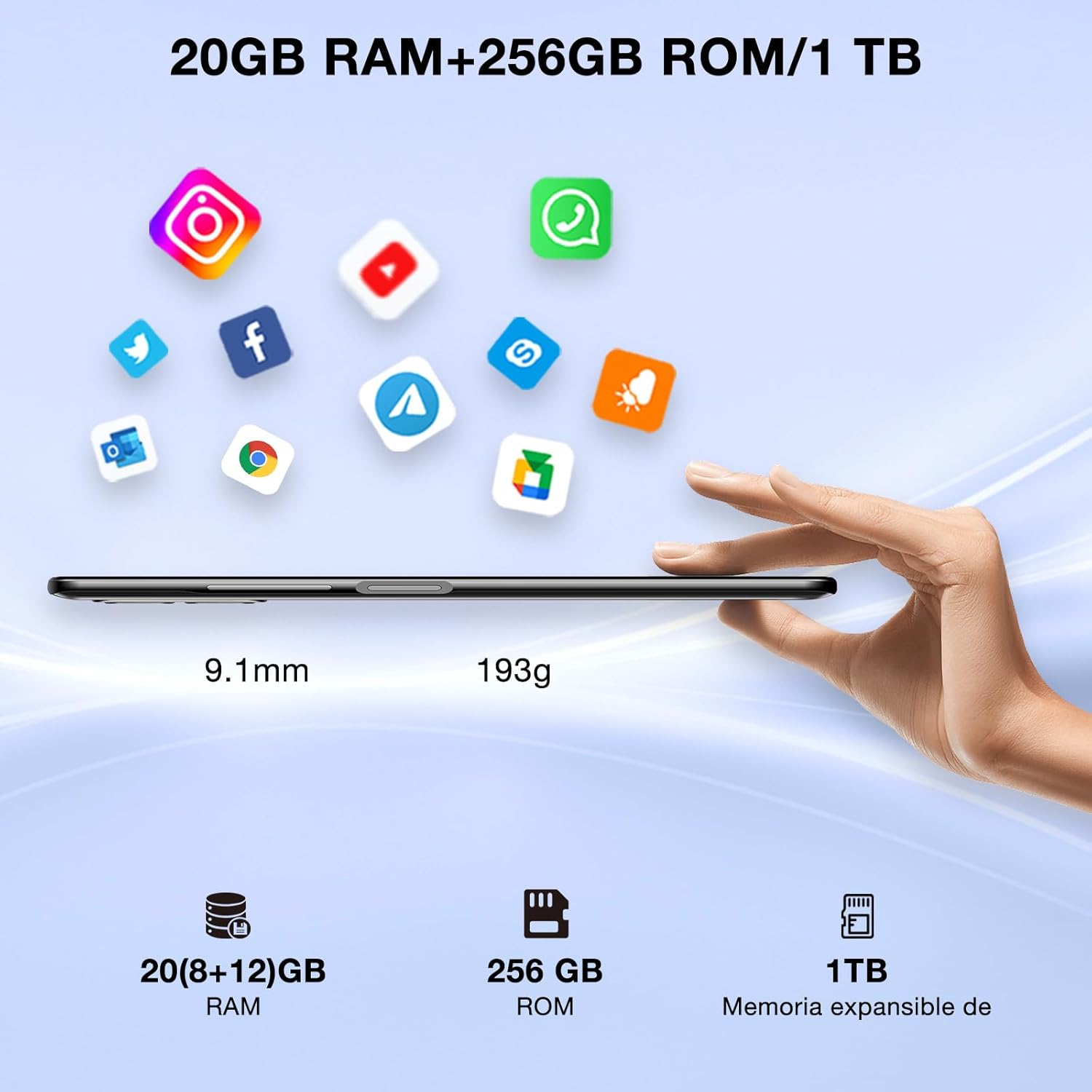
Image: DOOGEE N50PRO smartphone showing its slim profile (9.1mm), weight (193g), and memory configuration (20GB RAM, 256GB ROM, 1TB expandable memory).
2. Бастапқы қуат қосулы
Press and hold the Power button located on the side of the device until the DOOGEE logo appears. Follow the on-screen prompts to complete the initial setup, including language selection, Wi-Fi connection, and Google account setup.
3. Батареяны зарядтау
Before first use, it is recommended to fully charge the device. Connect the USB Type-C cable to the phone's charging port and the other end to the provided 9V/2A charger. Plug the charger into a power outlet. The charging indicator will appear on the screen.

Image: DOOGEE N50PRO connected to a charger, illustrating its 4200mAh battery capacity and 18W fast charging capability. The image also highlights OTG reverse charging.
Пайдалану нұсқаулары
1. Basic Navigation and Android 13 Features
Your DOOGEE N50PRO runs on Android 13, offering an intuitive user experience. Swipe down from the top of the screen to access the notification panel and quick settings. Customize your control center and direct access operations for efficient use of various functions.

Image: Visual representation of the DOOGEE N50PRO's internal components, highlighting the Spreadtrum T606 Octa-Core processor with 1.6GHz high frequency and 12nm advanced technology, running on Android 13.
2. Security Features: Face ID and Fingerprint ID
Enhance your device's security and convenience with advanced biometric authentication:
- Бет идентификаторы: Register your face to unlock the phone by simply looking at the front camera.
- Саусақ ізі идентификаторы: Register your fingerprint(s) to unlock the phone or authorize purchases with a touch. The fingerprint sensor is typically located on the side or back of the device.

Image: A user demonstrating Face ID unlock and a close-up of the Fingerprint ID sensor on the DOOGEE N50PRO, showcasing its multi-function security features.
3. Камераны пайдалану
The DOOGEE N50PRO features a triple camera system:
- 50 МП негізгі камера: Ажыратымдылығы жоғары фотосуреттер үшін.
- 8 MP Front Camera: Селфи және бейне қоңыраулар үшін.
- 2 МП макрокамера: Егжей-тегжейлі жақыннан түсіру үшін.
Access the Camera app from your home screen or app drawer. Explore various modes such as Panorama, Portrait, and Night mode to capture different scenes effectively.

Image: Diagram illustrating the DOOGEE N50PRO's dual AI camera setup, featuring a 50MP main camera, an 8MP front camera, and a 2MP macro camera. Sample photos taken with the 50MP main and 8MP front cameras are also shown.
4. Қосылу мүмкіндігі
- Сымсыз дәлдiк: Supports 2.4G/5G Wi-Fi for fast and stable internet connection. Go to Settings > Network & internet > Wi-Fi to connect to available networks.
- Bluetooth 5.0: For connecting wireless accessories like headphones or speakers. Go to Settings > Connected devices > Bluetooth.
- OTG (Жолда): Allows the phone to act as a host to connect USB devices like flash drives or external keyboards. It also supports reverse charging for other devices.
- Навигация: Integrated GPS, GLONASS, BeiDou, and Galileo for accurate location services.
- FM радиосы: Use the built-in FM radio feature (requires headphones to act as an antenna).
- 3.5 мм құлаққап ұясы: For wired audio accessories.
5. Parental Control
The device includes parental control features, allowing you to monitor and manage screen time and application usage for children. Access these settings through the device's system settings to balance usage effectively.
Техникалық қызмет көрсету
1. Батареяны күту
- Батареяны шектен тыс температураға (ыстық немесе суық) түсірмеңіз.
- Батареяны жиі толық зарядсыздандырмаңыз. Оны 20%-дан төмен түсірмей тұрып зарядтаңыз.
- Use only the provided charger and cable to prevent damage.
2. Тазалау
Телефонның экраны мен корпусын тазалау үшін жұмсақ, түксіз матаны пайдаланыңыз. Қатты химиялық заттарды немесе абразивті материалдарды пайдаланбаңыз. Қатты дақтар үшін, аздап dampшүберекті сумен немесе электроникаға арналған экран тазалағышпен.
3. Бағдарламалық құралды жаңарту
Құрылғыда соңғы мүмкіндіктер, қауіпсіздік патчтары және өнімділік жақсартулары бар екеніне көз жеткізу үшін бағдарламалық құрал жаңартуларын жүйелі түрде тексеріп, орнатыңыз. Параметрлер > Жүйе > Жүйені жаңарту тармағына өтіңіз.
Ақаулықтарды жою
- Құрылғы қосылмаған: Батарея зарядталғанына көз жеткізіңіз. Зарядтағышты қосып, қайта қосу әрекетінен бұрын бірнеше минут күтіңіз.
- Экран жауап бермейді: Try restarting the device by holding the Power button for about 10-15 seconds.
- Желі мәселелері: Check if your SIM card is properly inserted. Try toggling Airplane Mode on and off. If issues persist, contact your mobile service provider.
- Қолданбалар бұзылады: Clear the cache of the problematic app (Settings > Apps > [App Name] > Storage & cache > Clear cache). If the issue continues, consider reinstalling the app.
- Баяу өнімділік: Пайдаланылмаған қолданбаларды жабыңыз, кэшті тазалаңыз немесе соңғы шара ретінде зауыттық параметрлерді қалпына келтіруді қарастырыңыз (алдымен деректердің сақтық көшірмесін жасаңыз).
Техникалық сипаттамалар
| Ерекшелік | Техникалық сипаттама |
|---|---|
| Модель атауы | DOOGEE N50PRO |
| Операциялық жүйе | Android 13.0 |
| Процессор | Octa-Core (Spreadtrum T606) |
| Жедел Жадтау Құрылғысы | 20 GB (Extended Memory) |
| Ішкі жад (ROM) | 256 ГБ |
| Кеңейтілетін сақтау орны | 1 ТБ дейін (TF картасы) |
| Дисплей өлшемі | 6.52 дюйм |
| Дисплей ажыратымдылығы | HD+ (720x1600) |
| Негізгі камера | 50 МП |
| Алдыңғы камера | 8 МП |
| Макрокамера | 2 МП |
| Батарея сыйымдылығы | 4200 мАч |
| Зарядталуда | 18 Вт C типті жылдам зарядтау |
| Ұялы технология | 4G |
| SIM картасының түрі | Nano SIM (Dual SIM support) |
| Қосылу мүмкіндігі | Wi-Fi (2.4G/5G), Bluetooth 5.0, OTG, FM Radio |
| Навигация | GPS, GLONASS, BeiDou, Galileo |
| Қауіпсіздік мүмкіндіктері | Face ID, Fingerprint ID |
| Өлшемдері | 165.8 x 76.2 x 9.1 мм |
| Салмағы | 187 г |
| Құлаққап ұясы | 3.5 мм |
| Сөйлесу уақыты | 16 сағатқа дейін |

Image: The DOOGEE N50PRO's 6.52-inch Waterdrop HD+ display, showing its 720x1600 resolution, 20:9 aspect ratio, and 86% screen-to-body ratio.
Кепілдік және қолдау
1. Кепілдік туралы ақпарат
Your DOOGEE N50PRO smartphone comes with a two-year official warranty from the date of purchase. Please retain your proof of purchase for warranty claims. This warranty covers manufacturing defects and malfunctions under normal use conditions.
2. Тұтынушыларға қолдау көрсету
For technical assistance, warranty claims, or further inquiries, please contact DOOGEE customer support through their official website or the contact information provided with your purchase. Ensure you have your device model number and proof of purchase ready when contacting support.