
Infinity NX 10
Infinity Smartwatch пайдаланушы нұсқаулығы
Model: NX 10
Кіріспе
Welcome to the user manual for your Infinity Smartwatch, Model NX 10. This device is designed to enhance your daily life with advanced fitness tracking, communication features, and smart notifications. Featuring a vibrant 1.43" AMOLED screen and robust IP68 water resistance, your smartwatch is built for both everyday use and active lifestyles. Please read this manual carefully to ensure proper operation and maintenance of your device.

Figure 1: Infinity Smartwatch NX 10. This image shows the smartwatch from an angled perspective, highlighting its round AMOLED display, black silicone strap, and two side buttons.
Орнату
1. Қораптан шығару және бастапқы зарядтау
Upon unboxing, ensure all components are present: the Infinity Smartwatch NX 10 and the charging cable.
- Магниттік зарядтау кабелін ақылды сағаттың артқы жағындағы зарядтау нүктелеріне қосыңыз.
- Кабельдің USB ұшын стандартты USB қуат адаптеріне (жинаққа кірмейді) немесе компьютердің USB портына қосыңыз.
- The watch display will show a charging indicator. Fully charge the device before first use, which typically takes approximately 2 hours.

Figure 2: Smartwatch charging. The image illustrates the smartwatch being charged magnetically, with a green lightning bolt icon on the screen indicating charging status and a "400mAh Battery Capacity" label.
2. Қолданбаны орнату және жұптастыру
To unlock the full potential of your Infinity Smartwatch, download and install the companion application, Fit Cloud Pro, смартфоныңызда.
- Scan the QR code provided in the quick start guide (if available) or search for "Fit Cloud Pro" in your smartphone's app store (Google Play Store for Android, Apple App Store for iOS).
- Қолданбаны орнатыңыз.
- Open the Fit Cloud Pro app and follow the on-screen instructions to create an account or log in.
- Смартфонда Bluetooth қосылғанына көз жеткізіңіз.
- In the app, navigate to the device pairing section and search for your smartwatch (e.g., "NX 10" or similar Bluetooth name).
- Select your smartwatch from the list to initiate pairing. Confirm the pairing request on both your phone and the smartwatch if prompted.
- Once paired, the app will synchronize data with your smartwatch, and you can customize settings.
Пайдалану нұсқаулары
1. Негізгі шарлау
- Сенсорлық экран: Swipe left/right to navigate between main screens (e.g., activity, heart rate, weather). Swipe up/down to access quick settings or notifications. Tap to select an option.
- Бүйірлік түймелер: The top button typically acts as a power button (long press) or a back/home button (short press). The bottom button may be customizable or provide quick access to sports modes.

Figure 3: 1.43" AMOLED Screen. This image highlights the vibrant display of the smartwatch, showing a detailed watch face with various data points like time, date, steps, and heart rate.
2. Қоңырау шалу және жауап беру
Your Infinity Smartwatch supports Bluetooth calling, allowing you to make and receive calls directly from your wrist when connected to your smartphone.
- Қоңырау шалу үшін: Access the dialer or contacts list on your smartwatch. You can dial a number directly or select a contact to call.
- Қоңырауға жауап беру үшін: When a call comes in, the smartwatch will display the caller ID. Tap the green answer icon to accept the call or the red icon to decline.

Figure 4: Stay Connected On The Go. This image shows a user interacting with the smartwatch to make a call, illustrating the microphone, dialing, call records, and contacts features.
3. Фитнес және денсаулықты бақылау
The smartwatch is equipped with multiple sensors to monitor your health and fitness activities.
- Педометр: Automatically tracks your steps, distance, and calories burned throughout the day.
- Жүрек соғу жиілігін бақылау: Provides real-time heart rate data. Access this feature from the main menu or set up continuous monitoring in the app.
- Қан қысымын бақылау: Offers blood pressure readings. For accurate results, ensure the watch is worn correctly and remain still during measurement. Note: This feature is for reference only and should not be used for medical diagnosis.
- Ұйқының мониторингі: Ұйқы режимдеріңізді, соның ішінде терең ұйқы, жеңіл ұйқы және ояу уақытыңызды бақылайды. View detailed analysis in the Fit Cloud Pro app.
- Спорт режимдері: Supports over 100 sports modes, including running, cycling, swimming, and more. Select your desired activity to track specific metrics.

Figure 5: Track Every Move. This image displays the smartwatch tracking a swimming activity, with additional visuals of rock climbing and cycling, indicating its multi-sport tracking capabilities.

Figure 6: More than 110 sports modes. This image shows a variety of colorful icons representing different sports activities supported by the smartwatch, overlaid on a background of a person cycling.
4. Баптау
Personalize your smartwatch experience through the Fit Cloud Pro app.
- Жүздерді қарау: Choose from a wide range of pre-installed watch faces or download new ones via the app. You can also create custom watch faces using your own photos.
- Хабарландырулар: Configure which app notifications you wish to receive on your smartwatch (e.g., calls, SMS, social media alerts).
- Дабылдар мен еске салғыштар: Set alarms, sedentary reminders, and hydration reminders through the app.
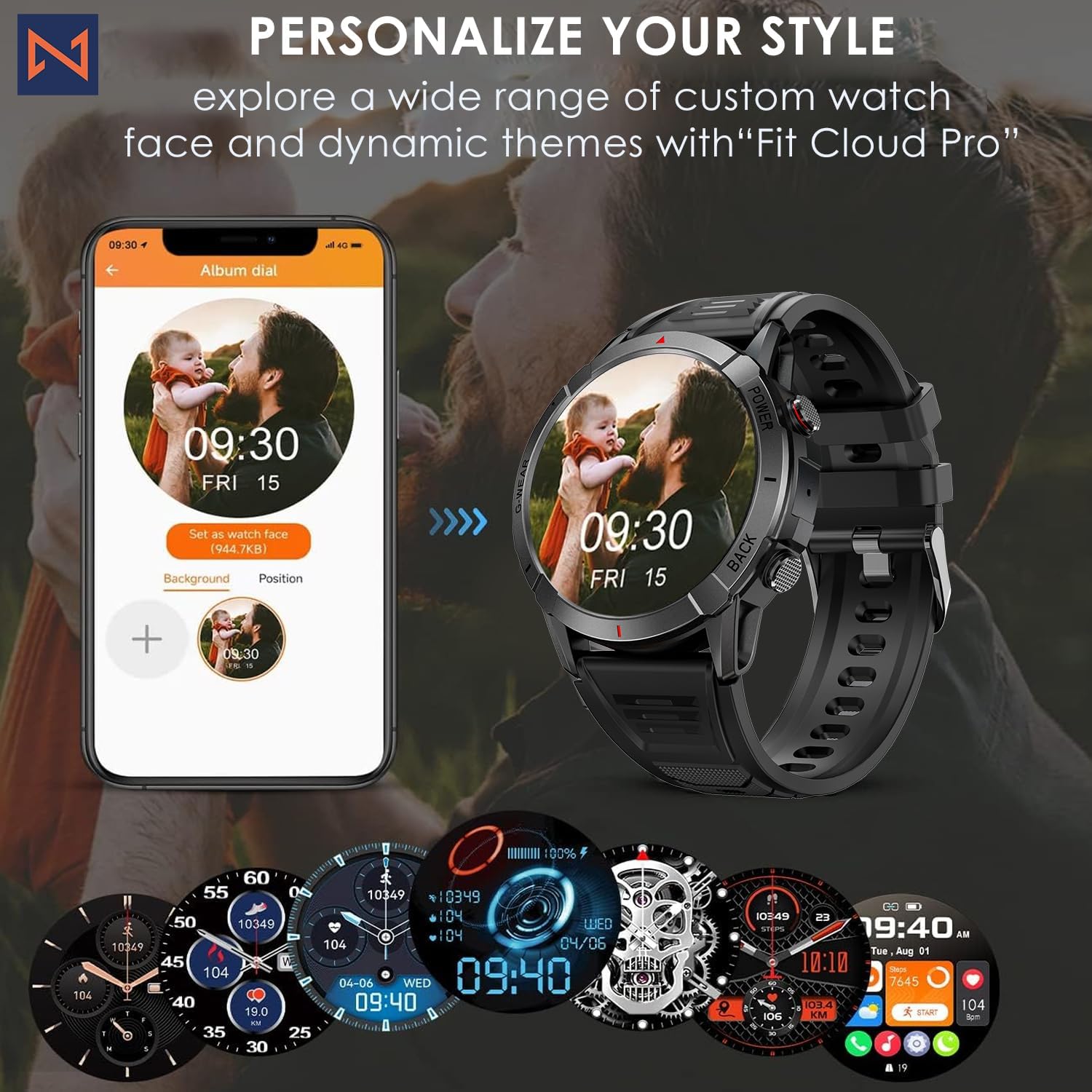
Figure 7: Personalize Your Style. This image demonstrates how to customize watch faces using the "Fit Cloud Pro" app, showing various digital and analog watch face options.
Техникалық қызмет көрсету
1. Смарт сағатыңызды тазалау
Тұрақты тазалау құрылғының сыртқы түрі мен функционалдығын сақтауға көмектеседі.
- Экранды және корпусты жұмсақ, талшықсыз шүберекпен сүртіңіз.
- Қатты дақтар үшін, dampшүберекке аздап су құйыңыз. Қатты химиялық заттарды немесе абразивті материалдарды пайдаланбаңыз.
- Дұрыс қосылуды қамтамасыз ету үшін зарядтау контактілерін мезгіл-мезгіл тазалап отырыңыз.
2. Суға төзімділік (IP68)
Your Infinity Smartwatch is rated IP68, meaning it is resistant to dust and can withstand immersion in water up to 1.5 meters for up to 30 minutes.
- It is suitable for daily use, hand washing, and light rain.
- Avoid prolonged immersion, hot water, steam, or high-pressure water jets (e.g., showering, sauna, diving).
- If the watch gets wet, dry it thoroughly before charging or operating buttons.

Figure 8: Engineered for Adventure. This image highlights the smartwatch's durability features, including waterproof, dustproof, anti-magnetic, and shockproof capabilities, with corresponding icons.
3. Батареяны күту
- Батареяның қызмет ету мерзімін ұзарту үшін шектен тыс температурадан аулақ болыңыз.
- Сағатты үнемі зарядтаңыз; батареяның ұзақ уақыт бойы толығымен таусылуына жол бермеңіз.
- Тек берілген зарядтау кабелін пайдаланыңыз.
Ақаулықтарды жою
| Мәселе | Мүмкін шешім |
|---|---|
| Сағат қосылмайды | Сағаттың толық зарядталғанына көз жеткізіңіз. Зарядтағышқа қосылып, қосу әрекетінен бұрын бірнеше минут күтіңіз. |
| Смартфонмен жұптастыру мүмкін емес |
|
| Дұрыс емес денсаулық деректері |
|
| Хабарландырулар алынбады |
|
| Қысқа батареяның қызмет ету мерзімі |
|
Техникалық сипаттамалар
| Ерекшелік | Мәлімет |
|---|---|
| Үлгі нөмірі | NX 10 |
| Дисплей | 1.43" AMOLED Screen |
| Дисплей ажыратымдылығы | 466x466 HD |
| Батарея сыйымдылығы | 400 мАч литий полимері |
| Суға төзімділік | IP68 |
| Қосылу мүмкіндігі | Блютез |
| Операциялық жүйе | Android (iOS жүйесімен үйлесімді) |
| Бау материалы | 22mm Silicon Belt |
| Дисплей материалы | Цинк қорытпасы |
| Элемент салмағы | 1.76 унция |
| Жад сақтау сыйымдылығы | 128 МБ |
Кепілдік және қолдау
For warranty information and technical support, please refer to the documentation included with your purchase or visit the official Infinity webсайт.
Manufacturer: Infiniity
For further assistance, you may contact Infiniity customer service through the contact information provided on their official website or within the Fit Cloud Pro application.
Ask a question about this manual
Ask about setup, troubleshooting, compatibility, parts, safety, or missing instructions. Manuals+ will review the question and use this page’s manual context to help answer it.