
1. Кіріспе
The diymore LCR-TC1 is a versatile multi-function transistor tester designed for automatic detection and measurement of various electronic components. This device can identify NPN and PNP transistors, N-channel and P-channel MOSFETs, diodes (including double diodes), thyristors, resistors, capacitors, and inductors. It features a full-color display for clear readings and is powered by a built-in lithium battery for convenience. This manual provides detailed instructions for the safe and effective use of your LCR-TC1 tester.
2. Қауіпсіздік туралы ақпарат
- Always ensure the component under test is fully discharged before connecting it to the tester, especially capacitors. Failure to do so can damage the tester.
- Зарядтау кіріс көлеміtage is 4.5V. Do not use an over-voltage charger, as this will damage the tester's internal circuitry.
- Do not attempt to test components while they are connected to a live circuit.
- Құрылғыны судан және төтенше температурадан алыс ұстаңыз.
- c ашпаңызasing of the device unless you are a qualified technician.
3. Өнім аяқталдыview
The diymore LCR-TC1 Multi-Function Tester is equipped with a clear display and intuitive controls for easy operation. Below is an illustration of the main components and their functions.

3.1-сурет: LCR-TC1 Tester with labeled parts including 160x128 TFT display, IR receiver window, multi-function key, Start button, transistor test area, Zener diode test area, Micro USB charging interface, and charge indicator LED.
- 160x128 TFT Display: Shows test results and device status.
- IR қабылдағыш терезесі: Used for decoding Hitachi-style IR remote control signals.
- Көп функциялы перне: For navigating menus or selecting options (if applicable).
- Бастау түймесі: Initiates the component test.
- Transistor Test Area: ZIF (Zero Insertion Force) socket for connecting components with multiple pins (e.g., transistors, ICs). Numbered pins (1, 2, 3) correspond to test points.
- Zener Diode Test Area: Dedicated area for testing Zener diodes.
- Micro USB Charging Interface: Ішкі литий батареясын зарядтау үшін.
- Жарық диодты индикаторы: Батарея толығымен зарядталғанда жасыл түспен жанады.
4. Техникалық сипаттамалар
The following table outlines the key performance parameters and general specifications of the diymore LCR-TC1 Multi-Function Transistor Tester.
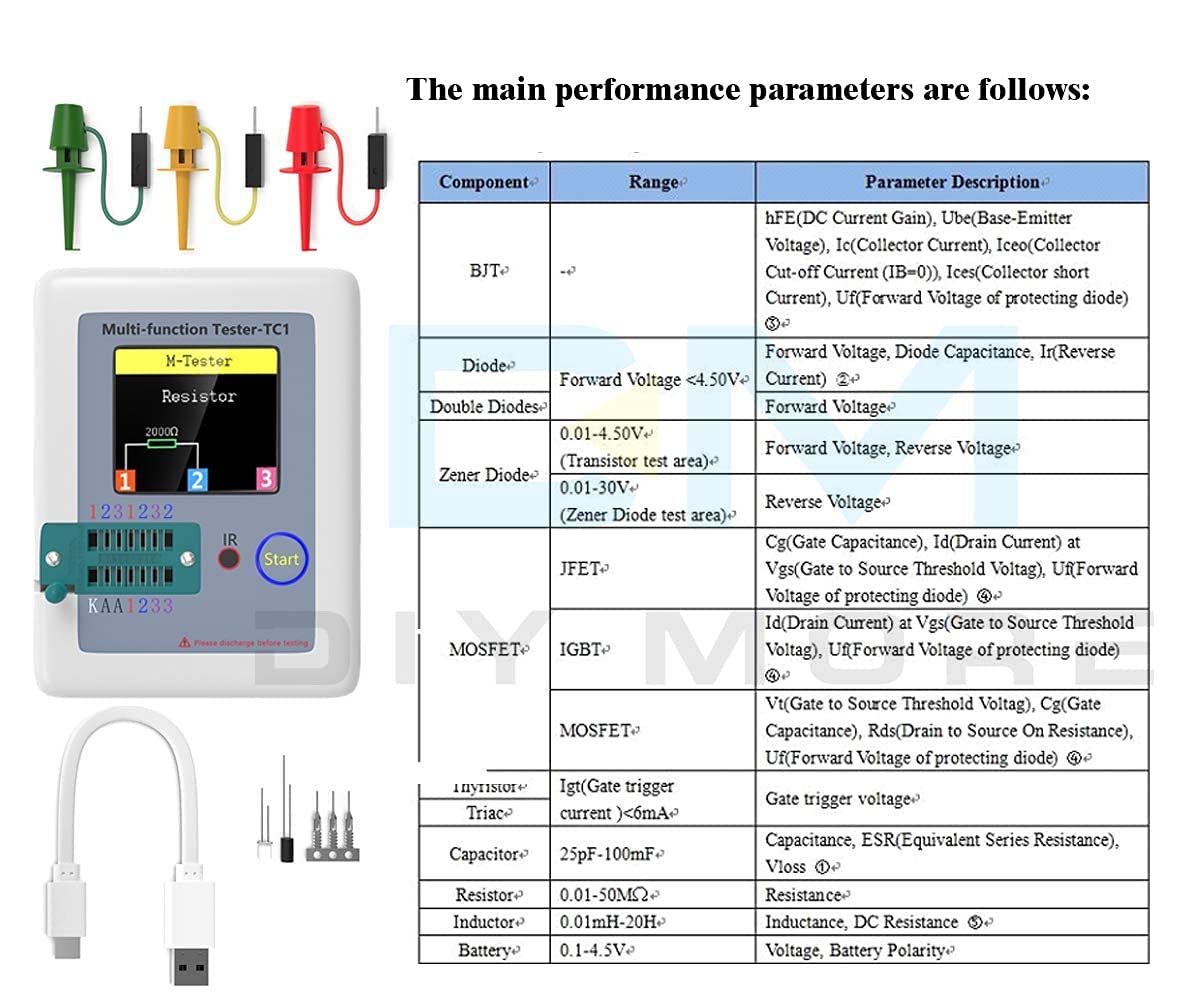
4.1-сурет: Main performance parameters including component types (BJT, Diode, Double Diodes, Zener Diode, JFET, MOSFET, IGBT, Thyristor/Triac, Capacitor, Resistor, Inductor, Battery) and their respective measurement ranges and parameter descriptions.
| Параметр | Мән |
|---|---|
| Бренд | diymore |
| Үлгі нөмірі | LCR-TC1 |
| Қуат көзі | Батареямен жұмыс істейтін (кіріктірілген литий батареясы) |
| Ең төменгі жұмыс көлеміtage | 4.5 Volts (Charging Input) |
| Максималды жұмыс көлеміtage | 4.5 Volts (Charging Input) |
| Өлшеу түрі | LCR өлшегіш |
| Элемент салмағы | 0.12 келі |
| Шығу елі | Қытай |
| Қосылған құрамдас бөліктер | Transistor Meter |
5. Орнату
Before using your LCR-TC1 tester for the first time, ensure it is adequately charged.
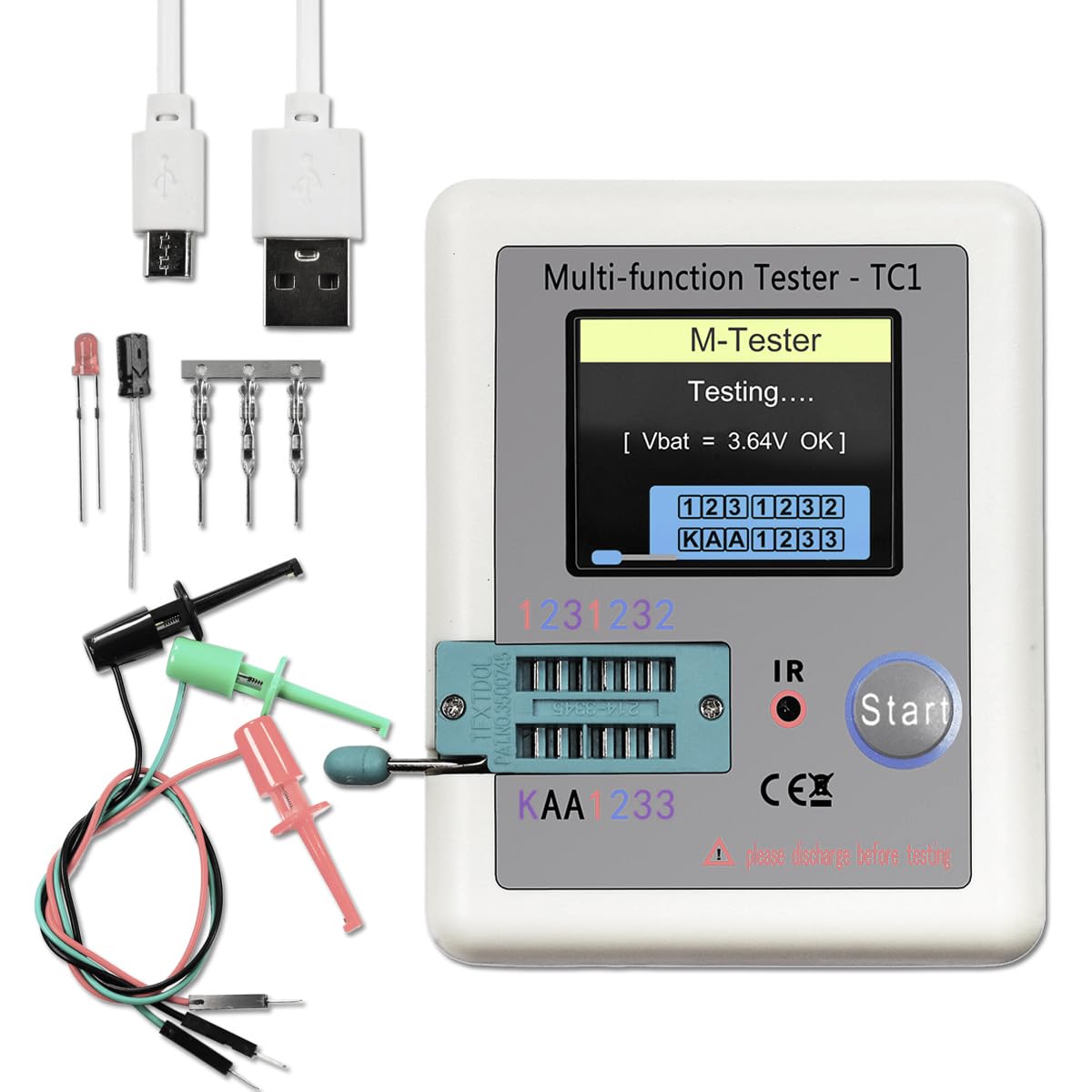
5.1-сурет: LCR-TC1 tester shown with a Micro USB charging cable and various test clips, indicating readiness for use or charging.
- Батареяны зарядтау: Connect the provided Micro USB cable to the charging interface on the tester and to a 4.5V USB power adapter (not included). The charge indicator LED will show the charging status. It will turn green when fully charged. Avoid using chargers with voltage 4.5 В-тан жоғары.
- Бастапқы қуат қосулы: Press the "Start" button to power on the device. The display will light up, and the tester will perform a self-check.
- Сынақ сымдарын қосу: For components that cannot be inserted directly into the ZIF socket, use the included test clips. Connect the clips to the corresponding test points (1, 2, 3) on the tester.
6. Пайдалану нұсқаулары
The LCR-TC1 tester is designed for automatic component identification and measurement. Follow these steps for testing various components.
6.1. General Testing Procedure
- Ensure the component to be tested is discharged, especially capacitors.
- Connect the component to the tester. You can use the ZIF socket for multi-pin components or the test clips for others. Ensure good contact between the component leads and the test points (1, 2, or 3).
- Press the "Start" button. The tester will automatically identify the component type and measure its parameters.
- The results will be displayed on the TFT screen.
- The device has an automatic shutdown function to conserve battery. It will power off after approximately 20 seconds of inactivity.
6.2. Testing Specific Components

6.1-сурет: Visual representation of the LCR-TC1 tester's capability to measure Inductance, Capacitance, Diode characteristics, and Resistance, showing typical component connections.
- Резисторлар: Connect the resistor leads to any two of the test points (1, 2, or 3). The tester will display the resistance value.
- Конденсаторлар: Connect the capacitor leads to any two of the test points (1, 2, or 3). Ensure the capacitor is discharged before testing. The tester will display capacitance, ESR (Equivalent Series Resistance), and Vloss.
- Индукторлар: Connect the inductor leads to any two of the test points (1, 2, or 3). The tester will display the inductance value and DC resistance.
- Diodes (including Double Diodes): Connect the diode leads to any two test points. The tester will identify the diode type and display forward voltage and reverse current.
- Transistors (NPN, PNP, MOSFET, JFET, IGBT): Insert the transistor leads into the ZIF socket, ensuring each lead (Emitter, Base, Collector for BJT; Source, Gate, Drain for FET) connects to a different test point (1, 2, or 3). The tester will identify the type, pinout, and measure parameters like hFE, Ube, Vt, Cgs, etc.

6.2-сурет: A MOSFET connected to the LCR-TC1 tester using test clips, demonstrating how to test multi-pin components that may not fit the ZIF socket directly.
- Thyristors and Triacs: Connect the leads to test points. The tester will identify the component and its gate trigger current.
- Зенер диодтары: Use the dedicated Zener diode test area for accurate measurements of Zener voltage.
- IR Remote Control Signals: Point a Hitachi-style IR remote control towards the IR receiver window and press a button. The tester will attempt to decode and display the signal.
7. Техникалық қызмет көрсету
- Тазалау: Use a soft, dry cloth to clean the exterior of the tester. Do not use abrasive cleaners or solvents.
- Сақтау орны: Құрылғыны салқын, құрғақ жерде, тікелей күн сәулесінен және төтенше температурадан алыс жерде сақтаңыз.
- Батареяға күтім жасау: Recharge the battery regularly, even if the device is not in frequent use, to maintain battery health. Avoid fully discharging the battery for extended periods.
8. Ақаулықтарды жою
| Мәселе | Ықтимал себебі | Шешім |
|---|---|---|
| Құрылғы қосылмайды. | Төмен немесе таусылған батарея. | Charge the device using a 4.5V Micro USB charger. |
| Incorrect or no reading displayed. | Poor connection to component; Component not discharged; Component is faulty. | Ensure component leads are clean and securely connected. Discharge capacitors before testing. Test a known good component to verify tester functionality. |
| Tester shuts off too quickly. | Automatic shutdown feature activated. | This is normal behavior to save battery. Press "Start" to reactivate. |
| Батарея зарядты ұстамайды. | Aging battery; Incorrect charging voltage. | Ensure you are using a 4.5V charger. If the issue persists, the internal battery may need replacement by a qualified technician. |
9. Қолдау және кепілдік
For any questions, technical assistance, or if you require further support regarding your diymore LCR-TC1 Multi-Function Transistor Tester, please contact the manufacturer or seller via email. Refer to your purchase documentation for specific contact details.
Regarding warranty, the product typically comes with a 10-day replacement policy. Please consult your retailer or purchase platform for the most accurate and up-to-date warranty information and terms of service.