
MEGATEK CP27BR
MEGATEK портативті CD ойнатқышының пайдаланушы нұсқаулығы
Model: CP27BR
Кіріспе
Thank you for choosing the MEGATEK Portable CD Player. This device is designed to provide a versatile and high-quality audio experience, supporting various media formats and offering multiple connectivity options. Please read this manual carefully to ensure proper use and maintenance of your new CD player.

Image: The MEGATEK Portable CD Player, showcasing its compact design, integrated speakers, control buttons, and included accessories like headphones and USB-C charging cables.
Қауіпсіздік туралы ақпарат
Қауіпсіз жұмысты қамтамасыз ету және зақымдануды болдырмау үшін келесі сақтық шараларын орындаңыз:
- Құрылғыны шектен тыс температураға, ылғалдылыққа немесе тікелей күн сәулесінің әсеріне ұшыратпаңыз.
- Құрылғыны құлатып алмаңыз немесе қатты соққыларға ұшырамаңыз.
- Құрылғыны өзіңіз бөлшектемеңіз немесе жөндеуге әрекет жасамаңыз. Барлық қызмет көрсетуді білікті мамандарға тапсырыңыз.
- Тек берілген зарядтау кабелін және үйлесімді қуат адаптерін пайдаланыңыз.
- Құрылғыны судан және басқа сұйықтықтардан алыс ұстаңыз.
- Құрылғыны жұмсақ, құрғақ шүберекпен тазалаңыз. Абразивті тазартқыштарды немесе еріткіштерді қолданбаңыз.
- Жоғары дыбыс деңгейінде ұзақ тыңдау есту қабілетінің бұзылуына әкелуі мүмкін. Дыбыс деңгейін қауіпсіз деңгейге реттеңіз.
Пакет мазмұны
Барлық элементтер пакетте бар екенін тексеріңіз:
- MEGATEK Portable CD Player - Black
- Сымды құлаққаптар
- USB-C зарядтау кабелі
- Пайдаланушы нұсқаулығы

Image: A visual representation of the package contents, including the CD player, headphones, USB-C cable, and user manual.
Өнім аяқталдыview
Familiarize yourself with the various parts and controls of your MEGATEK Portable CD Player.
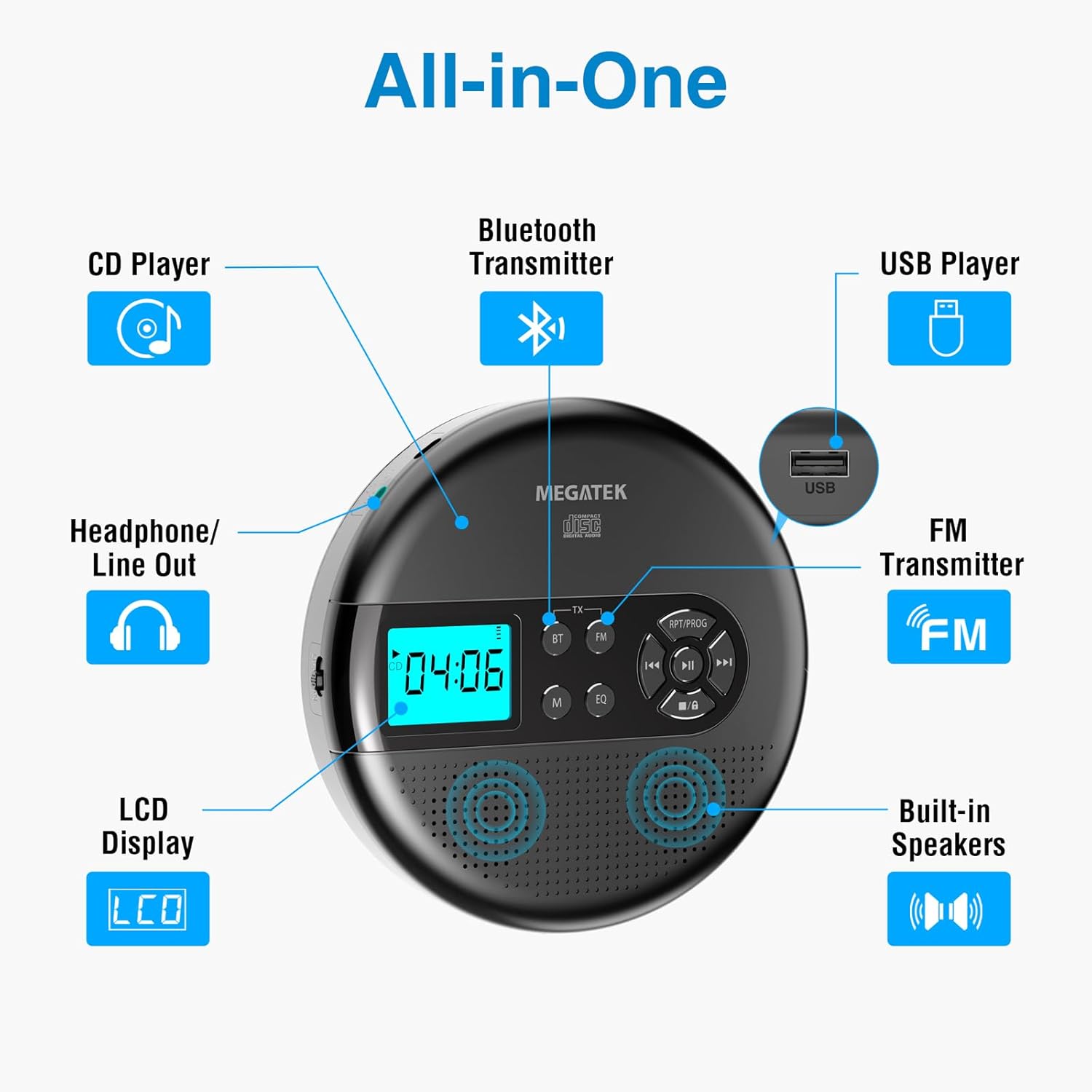
Image: An "All-in-One" diagram highlighting key features such as the CD Player, Bluetooth Transmitter, USB Player, FM Transmitter, Built-in Speakers, LCD Display, and Headphone/Line Out port.
Басқару элементтері мен порттар:
- СКД дисплей: Shows track number, time, mode, and battery status.
- Ойнату/Кідірту түймесі: Ойнатуды бастайды немесе тоқтатады.
- Алдыңғы/Келесі түймелері: Skips tracks or fast-forwards/rewinds.
- Тоқтату батырмасы: Ойнатуды тоқтатады.
- RPT/PROG Button: Controls repeat modes and programming tracks.
- BT түймесі: Activates Bluetooth transmission mode.
- FM түймесі: Activates FM transmission mode.
- M (режим) түймесі: Switches between CD, USB, Bluetooth, and FM modes.
- EQ батырмасы: Эквалайзердің алдын ала орнатулары арқылы айналдырады.
- Дыбыс деңгейін басқару: Аудио шығыс деңгейін реттейді.
- USB порты: Аудионы ойнату үшін fileUSB дискісінен.
- Type-C зарядтау порты: Ішкі батареяны зарядтауға арналған.
- 3.5mm Audio Out Jack: Құлаққаптарды немесе сыртқы динамиктерді қосуға арналған.
- Кірістірілген стерео үндеткіштер: For direct audio playback.
Орнату
Батареяны зарядтау:
The device is equipped with a built-in 2000mAh rechargeable Li-ion battery. Before first use, fully charge the player.
- Connect the provided USB-C charging cable to the Type-C charging port on the player.
- USB-C кабелінің екінші ұшын USB қуат адаптеріне (жинаққа кірмейді) немесе компьютердің USB портына жалғаңыз.
- The battery indicator on the LCD display will show charging status. A full charge provides up to 15 hours of playtime at medium volume.

Image: The portable CD player connected to a power source via its USB-C cable, resting on a nightstand next to a bed.
CD енгізу:
- Locate the CD compartment latch/button on the side of the player and slide/press it to open the lid.
- Carefully place the CD onto the center spindle with the label side facing up.
- Ықшам дискіні орнына түскенше ақырын басыңыз.
- Ықшам дискі бөлігінің қақпағын ол бекітілгенше мықтап жабыңыз.

Image: The portable CD player with its lid open, showing a blue CD disc inserted into the compartment, ready for playback.
Пайдалану нұсқаулары
CD ойнату:
- Insert a CD as described in the Setup section.
- түймесін басыңыз Ойнату/Үзіліс ойнатуды бастау үшін түймесін басыңыз.
- пайдаланыңыз Алдыңғы/Келесі buttons to navigate between tracks. Hold to fast-forward or rewind.
- түймесін басыңыз RPT/PROG button to cycle through repeat modes (repeat one, repeat all, random) or to program a custom playback order.
- түймесін басыңыз Тоқта ойнатуды аяқтау үшін түймесін басыңыз.
- Adjust volume using the dedicated volume control.
USB ойнату:
The player supports MP3, WMA, and WAV audio fileUSB дискісінен.
- USB флэш-дискісін USB портына салыңыз.
- түймесін басыңыз M (режим) USB режиміне ауысу үшін түймесін басыңыз.
- пайдаланыңыз Ойнату/Үзіліс, Алдыңғы/Келесі, және RPT/PROG CD ойнату кезіндегідей түймелерді басыңыз.
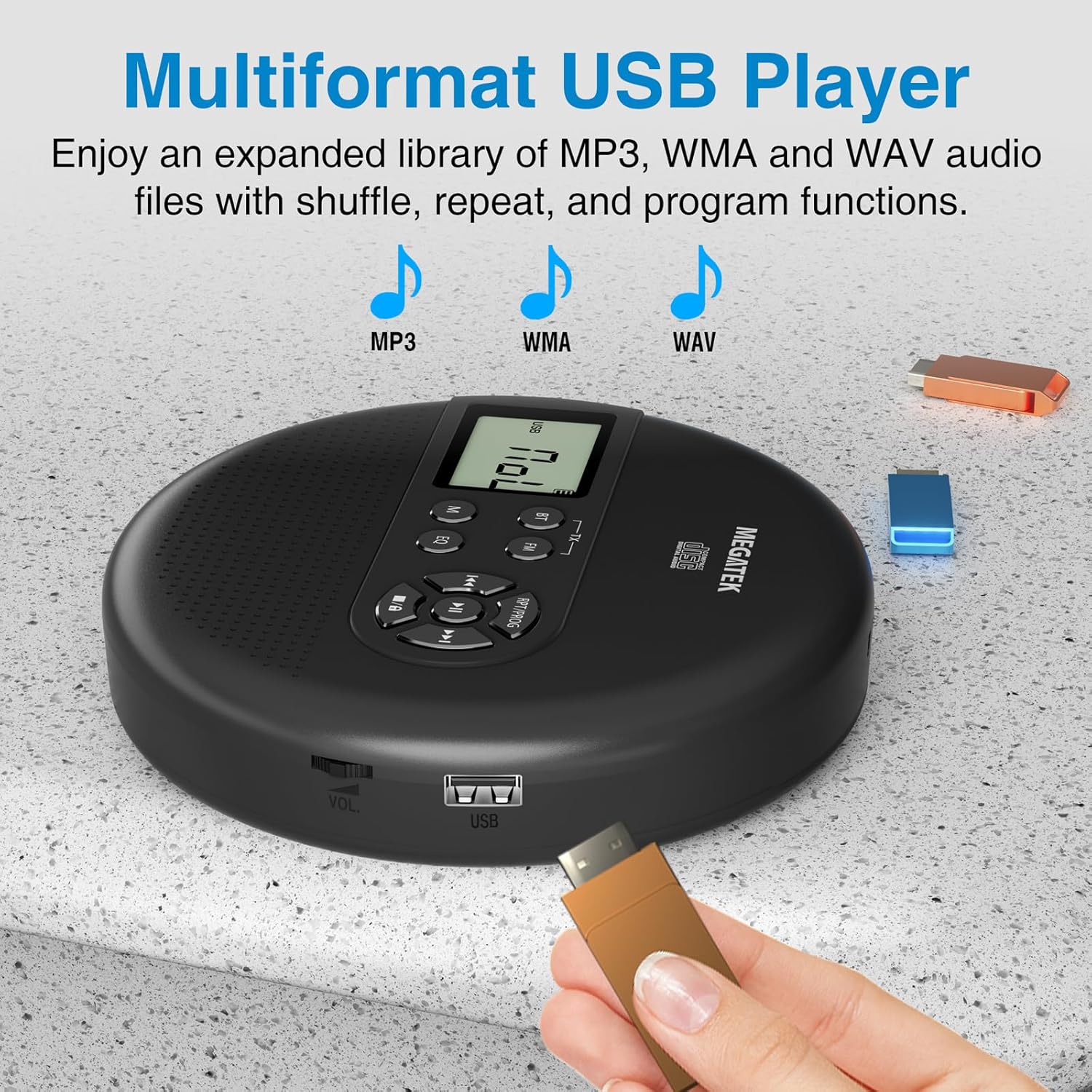
Image: The portable CD player with a USB flash drive inserted into its side port, illustrating its multi-format USB playback capability.
Bluetooth беру:
Stream audio wirelessly to Bluetooth-enabled headphones or speakers. Note: This feature does not support connections to car stereo systems.
- Bluetooth құлақаспаптары немесе динамиктері жұптастыру режимінде екеніне көз жеткізіңіз.
- On the CD player, press the BT button. The Bluetooth indicator on the display will flash.
- The player will automatically search for and connect to nearby Bluetooth devices. Once connected, the indicator will stop flashing.

Image: The portable CD player wirelessly transmitting audio to two external Bluetooth speakers, demonstrating its Bluetooth transmission capability.
FM жіберу:
Transmit audio signals to nearby FM radios, including car FM stereos and home stereo systems.
- түймесін басыңыз FM button on the CD player. The display will show an FM frequency.
- Tune your FM radio (car stereo, home stereo) to the same frequency displayed on the CD player.
- Adjust the frequency on the CD player using the Алдыңғы/Келесі buttons if interference occurs or to find a clearer channel.

Image: The portable CD player placed on a car dashboard, transmitting audio to the car's FM stereo system, indicated by an FM frequency on the car's display.
Using Headphones/External Speakers:
For private listening or connecting to wired audio systems:
- Plug the included wired headphones into the 3.5mm audio out jack.
- Alternatively, connect an audio cable (not included) from the 3.5mm audio out jack to the AUX input of external speakers or an audio system.
- The built-in speakers will automatically mute when headphones or external speakers are connected.

Image: A close-up of the portable CD player, visually representing sound waves emitting from its dual stereo speakers, emphasizing the built-in audio capability.
Техникалық қызмет көрсету
- Тазалау: Use a soft, dry, lint-free cloth to clean the exterior of the player. For the CD lens, use a specialized CD lens cleaner. Do not use liquids or aerosol cleaners directly on the device.
- Сақтау орны: When not in use for extended periods, store the player in a cool, dry place, away from direct sunlight and extreme temperatures.
- Батареяға күтім жасау: Батареяның қызмет ету мерзімін ұзарту үшін батареяны жиі толық зарядсыздандырудан аулақ болыңыз. Құрылғыны белсенді пайдаланбасаңыз да, үнемі зарядтаңыз.
Ақаулықтарды жою
| Мәселе | Ықтимал себебі | Шешім |
|---|---|---|
| Ойыншы қосылмайды. | Батарея таусылды. | Charge the player using the USB-C cable. |
| Динамиктерден/құлаққаптардан дыбыс жоқ. | Volume is too low; headphones not fully plugged in; incorrect mode selected. | Increase volume; ensure headphones are securely connected; press the M (режим) Дұрыс дереккөзді таңдау үшін түймесін басыңыз. |
| CD ойнатылмайды немесе ойнатылмайды. | CD is dirty, scratched, or inserted incorrectly; anti-skip function overwhelmed. | Clean the CD; ensure CD is properly seated; avoid strong vibrations. |
| Bluetooth байланысы мәселелері. | Device not in pairing mode; too far from player; interference. | Ensure receiving device is in pairing mode; move closer to the player; restart both devices. |
| FM transmission static/poor quality. | Interference; incorrect frequency. | Adjust the FM frequency on the player and receiver to find a clear channel. |
Техникалық сипаттамалар
| Ерекшелік | Мәлімет |
|---|---|
| Үлгі нөмірі | CP27BR |
| Өнім өлшемдері | 5.91 x 5.91 x 1.32 дюйм |
| Элемент салмағы | 10.9 унция |
| Батарея | 2000 мАч литий-ион (қайта зарядталатын) |
| Ойын уақыты | 15 сағатқа дейін (орташа көлемде) |
| Қолдау көрсетілетін CD форматтары | CD, CD-R/RW, MP3 CD, Audio Book CD |
| Қолдау көрсетілетін USB пішімдері | MP3, WMA, WAV |
| Өткізіп жіберуге қарсы қорғаныс | 60 секунд |
| Қосылу мүмкіндігі | USB, Bluetooth Transmitter, FM Transmitter, 3.5mm Audio Out |
| Арнайы мүмкіндіктер | Built-in Stereo Speakers, Resume Play, Shuffle, Repeat, Program Functions, 5 EQ Options |
Кепілдік және қолдау
MEGATEK offers comprehensive support for its products:
- 12 айлық ауыстыру: In case of product defects or issues within 12 months of purchase.
- Өмір бойы техникалық қолдау көрсету: Assistance with product usage, troubleshooting, and general inquiries.
- 24/7 тұтынушыларға қызмет көрсету: Available through Amazon buyer-seller messaging.
For any questions or problems, please contact MEGATEK customer service via the Amazon platform or refer to the contact information provided in the product packaging.
Image: A graphic detailing MEGATEK's customer support, including 12-month replacement, lifetime technical support, and 24/7 Amazon buyer-seller messaging, alongside an image of customer service representatives.
Ask a question about this manual
Ask about setup, troubleshooting, compatibility, parts, safety, or missing instructions. Manuals+ will review the question and use this page’s manual context to help answer it.