
1. Кіріспе
Thank you for choosing the WORKPRO 1500W Rotary Hammer Drill. This heavy-duty tool is designed for demanding tasks such as drilling in concrete, wood, and steel, as well as chiseling applications. This manual provides essential information for the safe and efficient operation, maintenance, and troubleshooting of your rotary hammer drill. Please read it thoroughly before first use and keep it for future reference.

Image 1.1: WORKPRO 1500W Rotary Hammer Drill and included accessories.
2. Жалпы қауіпсіздік нұсқаулары
Өрт, электр тогының соғуы және жеке жарақат алу қаупін азайту үшін әрқашан негізгі қауіпсіздік шараларын сақтаңыз. Бұл нұсқауларды орындамау ауыр жарақатқа әкелуі мүмкін.
- Жұмыс аймағының қауіпсіздігі: Жұмыс орнын таза және жақсы жарықтандырыңыз. Шамалы немесе қараңғы жерлер жазатайым оқиғаларға шақырады. Жарылыс қаупі бар ортада, мысалы, жанғыш сұйықтықтар, газдар немесе шаң бар жерлерде электр құралдарын пайдаланбаңыз.
- Электр қауіпсіздігі: Электр құралының ашалары розеткаға сәйкес келуі керек. Штепсельді ешбір жағдайда өзгертпеңіз. Денені жерге тұйықталған немесе жерге тұйықталған беттерге тигізбеңіз. Электр құралдарын жаңбырға немесе ылғалға ұшыратпаңыз.
- Жеке қауіпсіздік: Always wear eye protection. Use hearing protection when operating the tool for extended periods. Wear a dust mask if drilling in dusty conditions. Dress properly; avoid loose clothing or jewelry.
- Құралды қолдану және күту: Электр құралын күштеп пайдаланбаңыз. Қолданбаңыз үшін дұрыс электр құралын пайдаланыңыз. Кез келген реттеулер, керек-жарақтарды ауыстыру немесе электр құралдарын сақтау алдында ашаны қуат көзінен ажыратыңыз.
- Техникалық қызмет көрсету: Электр құралдарын ұстаңыз. Электр құралының жұмысына әсер етуі мүмкін жылжымалы бөлшектердің бұрмалануын немесе байланыстырылуын, бөлшектердің сынуын және басқа жағдайды тексеріңіз.
3. Product Components and Included Items
Familiarize yourself with the parts of your WORKPRO Rotary Hammer Drill and the accessories provided.

Image 3.1: Key components of the rotary hammer drill, including SDS-PLUS Chuck, Four Functions Switch, Grease Pot, Shock Absorber, On/Off Switch, Cushioned Handle, Variable Speed Control, 360° Rotatable Handle, and Heat Outlet.
Қосылған керек-жарақтар:

Image 3.2: The complete set of accessories includes a carrying case, rotary hammer drill, SDS-plus point flat bit (250mm), SDS-plus point chisel bit (250mm), wrench, grease, SDS-plus drill bits (8mm, 10mm, 12mm), and a dust collector.
- 1 x Heavy-duty Rotary Hammer Drill
- 3 x SDS-plus Drill Bits (8 mm, 10 mm, 12 mm)
- 1 x Round Shank Chisel (Φ14 × 250 mm)
- 1 x Flat Chisel (Φ14 × 250 mm)
- 1 x Grease container
- 1 x Carbon Brush set
- 1 x шаң қақпағы
- 1 x кілт
- 1 x Тасымалдау қорабы
4. Орнату және құрастыру
4.1 Көмекші тұтқаны бекіту
The 360° rotatable handle provides better control and comfort. Loosen the handle clamp, тұтқаны қалаған бұрышқа қойып, clamp қауіпсіз.
4.2 Inserting and Removing SDS-plus Bits
The SDS-plus chuck allows for quick and secure bit changes.
- Енгізуде: Clean the bit shank. Pull back the chuck collar, insert the bit into the chuck until it clicks into place. Release the collar. Pull on the bit to ensure it is securely locked.
- Жою: Pull back the chuck collar and pull the bit out.

Image 4.1: Illustration of the auto-lock SDS-plus chuck for secure bit clamping.
4.3 Attaching the Dust Collector
For cleaner operation and to protect the user, attach the dust collector to the front of the tool when drilling.

Image 4.2: The anti-dust cover protects users and the machine from dust and debris.
5. Пайдалану нұсқаулары
The WORKPRO Rotary Hammer Drill features four operating modes and variable speed control for versatile applications.
5.1 Режимді таңдау
Use the four-function switch located on the side of the tool to select the desired operating mode:
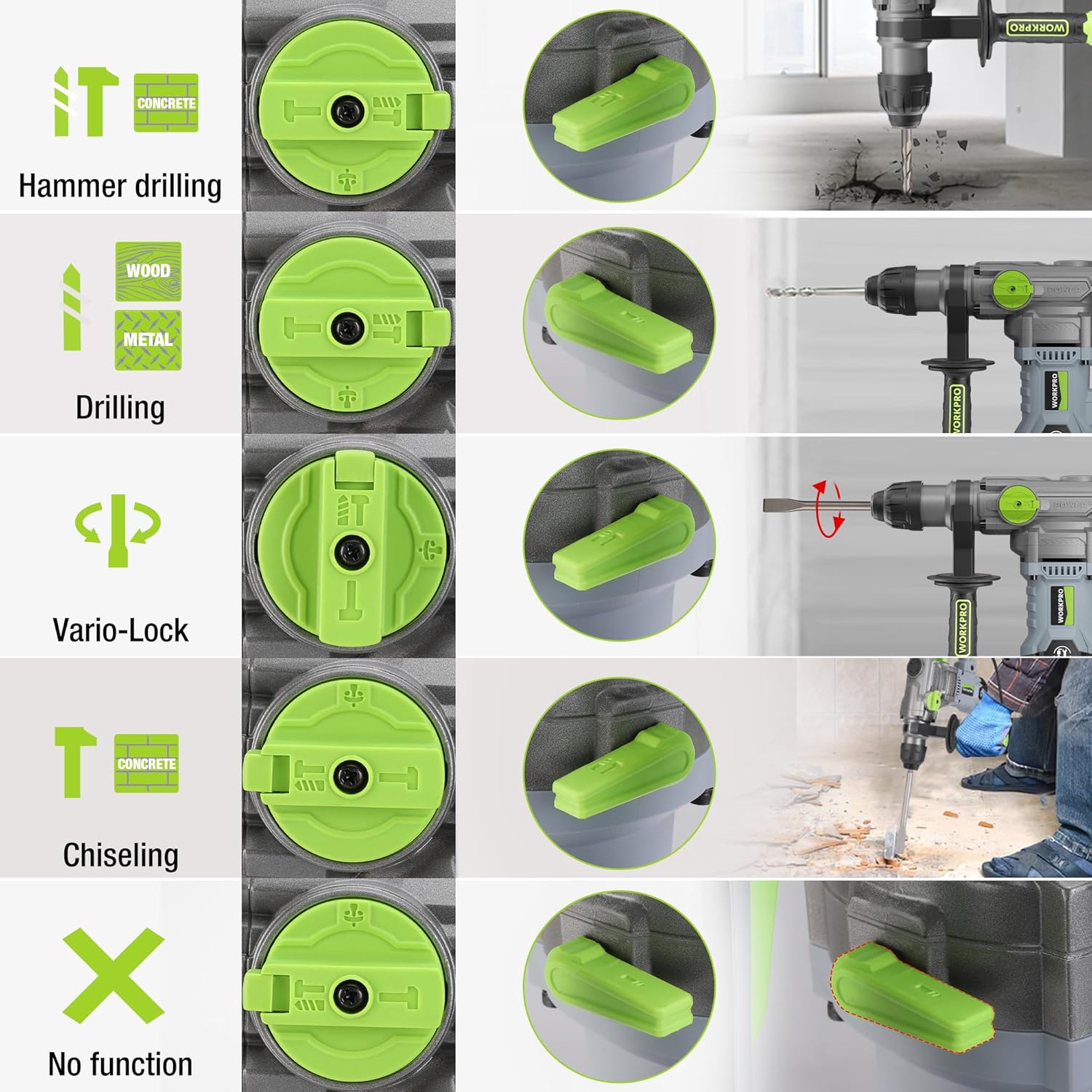
Image 5.1: The four-function switch allows selection between Hammer Drilling, Drilling, Vario-Lock (Chisel Adjust), and Chiseling modes.
- Балғамен бұрғылау: Бетон және кірпішті соққымен бұрғылауға арналған.
- Бұрғылау: For drilling in wood, metal, and plastic without impact.
- Қашау (тек балғамен): For light chiseling work in concrete and masonry.
- Vario-Lock (Chisel Adjust): Allows you to rotate and lock the chisel in various positions to optimize the working angle.

Image 5.2: Visual representation of the hammer drilling, drilling, hammer, and chisel adjust modes.
5.2 Айнымалы жылдамдықты басқару
The variable speed control allows you to adjust the rotation speed (0-930 RPM) and impact frequency (0-4300 BPM) to match the material and application.
- Rotate the speed adjustment dial to increase or decrease the speed.
- Start with a lower speed for precise drilling and increase as needed.
5.3 Бұрғылау қуаты
The tool offers excellent drilling performance across various materials:
- Бетон: 32 мм дейін
- Ағаш: 42 мм дейін
- Болат: 13 мм дейін
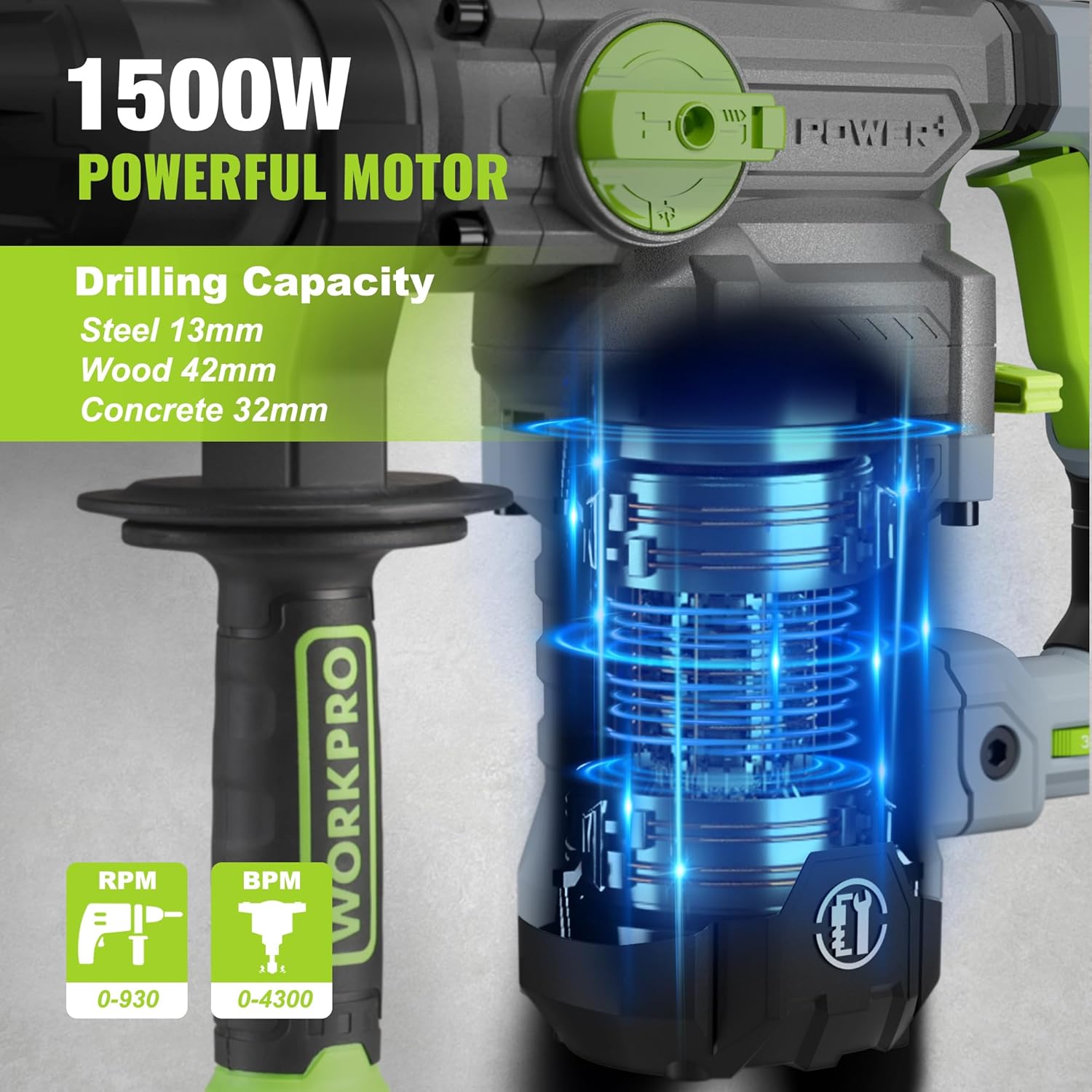
Image 5.3: The 1500W motor provides sufficient power for drilling in steel, wood, and concrete.
5.4 Өтінім Мысamples

Image 5.4: The tool is suitable for various tasks including chiseling concrete, removing tiles, concrete drilling, and floor breaking.
6. Техникалық қызмет көрсету
Тұрақты техникалық қызмет көрсету құралдың ұзақ қызмет ету мерзімін және оңтайлы өнімділігін қамтамасыз етеді.
6.1 Тазалау
- Тазалау алдында құралды әрқашан қуат көзінен ажыратыңыз.
- Қызып кетудің алдын алу үшін желдеткіш саңылауларын үнемі тазалап отырыңыз.
- Құрал корпусын жұмсақ шүберекпен сүртіңіз, damp шүберек. Қатты химиялық заттарды немесе абразивті тазартқыштарды қолданбаңыз.
- The tool features a dust-proof design and anti-dust bottom structure to extend its service life.
6.2 Grease Replenishment
To maintain optimal performance and durability, replenish the grease every 30-40 hours of cumulative use.
- Use the provided wrench to open the grease pot.
- Apply the advanced lubricant (grease) as instructed.
- Securely close the grease pot after replenishment.
Image 6.1: Instructions for grease replenishment using the provided spanner and grease.
6.3 Көміртекті щетканы ауыстыру
Carbon brushes are wear parts and should be checked periodically. Replace them when they are worn down to their limit to ensure consistent motor performance.
7. Ақаулықтарды жою
Бұл бөлім сізде кездесетін жалпы мәселелерді қарастырады. Мұнда көрсетілмеген мәселелер бойынша тұтынушыларды қолдау қызметіне хабарласыңыз.
| Мәселе | Ықтимал себебі | Шешім |
|---|---|---|
| Құрал іске қосылмайды | Қуат көзі жоқ; Ақаулы қосқыш; Тозған көміртекті щеткалар | Check power connection; Test switch; Replace carbon brushes |
| Бұрғылау өнімділігі төмендеді | Dull drill bit; Incorrect mode selected; Insufficient grease | Replace or sharpen drill bit; Select correct mode; Replenish grease |
| Шамадан тыс діріл/шу | Loose components; Damaged bit; Internal issue | Check all connections; Replace bit; Contact service center |
| Қызып кету | Бітелген желдету саңылаулары; Ұзақ уақыт бойы ауыр пайдалану | Clean ventilation slots; Allow tool to cool down |
8. Техникалық шарттар
| Ерекшелік | Техникалық сипаттама |
|---|---|
| Үлгі нөмірі | W125244A |
| Кіріс көлеміtage | 230-240 В |
| Жиілік | 50 Гц |
| Номиналды кіріс қуаты | 1500 Вт |
| Жүксіз жылдамдық | 0-930 rpm ±10% |
| Әсер ету жиілігі | 0-4300 bpm ±10% |
| Бірыңғай әсер ету күші | 5.5 Дж |
| Бұрғылау сыйымдылығы (бетон) | 32 мм |
| Бұрғылау сыйымдылығы (ағаш) | 42 мм |
| Бұрғылау сыйымдылығы (болат) | 13 мм |
| Чак түрі | SDS-плюс |
| Өнім өлшемдері (L x W x H) | 38.6 x 10.4 x 26.4 см |
| Салмағы | 8.34 кг |
| Қуат көзі | Сымды электр |
| Беріліс саны | 6 (Variable Speed) |
9. Кепілдік және қолдау туралы ақпарат
For warranty details, product support, or service inquiries, please refer to the warranty card included with your purchase or contact WORKPRO customer service directly. Keep your proof of purchase for any warranty claims.