
1. Кіріспе
This manual provides comprehensive instructions for the installation, operation, and maintenance of your Raymarine Axiom 2 Pro 16 RVM Chartplotter/Fishfinder. The Axiom 2 Pro series offers enhanced performance with an ultra-fast 6-core processor, HybridTouch control, and advanced RealVision MAX sonar capabilities. Its HydroTough display ensures reliable operation in challenging marine environments. This device integrates seamlessly with other marine electronics through the LightHouse 4 operating system.
Қауіпсіз және тиімді жұмыс істеуін қамтамасыз ету үшін өнімді қолданар алдында осы нұсқаулықты мұқият оқып шығыңыз.
2. Қауіпсіздік туралы ақпарат
Маңызды қауіпсіздік нұсқаулары:
- Always ensure proper installation by qualified personnel to prevent damage or injury.
- Кез келген техникалық қызмет көрсету немесе орнату процедураларын орындамас бұрын электр қуатын ажыратыңыз.
- Do not expose the unit to extreme temperatures or direct sunlight for prolonged periods when not in use.
- Use only Raymarine approved accessories and parts.
- Observe all local and international maritime regulations when operating this device.
3. Пакет мазмұны
Төменде тізімделген барлық элементтердің өнім бумасында бар екенін тексеріңіз:
- 1 x Raymarine Axiom 2 Pro 16 RVM Monitor
- Mounting Hardware (screws, gaskets, etc.)
- Қуат кабелі
- Documentation Pack (including this manual)
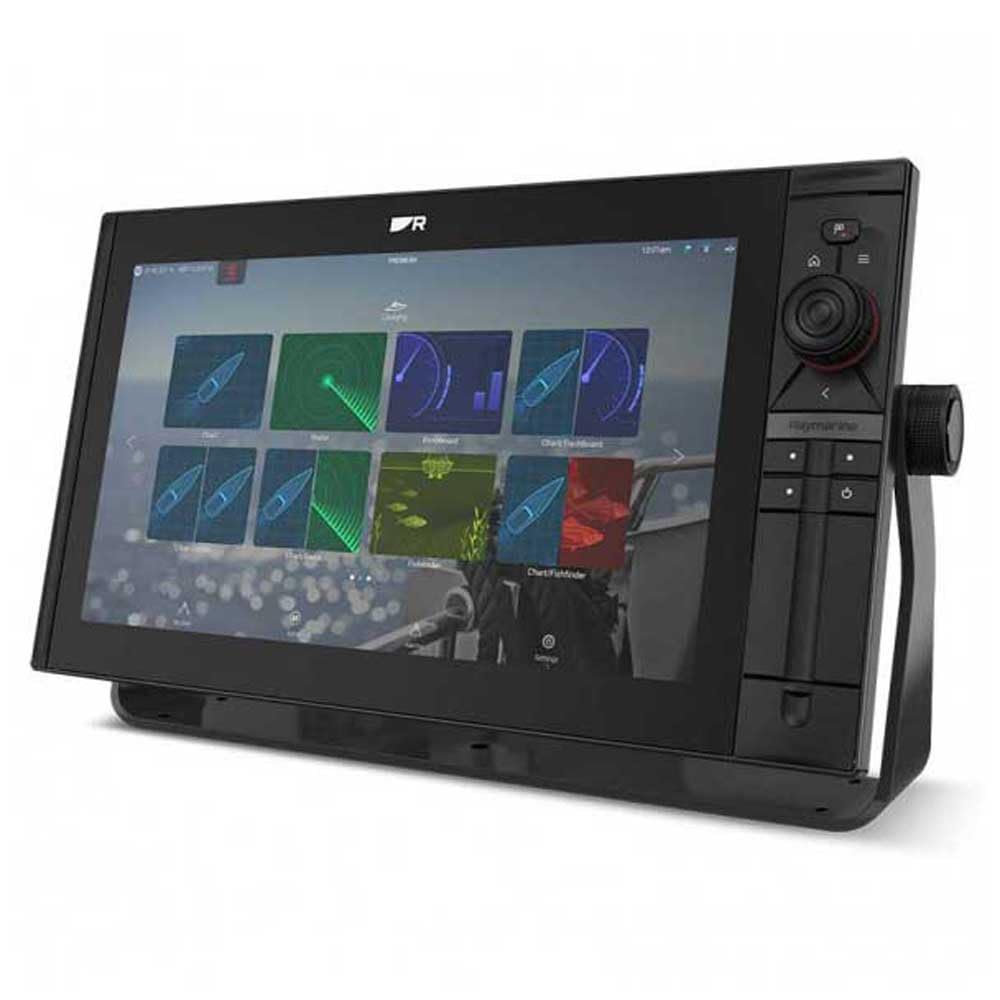
Image 1: Raymarine Axiom 2 Pro 16 RVM Chartplotter/Fishfinder unit. This image shows the main display unit, which is the primary component of the package.
4. Орнату және орнату
The Axiom 2 Pro 16 RVM is designed for panel mount installation. Ensure you have adequate space and access for wiring before beginning.
4.1 Дисплейді орнату
- Choose a suitable location on your boat's dashboard or panel, ensuring clear visibility and access.
- Use the provided template (if applicable) to cut the mounting hole.
- Secure the display unit into the panel using the supplied mounting hardware.
4.2 Электр қосылымдары
- Connect the power cable to a suitable 12V DC power source on your vessel. Ensure proper polarity.
- Connect any external sensors or transducers (sold separately) according to their respective manuals.
- For network integration, connect Ethernet cables to other compatible Raymarine devices.
- The unit supports HDMI connectivity for remote displays.
5. Пайдалану нұсқаулары
5.1 Қуатты қосу/өшіру
- Press and hold the Power button to turn the unit on or off.
- The automatic display brightness sensor adjusts screen illumination based on ambient light conditions.
5.2 HybridTouch Control
The Axiom 2 Pro features HybridTouch, allowing control via the fluid touchscreen or reliable keypad. Use the touchscreen for quick navigation and planning, and the keypad for precise control in rough seas. An interchangeable keypad field offers options for autopilot controls or user-programmable soft keys.
5.3 LightHouse 4 Operating System
Navigate seamlessly through chartplotter, sonar, radar, autopilot, and video functions using the intuitive LightHouse 4 OS. Customize your display with multiple Axiom displays and advanced video options, including HDMI output.
5.4 RealVision MAX Sonar
RealVision MAX optimizes DownVision, SideVision, and 3D sonar for greater range, improved resolution, and sharper target identification. This feature enhances fishfinding capabilities.
5.5 Диаграмма жасаушы функциялар
The unit supports Navionics/C-Map cartography. Plan and create your course directly on the display. Utilize GPS for accurate positioning and navigation.
6. Техникалық қызмет көрсету
6.1 Дисплейді тазалау
The HydroTough display features nanocoating technology that repels water, ensuring reliable touchscreen operation and vibrant colors. Clean the screen with a soft, damp мата. Абразивті тазартқыштарды немесе еріткіштерді қолданбаңыз.
6.2 Бағдарламалық құралды жаңарту
Periodically check the Raymarine webоңтайлы өнімділікті және жаңа мүмкіндіктерге қол жеткізуді қамтамасыз ету үшін бағдарламалық жасақтаманы жаңарту сайты.
7. Ақаулықтарды жою
| Мәселе | Ықтимал себебі | Шешім |
|---|---|---|
| Құрылғы қосылмайды. | Қуат көзі жоқ; сымдар дұрыс емес; сақтандырғыш жанып кеткен. | Check power connections; verify fuse; ensure battery is charged. |
| No sonar data. | Transducer not connected; transducer faulty; incorrect settings. | Ensure transducer is properly connected; check transducer for damage; verify sonar settings. |
| Сенсорлық экран жауап бермейді. | Screen dirty; temporary software glitch. | Clean screen with a soft cloth; restart the unit. |
8. Техникалық сипаттамалар
| Ерекшелік | Мәлімет |
|---|---|
| Бренд | Рэймарин |
| Модель атауы | Axiom 2 Pro |
| Экран өлшемі | 16 дюйм |
| Дисплей түрі | Touch Screen (HydroTough) |
| Бақылау әдісі | Touchscreen, Keypad (HybridTouch) |
| Арнайы мүмкіндік | RealVision MAX |
| Қосылу технологиясы | HDMI, Ethernet |
| Карта түрі | Nautical (Navionics/C-Map) |
| Монтаждау түрі | Панельді бекіту |
| Қолдау көрсетілетін спутниктік навигация жүйесі | GPS |
| Қосылған құрамдас бөліктер | 1 x Монитор |
| UPC | 723193843567 |
| ASIN | B0CFWVQBVC |
9. Кепілдік және қолдау
For detailed warranty information, please refer to the warranty card included with your product or visit the official Raymarine website. Raymarine offers technical support and service for its products.
Байланыс ақпараты:
- Visit the Raymarine official webқолдау ресурстары, жиі қойылатын сұрақтар және байланыс мәліметтері үшін сайт.
- For service inquiries, please contact your authorized Raymarine dealer.