
Xprinter XP-Q801K
Xprinter XP-Q801K Thermal Receipt Printer User Manual
Model: XP-Q801K
1. Кіріспе
This manual provides comprehensive instructions for the setup, operation, and maintenance of your Xprinter XP-Q801K Thermal Receipt Printer. This printer is designed for efficient and reliable receipt printing in various business environments, featuring high-speed direct thermal printing and a USB interface for easy connectivity.

1-сурет: Алдыңғы view of the Xprinter XP-Q801K Thermal Receipt Printer, showing the paper output slot and control buttons.
2. Орнату
2.1 Қаптаманы ашу
Carefully remove the printer and all accessories from the packaging. Verify that all components are present:
- Xprinter XP-Q801K Thermal Receipt Printer
- Қуат адаптері
- USB кабелі
- Қағаз орамы (бастапқы)
- Пайдаланушы нұсқаулығы (бұл құжат)
2.2 Принтерді қосу
Before connecting, ensure the printer is powered off. Locate the ports on the rear of the printer.
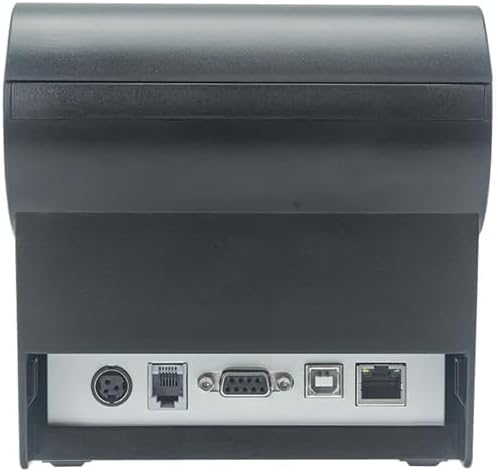
2-сурет: Артқы view of the printer, highlighting the power, USB, and other interface ports.
- Қуатты қосу: Insert the power adapter cable into the printer's power input port (DC 24V/2.5A) and plug the adapter into a suitable electrical outlet (AC 100-240V, 50-60Hz).
- USB қосу: Connect one end of the provided USB cable to the USB port on the printer and the other end to an available USB port on your computer.
- Cash Drawer (Optional): If using a cash drawer, connect its cable to the cash drawer port (DC 24V/1A) on the printer.
2.3 Loading the Paper Roll
The printer uses 80mm wide thermal paper rolls.
- Open the paper cover by pushing the cover open button (usually located on the side or front).
- Insert the thermal paper roll with the printing surface facing the print head. Ensure the roll is seated correctly in the paper compartment.
- Кескіштің жанынан аздаған қағазды тартыңыз.
- Қағаз қақпағын орнына шерткенше мықтап жабыңыз.
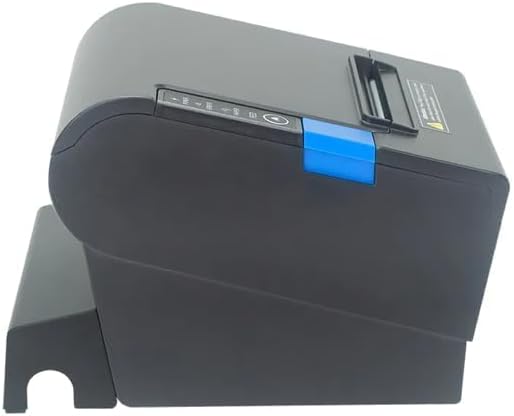
3-сурет: жағы view of the printer, illustrating the paper cover mechanism.
2.4 Драйверді орнату
The printer requires a driver to communicate with your computer. Drivers are typically available for Windows, Linux, Android, and Mac operating systems.
- For Windows users, the printer often supports plug-and-play installation or requires a specific Windows driver.
- For Linux, Android, and Mac, SDKs (Software Development Kits) are usually provided for integration.
Өндірушіге жүгініңіз website or the included driver CD/USB drive for the latest drivers and installation instructions specific to your operating system.
3. Принтерді пайдалану
3.1 Қуатты қосу/өшіру
Locate the power switch on the side or rear of the printer. Flip the switch to the 'ON' position to power on the printer. The 'POWER' indicator light will illuminate. Flip to 'OFF' to power down.
3.2 Indicator Lights and Buttons
The front panel typically features several indicator lights and buttons:
- ҚУАТ: Indicates the printer is powered on.
- ҚАТЕ: Illuminates or flashes to indicate an error condition (e.g., paper out, print head overheating, cutter error).
- ҚАҒАЗ: Indicates that the paper roll is low or out.
- FEED түймесі: Press to manually feed paper. Hold to perform a self-test print (if supported by model).
3.3 Негізгі басып шығару
Once the printer is connected and drivers are installed, you can print receipts from your POS software or application. Ensure the printer is selected as the default or active printer in your system settings.
The printer supports various print speeds up to 300 mm/s and automatic paper cutting after each print job.
4. Техникалық қызмет көрсету
Тұрақты техникалық қызмет көрсету оңтайлы өнімділікті қамтамасыз етеді және принтердің қызмет ету мерзімін ұзартады.
4.1 Басып шығару механизмін тазалау
The print head should be cleaned regularly, especially if print quality degrades.
- Принтерді өшіріп, қуат кабелін ажыратыңыз.
- Қағаз қақпағын ашыңыз.
- Мақта тампонын жеңіл қолданыңыз dampened with isopropyl alcohol (ethanol) to gently wipe the thermal elements of the print head.
- Allow the print head to dry completely before closing the cover and reconnecting power.
4.2 Cleaning the Cutter
Paper dust can accumulate around the cutter blade, affecting its performance.
- Принтерді өшіріп, қуат кабелін ажыратыңыз.
- Carefully remove any visible paper dust or debris from around the cutter blade using a soft brush or compressed air.
- Do not use liquids on the cutter.
4.3 Жалпы тазалау
Принтердің сыртын жұмсақ шүберекпен сүртіңіз, damp мата. Қатты химиялық заттарды немесе абразивті тазартқыштарды қолданбаңыз.
5. Ақаулықтарды жою
Бұл бөлім принтерге қатысты жиі кездесетін мәселелерді қарастырады.
| Мәселе | Ықтимал себебі | Шешім |
|---|---|---|
| Принтер қосылмайды. | Қуат кабелі қосылмаған; Розетка ақаулы; Қуат сөндіргіші өшірулі. | Ensure power cable is securely connected. Test power outlet. Turn power switch to 'ON'. |
| No printing. | Paper out; Paper loaded incorrectly; Driver not installed or incorrect; USB cable loose; Printer not selected. | Load new paper roll. Re-load paper correctly. Install/reinstall correct driver. Check USB connection. Select printer in software. |
| ERROR light is on/flashing. | Paper out; Paper jam; Print head overheating; Cutter error. | Load paper. Clear paper jam. Allow printer to cool down. Check cutter for obstructions. |
| Баспа сапасы нашар. | Dirty print head; Low quality paper; Old paper roll. | Clean the print head (see Section 4.1). Use high-quality thermal paper. Replace old paper rolls. |
Осы шешімдерді қолданып көргеннен кейін мәселе жойылмаса, тұтынушыларды қолдау қызметіне хабарласыңыз.
6. Техникалық сипаттамалар
| Ерекшелік | Мәлімет |
|---|---|
| Басып шығару әдісі | Тікелей термиялық |
| Қағаз ені | 80 мм |
| Басып шығару жылдамдығы | 230 мм/с, 260 мм/с, 300 мм/с |
| Интерфейс | USB |
| Жол аралығы | 3.75 mm (adjustable by commands) |
| Character Size (ANK) | Font A: 1.5 × 3.0 mm (12 × 24 dots) Font B: 1.1 × 2.1 mm (9 × 17 dots) |
| Character Size (Chinese/Traditional Chinese) | 3.0 × 3.0 mm (24 × 24 dots) |
| Штрих-код түрлері | UPC-A / UPC-E / JAN13 (EAN13) / JAN8 (EAN8) / CODE39 / ITF / CODABAR / CODE93 / CODE128 |
| 2D штрих-код | QR Code / PDF417 |
| NV Flash Memory | 256 КБ |
| Кіріс қуаты | 100-240 В, 50-60 Гц |
| Шығу қуаты | Тұрақты ток 24В/2.5А |
| Қолма-қол ақша жәшігі шығысы | Тұрақты ток 24В/1А |
| Салмағы | 1.0 кг |
| Өлшемдері (D × W × H) | 194.5 × 145 × 146.4 мм |
| Жұмыс температурасы | 0~45°C |
| Жұмыс ылғалдылығы | 10~80% RH |
| Кескіш өмір | 1.5 миллион қысқарту |
| Басты өмірді басып шығарыңыз | 150 км |
| ОЖ үйлесімділігі | Windows, Linux, Android, Mac |