
1. Кіріспе
This manual provides essential information for the installation, operation, and maintenance of your Raymarine Axiom 2 Pro 9 S 9-inch Chartplotter/Fishfinder. The Axiom 2 Pro 9 S is a powerful marine multi-function display designed for navigation and fishfinding, featuring a 9-inch HybridTouch display and integrated High CHIRP Sonar. Please read this manual thoroughly before using the device to ensure safe and optimal performance.
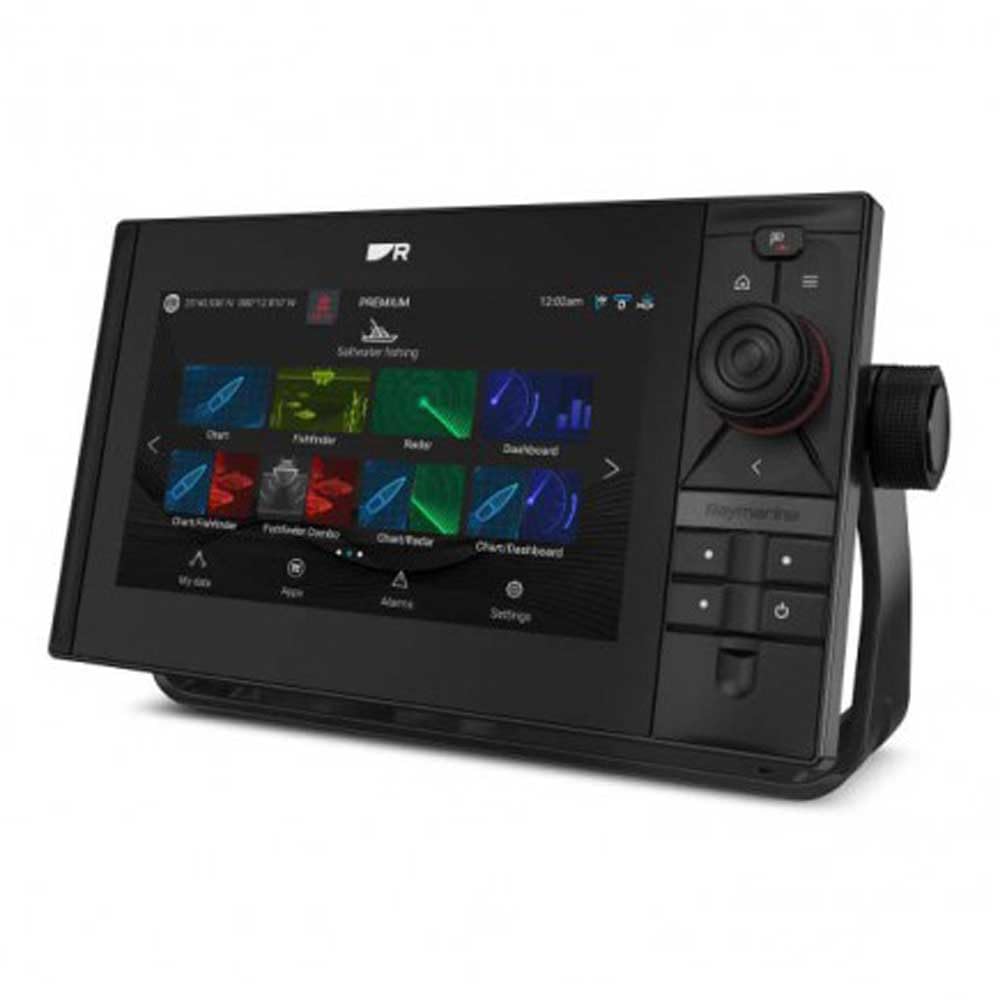
Image 1.1: The Raymarine Axiom 2 Pro 9 S 9-inch Chartplotter/Fishfinder unit, showcasing оның әдемі дизайны және үлкен дисплейі.
2. Қауіпсіздік туралы ақпарат
Always observe the following safety precautions to prevent injury, damage to the product, or damage to your vessel.
- Орнату: Ensure all electrical connections are made correctly and securely to prevent short circuits or fire hazards. Consult a qualified marine electronics technician if you are unsure about any installation steps.
- Нәр беруші: Connect the device only to a power source that matches the specified voltage and current requirements. Incorrect power can damage the unit.
- Навигация: This device is an aid to navigation. Always use official government charts and exercise due caution. Do not rely solely on electronic navigation for safe passage.
- Суға әсер ету: While the unit is designed for marine environments, ensure all covers and seals are properly secured to maintain water resistance.
- 65 ұсыныс Ескерту: Бұл өнім Калифорния штатында қатерлі ісік және туа біткен ақаулар немесе басқа ұрпақты болу зиянын тудыратыны белгілі қорғасынды қоса, химиялық заттардың әсеріне ұшырауы мүмкін. Қосымша ақпарат алу үшін өтіңіз www.P65Warnings.ca.gov.
3. Пакет мазмұны
Төменде тізімделген барлық заттардың өнім қаптамасында бар екенін тексеріңіз:
- Raymarine Axiom 2 Pro 9 S Display Unit
- Қуат / деректер кабелі
- Mounting Hardware (Gasket, Mounting Studs, Thumb Nuts)
- Күн жамылғысы
- Documentation Pack (including this manual)
- 1 x қашықтан басқару құралы
Note: Transducer and navigation charts are sold separately and are not included with this model.
4. Орнату
4.1 Дисплейді орнату
The Axiom 2 Pro 9 S supports both Dashboard Mount and Panel Mount installations. Choose a location that provides clear visibility, easy access to controls, and protection from excessive heat or direct sunlight.
- Бақылау тақтасын орнату: Secure the included mounting bracket to a flat surface using appropriate fasteners. Attach the display unit to the bracket.
- Панельді орнату: Cut an opening in your dashboard according to the provided template. Insert the display unit into the opening and secure it from the rear using the supplied mounting studs and thumb nuts. Ensure the gasket is properly seated for a watertight seal.
4.2 Электр қосылымдары
Connect the power/data cable to the corresponding port on the back of the display. Ensure the cable is routed safely and secured to prevent damage. Connect the other end to your vessel's 12V DC power supply, observing correct polarity. It is recommended to connect through a dedicated fuse or circuit breaker.
4.3 Перифериялық қосылымдар
The Axiom 2 Pro 9 S offers extensive connectivity options:
- Ethernet: For connecting to other Raymarine network devices (e.g., radar, additional displays).
- HDMI: Сыртқы мониторға бейне шығысы үшін.
- USB: For data transfer, software updates, or connecting compatible accessories.
- TNC: For external GPS antenna connection (if required).
- 25 істікшелі қосқыш: For transducer connection (transducer sold separately).
- Bluetooth және Wi-Fi: For wireless connectivity with compatible devices like smartphones and tablets, and for software updates.
4.4 Бастапқы қосу
Once all connections are secure, press and hold the power button until the Raymarine logo appears. The unit will boot up and guide you through an initial setup wizard, including language selection, time zone, and basic network settings.
5. Құрылғыны пайдалану
The Axiom 2 Pro 9 S features a HybridTouch interface, combining a responsive capacitive touchscreen with physical buttons for intuitive control.
5.1 Touchscreen Controls
Navigate menus, pan charts, zoom, and select options by touching the screen. Standard gestures like pinch-to-zoom are supported. The touchscreen is capacitive, offering precise and fluid interaction.
5.2 Диаграмма жасаушы функциялар
Access the Chart application to view nautical charts. The unit supports GPS for accurate positioning. You can plot waypoints, create routes, and monitor your vessel's progress. Ensure compatible nautical charts are installed for detailed mapping.
5.3 Fishfinder Functions
Utilize the integrated High CHIRP Sonar for detailed underwater imaging. Access the Sonar application to view fish arches, bottom structure, and depth information. Adjust sonar settings such as frequency, gain, and range for optimal performance in different water conditions.
5.4 Қашықтан басқару құралы
The included remote control can be used to operate various functions of the Axiom 2 Pro 9 S, providing convenience, especially in challenging marine conditions. Refer to the remote control's specific instructions for pairing and function mapping.
6. Техникалық қызмет көрсету
Regular maintenance ensures the longevity and optimal performance of your Axiom 2 Pro 9 S.
- Дисплейді тазалау: Жұмсақ, түксіз матаны пайдаланыңыз dampened with fresh water to clean the screen. For stubborn marks, a mild glass cleaner can be used sparingly. Avoid abrasive cleaners or solvents.
- Бағдарламалық құрал жаңартулары: Periodically check the Raymarine website for software updates. Updates often include performance enhancements, new features, and bug fixes. Updates can typically be performed via Wi-Fi or USB.
- Кабельді тексеру: Regularly inspect all cables and connections for signs of wear, corrosion, or damage. Replace any damaged cables immediately.
- Сақтау орны: If storing the vessel for an extended period, ensure the unit is powered off and, if possible, remove the display and store it in a dry, temperature-controlled environment.
7. Ақаулықтарды жою
If you encounter issues with your Axiom 2 Pro 9 S, refer to the following common troubleshooting steps:
| Мәселе | Ықтимал себебі | Шешім |
|---|---|---|
| Құрылғы қосылмайды | Қуат жоқ, кабель ақаулы, сақтандырғыш жарылған | Check power connections, inspect fuse, test power cable. |
| GPS сигналы жоқ | Кедергі view of sky, faulty GPS antenna | анық болуын қамтамасыз етіңіз view of sky, check external GPS antenna connection (if applicable). |
| Sonar not displaying data | Transducer not connected, faulty transducer, incorrect settings | Verify transducer connection, check sonar settings (gain, range), inspect transducer for damage. |
| Сенсорлық экран жауап бермейді | Screen dirty, temporary software glitch | Clean screen, restart the unit. |
If the problem persists after attempting these solutions, please contact Raymarine Customer Support.
8. Техникалық сипаттамалар
| Ерекшелік | Мәлімет |
|---|---|
| Бренд | Рэймарин |
| Модель атауы | E70653 |
| Экран өлшемі | 9 дюйм |
| Дисплей түрі | Сыйымдылығы жоғары сенсорлық экран |
| Ажыратымдылық | 500 x 500 |
| Арнайы мүмкіндік | HybridTouch, Integrated High CHIRP Sonar |
| Қосылу технологиясы | HDMI, USB, Ethernet, TNC, 25-pin connector, Bluetooth, Wi-Fi |
| Карта түрі | Теңіз |
| Қолдау көрсетілетін спутниктік навигация жүйесі | GPS |
| Жад сақтау сыйымдылығы | 64 ГБ |
| Монтаждау түрі | Dashboard Mount, Panel Mount |
| Элемент салмағы | 11.1 фунт |
| Модель жылы | 2021 |
9. Кепілдік және қолдау
Your Raymarine Axiom 2 Pro 9 S is covered by a manufacturer's warranty. For specific details regarding the warranty period and terms, please refer to the warranty card included in your product packaging or visit the official Raymarine webсайт.
For technical support, service, or to register your product, please visit the official Raymarine support portal:
You can also find FAQs, software downloads, and additional documentation on their webсайт.