
1. Кіріспе
This manual provides detailed instructions for the setup, operation, maintenance, and troubleshooting of your Xprinter XP-233B Thermal Barcode Printer. The XP-233B is designed for efficient thermal printing of barcodes and labels, utilizing heat-sensitive paper without the need for ink or ribbons.
2. Қауіпсіздік нұсқаулары
- Ensure the printer is connected to a power source with the correct voltage as specified on the power adapter.
- Принтерді суға немесе шамадан тыс ылғалдылыққа ұшыратпаңыз.
- Принтерді тікелей күн сәулесі түсетін жерге немесе жылу көздеріне жақын қоймаңыз.
- Keep the printer away from dust and debris to prevent damage to internal components.
- Принтерді өз бетіңізше бөлшектеуге немесе жөндеуге әрекеттенбеңіз. Көмек алу үшін білікті қызмет көрсету қызметкерлеріне хабарласыңыз.
- Use only recommended thermal label rolls to ensure optimal print quality and printer longevity.
3. Пакет мазмұны
Барлық элементтер пакетте бар екенін тексеріңіз:
- Xprinter XP-233B Thermal Barcode Printer
- Қуат адаптері
- USB кабелі
- Жылдам бастау нұсқаулығы (бар болса)
- Driver CD (if included, drivers can also be downloaded online)
4. Өнім аяқталдыview
Familiarize yourself with the main components of the XP-233B printer.

4.1-сурет: Алдыңғы жағы view of the Xprinter XP-233B, showing the power switch, control panel, and label output slot.

4.2-сурет: Артқы view of the Xprinter XP-233B, highlighting the USB, Ethernet, and power input ports.
Басқару тақтасының функциялары:
- FEED түймесі: Press to feed a blank label. Hold to perform a self-test print.
- ТОҚТАТУ түймесі: Pauses or resumes printing.
- БАС ТАРТУ түймесі: Cancels the current print job.
- Жарықдиодты индикаторлар: Display printer status (e.g., Power, Error, Paper Out). Refer to troubleshooting for specific light patterns.
5. Орнату
5.1 Принтерді қосу
- Connect the power adapter to the printer's power input port and then plug it into a wall outlet.
- Connect the USB cable from the printer to your computer. For Ethernet connectivity, connect an Ethernet cable from the printer to your network router or switch.
- Бүйір жағында орналасқан қуат қосқышын пайдаланып принтерді қосыңыз.
5.2 Жапсырмаларды жүктеу
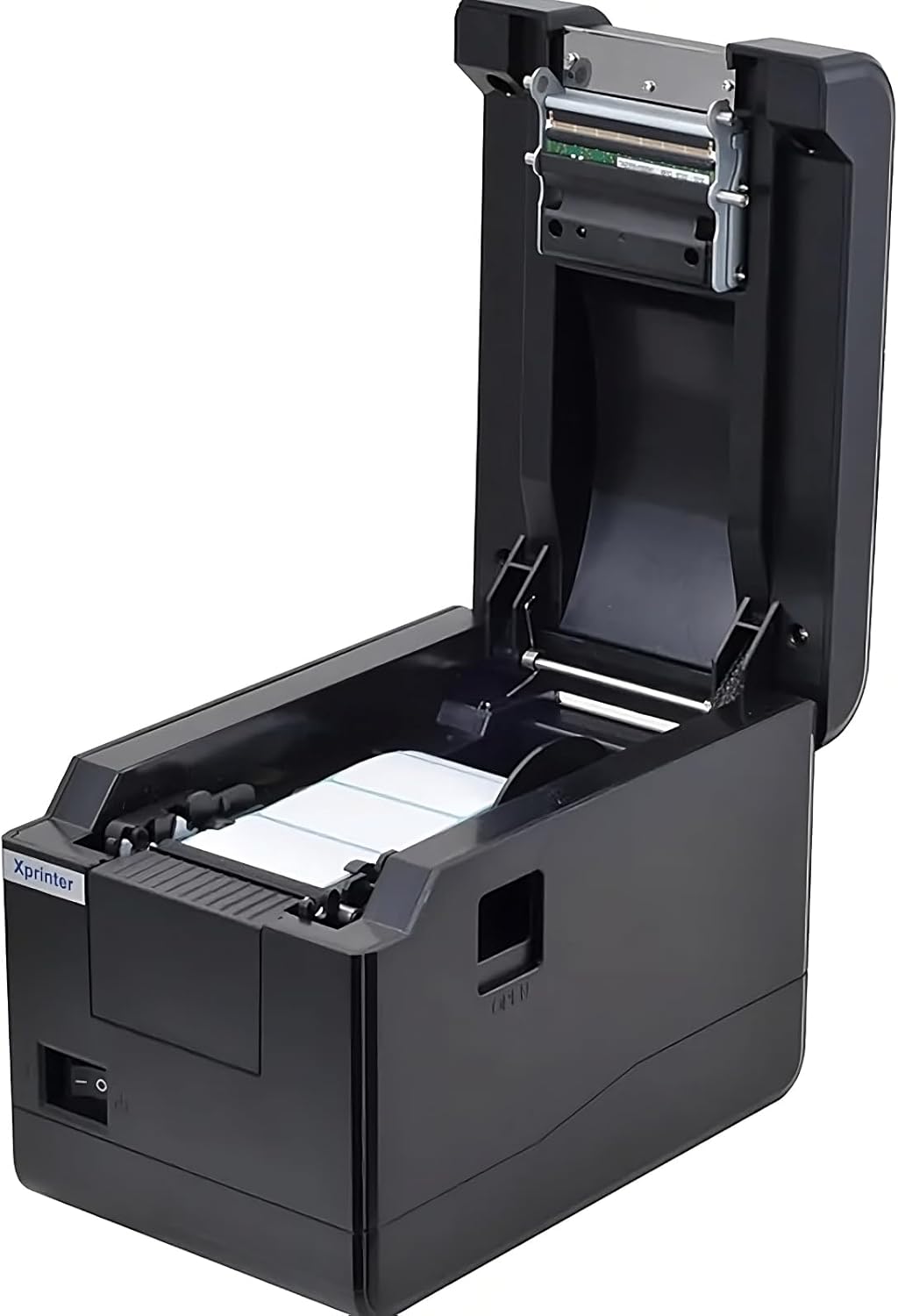
5.1-сурет: Жоғарыдан төмен view of the Xprinter XP-233B with the cover open, illustrating the label loading area.
- Press the 'OPEN' button on the side of the printer to open the top cover.
- Place the thermal label roll into the label compartment, ensuring the labels feed from the bottom of the roll and the printable side faces upwards.
- Adjust the movable label guides to fit the width of your label roll snugly, without pinching the labels.
- Pull a few labels past the print head and out through the front slot.
- Жоғарғы қақпақты орнына түскенше мықтап жабыңыз.
- The printer will automatically calibrate and feed a few labels to detect the label gap.
5.3 Драйверді орнату
Install the printer drivers on your computer. Drivers can typically be found on the included CD or downloaded from the official Xprinter webсайт. Орнату үшін экрандағы нұсқауларды орындаңыз.
6. Принтерді пайдалану
6.1 Негізгі басып шығару
Once the printer is set up and drivers are installed, you can print labels from your application (e.g., label design software, shipping software). Ensure the correct printer model (Xprinter XP-233B) is selected in your application's print settings.
6.2 Өзін-өзі тексеру басып шығару
To perform a self-test print:
- Ensure the printer is powered on and labels are loaded.
- түймесін басып тұрыңыз БЕРУ button for approximately 3-5 seconds until the printer starts printing.
- The self-test print will display printer information and a test pattern, confirming basic functionality.
7. Техникалық қызмет көрсету
7.1 Басып шығару механизмін тазалау
Regular cleaning of the print head ensures optimal print quality and extends the printer's lifespan. Clean the print head when print quality degrades or after every few rolls of labels.
- Принтерді өшіріп, қуат сымын ажыратыңыз.
- Жоғарғы қақпақты ашыңыз.
- Басып шығару басының бетін мақта таяқшасымен ақырын сүртіңізampened with isopropyl alcohol (70% or higher).
- Allow the print head to dry completely (approximately 2-3 minutes) before closing the cover and turning on the printer.
7.2 Сыртын тазалау
Принтердің сыртын жұмсақ шүберекпен сүртіңіз, damp шүберек. Қатты химиялық заттарды немесе абразивті тазартқыштарды қолданбаңыз.
8. Ақаулықтарды жою
| Мәселе | Ықтимал себебі | Шешім |
|---|---|---|
| Принтер қосылмайды | Power cord loose; power outlet faulty; power adapter damaged. | Check power connections; try a different outlet; replace power adapter if necessary. |
| No labels feeding | Labels incorrectly loaded; paper out; label guides too tight. | Reload labels correctly; replace label roll; adjust label guides. |
| Баспа сапасының нашарлығы (түсі кеткен, сызықтар) | Print head dirty; low-quality labels; print head damaged. | Clean print head (refer to Section 7.1); use recommended thermal labels; contact support if print head is damaged. |
| Printer not responding to print commands | Incorrect driver installed; USB/Ethernet cable loose; printer paused. | Reinstall drivers; check cable connections; press ТОҚТАТУ жалғастыру үшін түймесін басыңыз. |
| Labels skipping or misaligning | Incorrect label sensor calibration; label guides not set correctly. | Perform a self-test print to recalibrate; adjust label guides. |
9. Техникалық сипаттамалар
| Ерекшелік | Техникалық сипаттама |
|---|---|
| Модель атауы | Xprinter - Thermal barcode printer |
| Элемент үлгі нөмірі | XP-233B |
| Принтер технологиясы | Жылулық |
| Қосылу технологиясы | Ethernet, USB |
| Принтердің шығысы | Монохромды |
| Баспа құралдары | Белгілер |
| Парақтың максималды сыйымдылығы | 100 (typical for roll capacity, actual sheet capacity depends on label size) |
| Өнім өлшемдері (D x W x H) | 26.8 x 18 x 17.2 см |
| Элемент салмағы | 1.2 кг |
| Түс | Қара |
10. Кепілдік туралы ақпарат
Xprinter products typically come with a limited manufacturer's warranty. Please refer to the warranty card included with your product or visit the official Xprinter website for specific warranty terms and conditions, including coverage duration and service procedures. Keep your purchase receipt as proof of purchase for warranty claims.
11. Тұтынушыларға қолдау көрсету
For technical assistance, driver downloads, or further inquiries regarding your Xprinter XP-233B, please visit the official Xprinter support website or contact their customer service department. Contact information can usually be found on the Xprinter webсайтында немесе принтермен бірге берілген құжатта.