
1. Кіріспе
Сатып алғаныңыз үшін рахметasing the Dpofirs LMD-750 Portable DVD Player. This device is designed to provide versatile entertainment on the go, at home, or in the office. Featuring a 270° rotating HD LCD screen, multi-format disc support, USB/SD card playback, analog TV function, FM radio, and game capabilities, it offers a comprehensive multimedia experience. Please read this manual carefully to ensure proper use and to maximize the performance and longevity of your device.
2. Қауіпсіздік туралы ақпарат
- Құрылғыны жаңбырға, ылғалға немесе шектен тыс температураға шығармаңыз.
- Құрылғыны жылу көздеріне жақын немесе тікелей күн сәулесі түсетін жерге қоймаңыз.
- Use only the provided power adapter and car adapter.
- Құрылғыны өзіңіз бөлшектеуге немесе жөндеуге әрекеттенбеңіз. Білікті қызмет көрсету қызметкерлеріне хабарласыңыз.
- Құрылғыны күшті магнит өрістерінен алыс ұстаңыз.
- Құрылғыны пайдалану кезінде дұрыс желдетуді қамтамасыз етіңіз.
- Remove discs when transporting the player to prevent damage.
3. Пакет мазмұны
Пакетте келесі элементтердің бар-жоғын тексеріңіз:
- 1 x Dpofirs LMD-750 Portable DVD Player
- 1 x қашықтан басқару құралы
- 1 x Power Adapter (EU Plug)
- 1 x Көлік адаптері
- 1 x AV кабелі
- 1 x антенна
- 1 x геймпад
- 1 x Game Disc
- 1 x Пайдаланушы нұсқаулығы
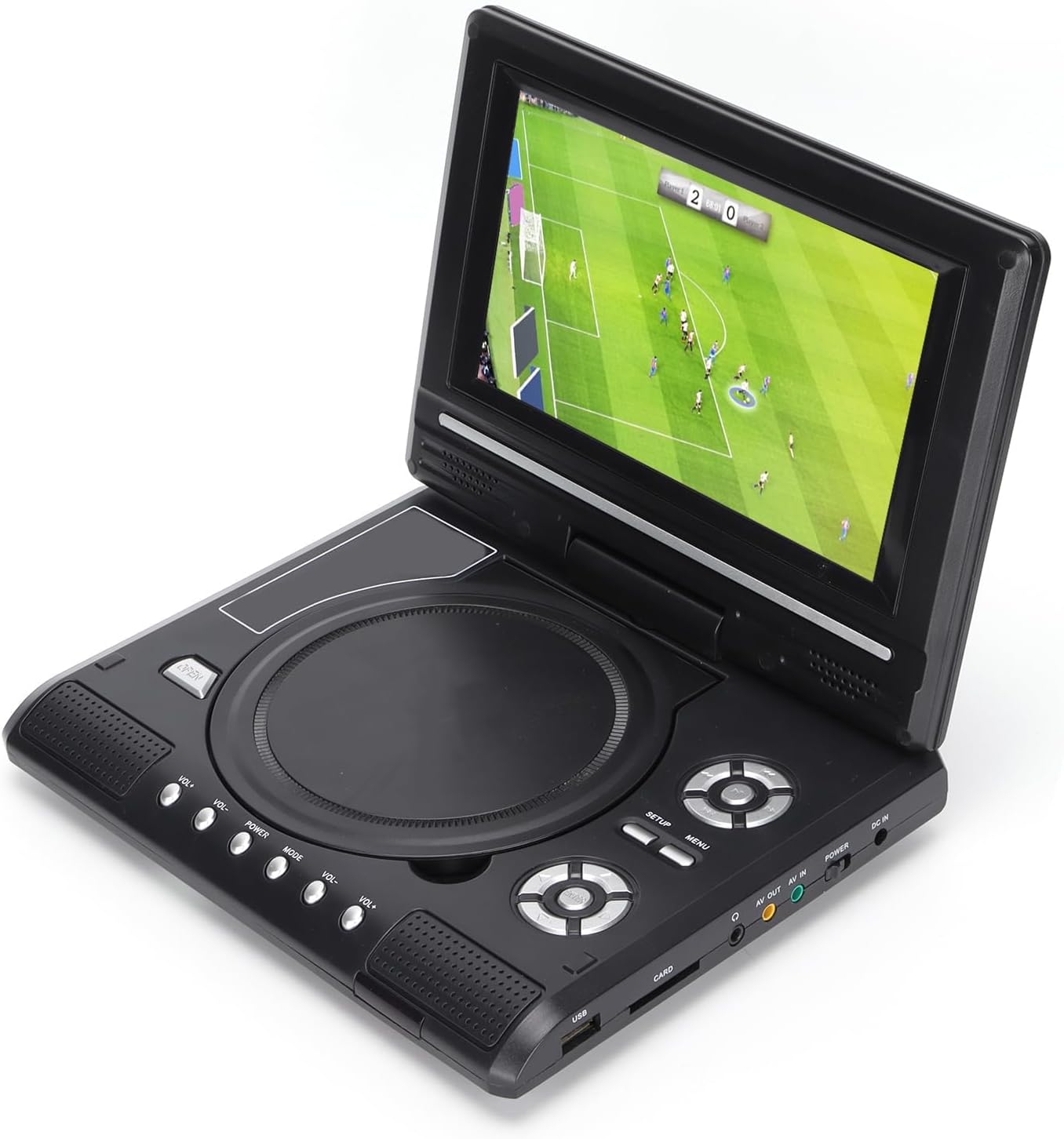
Image: All accessories included with the Dpofirs LMD-750 Portable DVD Player.
4. Өнім аяқталдыview
The Dpofirs LMD-750 features a compact design with intuitive controls and multiple connectivity options.

Сурет: алдыңғы view of the Dpofirs LMD-750 Portable DVD Player with the screen open.

Сурет: жағы view detailing the input/output ports.

Сурет: жоғарғы view of the player when closed.
Басқару элементтері мен порттар:
- Экран: 6.8"/8.5" HD LCD, 270° rotatable.
- Диск науасы: For DVD/CD media.
- Басқару түймелері: Play/Pause, Stop, Fast Forward/Rewind, Next/Previous, Setup, Menu, Volume +/-.
- USB порты: USB флэш-дискілерін қосуға арналған.
- CARD Slot: For inserting memory cards (e.g., SD card).
- Құлаққап ұясы: Жеке тыңдау үшін.
- ШЫҒАРЫЛАДЫ: Audio/Video output to external display.
- AV IN: Audio/Video input from external source.
- POWER қосқышы: To turn the device On/Off.
- DC IN: Power input for adapter.
5. Орнату
5.1 Батареяны зарядтау
Before first use, fully charge the built-in 1500mAh lithium battery. Connect the power adapter to the DC IN port on the player and plug it into a wall outlet (110-240V 50/60Hz). The charging indicator will illuminate. Once fully charged, the indicator may change color or turn off. A full charge provides approximately 30-60 minutes of continuous playback, depending on usage.
5.2 Қуатты қосу
- Үйде пайдалану: Connect the AC power adapter to the DC IN port and a wall socket.
- Көлікті пайдалану: Connect the car adapter to the DC IN port and your vehicle's cigarette lighter socket.
5.3 Connecting to an External Display (AV OUT)
Кімге view үлкенірек экрандағы мазмұн:
- AV кабелінің бір ұшын DVD ойнатқышындағы AV OUT портына жалғаңыз.
- Connect the other end of the AV cable to the corresponding AV IN ports (Yellow for Video, White/Red for Audio) on your TV or monitor.
- Select the correct AV input source on your external display.
5.4 Connecting External Devices (AV IN)
To display content from an external source on the DVD player's screen:
- Connect one end of the AV cable to the AV IN port on the DVD player.
- Connect the other end of the AV cable to the AV OUT ports of your external device (e.g., another DVD player, game console).
- Switch the DVD player to AV IN mode (refer to Operating Instructions).
6. Пайдалану нұсқаулары
6.1 Қуатты қосу/өшіру
сырғытыңыз ҚУАТ switch to the "ON" position to turn on the player. Slide it to "OFF" to power down.
6.2 Экранды айналдыру
The LCD screen can rotate up to 270 degrees. Gently adjust the screen to your desired viewing angle. This allows for flexible viewәртүрлі ортада өмір сүру.
6.3 Дыбыс деңгейін басқару
пайдаланыңыз VOL+ және VOL- buttons on the player or remote control to adjust the audio volume.
6.4 Мәзір навигациясы
түймесін басыңыз МӘЗІР button to access the main menu. Use the directional buttons (up, down, left, right) to navigate and the OK таңдауларды растау үшін түймесін басыңыз. түймесін басыңыз ОРНАТУ жүйе параметрлеріне қол жеткізу үшін.
7. Медиа ойнату
7.1 Дискіні ойнату (DVD/CD)
- Диск қақпағын ашыңыз.
- Carefully place a compatible disc (DVD, DVD±R, DVD±RW, VCD, CD, CD±R, CD±RW) onto the spindle with the label side facing up.
- Диск қақпағын мықтап жабыңыз.
- The player will automatically detect and begin playback. If not, press the ОЙНАУ түймесі.

Image: Player displaying video content.

Image: Player displaying a sports event.
7.2 USB/SD картасын ойнату
- USB флэш-дискісін салыңыз USB port or a memory card into the КАРТА ұяшық.
- The player will automatically switch to USB/Card mode or prompt you to select the source.
- Өзіңіз арқылы шарлаңыз files using the directional buttons and press OK ойнау.
Қолдау көрсетілетін форматтар: DIVX, AV/VOB, MPG, MP3, MP4, WMA, JPEG, TXT, RMVB.
The player features an intelligent power-off memory function, resuming playback from where it stopped after a power interruption.
8. TV Function
The Dpofirs LMD-750 includes an analog TV tuner.
- Connect the included antenna to the antenna port on the player.
- Switch the player to TV mode (usually via the РЕЖИМ button or menu selection).
- Perform an automatic channel scan in the TV settings menu to find available analog channels.
- Channel reception quality depends on local signal strength.
Supported TV Standards: PAL, NTSC, SECAM (optional).
9. Game Function
Enjoy gaming with the included gamepad and game disc.
- Connect the gamepad to the designated game port on the player.
- Insert the game disc into the disc tray.
- Select the game function from the main menu.
- Choose from the available games on the disc (up to 300 games).
10. Техникалық қызмет көрсету
10.1 Құрылғыны тазалау
- Ойнатқыштың сыртын жұмсақ, құрғақ шүберекпен сүртіңіз.
- Сұйық тазалағыштарды немесе абразивті материалдарды пайдаланбаңыз.
- For the screen, use a soft, lint-free cloth specifically designed for LCD screens.
10.2 Диск күтімі
- Саусақ іздері қалмас үшін дискілерді шетінен ұстаңыз.
- Дискілерді ортасынан сыртқа қарай сүртіп, жұмсақ, талшықсыз шүберекпен тазалаңыз.
- Store discs in their cases to prevent scratches.

Image: Internal disc mechanism.
11. Ақаулықтарды жою
| Мәселе | Ықтимал себебі | Шешім |
|---|---|---|
| Қуат жоқ | Battery drained; Power adapter not connected; Power switch OFF. | Charge the battery; Connect power adapter; Slide POWER switch to ON. |
| No disc playback | Disc inserted incorrectly; Disc dirty or scratched; Incompatible disc format. | Insert disc correctly (label up); Clean or replace disc; Use supported disc format. |
| Дыбыс жоқ | Volume too low; Mute function active; Headphone connected. | Increase volume; Deactivate mute; Disconnect headphones if using speakers. |
| Теледидарды нашар қабылдау | Weak signal; Antenna not positioned correctly. | Adjust antenna position; Rescan channels; Check local signal strength. |
| Қашықтан басқару пульті жұмыс істемейді | Batteries drained or inserted incorrectly; Obstruction between remote and player. | Replace batteries (2x AAA); Ensure correct polarity; Remove obstructions. |
12. Техникалық сипаттамалар
| Үлгі нөмірі | LMD-750 (Dpofirsrgi5bmonx0-13) |
| Материал | ABS |
| Түс | Қара |
| Экран өлшемі | 6.8" / 8.5" (diagonal, depending on variant) |
| Дисплей түрі | СКД |
| Дисплей ажыратымдылығы | 234 x 480 x RGB (native), supports up to 1280 x 720, 1366 x 768 |
| Кіріс көлеміtage | 110-240В 50/60Гц |
| Шығу көлеміtage | 12В |
| Батарея сыйымдылығы | 1500mAh Lithium Battery (built-in) |
| Қашықтан басқару пультінің батареясы | 2 x AAA батареялары (жинаққа кірмейді) |
| Қолдау көрсетілетін диск пішімдері | DVD, DVD±R, DVD±RW, VCD, MP3, MP4, CD±R, CD±RW |
| Supported Media Formats (USB/Card) | DIVX, AV/VOB, MPG, MP3, MP4, WMA, JPEG, TXT, RMVB |
| Теледидар жүйесі | PAL, NTSC, SECAM (full system) |
| Қабылдау арналары | LHF1-5, VHF6-12, UHF13-69, ATV |
| Дыбыс кодтау технологиясы | 96 кГц/24 бит |
| Динамикалық диапазон | ≥ 80дБ |
| Сигналдардың шуылға қатынасы | ≥ 70дБ |
| Арналарды оқшаулау | ≥ 70дБ |
| Қосылу технологиясы | USB, Composite Video |
| Өндіруші | Дпофирлер |
| Шығу елі | Қытай |
13. Кепілдік және қолдау
For warranty information and customer support, please refer to the documentation provided with your purchase or contact your retailer. Keep your proof of purchase for any warranty claims.