
1. Кіріспе
The Ankilo Mini Bluetooth 5.3 Receiver/Transmitter is a versatile 2-in-1 audio adapter designed to add Bluetooth functionality to non-Bluetooth devices. Featuring the latest Bluetooth 5.3 technology, it ensures stable connections and a transmission range of up to 33 feet (10 meters). This device is suitable for use with cars, speakers, stereo systems, and headphones, allowing you to enjoy wireless audio streaming and hands-free calling.

Figure 1: Ankilo Mini Bluetooth 5.3 Receiver/Transmitter.

Figure 2: Highlighting Bluetooth 5.3 for stable connections, auto reconnect in RX mode, 33 ft signal range, and fast transmission.
2. Өнім аяқталдыview
Құрылғының құрамдас бөліктерімен танысыңыз:
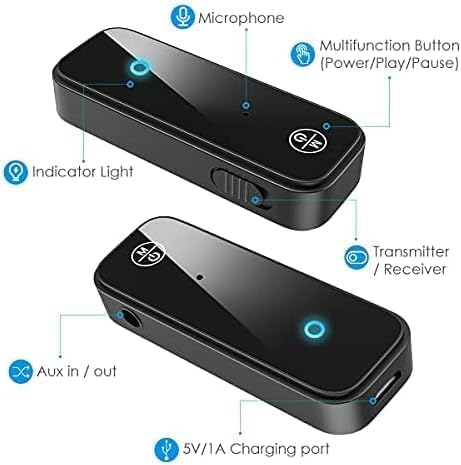
Figure 3: Labeled diagram of the Ankilo Bluetooth adapter. Key components include the Microphone, Multifunction Button (Power/Play/Pause), Indicator Light, Transmitter/Receiver (TX/RX) switch, Aux in/out port, and 5V/1A Charging port.
3. Пакет мазмұны
Пакетте барлық элементтер бар екеніне көз жеткізіңіз:
- 1 x Ankilo Mini Bluetooth 5.3 Receiver/Transmitter
- 1 x 3.5mm Audio Connector (new and old versions may be sent randomly)
- 1 x USB зарядтау кабелі
- 1 x Пайдаланушы нұсқаулығы
4. Орнату және қосылу
4.1. Қабылдағыш режимі (RX)
Use Receiver Mode to stream audio from your Bluetooth-enabled device (e.g., smartphone, laptop) to a non-Bluetooth audio system (e.g., car stereo, wired speakers, wired headphones).
- RX режиміне ауысу: Locate the TX/RX switch on the side of the adapter and slide it to the "RX" position.
- Аудио жүйеге қосылу: Plug the 3.5mm audio connector into the Aux in/out port of the Bluetooth adapter. Then, plug the other end of the 3.5mm audio connector into the auxiliary input port of your non-Bluetooth audio system.
- Қуатты қосу және жұптау: Press and hold the Multifunction Button (power button) for 3 seconds to turn on the device. The indicator light will flash red and blue alternately, indicating it is in pairing mode.
- Құрылғыңызбен жұптастыру: On your smartphone or other Bluetooth-enabled device, go to Bluetooth settings and search for "Ankilo" or "ZF-360" (or similar device name). Select it to connect. Once connected, the indicator light on the adapter will turn solid blue.

Figure 4: Step-by-step visual guide for connecting in both Receiver (RX) and Transmitter (TX) modes.
4.2. Таратқыш режимі (TX)
Use Transmitter Mode to stream audio from a non-Bluetooth audio source (e.g., TV, computer, MP3 player) to your Bluetooth headphones or speakers.
- TX режиміне ауысу: Locate the TX/RX switch on the side of the adapter and slide it to the "TX" position.
- Аудио көзіне қосылу: Plug the 3.5mm audio connector into the Aux in/out port of the Bluetooth adapter. Then, plug the other end of the 3.5mm audio connector into the auxiliary output port of your non-Bluetooth audio source (e.g., TV headphone jack).
- Қуатты қосу және жұптау: Press and hold the Multifunction Button (power button) for 3 seconds to turn on the device. The indicator light will flash red and blue alternately, indicating it is in pairing mode.
- Pair with Bluetooth Headphones/Speakers: Put your Bluetooth headphones or speakers into pairing mode. The adapter will automatically search and connect to your headphones/speakers. Once connected, the indicator light on the adapter will turn solid red.
Video 1: General guide on how to use an Aux Bluetooth Adapter for Car. (Note: Product shown may vary slightly from Ankilo model.)
Video 2: Demonstration of ensuring the audio plug is firmly inserted for optimal sound quality. (Note: Product shown may vary slightly from Ankilo model.)
5. Жұмыс режимдері мен функциялары
5.1. Қолсыз қоңырау шалу
The adapter features a built-in HD microphone for convenient hands-free calling while driving or performing other tasks.
- Қоңырауға жауап беру/қосу: Көп функциялы түймені бір рет басыңыз.
- Қоңырауды қабылдамау: Көпфункционалды батырманы 2 секунд басып тұрыңыз.
- Соңғы нөмірді қайта теру: Double-press the Multifunction Button.
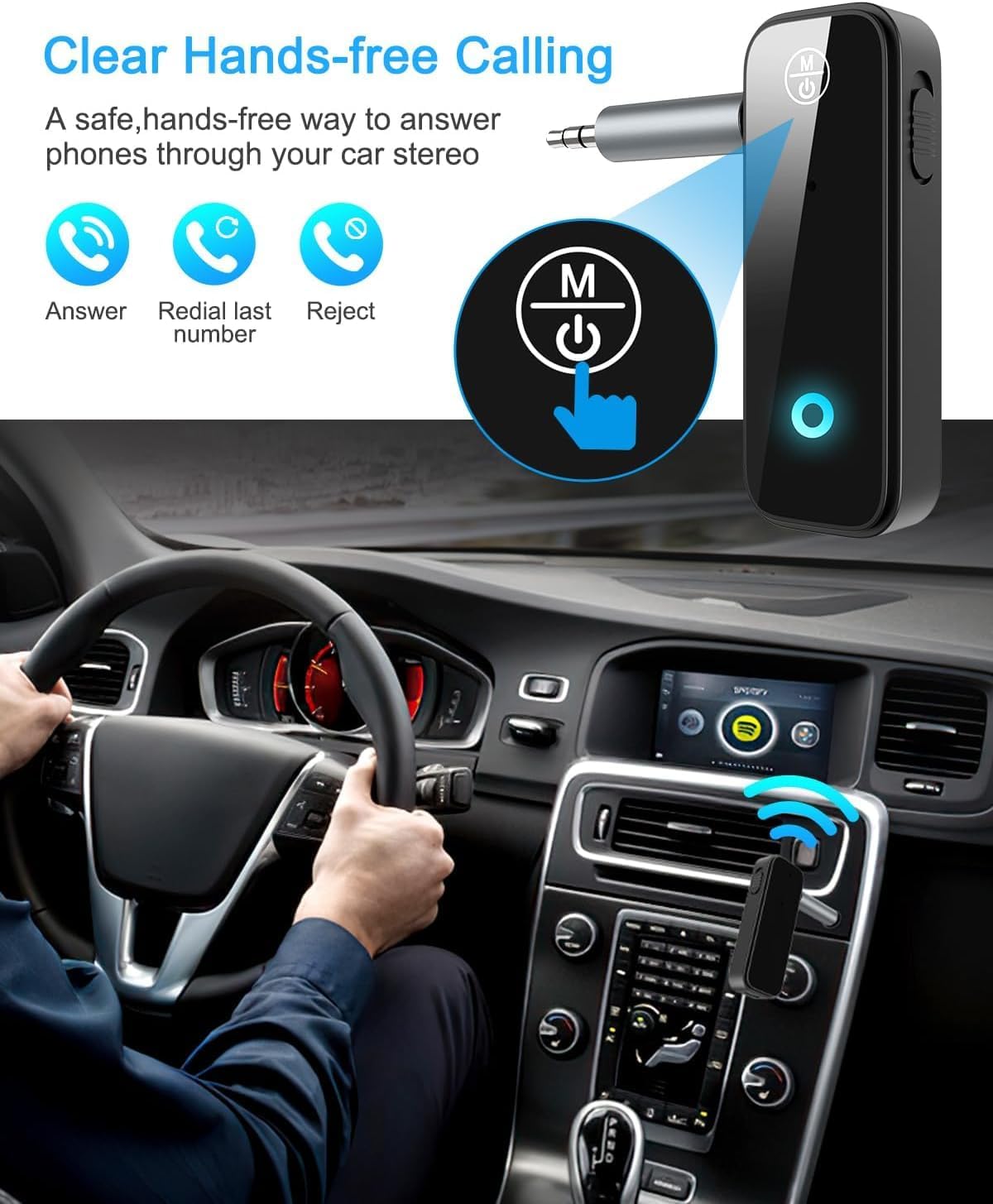
Figure 5: Visual representation of hands-free calling functionality in a vehicle.
5.2. Музыканы ойнатуды басқару
- Ойнату/кідірту: Көп функциялы түймені бір рет басыңыз.
- Келесі трек: «+» түймесін бір рет басыңыз.
- Алдыңғы трек: «-» түймесін бір рет басыңыз.
- Дыбыс деңгейі: «+» түймесін басып тұрыңыз.
- Дыбыстың төмендеуі: «-» түймесін басып тұрыңыз.
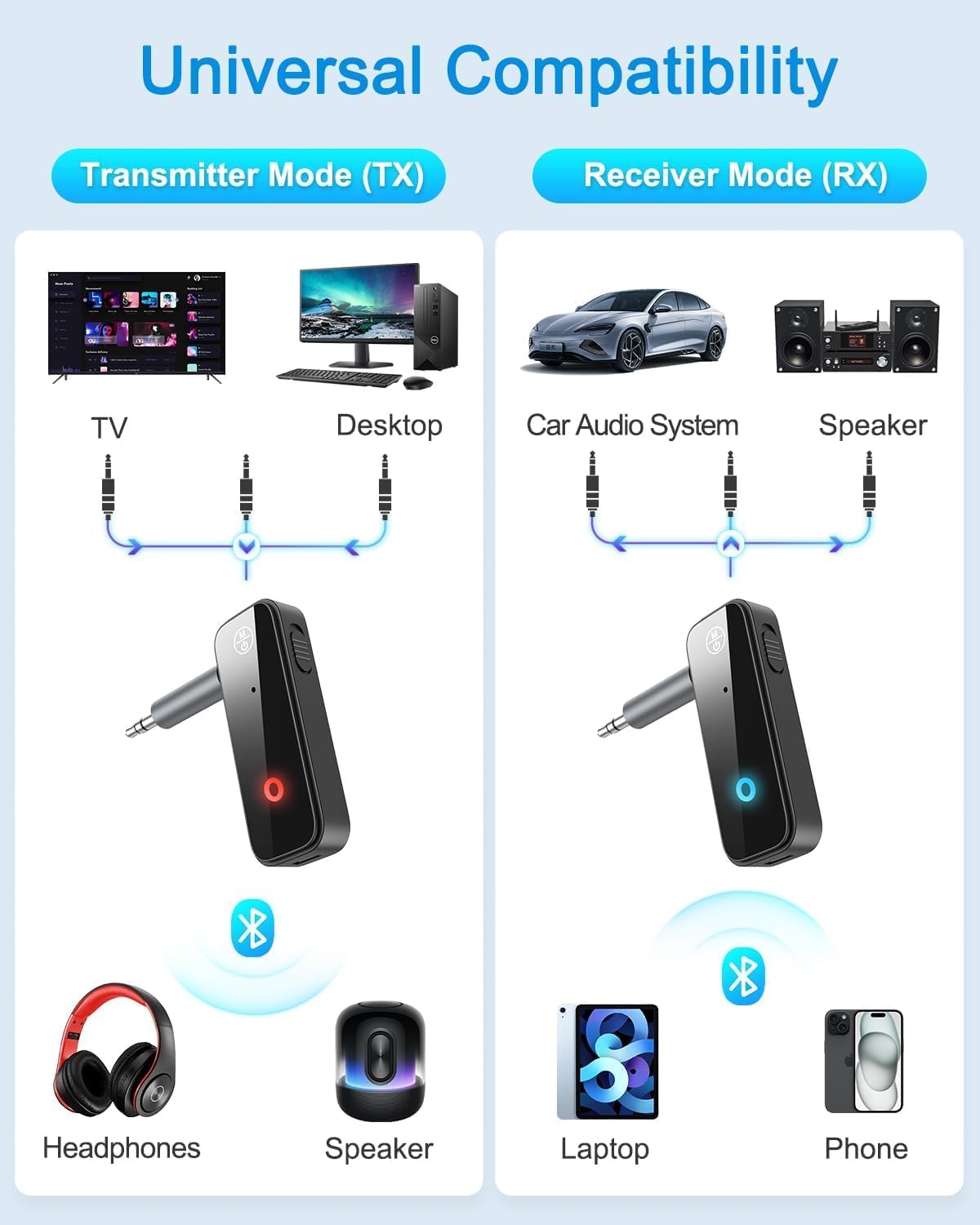
Figure 6: Illustrates the universal compatibility of the device in both Transmitter (TX) and Receiver (RX) modes with various devices like TVs, desktops, car audio systems, speakers, headphones, laptops, and phones.
6. Зарядтау және батареяның қызмет ету мерзімі
The Ankilo Mini Bluetooth adapter is equipped with a built-in rechargeable battery. A full charge takes approximately 2 hours and provides up to 8 hours of music playback or call time.
- Зарядтау: Connect the provided USB charging cable to the 5V/1A Charging port on the adapter and to a USB power source. The red indicator light will be solid during charging and turn off when fully charged.
- Төмен батарея көрсеткіші: When the battery is low, the red indicator light will flash.

Figure 7: Details on the device's 8-hour battery life, 2-hour fast charging, and USB charging port.
7. Техникалық сипаттамалар
| Ерекшелік | Мәлімет |
|---|---|
| Бренд | Анкило |
| Үлгі | CP210-MA06CA-KH |
| Bluetooth нұсқасы | 5.3 |
| Жұмыс режимдері | Receiver (RX) & Transmitter (TX) |
| Беріліс диапазоны | 33 футқа дейін (10 метр) |
| Батареяның қызмет ету мерзімі | Approx. 8 hours (music/call) |
| Зарядтау уақыты | Шамамен 2 сағат |
| Зарядтау порты | 5В/1А (USB) |
| Аудио кіріс/шығыс | 3.5 мм көмекші |
| Кірістірілген микрофон | Yes (HD) |
| Материал | Пластмасса |
| Өнім өлшемдері | 6.7 x 1.8 x 10 см; 30 гр |
8. Ақаулықтарды жою
- Құрылғы қосылмаған: Ensure the device is fully charged. Connect it to a power source using the USB cable.
- Құрылғымен жұптастыру мүмкін емес:
- Ensure the adapter is in the correct TX or RX mode.
- Make sure the adapter is in pairing mode (red and blue lights flashing alternately).
- Ensure the target device (phone, headphones, speaker) is also in pairing mode.
- Turn off and on the Bluetooth function on your device and try searching again.
- Clear previous Bluetooth connections on both devices if necessary.
- No audio or low audio:
- Check that the 3.5mm audio connector is fully and firmly inserted into both the adapter and the audio system/source.
- Адаптерде де, жалғанған аудио құрылғысында да дыбыс деңгейінің қосылғанына көз жеткізіңіз.
- Verify that the adapter is correctly connected to the audio source/system (TX mode for output, RX mode for input).
- Үзіліссіз қосылым: Ensure there are no significant obstacles (like walls) between the adapter and the connected Bluetooth device. Keep devices within the 33-foot (10-meter) range.
9. Қауіпсіздік туралы ақпарат
- Құрылғыны шектен тыс температураға, ылғалға немесе коррозиялық ортаға шығармаңыз.
- Құрылғыны өзіңіз бөлшектемеңіз немесе жөндеуге әрекет жасамаңыз.
- Балалардың қолы жетпейтін жерде сақтаңыз.
- Note: This adapter is not suitable for SONY devices. Please confirm compatibility before purchase.
10. Кепілдік және қолдау
Ankilo offers a 12-month quality protection warranty and 60 days free replacement for this product. For any questions or concerns, please contact our customer support. We are committed to responding within 24 hours to assist you.