
Кіріспе
The Nonstop NSA2-BK Station A is a versatile bedside companion designed to enhance your daily routine. This device integrates a wireless Bluetooth speaker, an alarm clock, and a multi-functional charging station, providing convenience and relaxation in one compact unit. It features soothing soundscapes for improved sleep and multiple charging options for your devices.

1-сурет: Алдыңғы view of the Nonstop NSA2-BK Station A, displaying the digital clock, alarm settings, and charging indicators.
Негізгі мүмкіндіктер
- Wireless Bluetooth Speaker: Enjoy enhanced stereo sound for music, videos, and apps from your Bluetooth-enabled devices.
- Relaxation Soundscapes: Improve sleep quality with built-in soothing sounds, including gentle ocean waves, calming rain, and noise-masking ambient sounds.
- Wireless Qi Charging: Conveniently charge Qi-compatible smartphones by simply placing them on the top surface of the unit.
- Dual USB Universal Charging: Equipped with two USB ports to charge a variety of devices, including smartphones, iPads, Kindles, and wireless headphones.

Figure 2: Illustration of the relaxation sound features, showing icons for Gentle Waves, Soothing Rain, and White Noise.
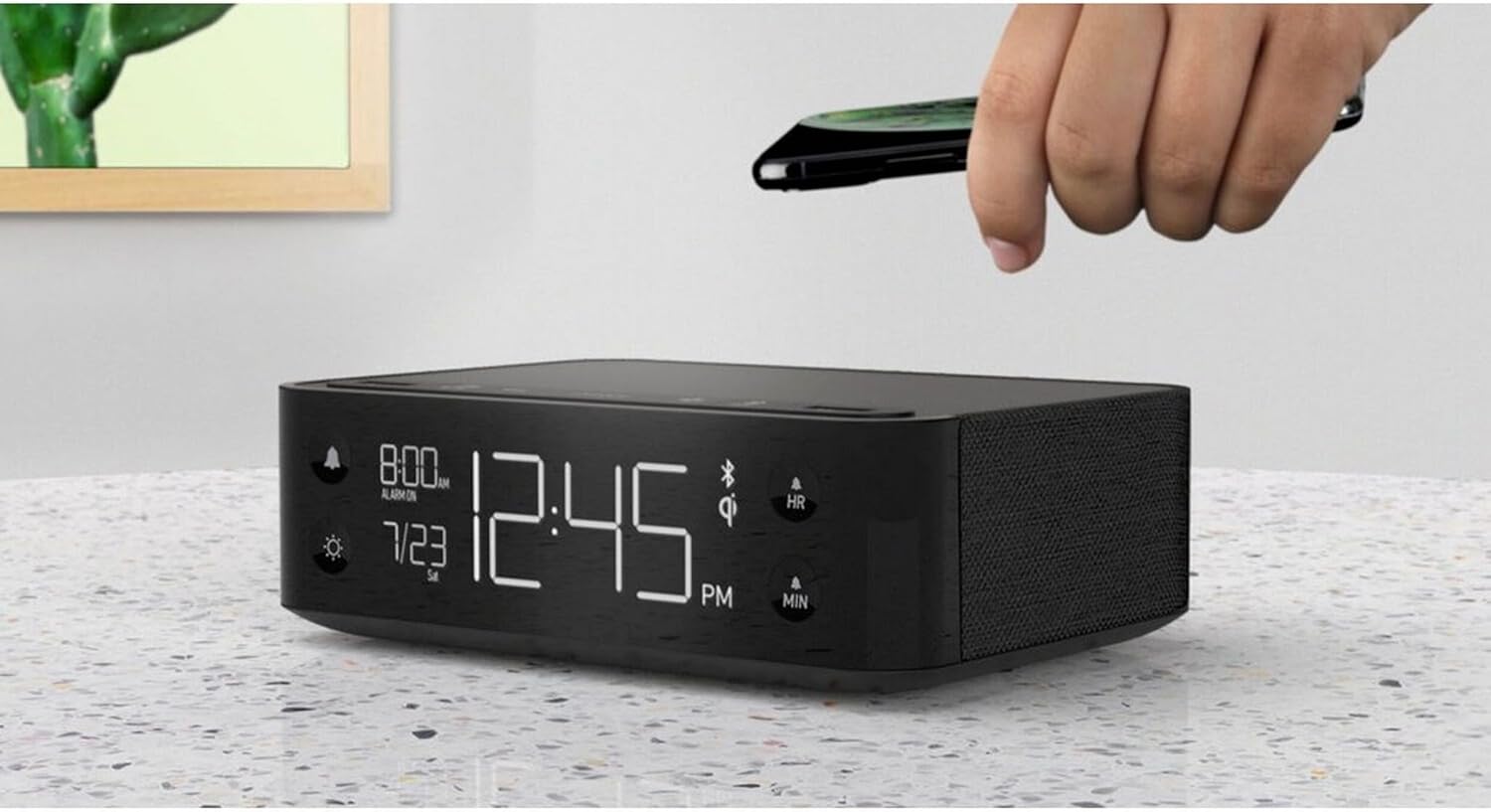
Figure 3: A smartphone being placed on the top surface of the Station A for wireless charging.
Орнату
1. Қуат қосылымы
- Unpack the Nonstop NSA2-BK unit and all accessories from the packaging.
- Connect the provided power adapter to the DC input port on the back of the unit.
- Plug the power adapter into a standard electrical outlet. The display will illuminate, indicating the unit is powered on.
2. Бастапқы сағат параметрі
Upon first power-up, the clock may display a default time. Refer to the "Operating Instructions" section for detailed steps on setting the current time and date.
3. Bluetooth жұптастыру
- Мобильді құрылғыңызда (смартфон, планшет және т.б.) Bluetooth қосулы екеніне көз жеткізіңіз.
- On the Nonstop NSA2-BK, press the Bluetooth pairing button (refer to button layout in "Operating Instructions" if available, otherwise assume a standard Bluetooth icon button). The Bluetooth indicator on the display will flash.
- On your mobile device, search for available Bluetooth devices. Select "Nonstop NSA2-BK" from the list.
- Once paired, the Bluetooth indicator on the unit will become solid, and you will hear an audible confirmation.
4. Wireless Qi Charging Setup
No specific setup is required for wireless charging beyond connecting the unit to power. Simply place your Qi-compatible device on the designated charging pad on top of the unit. Ensure the device is centered for optimal charging.
Пайдалану нұсқаулары
Уақыт пен күнді орнату
- түймесін басып тұрыңыз УАҚЫТ ОРНАТЫЛДЫ button (or equivalent, often combined with HR/MIN buttons).
- пайдаланыңыз HR (Сағат) және MIN Уақытты реттеуге арналған (минут) түймелері.
- түймесін басыңыз УАҚЫТ ОРНАТЫЛДЫ button again to confirm and move to date setting (if applicable).
- пайдаланыңыз HR және MIN buttons to adjust the month and day.
- түймесін басыңыз УАҚЫТ ОРНАТЫЛДЫ шығу.
Дабылды орнату және пайдалану
- түймесін басып тұрыңыз ДАБЫЛДЫ ОРНАТУ button (bell icon). The alarm time will flash.
- пайдаланыңыз HR және MIN қажетті оятқыш уақытын орнату үшін түймелер.
- түймесін басыңыз ДАБЫЛДЫ ОРНАТУ растау үшін қайтадан басыңыз.
- Дабылды қосу/өшіру үшін түймесін басыңыз ДАБЫЛ ҚОСУ / ӨШІРУ button (bell icon). An alarm indicator will appear/disappear on the display.
- Дабыл естілгенде, түймесін басыңыз ҰЙЫҚТАУ button (if available, or any button except alarm off) for a temporary pause. Press the ДАБЫЛ ҚОСУ / ӨШІРУ button to turn off the alarm completely.
Using Bluetooth Speaker
- Ensure the unit is paired with your device (see "Bluetooth Pairing" in Setup).
- Play audio from your paired device. Sound will be output through the NSA2-BK speaker.
- Adjust volume using the volume controls on your paired device or on the NSA2-BK unit (if available).
Playing Relaxation Sounds
- түймесін басыңыз ДЫБЫС button (or similar, possibly a wave/rain icon).
- Press repeatedly to cycle through available soundscapes (Ocean Waves, Rain, Ambient Sounds).
- түймесін басып тұрыңыз ДЫБЫС button to turn off the soundscape.
Using Charging Functions
- Wireless Qi Charging: Place your Qi-compatible smartphone centrally on the top charging pad. A charging indicator on the display will illuminate.
- USB зарядтау: Connect your device's USB charging cable to one of the two USB ports on the back or side of the unit. Charging will begin automatically.
Дисплей жарықтығын реттеу
- түймесін басыңыз DIMMER button (sun icon).
- Press repeatedly to cycle through different brightness levels for the display.
Техникалық қызмет көрсету
- Тазалау: Disconnect the power before cleaning. Use a soft, dry cloth to wipe the exterior of the unit. Do not use liquid cleaners or abrasive materials.
- Сақтау орны: Егер құрылғыны ұзақ уақыт сақтасаңыз, оны қуат көзінен ажыратып, салқын, құрғақ жерде сақтаңыз.
- Сұйықтықтан аулақ болыңыз: Құрылғыны судан немесе шамадан тыс ылғалдан алыс ұстаңыз.
- Желдету: Қызып кетудің алдын алу үшін құрылғының айналасында дұрыс желдетуді қамтамасыз етіңіз. Желдету саңылауларын жаппаңыз.
Ақаулықтарды жою
| Мәселе | Ықтимал себебі | Шешім |
|---|---|---|
| Құрылғы қосылмайды. | Қуат адаптері қосылмаған немесе розетка белсенді емес. | Ensure power adapter is securely plugged into the unit and a working electrical outlet. |
| Bluetooth құрылғысын жұптау мүмкін емес. | Unit is not in pairing mode; device is too far; another device is already connected. | Ensure the NSA2-BK is in pairing mode. Move device closer. Disconnect any previously paired devices. |
| Сымсыз зарядтау жұмыс істемейді. | Device is not Qi-compatible; device not centered; foreign objects on pad; thick phone case. | Verify device supports Qi wireless charging. Re-position device centrally. Remove foreign objects or thick phone cases. |
| USB арқылы зарядтау жұмыс істемейді. | Cable is faulty; device is not compatible; unit is overloaded. | Try a different USB cable. Ensure device is compatible. Avoid charging too many high-power devices simultaneously. |
| Дабыл естілмейді. | Дабыл іске қосылмаған; дыбыс деңгейі тым төмен. | Ensure the alarm is set and activated (alarm indicator visible). Increase the unit's volume. |
Техникалық сипаттамалар
- Бренд: Тоқтаусыз
- Үлгі: NSA2-BK
- Түсі: Black, Ocean
- Элемент салмағы: 3 фунт
- Аппараттық интерфейс: USB
- Үйлесімді құрылғылар: iPad, Smartphones, Kindle, Wireless Headphones (via USB/Qi)
- Жалпы USB порттары: 2
- Ватtage: 10 watts (for charging)
- UPC: 840148709171
- ASIN: B0C8LDWF57
- Бірінші қол жетімді: 29 жылғы 2024 шілде
Кепілдік және қолдау
Specific warranty details for the Nonstop NSA2-BK are typically provided with the product packaging or on the manufacturer's official webсайт. Кепілдік туралы толық ақпаратты алу үшін осы көздерді қараңыз.
For technical support, troubleshooting assistance beyond this manual, or inquiries regarding parts and service, please contact Nonstop customer support through their official webсайтында немесе өнімнің түпнұсқа құжаттамасында берілген байланыс ақпаратында.
Ескертпе: Кепілдік талаптары үшін сатып алуды растайтын құжатты әрқашан сақтаңыз.