
1. Кіріспе
Thank you for choosing the Generic Replacement Remote Control. This remote is designed to be a direct replacement for your original Formuler (Z10 SE, Z+ Neo, Z Plus) 4K UHD IPTV Android HDTV Box remote. It operates using infrared (IR) technology and requires no complex setup or programming.
Маңызды: Please ensure your original remote control matches the appearance of this replacement remote to guarantee compatibility. This remote is specifically designed for the models listed.
2. Орнату
2.1 Батареяны орнату
The remote control requires two (2) AAA batteries (not included) for operation. Follow these steps to install the batteries:
- Қашықтан басқару құралының артқы жағындағы батарея бөлімін табыңыз.
- Батарея қақпағын ашу үшін ілгекті басып, төмен қарай сырғытыңыз.
- Оң (+) және теріс (-) терминалдардың бөлімнің ішіндегі белгілермен дұрыс туралануын қамтамасыз етіп, екі AAA батареясын салыңыз.
- Батарея қақпағын қауіпсіз шерткенше орнына сырғытыңыз.

1-сурет: Қақпағы шешілген батарея бөлімі.
2.2 Бастапқы пайдалану
This replacement remote control is an infrared (IR) device and does not require any pairing, programming, or code setup. Once batteries are correctly installed, it is ready for immediate use with compatible Formuler devices.
3. Пайдалану нұсқаулары
Point the remote control directly towards your Formuler 4K UHD IPTV Android HDTV Box. Ensure there are no obstructions between the remote and the device. The maximum effective range is approximately 10 meters (33 feet).

2-сурет: Алдыңғы view қашықтан басқару пультінің.
3.1 Түйме функциялары
The remote control features standard buttons for navigating and controlling your Formuler device. Refer to your Formuler device's user manual for specific functions of each button, as their behavior may vary slightly depending on the device model and software version.
- Қуат (теледидар/СТБ): Turns the TV or Set-Top Box on/off.
- Сандық тақта (0-9): For direct channel input or numerical selections.
- Navigation (Up, Down, Left, Right, OK): Мәзірді шарлау және таңдау үшін.
- Дыбыс деңгейі (+/-): Дыбыс деңгейін реттейді.
- Арна (CH +/-): Арналарды өзгертеді.
- Menu/Info/Back/Exit: Accesses menus, displays information, goes back, or exits current screen.
- Медиа ойнатуды басқару элементтері (ойнату, кідірту, тоқтату, кері айналдыру, алға жылдам айналдыру): Медианы ойнатуды басқарады.
- Түсті түймелер (қызыл, жасыл, сары, көк): Often used for specific functions within applications or menus.
4. Техникалық қызмет көрсету
4.1 Тазалау
To clean the remote control, wipe it gently with a soft, dry cloth. Do not use liquid cleaners, abrasive pads, or chemical solvents, as these can damage the remote's surface or internal components.
4.2 Батареяны ауыстыру
Қашықтан басқару пультінің жауабы баяу болғанда немесе жұмысын тоқтатқанда батареяларды ауыстырыңыз. Әрқашан екі батареяны бір уақытта жаңа AAA батареяларымен ауыстырыңыз. Ескі және жаңа батареяларды немесе батареялардың әртүрлі түрлерін араластырмаңыз.
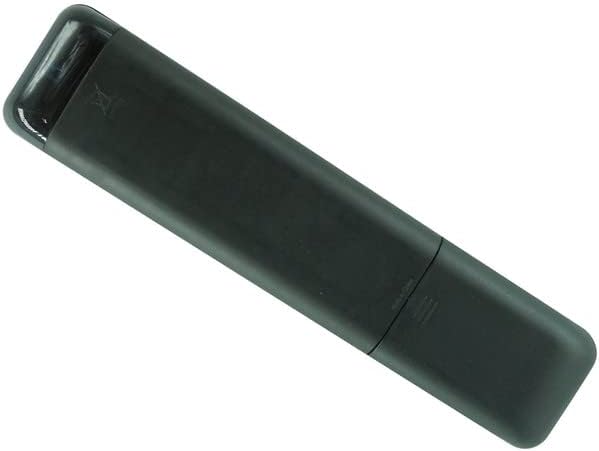
3-сурет: Артқа view қашықтан басқару пультінің.
5. Ақаулықтарды жою
- Пульт жауап бермейді:
- Батареялардың дұрыс полярлықпен (+/-) дұрыс салынғанына көз жеткізіңіз.
- Ескі батареяларды жаңа AAA батареяларымен ауыстырыңыз.
- Check for any obstructions between the remote control and your Formuler device.
- Make sure you are within the effective operating range (up to 10 meters).
- Кейбір түймелер жұмыс істемейді:
- Verify that the remote control is indeed compatible with your specific Formuler model (Z10 SE, Z+ Neo, Z Plus). If your model is not listed, this remote may not be fully compatible.
- Some functions may be specific to the original remote or require specific software versions on your device.
- Қашықтан басқару пульті үзіліссіз жұмыс істейді:
- Бұл көбінесе батарея қуатының төмен екенін көрсетеді. Батареяларды ауыстырыңыз.
- Ensure a clear line of sight to the device.
If issues persist after following these steps, please refer to the support section.
6. Техникалық сипаттамалар
| Бренд | Жалпы |
| Үлгі нөмірі | Easytry20118 |
| Қосылу технологиясы | Инфрақызыл (ИК) |
| Үйлесімді құрылғылар | Formuler Z10 SE, Z+ Neo, Z Plus 4K UHD IPTV Android HDTV Box |
| Қолдау көрсетілетін құрылғылардың максималды саны | 1 |
| Контроллер түрі | Түймені басқару |
| Максималды диапазон | 10 метр (шамамен 33 фут) |
| Батареялар қажет | 2 x AAA батареялары |
7. Кепілдік және қолдау
7.1 Кепілдік туралы ақпарат
Бұл өнім а 90 күндік кепілдік from the date of purchase. This warranty covers manufacturing defects. It does not cover damage caused by misuse, accidents, unauthorized modifications, or normal wear and tear.
7.2 Тұтынушыларды қолдау қызметі
For any questions, concerns, or troubleshooting assistance not covered in this manual, please contact the seller directly through the platform where the product was purchased. Please have your order number and product details ready for faster service.