
1. Маңызды қауіпсіздік нұсқаулары
Осы өнімді қолданар алдында барлық қауіпсіздік нұсқауларын оқып шығыңыз және түсініңіз. Осы нұсқауларды орындамау электр тогының соғуына, өртке немесе ауыр жарақатқа әкелуі мүмкін.
- Құрылғыны шектен тыс температураға, тікелей күн сәулесіне немесе жоғары ылғалдылыққа шығармаңыз.
- Keep the device away from water and other liquids. If it gets wet, turn it off immediately and allow it to dry completely before reuse.
- Құрылғыны бөлшектеуге, жөндеуге немесе өзгертуге тырыспаңыз. Барлық қызмет көрсету жұмыстарын білікті мамандарға тапсырыңыз.
- Use only specified charging methods (USB-C, solar, hand crank).
- Балалардың қолы жетпейтін жерде сақтаңыз.
- Батареяларды жергілікті ережелерге сәйкес тастаңыз.
2. Өнім аяқталдыview
The FosPower Emergency Weather Radio Model A6 is a versatile device designed for emergency preparedness and outdoor activities. It features multiple power sources, radio reception, lighting, and a power bank function.
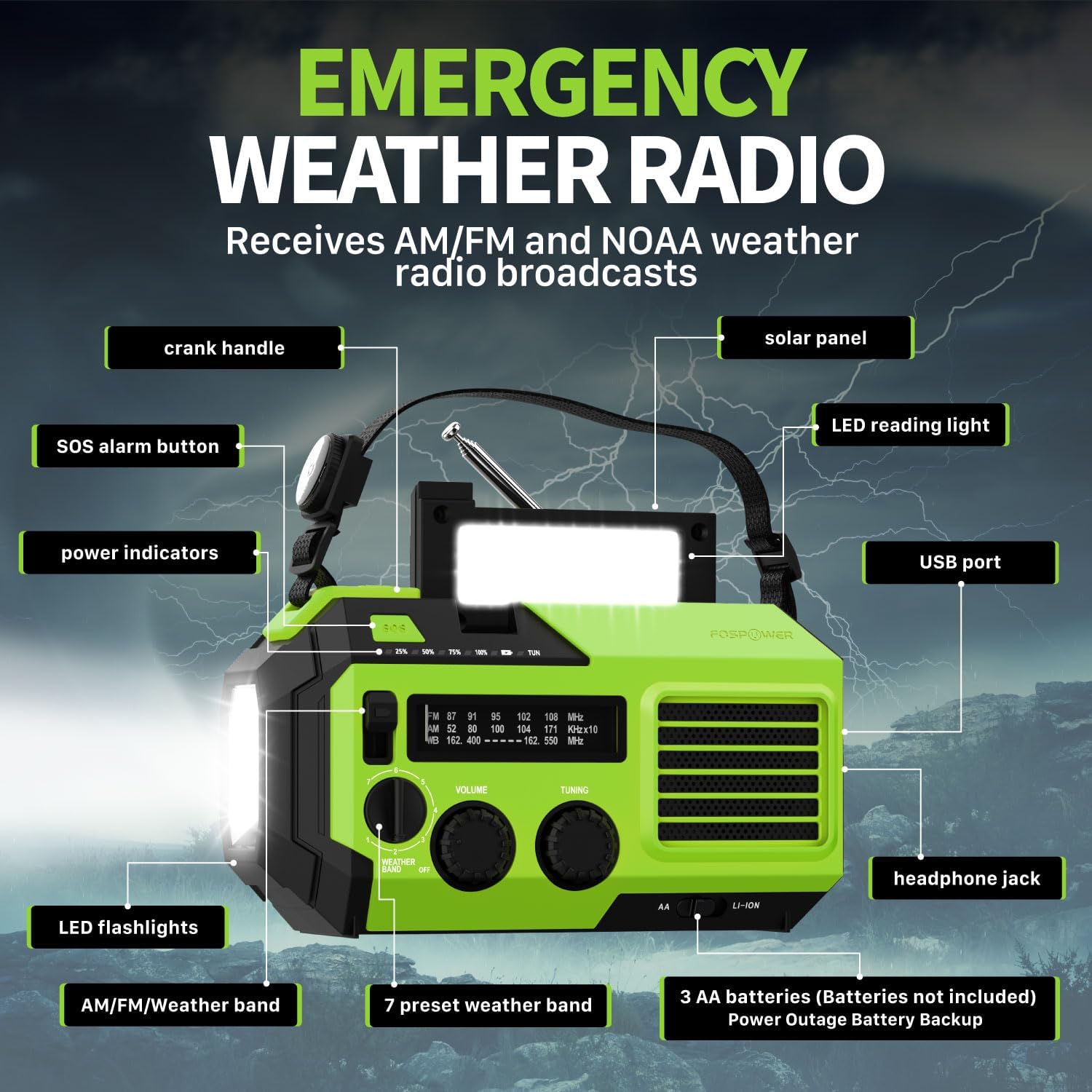
2.1-сурет: Алдыңғы view of the FosPower Emergency Weather Radio with key components labeled, including the crank handle, solar panel, SOS alarm button, power indicators, LED reading light, USB port, LED flashlights, AM/FM/Weather band selector, volume and tuning knobs, and headphone jack.
Негізгі ерекшеліктері:
- NOAA/AM/FM Radio: Access local weather information and emergency hazard alerts, as well as standard AM/FM broadcasts.
- 19240mWh (5200mAh) Power Bank: Charge USB devices during power outages or in outdoor settings.
- Бірнеше қуат көздері: Recharge via USB-C cable, solar panel, or hand crank. Can also be powered by AA batteries (not included).
- SOS дабылы: Activates a loud siren and flashing light for emergency signaling.
- Біріктірілген жарықтандыру: Features a powerful flashlight and a reading light.
- IPX3 суға төзімділігі: Су шашырауынан қорғауды қамтамасыз етеді.
3. Орнату
3.1 Бастапқы зарядтау
Before first use, fully charge the internal battery using the provided USB-C cable. Connect the USB-C cable to the radio's USB-C port and the other end to a USB power adapter (not included) or a computer USB port. The power indicators will illuminate to show charging progress.
3.2 AA Battery Installation (Optional)
The radio can also operate on 3 AA batteries (not included) as a backup power source. Open the battery compartment cover on the back of the radio and insert 3 AA batteries, ensuring correct polarity. Close the cover securely.

3.1-сурет: артқы view of the radio highlighting the solar panel, hand-crank, AA battery compartment, and USB charging port, illustrating the multiple power sources.
4. Пайдалану нұсқаулары
4.1 Радиомен жұмыс
- Қуатты қосу/өшіру: Rotate the 'VOLUME' knob clockwise to turn the radio on and adjust the volume. Rotate counter-clockwise until it clicks to turn off.
- Диапазонды таңдау: Use the 'WEATHER BAND' switch to select between AM, FM, or WB (Weather Band).
- баптау: Rotate the 'TUNING' knob to scan for radio stations. Extend the telescopic antenna for improved reception, especially for FM and WB.
- NOAA ауа райы диапазоны: When WB is selected, the radio will receive NOAA weather alerts. The radio supports 7 preset weather bands.
- Құлаққап ұясы: For private listening, connect 3.5mm headphones to the headphone jack.
4.2 Flashlight and Reading Light

Image 4.1: The radio demonstrating its high-power flashlight and cool-tone reading lamp Ерекше өзгешеліктері.
- Шам: Press the flashlight button located on the front of the radio to turn the flashlight on or off.
- Оқу шамы: Lift the solar panel to reveal the LED reading light. Press the reading light button to turn it on or off.
4.3 SOS дабылы
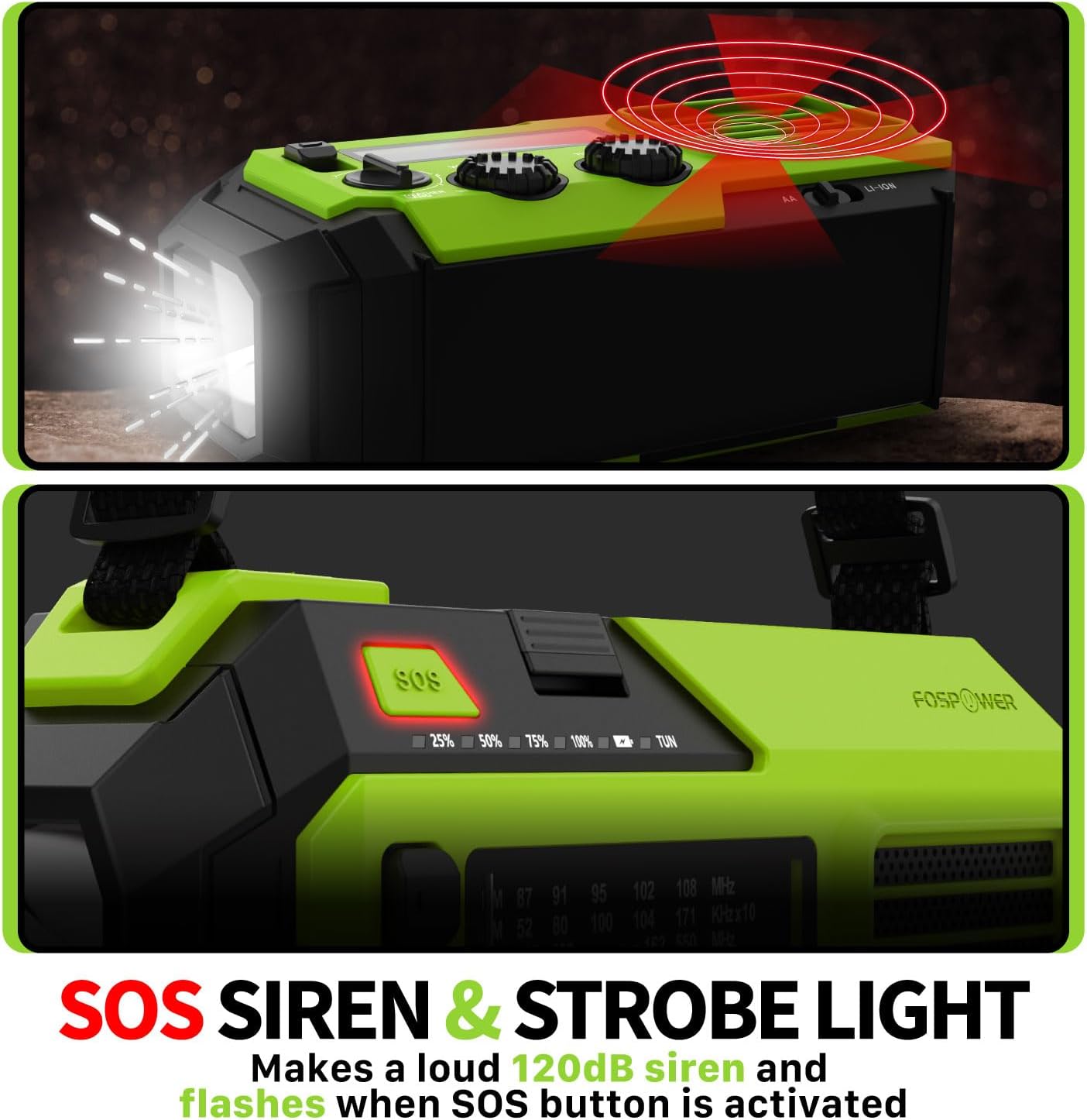
Image 4.2: Close-up of the radio's SOS button and an illustration of the siren and strobe light being activated.
In an emergency, press and hold the 'SOS' button to activate a loud 120dB siren and a flashing strobe light. Press the 'SOS' button again to deactivate.
4.4 Charging External Devices (Power Bank)

Image 4.3: The radio connected via USB to a smartphone, demonstrating its power bank capability for charging small electronics.
Connect your USB-powered device (e.g., smartphone, tablet) to the radio's USB-A output port using your device's charging cable. The radio's internal battery will begin charging your device.
4.5 Радионы зарядтау
- USB-C зарядтау: Connect the provided USB-C cable to the radio's USB-C input port and a USB power source. This is the most efficient charging method.
- Күннен зарядтау: Place the radio with the solar panel facing direct sunlight. The solar panel charges the internal battery, primarily for maintaining charge or slow charging in emergencies.
- Қолмен зарядтау: Rotate the hand crank clockwise or counter-clockwise at a steady pace (approximately 130-150 RPM) for 3-5 minutes to generate power for short-term use or to initiate charging.
5. Техникалық қызмет көрсету
- Тазалау: Радионы жұмсақ, құрғақ шүберекпен сүртіңіз. Абразивті тазартқыштарды немесе еріткіштерді қолданбаңыз.
- Сақтау орны: Store the radio in a cool, dry place away from direct sunlight when not in use for extended periods. For optimal battery health, fully charge the internal battery every 3-6 months.
- Батареяға күтім жасау: If using AA batteries, remove them if the radio will not be used for a long time to prevent leakage.
6. Ақаулықтарды жою
| Мәселе | Ықтимал себебі | Шешім |
|---|---|---|
| Радио қосылмайды. | Internal battery is depleted; AA batteries are depleted or incorrectly installed. | Charge the internal battery via USB-C or hand crank. Check and replace AA batteries if used. |
| Нашар радио қабылдау. | Антенна ұзартылмаған; сигнал аймағы әлсіз; кедергі бар. | Fully extend the telescopic antenna. Adjust radio position. Try tuning to a stronger station. |
| Сыртқы құрылғы зарядталмайды. | Radio's internal battery is low; incorrect cable; device not compatible. | Ensure the radio's internal battery is sufficiently charged. Use a functional USB charging cable. Verify device compatibility. |
| Hand crank is stiff or not generating power. | Mechanism obstruction; improper cranking speed. | Ensure no obstructions. Crank at a steady, moderate pace (130-150 RPM). |
7. Техникалық сипаттамалар
| Ерекшелік | Мәлімет |
|---|---|
| Үлгі нөмірі | FOSPWB-2419 |
| Өнім өлшемдері | 6.76 x 3.52 x 2.59 дюйм |
| Элемент салмағы | 1.08 фунт |
| Ішкі батарея | 19240mWh (5200mAh) |
| External Battery Support | 3 x AA батареялары (жинаққа кірмейді) |
| Радио диапазондары | AM, FM, NOAA Weather Band (WB) |
| Зарядтау әдістері | USB-C, Solar, Hand Crank |
| Арнайы мүмкіндіктер | Built-In Flashlight, Reading Light, SOS Alarm, Power Bank |
| Суға төзімділік | IPX3 |
8. Кепілдік және қолдау
FosPower provides a limited lifetime warranty for this product. For warranty claims, technical assistance, or customer service inquiries, please contact FosPower's USA-based customer support team. Refer to the official FosPower webБайланыс мәліметтерін алу үшін сайт немесе сатып алу құжаттамасы.