
1. Кіріспе және өнім аяқталдыview
This manual provides essential information for the safe and efficient operation of your Mistral MAC2300R Air Cooler. Please read it thoroughly before use and retain it for future reference.
The Mistral MAC2300R is a 25-liter detachable air cooler designed to provide effective cooling and air purification. Key features include plasma sterilisation for improved air quality, a convenient 9-hour timer, and remote control operation for ease of use. It also incorporates a built-in ionizer and humidifying function to enhance your indoor comfort.
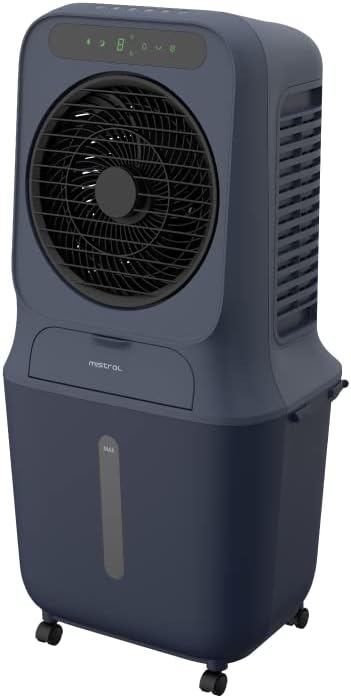
1-сурет: Алдыңғы view of the Mistral MAC2300R Air Cooler.
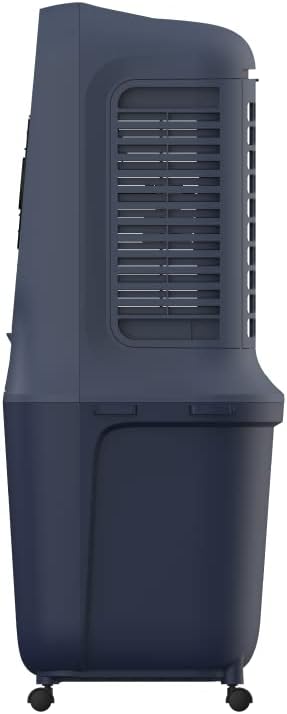
2-сурет: жағы view of the Mistral MAC2300R Air Cooler, showing the air intake grille.

3-сурет: Артқа view of the Mistral MAC2300R Air Cooler, highlighting the cooling pad area.
2. Орнату нұсқаулары
- Қаптаманы ашу: Carefully remove the air cooler and all accessories from the packaging. Ensure all components, including the remote control, dustproof filter, and washable cooling pad, are present.
- Орналастыру: Place the air cooler on a flat, stable, and dry surface. The unit is freestanding and designed to cool areas up to 30 square meters. Ensure there is adequate space around the unit for proper airflow.
- Су қоймасын толтыру: The air cooler features a 25-liter detachable water reservoir. Locate the water tank cap, open it, and pour clean, cool water into the reservoir. Do not exceed the 'MAX' fill line indicated on the tank. For enhanced cooling, you may add ice packs or ice cubes to the water.
- Install Cooling Pad and Filter: Ensure the washable cooling pad and dustproof filter are correctly installed in their designated slots. Refer to the product diagrams for precise placement.
- Қуатты қосу: Қуат сымын стандартты электр розеткасына қосыңыз. Құрылғы енді жұмысқа дайын.
3. Пайдалану нұсқаулары
Your Mistral MAC2300R Air Cooler can be operated using the integrated LED control panel or the provided remote control.
3.1 Басқару тақтасы және қашықтан басқару құралы
The control panel on top of the unit features various buttons for different functions. The remote control duplicates these functions for convenient operation from a distance. Ensure the remote control has working batteries.
3.2 Негізгі функциялар
- Қуатты қосу/өшіру: түймесін басыңыз Қуат құрылғыны қосу немесе өшіру үшін түймесін басыңыз.
- Желдеткіш жылдамдығы: Select from 3 fan speeds (Low, Medium, High) by pressing the Жылдамдық түймесі.
- Режимдер: Cycle through different operating modes (e.g., Normal, Natural, Sleep) using the Режим түймесі.
- Таймер: Set the auto-off timer for up to 9 hours by pressing the Таймер button repeatedly to select the desired duration.
3.3 Қосымша функциялар
- Plasma Sterilization: Activate the plasma sterilisation function by pressing the dedicated Плазма button. This feature helps to eliminate airborne bacteria and viruses, improving air quality with up to 99.99% efficiency.
- Humidifying Function: түймесін басыңыз Ылғалдандыру button to enable the humidifying function, which adds moisture to the air for increased comfort, especially in dry climates.
- Ионизатор: The built-in ionizer can be activated to release negative ions, which help to purify the air by attracting dust and allergens.
- Судың аздығы туралы дабыл: The unit is equipped with a low water alarm that will alert you when the water reservoir needs refilling to ensure continuous operation of the cooling and humidifying functions.
4. Техникалық қызмет көрсету
Regular maintenance ensures the longevity and optimal performance of your Mistral MAC2300R Air Cooler.
- Су қоймасын тазалау: To prevent the growth of mold, mildew, and bacteria, regularly drain and clean the 25-liter water reservoir. Unplug the unit, detach the reservoir, and wash it with mild soap and water. Rinse thoroughly and dry before reattaching.
- Filter and Cooling Pad Cleaning: The dustproof filter and washable cooling pad should be cleaned periodically. Carefully remove these components as per the product diagram. Wash them under running water to remove dust and debris. Allow them to air dry completely before reinstallation.
- Сыртқы тазалау: Wipe the exterior surfaces of the air cooler with a soft, damp cloth. Do not use harsh chemicals, abrasive cleaners, or solvents, as these can damage the unit's finish.
- Сақтау орны: If storing the unit for an extended period, ensure the water reservoir is empty and clean, and all filters and pads are dry. Store the air cooler in a cool, dry place, away from direct sunlight.
5. Ақаулықтарды жою
If you encounter any issues with your Mistral MAC2300R Air Cooler, please refer to the following common troubleshooting steps:
- Құрылғы қосылмайды:
- Қуат сымының жұмыс істейтін электр розеткасына мықтап қосылғанына көз жеткізіңіз.
- Check if the power button on the control panel or remote control has been pressed.
- No or weak cooling effect:
- Verify that the water reservoir is filled to an adequate level.
- Check if the cooling pad is wet. If dry, ensure the water pump is operating correctly.
- Clean the dustproof filter and washable cooling pad, as blockages can reduce efficiency.
- Ерекше шу:
- Құрылғының тұрақты, тегіс бетке қойылғанына көз жеткізіңіз.
- Check for any foreign objects inside the unit or around the fan blades.
- Verify that the water pump is not obstructed.
- Судың ағуы:
- Ensure the water reservoir is correctly seated and sealed.
- Do not overfill the water reservoir beyond the 'MAX' line.
Осы қадамдарды орындағаннан кейін мәселе жойылмаса, тұтынушыларды қолдау қызметіне хабарласыңыз.
6. Техникалық сипаттамалар
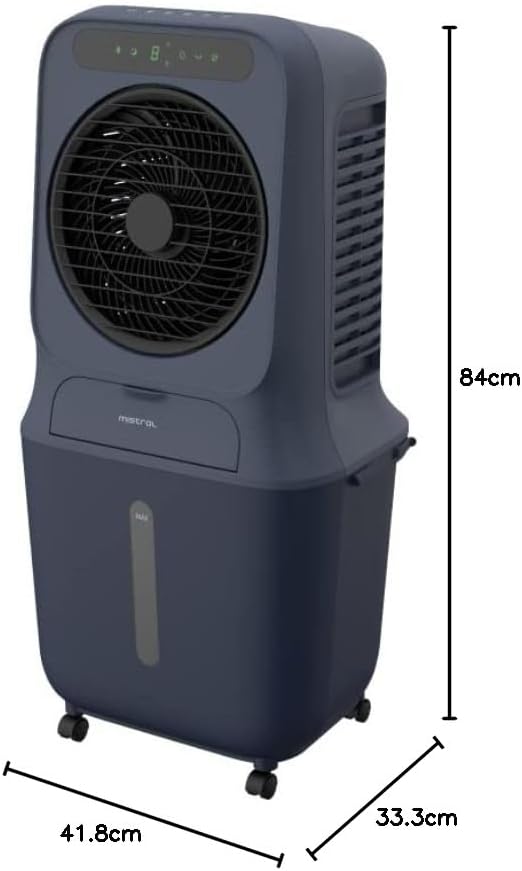
Figure 4: Dimensions of the Mistral MAC2300R Air Cooler.
| Ерекшелік | Сипаттама |
|---|---|
| Бренд | МИСТРАЛ |
| Модель атауы | MAC2300R |
| Материал | Пластмасса |
| Монтаждау түрі | Ерекше |
| Арнайы мүмкіндіктер | Remote Control, Timer, Plasma Sterilization |
| Түс | Көк |
| Басқару түрі | Қашықтан |
| Резервуардың сыйымдылығы | 25 литр |
| Еден ауданы | 30 шаршы метр |
| Элемент салмағы | 8.5 келі |
| Элемент өлшемдері (D x W x H) | 41.8D x 33.3 Вт x 84 H сантиметр |
| Қосылған құрамдас бөліктер | Dustproof filter, washable cooling pad |
7. Кепілдік және қолдау
The Mistral MAC2300R Air Cooler is covered by a 2-year local seller warranty. Бұл кепілдік өндірістік ақауларды қамтиды және қалыпты пайдалану кезінде өніміңіздің жұмыс істеуін қамтамасыз етеді.
For warranty claims, technical assistance, or any product-related inquiries, please contact the local seller from whom you purchased the unit. You can find their contact information in your purchase documentation or on the product detail page where you made your purchase.
Information regarding replacement policies and additional support resources can also be obtained by contacting customer service or visiting the official Mistral webсайт.


