
1. Кіріспе
Thank you for choosing the Podofo 1 Din Android Car Stereo. This device integrates advanced features such as a 7-inch retractable touch screen, Android operating system, Bluetooth, GPS navigation, Wi-Fi connectivity, FM/RDS radio, Mirror Link, AUX-in, and support for a backup camera. This manual provides essential information for installation, operation, maintenance, and troubleshooting to ensure optimal performance and user experience.

Image 1.1: Podofo 1 Din Android Car Stereo with its main components and accessories.
2. Пакет мазмұны
Барлық заттардың бар екеніне көз жеткізу үшін пакетті мұқият тексеріңіз:
- 1 x Single DIN Car Stereo Unit
- 1 x сақтық көшірме камерасы
- 1 x GPS антеннасы
- 1 x Power Cable Harness
- 1 x Speaker Cable Harness
- 2 x Disassembly Keys
- 1 x Пайдаланушы нұсқаулығы
- 1 x Орнату кронштейнінің жинағы

Image 2.1: Visual representation of the package contents.
3. Техникалық сипаттамалар
| Жүйе | Android 10.0 |
| Экран өлшемі | 7-inch Retractable Touch Screen |
| Ажыратымдылық | 1024 x 600 |
| Bluetooth нұсқасы | 4.2 |
| FM радио диапазоны | 87.5 ~ 108 МГц |
| Жұмыс температурасы | -10℃ ~ +60℃ |
| USB интерфейсі | USB 2.0 |
| Тtage | 12В |
| Шығу қуаты | 60 Вт |
| Сақтау | 1 ГБ жедел жады + 16 ГБ ROM |
| Аудио пішімдері | MP3 / WMA / WA / OGG / FLAC / APE |
| Бейне форматтары | RM / RMVB / MP4 / FLV / MKV / 3GP / AVIASF / SWFMP1 |
| Кескін пішімі | JPG |
| Қосылу мүмкіндігі | Сымсыз дәлдiк |
| Өнім өлшемдері (L x W x H) | 18.8 см x 5.8 см x 16.5 см |
| Салмағы | 1660 грамм |

Image 3.1: Product details including dimensions and rear panel connections.
4. Орнату және орнату
Before installation, ensure your vehicle's power is disconnected. Professional installation is recommended.
4.1 Сымды қосылымдар
- Қуат қосылымы: Connect the power cable harness to your vehicle's power supply (ACC, B+, GND). Ensure correct polarity.
- Динамик қосылымы: Connect the speaker cable harness to your vehicle's speakers. Match positive and negative terminals.
- GPS антеннасы: Connect the GPS antenna to the dedicated port on the back of the unit and mount it in a location with a clear view аспанның.
- Сақтық көшірме камерасы: Connect the backup camera's video output to the 'CAMERA IN' port on the stereo. Connect the camera's power to your vehicle's reverse light circuit for automatic activation.
- AUX-in/USB: Connect external devices via the AUX-in port or USB ports as needed.
- Руль дөңгелегін басқару (SWC): If your vehicle supports SWC, connect the SWC wires (KEY1, KEY2) to the corresponding wires from your vehicle's harness. Configuration will be done in the settings menu.

Image 4.1: Backup camera wiring diagram.
4.2 Құрылғыны орнату
Insert the single DIN unit into your vehicle's dashboard opening. Secure it using the provided mounting brackets and screws. Ensure the retractable screen mechanism has enough clearance to operate freely.
5. Пайдалану нұсқаулары
5.1 Негізгі операция
- Қуатты қосу/өшіру: Press the power button (usually labeled SRC or PWR) to turn the unit on or off.
- Дыбыс деңгейін басқару: Дыбыс деңгейін реттеу үшін айналмалы тұтқаны немесе экрандағы басқару элементтерін пайдаланыңыз.
- Screen Retraction: Manually adjust the screen's angle or retract it into the unit as desired.
5.2 Bluetooth Connectivity (Bluetooth 4.2)
Pair your mobile phone with the car stereo for hands-free calling and audio streaming.
- Go to the Bluetooth menu on the car stereo.
- Ұялы телефонда Bluetooth қосыңыз және қолжетімді құрылғыларды іздеңіз.
- Select "MY PODOFO" or a similar name from the list on your phone.
- Сұралған жағдайда жұптастыру кодын растаңыз.
- Once paired, you can make/receive calls and play music through the car stereo.

Image 5.1: Bluetooth connection and FM/RDS radio interface.
5.3 FM/RDS радиосы
Access the Radio application to listen to FM broadcasts. The RDS function displays station names and program information where available.
- Open the "Radio" app from the main menu.
- Станцияларды іздеу, қолмен реттеу немесе алдын ала орнатылған станцияларды таңдау үшін экрандағы басқару элементтерін пайдаланыңыз.
5.4 GPS навигациясы
The unit supports both online and offline navigation. Ensure the GPS antenna is properly connected.
- Open the "Navigation" or "Maps" app.
- For offline maps, download them via Wi-Fi before driving.
- Баратын жеріңізді енгізіп, дауыспен берілген нұсқауларды орындаңыз.
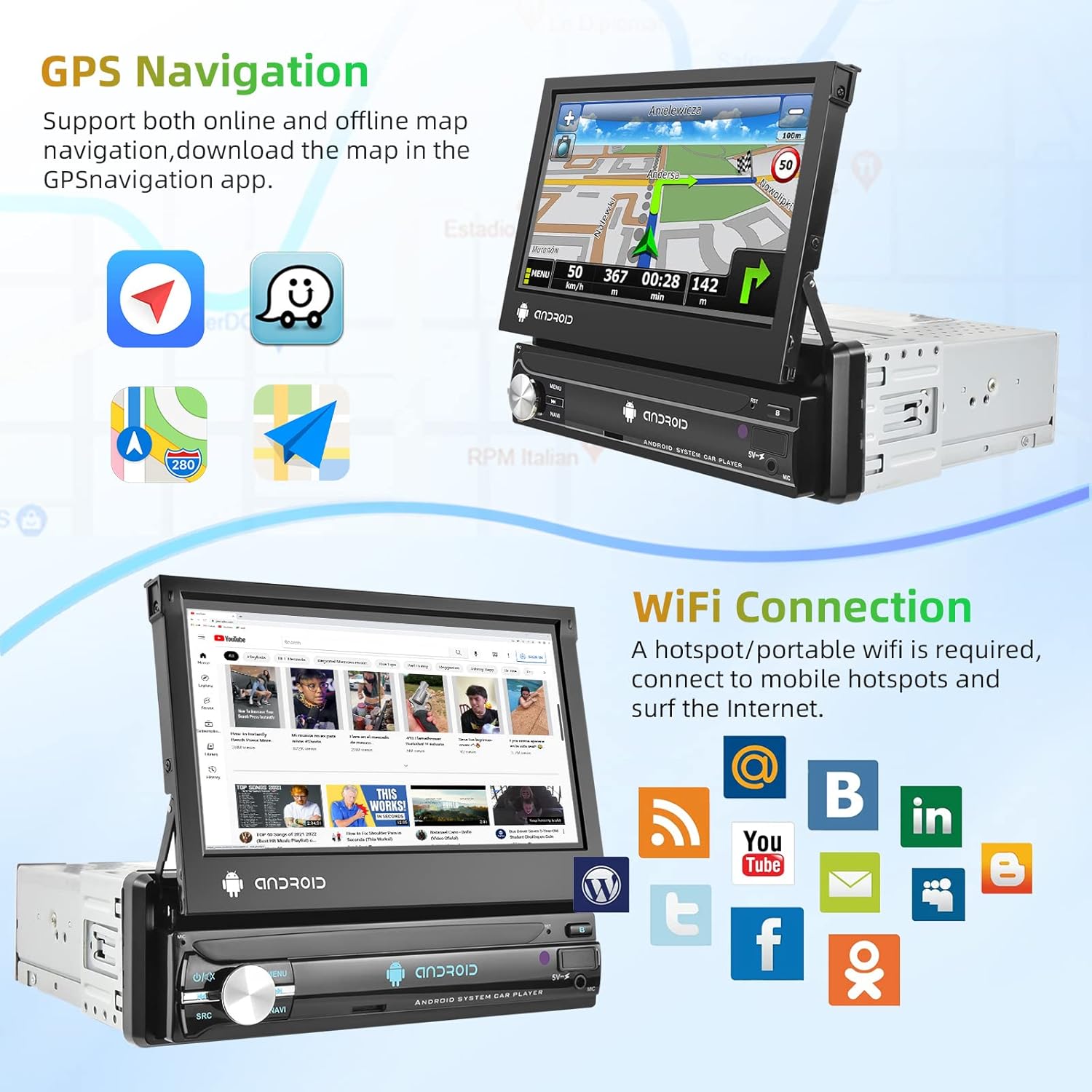
Image 5.2: GPS navigation and Wi-Fi connection features.
5.5 Wi-Fi қосылымы
Connect to a mobile hotspot or Wi-Fi network to access online features, download apps, and browse the internet.
- Go to "Settings" and select "Wi-Fi".
- Wi-Fi қосыңыз және қажетті желіні таңдаңыз.
- Қажет болса, құпия сөзді енгізіңіз.
5.6 Айна сілтемесі
Project your smartphone screen onto the car stereo display. Supports both Android and iOS devices via USB connection.
- Connect your smartphone to the car stereo via a USB cable.
- Follow the on-screen prompts on both your phone and the stereo to establish the connection.

Image 5.3: Split screen, EQ settings, Mirror Link, and Steering Wheel Control features.
5.7 Сақтық көшірме камерасының дисплейі
When the vehicle is shifted into reverse gear, the car stereo will automatically display the view from the connected backup camera.
5.8 Руль дөңгелегін басқару (SWC)
Configure your vehicle's steering wheel buttons to control the car stereo functions.
- Go to "Settings" and find the "Steering Wheel Control" or "SWC Learning" option.
- Follow the on-screen instructions to assign functions to each button.
5.9 EQ Setting
Adjust audio equalization for a personalized sound experience.
- «EQ» немесе «Дыбыс параметрлері» мәзіріне кіріңіз.
- Choose from preset equalizer modes or manually adjust frequency bands.
5.10 Экранды бөлу
Жетілдірілген көп тапсырма үшін экранда екі қолданбаны бір уақытта іске қосыңыз.
- While an app is open, long-press the recent apps button or drag an app to one side of the screen (depending on Android version).
- Select another app to open on the other side.
6. Техникалық қызмет көрсету
- Экранды тазалау: Сенсорлық экранды ақырын сүрту үшін жұмсақ, мамықсыз шүберекті пайдаланыңыз. Абразивті тазартқыштарды немесе еріткіштерді пайдаланбаңыз.
- Жалпы тазалау: Keep the unit free from dust and debris. Use a dry cloth for the main body.
- Бағдарламалық құрал жаңартулары: Оңтайлы өнімділікті және жаңа мүмкіндіктерге қол жеткізуді қамтамасыз ету үшін жүйелік параметрлер арқылы бағдарламалық құрал жаңартуларын мерзімді түрде тексеріңіз.
7. Ақаулықтарды жою
| Мәселе | Ықтимал себебі | Шешім |
|---|---|---|
| Құрылғы қосылмайды. | Incorrect wiring, blown fuse, no power supply. | Check power cable connections (ACC, B+, GND). Verify vehicle fuse. Ensure vehicle battery is charged. |
| Дыбыс жоқ. | Динамик сымдары ажыратылған, дыбыс деңгейі тым төмен, дыбыс көзі дұрыс емес. | Check speaker wiring. Increase volume. Select correct audio source (FM, Bluetooth, USB, AUX). |
| GPS сигналы жоғалған немесе дұрыс емес. | GPS antenna improperly connected or obstructed. | Ensure GPS antenna is securely connected and mounted in a clear location (e.g., dashboard, not under metal). |
| Bluetooth қосылмайды. | Bluetooth off on either device, incorrect pairing process. | Ensure Bluetooth is enabled on both the stereo and phone. Delete previous pairings and try pairing again. |
| Сақтық көшірме камерасы көрсетілмейді. | Camera not powered, video cable disconnected, reverse trigger wire not connected. | Check camera power and video connections. Ensure the reverse trigger wire is correctly connected to the vehicle's reverse light. |
8. Кепілдік және қолдау
8.1 Кепілдік туралы ақпарат
Бұл өнім а 2 жылдық өндірушінің кепілдігі. Кепілдік шағымдары үшін сатып алуды растайтын құжатты сақтаңыз. Кепілдік қалыпты пайдалану кезіндегі материалдар мен өңдеу ақауларын қамтиды.
8.2 Тұтынушыларды қолдау қызметі
For technical assistance, troubleshooting beyond this manual, or warranty inquiries, please contact Podofo customer support through the retailer where the product was purchased or visit the official Podofo webбайланыс ақпаратына арналған сайт.