
Axis Communications 02316-002
AXIS Q6225-LE PTZ камерасының пайдаланушы нұсқаулығы
Үлгі: 02316-002
1. Кіріспе
This user manual provides comprehensive instructions for the installation, operation, and maintenance of the Axis Communications AXIS Q6225-LE PTZ Camera. Please read this manual thoroughly before using the product to ensure proper functionality and safety. This camera is designed for robust outdoor surveillance in challenging conditions.
2. Қауіпсіздік туралы ақпарат
Observe the following safety precautions to prevent damage to the product or injury to personnel:
- Орнату: Installation must be performed by qualified personnel in accordance with all local and national electrical and building codes.
- Нәр беруші: Use only the specified power supply (60 watts) for this device. Ensure the power source is stable and meets the camera's requirements.
- Қоршаған орта: The camera is designed for outdoor use. However, avoid exposing it to extreme conditions beyond its specified operating range.
- Тазалау: Тазалау алдында электр қуатын ажыратыңыз. Жұмсақ, құрғақ шүберекті пайдаланыңыз. Сұйық немесе аэрозольді тазартқыштарды қолданбаңыз.
- Өзгертулер: Do not attempt to modify or disassemble the camera. This may void the warranty and pose safety risks.
3. Пакет мазмұны
Барлық элементтер пакетте бар екенін тексеріңіз:
- AXIS Q6225-LE PTZ камерасы
- Орнату нұсқаулығы
- Бекіту кронштейні және жабдық
- Network Cable Connector
- Documentation and Software CD (if applicable)
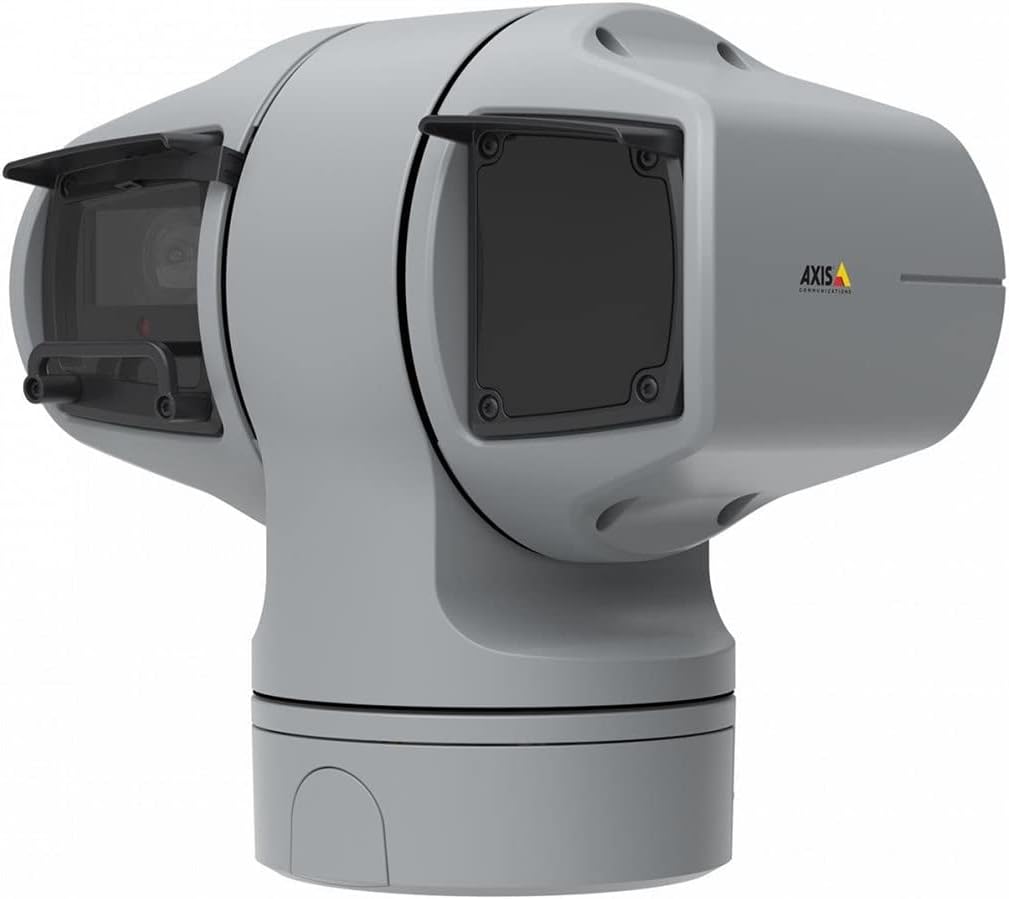
1-сурет: AXIS Q6225-LE PTZ Camera. This image displays the grey-colored PTZ camera unit, highlighting its robust housing and integrated lens system, designed for outdoor surveillance.
4. Орнату және орнату
4.1 Камераны орнату
The AXIS Q6225-LE is designed for wall mount installation. Ensure the mounting surface is strong enough to support the camera's weight and withstand environmental conditions.
- Қажетті өрісті қамтамасыз ететін қолайлы орнату орнын таңдаңыз view және қуат пен желі қосылымдарына қол жетімді жерде.
- Қабырғадағы бұрғылау тесіктерін белгілеу үшін берілген бекіту үлгісін пайдаланыңыз.
- Drill pilot holes and secure the mounting bracket using appropriate screws and anchors.
- Attach the camera to the mounting bracket, ensuring it is firmly locked in place.
4.2 Қуат және желіге қосылу
Connect the camera to power and network as follows:
- Қуат: Connect the power cable to a 60-watt power source. Ensure the connection is secure and weatherproof.
- Желі: Connect an Ethernet cable from your network switch or router to the camera's network port. The camera supports Wi-Fi for wireless communication. Refer to the network configuration section for wireless setup.
4.3 Бастапқы конфигурация
After physical installation and connection, access the camera's web interface for initial configuration:
- ашу а web камерамен бірдей желіге қосылған компьютердегі шолғыш.
- Enter the camera's IP address in the browser's address bar. If the IP address is unknown, use the AXIS IP Utility tool to discover it.
- Follow the on-screen prompts to set up a new password for the administrator account.
- Configure basic network settings, date/time, and video stream settings.
5. Камераны пайдалану
5.1 Панорама, көлбеу және масштабтау (PTZ) басқаруы
The AXIS Q6225-LE camera features full PTZ capabilities, allowing remote adjustment of its viewing angle and zoom level. Control is typically performed via the camera's web интерфейс немесе үйлесімді бейнені басқару бағдарламалық құралы (VMS).
- Пан: Rotate the camera horizontally to cover a wider area.
- Еңкейту: Adjust the camera vertically to view objects at different heights.
- Оптикалық масштабтау: Use the optical zoom feature to magnify distant objects without loss of image quality.
5.2 Қозғалысты анықтау және ескертулер
The camera supports motion-only alerts. Configure motion detection zones and sensitivity settings in the web interface to trigger recordings or notifications when movement is detected.
5.3 Infrared (IR) Illumination
Equipped with infrared light sources, the camera provides clear video surveillance in low-light or complete darkness. IR illumination activates automatically or can be manually controlled.
6. Техникалық қызмет көрсету
6.1 Тазалау
Regular cleaning of the camera lens and housing is recommended to ensure optimal performance, especially in dusty or harsh environments.
- Gently wipe the lens with a soft, lint-free cloth. For stubborn dirt, use a lens cleaning solution specifically designed for optical surfaces.
- Камера корпусын жарнамамен тазалаңызamp шүберек. Абразивті тазартқыштардан немесе еріткіштерден аулақ болыңыз.
6.2 Микробағдарлама жаңартулары
Axis Communications қызметін мезгіл-мезгіл тексеріп отырыңыз website for firmware updates. Keeping the camera's firmware up-to-date ensures access to the latest features, security enhancements, and bug fixes.
7. Ақаулықтарды жою
Бұл бөлімде AXIS Q6225-LE камераңызбен кездесуі мүмкін жиі кездесетін мәселелер қарастырылады.
| Мәселе | Ықтимал себебі | Шешім |
|---|---|---|
| Бейне арнасы жоқ | Power disconnected, network issue, incorrect IP address. | Check power connection. Verify network cable or Wi-Fi connection. Confirm camera's IP address. |
| Суреттің сапасы нашар | Dirty lens, improper focus, low light conditions. | Clean the lens. Adjust focus via web interface. Ensure adequate lighting or verify IR functionality. |
| PTZ controls unresponsive | Network latency, software glitch, motor issue. | Check network connection. Restart the camera. If problem persists, contact support. |
8. Техникалық сипаттамалар
| Ерекшелік | Мәлімет |
|---|---|
| Үлгі нөмірі | 02316-002 |
| Бренд | Осьтік коммуникациялар |
| Монтаждау түрі | Қабырғаға аспа |
| Түс | Ақ |
| Материал | Металл |
| Ватtage | 60 ватт |
| Қосылу технологиясы | Сымсыз, Wi-Fi |
| Ішкі/сыртқы пайдалану | Сыртта |
| Бақылау әдісі | Қашықтан |
| Фото сенсор технологиясы | CMOS |
| Бейне түсіру пішімі | MPEG-4 |
| Жарық көзі түрі | Инфрақызыл |
| Ескерту түрі | Тек қозғалыс |
| Масштабтау түрі | Оптикалық масштабтау |
| Элемент салмағы | 0.01 килограмм (0.352 унция) |
| Қосылған құрамдас бөліктер | Камера/Аксессуарлар |
9. Кепілдік және қолдау
For warranty information and technical support, please refer to the official Axis Communications webсайтына кіріңіз немесе уәкілетті дилерге хабарласыңыз. Сатып алуды растау ретінде сатып алу түбіртегіңізді сақтаңыз.
Онлайн ресурстар: www.axis.com
Ask a question about this manual
Ask about setup, troubleshooting, compatibility, parts, safety, or missing instructions. Manuals+ will review the question and use this page’s manual context to help answer it.