
Кіріспе
This manual provides essential information for setting up, operating, and maintaining your Beelink SER3 Mini PC. Please read it thoroughly before use to ensure proper functionality and safety.
The Beelink SER3 Mini PC is a compact and powerful computer featuring an AMD Ryzen 3 3200U processor, 16GB DDR4 RAM, and a 500GB NVMe SSD, designed for various computing tasks from office work to media streaming.
Пакет мазмұны
Ensure all items listed below are present in your package.
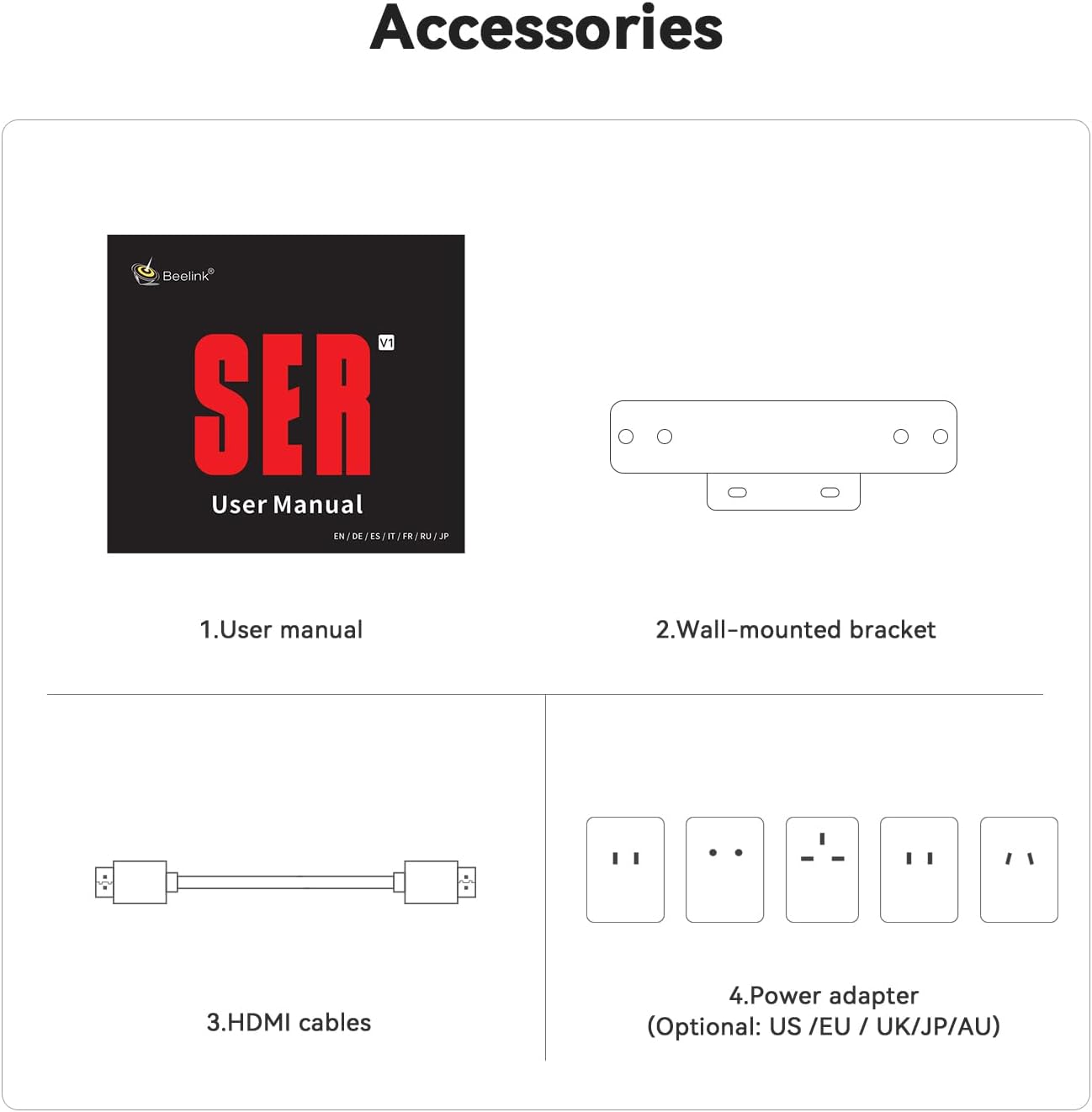
Image: Contents of the Beelink SER3 Mini PC package, showing the user manual, a wall-mounted bracket, two HDMI cables, and a power adapter with various regional plugs.
- Beelink SER3 Mini PC Unit
- Пайдаланушы нұсқаулығы
- Қабырғаға бекітілген кронштейн
- HDMI Cables (x2)
- Power Adapter (with regional plugs)
Өнім аяқталдыview
Алдыңғы және артқы панельдің орналасуы
The following diagrams illustrate the ports and buttons on your Beelink SER3 Mini PC.
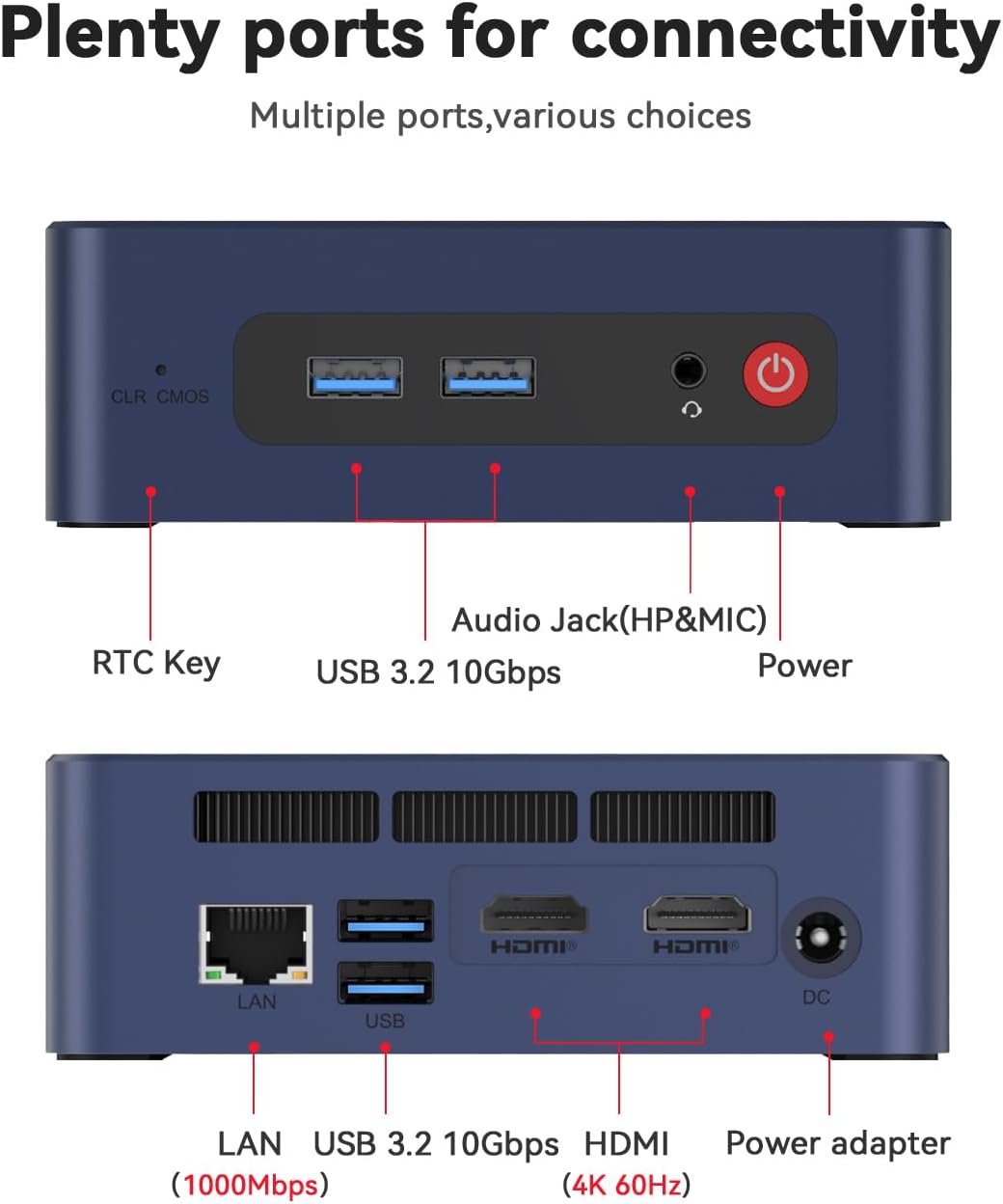
Image: Top panel of the Beelink SER3 Mini PC showing the CLR CMOS button, two USB 3.2 10Gbps ports, an Audio Jack (HP&MIC), and the Power button. The bottom panel shows the LAN port (1000Mbps), two USB 3.2 10Gbps ports, two HDMI (4K 60Hz) ports, and the DC power adapter input.
- Алдыңғы панель:
- CLR CMOS Key: Button to clear CMOS settings.
- USB 3.2 10Gbps Ports (x2): For high-speed data transfer and peripheral connections.
- Audio Jack (HP&MIC): Құлаққаптар мен микрофонға арналған.
- Қуат түймесі: Құрылғыны қосу/өшіру үшін.
- Артқы панель:
- LAN Port (1000Mbps): Сымды желі қосылымы үшін.
- USB 3.2 10Gbps Ports (x2): Қосымша жоғары жылдамдықты USB порттары.
- HDMI Ports (x2, 4K 60Hz): For connecting displays, supporting dual monitor setup.
- DC ұясы: Адаптерге арналған қуат кірісі.
Ішкі құрамдас бөліктер
Жарылған view of the Beelink SER3 Mini PC's internal structure.
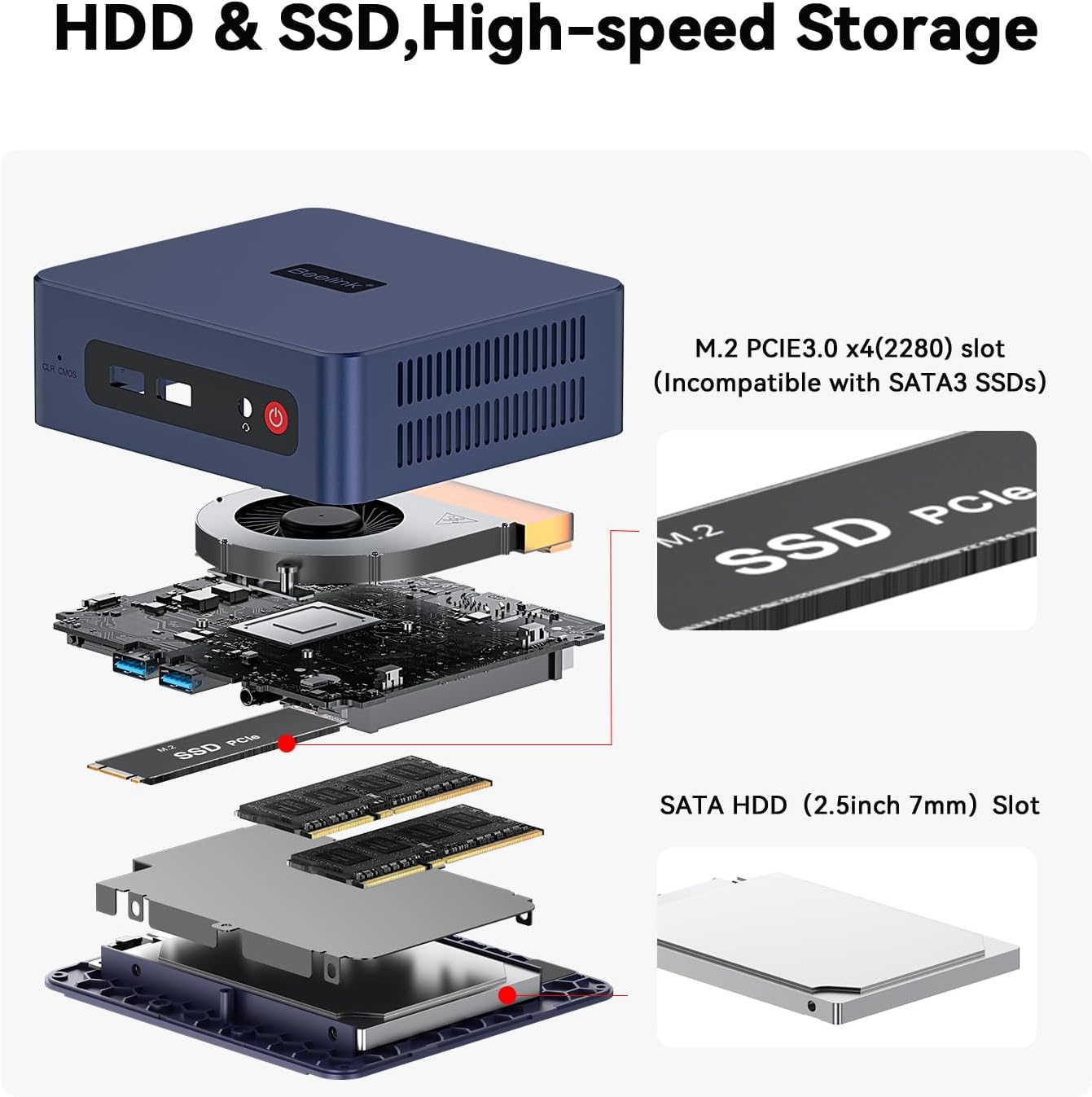
Image: An exploded diagram of the Beelink SER3 Mini PC, illustrating its components: plastic case, cooling fan, CPU, motherboard, M.2 2280 PCIe SSD, SO-DIMM DDR4 2400MT/s RAM, shielding can, and 2.5-inch HDD (7mm) bay, along with the plastic bottom panel.
- Пластикалық қорап: External housing.
- Салқындату желдеткіші: Dissipates heat from internal components.
- CPU (AMD Ryzen 3 3200U): Орталық өңдеу блогы.
- Аналық плата: Main circuit board connecting all components.
- M.2 2280 PCIe SSD: Primary storage drive.
- SO-DIMM DDR4 RAM: System memory (16GB installed, expandable).
- Shielding Can: Provides electromagnetic shielding.
- 2.5-inch HDD (7mm) Bay: Slot for additional SATA HDD/SSD storage.
- Plastic Bottom Panel: Base cover of the unit.
Орнату
Follow these steps to set up your Beelink SER3 Mini PC:
- Қуатқа қосылу: Plug the power adapter into the DC Jack on the rear panel of the Mini PC, then connect the adapter to a power outlet.
- Дисплейге қосылу: Use an HDMI cable to connect one or both HDMI ports on the Mini PC to your monitor(s) or TV.
- Перифериялық құрылғыларды қосу: Connect your keyboard, mouse, and other USB devices to the available USB 3.2 ports.
- Желі қосылымы (қосымша): For a wired internet connection, connect an Ethernet cable from your router to the LAN port on the rear panel. For wireless, ensure Wi-Fi is enabled in the operating system settings after initial setup.
- Қуат қосулы: Press the Power button on the front panel to turn on the Mini PC.
Пайдалану нұсқаулары
Basic operational guidelines for your Mini PC:
- Бірінші жүктеу: Upon first power-on, the system may guide you through the Windows 11 Pro setup process. Follow the on-screen instructions to configure your operating system.
- Қуатты қосу/өшіру:
- Қосу үшін: Қуат түймесін басыңыз.
- Өшіру үшін: Windows жүйесінде «Бастау» түймесін басып, Қуат > Өшіру опциясын таңдаңыз.
- Қайта бастау үшін: Windows жүйесінде Бастау түймесін басып, Қуат > Қайта іске қосу тармағын таңдаңыз.
- Ұйықтау үшін: Windows жүйесінде «Бастау» түймесін басыңыз, содан кейін Қуат > Ұйқы режимі тармағын таңдаңыз.
- Wi-Fi желісіне қосылу: In Windows, click the Wi-Fi icon in the taskbar, select your network, enter the password, and click Connect.
- Dual Display Setup: Connect two monitors to the HDMI ports. Windows should automatically detect both displays. You can configure display settings (extend, duplicate) via Display Settings in Windows.
- Жадты кеңейту: The Mini PC supports storage expansion. Refer to the "Maintenance" section for instructions on installing additional RAM or a 2.5-inch SATA HDD/SSD.
Техникалық қызмет көрсету
Regular maintenance helps ensure the longevity and optimal performance of your Mini PC.
Тазалау
- Сыртқы: Use a soft, dry cloth to clean the exterior of the Mini PC. Avoid liquid cleaners.
- Желдету: Ensure the ventilation holes are clear of dust and obstructions to prevent overheating. Use compressed air to gently clear dust from vents if necessary.
Жабдықты жаңарту
The Beelink SER3 Mini PC allows for RAM and storage upgrades.

Image: Diagram illustrating the storage expansion options for the Beelink SER3 Mini PC, including the M.2 PCIe 3.0 x4 (2280) slot for NVMe SSDs (up to 2TB) and the SATA HDD (2.5-inch 7mm) slot for additional storage (500GB~2TB).
- ЖЖҚ жаңарту: The device supports up to 32GB DDR4 RAM (2*16G). To upgrade, carefully open the case, locate the SO-DIMM slots, and install compatible RAM modules.
- NVMe SSD Upgrade: The M.2 2280 PCIe 3.0 SSD can be upgraded up to 2TB.
- 2.5-inch SATA HDD/SSD Installation: An additional 2.5-inch SATA HDD/SSD (500GB~2TB) can be installed in the dedicated bay.
Ескерту: Always power off and disconnect the Mini PC from the power source before performing any hardware maintenance or upgrades. Consult a professional if you are unsure about any steps.
Ақаулықтарды жою
Жалпы мәселелер мен шешімдер
- Қуат жоқ / Жүйе қосылмайды:
- Қуат адаптерінің шағын компьютерге де, жұмыс істейтін қуат розеткасына да сенімді жалғанғанын тексеріңіз.
- Басқа құрылғымен сынау арқылы розетканың жұмыс істеп тұрғанын тексеріңіз.
- Try pressing the Power button firmly.
- Дисплей жоқ / Қара экран:
- Check that the HDMI cable(s) are securely connected to both the Mini PC and the monitor.
- Ensure the monitor is powered on and set to the correct input source (HDMI 1, HDMI 2, etc.).
- Try connecting to a different monitor or using a different HDMI cable.
- Интернет қосылымы жоқ:
- Сымды: Check the Ethernet cable connection to both the Mini PC and your router. Verify router functionality.
- Сымсыз: Ensure Wi-Fi is enabled in Windows settings. Check if other devices can connect to your Wi-Fi network. Restart your router if necessary.
- System Slowdown / Performance Issues:
- Фондық режимде жұмыс істейтін қажет емес қолданбаларды жабыңыз.
- Қол жетімді Windows жаңартуларын тексеріңіз және оларды орнатыңыз.
- Қызып кетудің алдын алу үшін тиісті желдетуді қамтамасыз етіңіз.
- Consider upgrading RAM or storage if consistently experiencing performance issues with demanding tasks.
Техникалық сипаттамалар
The following table details the technical specifications of the Beelink SER3 Mini PC.

Image: A detailed table outlining the product specifications of the Beelink SER3 Mini PC, including dimensions, CPU, graphics, system disk, internal slots, interfaces, wireless LAN, power details, operating/storage environment, and accessories.
| Ерекшелік | Мәлімет |
|---|---|
| Бренд | Beelink |
| Үлгі | SER/3200U/16G/500G |
| CPU моделі | AMD Ryzen 3 3200U (2C/4T, up to 3.5 GHz) |
| Графика | AMD Radeon Vega 3 Graphics (3 core, 1200 MHz) |
| Жедел Жадтау Құрылғысы | 16 ГБ DDR4 (32 ГБ дейін кеңейтуге болады) |
| Сақтау | 500GB M.2 2280 PCIe 3.0 SSD (expandable to 2TB NVMe M.2 SSD, plus 2.5-inch SATA HDD/SSD slot) |
| Операциялық жүйе | Windows 11 Pro |
| Сымсыз қосылым | WiFi 5 (802.11ac), Bluetooth 5.0 |
| Ethernet | 1000M RJ45 Port |
| Бейне шығысы | 2 x HDMI (4K 60Hz), supports dual display |
| USB порттары | 4 x USB 3.2 Gen2 (10Gbps) |
| Аудио | 1 x Audio Jack (HP&MIC) |
| Өлшемдері | Approximately 4.96 x 4.45 x 1.65 inches (124 x 113 x 42mm) |
| Қуат кірісі | 19V-3.42A (Input: 100-240V AC, 50/60Hz) |
| Жұмыс ортасы | -10°C~45°C, 30%~90% Ылғалдылық |
| Сақтау ортасы | -20°C~60°C, 10%~90% Ылғалдылық |
Кепілдік және қолдау
The Beelink SER3 Mini PC comes with a 1 жылдық кепілдік сатып алған күннен бастап өндірістік ақауларды жабады.
Beelink provides lifetime technical support, 30 days free return, and 7 days / 24 hours service. For technical assistance, warranty claims, or any questions regarding your product, please contact Beelink customer support through their official channels or the retailer where the product was purchased.
All Beelink products have obtained FCC, CE, and RoHS certifications, ensuring compliance with safety and environmental standards.