
1. Кіріспе
The Waveshare General Driver Board for Robots is a versatile control board designed for robotics applications. It integrates an ESP32-WROOM-32 module, offering wireless communication capabilities such as WiFi, Bluetooth, and ESP-NOW. This board is compatible with host computers like Raspberry Pi and Jetson Nano, providing extensive peripheral interfaces for motor control, servo management, sensor integration, and more. It serves as a central hub for building and controlling various types of robots.
2. Ерекшеліктер
- ESP32-WROOM-32 Module: Supports wireless communication including WiFi, Bluetooth, and ESP-NOW.
- Моторды басқару: Onboard interfaces for 2x DC motors with encoders or 4x DC motors (2 groups) without encoders.
- Serial Bus Servo Control: Interfaces for controlling up to 253 ST3215 serial bus servos with feedback.
- 9-Axis IMU: Integrated for obtaining attitude and heading information.
- Қуат кірісі: Supports 7-13V, compatible with 2S or 3S lithium battery modules.
- Automatic Download Circuit: Facilitates easy program uploading.
- Тtage/Current Monitoring: Onboard support for power status monitoring.
- TF картасының ұясы: For data storage and WiFi configurations.
- Laser Lidar Interface: Dedicated interface for Lidar modules.
- UART to USB Function: Integrated for communication.
- IIC Interface: For connecting peripherals like OLED displays and other IIC devices.
- Multi-functional Extended Header: For additional functions, such as controlling servos or relays.
- 40PIN GPIO Header: For connecting and powering host computers (Raspberry Pi/Jetson Nano) via serial port or IIC.
- Open-Source Demos & Tutorials: Provided to assist with development.
3. Пакет мазмұны
Verify that all items listed below are included in your package. If any components are missing or damaged, please contact your vendor.

Image: Package contents of the Waveshare General Driver Board, showing the main board, a 2.8-inch USB monitor, a screw pack, and a Bluetooth antenna.
- General Driver Board for Robots x1
- 2.8-inch USB Monitor x1
- Screws Pack x1
- Bluetooth антеннасы x1
4. Тақтаview
Бұл бөлімде егжей-тегжейлі ақпарат берілгенview of the components and interfaces on the General Driver Board.

Image: Detailed diagram illustrating the various components and interfaces on the General Driver Board.
- ESP32-WROOM-32 controller module
- IPEX1 WiFi connector
- LIDAR interface
- I2C peripheral expansion interface
- Қалпына келтіру түймесі
- Жүктеп алу түймесі
- DC-DC 5V voltage реттегіш тізбегі
- Type-C port (LADAR)
- Type-C port (USB)
- XH2.54 power port
- INA219 томtage/ағымдық бақылау чипі
- Қуатты қосу/өшіру қосқышы
- ST3215 serial bus servo interface
- Motor interface PH2.0 6P (Group B for motor with encoder)
- Motor interface PH2.0 6P (Group A for motor with encoder)
- Motor interface PH2.0 2P (Group A for motor without encoder)
- Motor interface PH2.0 2P (Group B for motor without encoder)
- AK09918C 3-axis electronic compass
- QMI8658C 6-axis motion sensor
- TB6612FNG Motor Control Chip
- Serial bus servo control circuit
- TF картасы ұясы
- 40PIN GPIO тақырыбы
- 40PIN extended header
- CP-2102 (UART to USB for radar data transmission)
- CP-2102 (UART to USB for ESP32 communication)
- Automatic download circuit
5. Техникалық сипаттамалар
Key technical specifications for the General Driver Board.
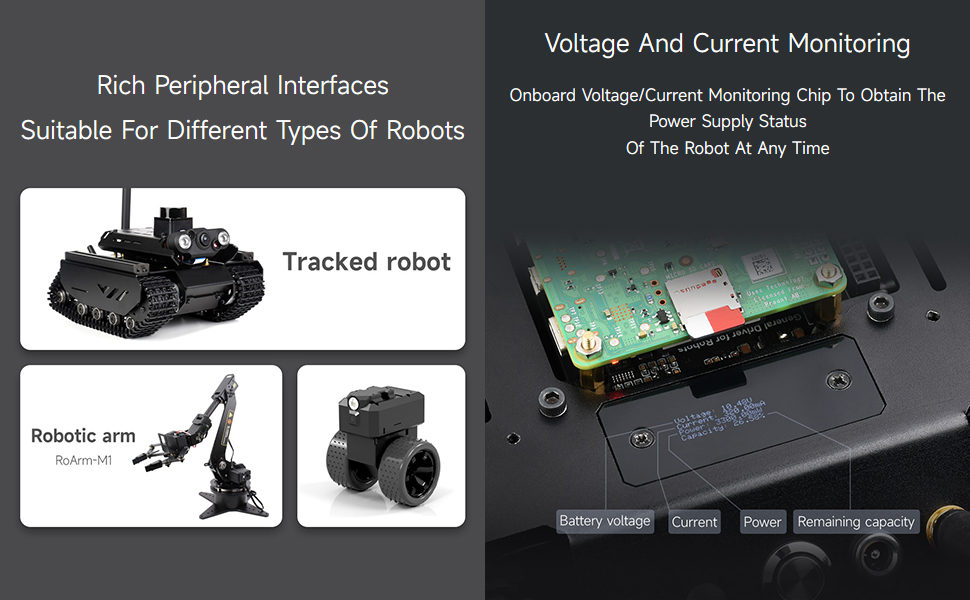
Image: Table detailing the control module, power supply, antenna, wireless communication, control chip, power interface, download interface, dimensions, mounting hole spacing, and diameter.
| Параметр | Мән | Параметр | Мән |
|---|---|---|---|
| Басқару модулі | ESP32-WROOM-32 | Басқару чипі | ESP32 |
| Нәр беруші | DC 7-13V | Қуат интерфейсі | XH2.54 |
| Антенна қосқышы | IPEX1 | Интерфейсті жүктеу | C түрі |
| Сымсыз байланыс | WiFi, ESP-NOW | Өлшемдері | 65 × 65 мм |
| Монтаждау тесіктерінің аралығы | 49 × 58 мм | Тесік диаметрі | 3мм |
| Операциялық жүйе | Linux | ЖЖҚ жады технологиясы | PSRAM |
| Процессор бренді | Espressif жүйелері | Сымсыз үйлесімділік | Блютез |

Image: Diagram showing the physical dimensions of the General Driver Board in millimeters.
6. Орнату
6.1 Қуат қосылымы
Connect a DC power source (7-13V) to the XH2.54 power port. Alternatively, a 2S or 3S lithium battery module can be used. Ensure the power switch (12) is in the OFF position before connecting power, then switch to ON.
6.2 Host Computer Connection
The 40PIN GPIO header (23) allows connection to host computers such as Raspberry Pi or Jetson Nano. Communication can be established via serial port or IIC. Ensure proper pin alignment to prevent damage.
6.3 Бастапқы бағдарламалау
Connect the board to your computer via the Type-C USB port (9). Utilize the automatic download circuit (27) for easy program uploading to the ESP32. Refer to the Waveshare wiki for detailed instructions on setting up your development environment (e.g., Arduino IDE).
7. Пайдалану нұсқаулары
7.1 Қозғалтқышты басқару
The board supports various motor configurations. Connect DC motors with encoders to the PH2.0 6P motor interfaces (14, 15) or DC motors without encoders to the PH2.0 2P motor interfaces (16, 17). The TB6612FNG Motor Control Chip (20) manages motor operation.
7.2 Serial Bus Servo Control
Connect ST3215 serial bus servos to the dedicated interface (13). The serial bus servo control circuit (21) allows for controlling up to 253 servos and obtaining feedback. Ensure adequate power supply for multiple servos.

Image: Illustration of how multiple serial bus servos are connected to the board for control.
7.3 IMU and Navigation
The onboard 9-axis IMU (AK09918C electronic compass (18) and QMI8658C motion sensor (19)) provides real-time attitude and heading information. This data is crucial for robot navigation and stabilization.

Image: Representation of the 9-axis IMU, showing its ability to detect acceleration, magnetic fields, and angular velocity across X, Y, and Z axes.
7.4 Сымсыз байланыс
The ESP32-WROOM-32 module (1) supports WiFi, Bluetooth, and ESP-NOW. Connect the provided Bluetooth antenna to the IPEX1 WiFi connector (2) for enhanced wireless range. Configure wireless settings via the ESP32 programming environment.
7.5 Перифериялық қосылымдар
The board offers various interfaces for connecting external peripherals:
- ЛИДАР: Connect Lidar modules to the LIDAR interface (3) and Type-C port (8).
- IIC Devices: Use the I2C peripheral expansion interface (4) for OLED displays, IMU sensors, and other IIC-compatible devices.
- TF картасы: Insert a TF card into the slot (22) for storing data or WiFi configurations.
Сурет: аяқталдыview of the board's rich peripheral interfaces, demonstrating connections for tracked robots, robotic arms, and other robot types.
7.6 томtage және Ағымдағы мониторинг
The INA219 voltage/current monitoring chip (11) allows for real-time monitoring of the power supply status. This feature helps in managing battery life and detecting power anomalies.

Image: Display of voltage and current monitoring, indicating battery voltage, current draw, power consumption, and estimated remaining capacity.
7.7 Open-Source Demos and Tutorials
Waveshare provides open-source demos and detailed tutorials to assist users in getting started and utilizing the board's full functionality. These resources cover various aspects, including motor control, IMU data reading, servo control, and more.

Image: Screenshot showing the range of open-source demos and detailed tutorials available, including examples for motor control, TF card reading, OLED screen control, PWM servo control, IMU data reading, ST3215 serial bus servo control, INA219 voltage and current monitoring, WEB key control, WEB JSON control, WEB robot status display, serial JSON control, closed-loop speed control, and WiFi status reading and connection settings.
8. Техникалық қызмет көрсету
- Өңдеу: Always handle the board by its edges to avoid touching components, especially the ESP32 module, to prevent electrostatic discharge.
- Қоршаған орта: Operate the board in a clean, dry environment. Avoid exposure to moisture, dust, and extreme temperatures.
- Тазалау: If necessary, gently clean the board with a soft, dry brush or compressed air. Do not use liquids or abrasive materials.
- Қуат көзін өшіру: Disconnect all power sources before making any physical connections or disconnections to the board.
9. Ақаулықтарды жою
- Тақта қосылмайды: Ensure the power supply is within the 7-13V range and correctly connected to the XH2.54 port. Check the power ON/OFF switch (12).
- Бағдарламалау мәселелері: Verify the Type-C USB connection (9) and ensure the correct drivers are installed on your computer. Confirm the automatic download circuit (27) is functioning. Refer to the Waveshare wiki for specific programming environment setup.
- Перифериялық құрылғы жауап бермейді: Check all physical connections for motors, servos, and IIC devices. Ensure the correct code is uploaded and that the peripheral is compatible with the board's interfaces.
- Сымсыз байланыс проблемалары: Ensure the Bluetooth antenna is securely connected to the IPEX1 WiFi connector (2). Verify WiFi credentials and network settings in your code.
- Күтпеген мінез-құлық: Review your code for logical errors. Consult the Waveshare official documentation and community forums for similar issues and solutions.
10. Қолдау және ресурстар
For further assistance, detailed documentation, and community support, please refer to the official Waveshare resources:
- Official Waveshare Webсайт: www.waveshare.com
- Өнім Wiki/Құжаттар: Іздеу "General Driver Board for Robots" on the Waveshare wiki for comprehensive guides, schematics, and exampкоды.
- Техникалық көмек: Contact Waveshare's customer support through their official website for specific technical inquiries.
11. Кепілдік туралы ақпарат
For information regarding the product warranty, please refer to the warranty policy available on the official Waveshare website or contact your point of purchase. Warranty terms and conditions may vary by region and retailer.