
Кіріспе
This manual provides detailed instructions for the installation, operation, and maintenance of your Tiandy TC-C38XS 8MP IR Turret Camera. Please read this manual thoroughly before using the product to ensure correct usage and to prevent damage.
Қауіпсіздік туралы ақпарат
- Ensure the power supply meets the camera's requirements (DC 12V or PoE).
- Камераны шамадан тыс температураға, ылғалдылыққа немесе коррозиялық ортаға ұшыратпаңыз.
- Avoid pointing the camera directly at strong light sources for extended periods.
- Handle the camera with care to prevent physical damage.
- Орнатуды білікті мамандар жергілікті электр ережелеріне сәйкес орындауы керек.
Пакет мазмұны
Барлық компоненттер пакетте бар екеніне көз жеткізіңіз:
- Tiandy TC-C38XS IR Turret Camera
- Бекіту бұрандалары мен қабырға тығындары
- Ethernet кабеліне арналған су өткізбейтін қосқыш
- Жылдам бастау нұсқаулығы (бар болса)
- Drill Template (if applicable)
Өнім аяқталдыview
The Tiandy TC-C38XS is an 8MP IR Turret Camera designed for outdoor surveillance, featuring a full metal housing and advanced imaging capabilities.
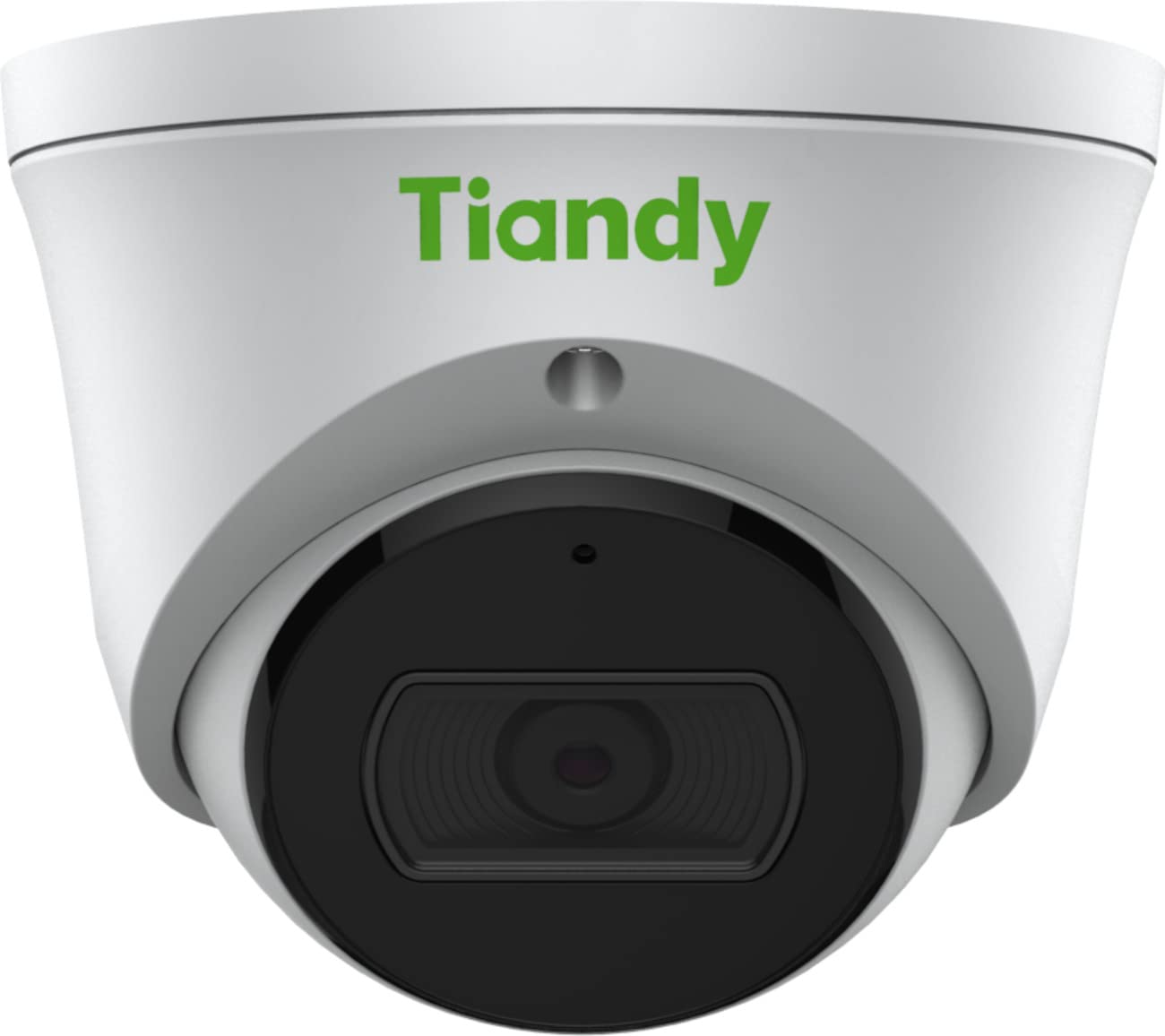
1-сурет: Алдыңғы view of the Tiandy TC-C38XS IR Turret Camera, showing the lens and IR illuminators.

2-сурет: Бұрыштық view of the Tiandy TC-C38XS IR Turret Camera, highlighting its compact turret design.

3-сурет: Technical drawing showing the dimensions of the Tiandy TC-C38XS IR Turret Camera (approx. 116.6mm diameter, 96mm height).
Негізгі ерекшеліктері:
- 8 мегапиксель рұқсаты: Captures video at up to 3840x2160 at 20fps.
- 1/2.8" CMOS Sensor: Provides clear images even in low-light conditions.
- Smart IR: Infrared illumination up to 30 meters (98.42 feet) for night vision.
- 120dB WDR: Wide Dynamic Range for balanced images in high-contrast scenes.
- Кірістірілген микрофон: Аудио бақылау үшін.
- Борттық сақтау: Supports MicroSD cards up to 512 GB.
- Full Metal Housing: Durable construction for outdoor use.
Орнату
1. Камераны орнату
The TC-C38XS is designed for wall mounting. Choose a suitable location that provides the desired field of view және желілік және қуат кабельдерінің қолы жететін жерде орналасқан.
- Use the provided drill template (if included) to mark the screw holes on the mounting surface.
- Drill pilot holes and insert wall plugs if mounting on masonry or drywall.
- Берілген бұрандаларды пайдаланып камера негізін бекіту бетіне бекітіңіз.
- Adjust the camera's angle: The camera supports pan 0 to 340°, tilt 0 to 75°, and rotate 0 to 360° for optimal positioning. Loosen the adjustment screws, position the camera, and then tighten the screws to secure it.
2. Сымдар және қуат қосылымы
The camera supports Power over Ethernet (PoE) or a DC 12V power supply.
- PoE қосылымы: Connect a standard Ethernet cable from a PoE-enabled switch or NVR to the camera's RJ45 port. This provides both power and data connectivity. Ensure the waterproof connector is properly installed to protect the Ethernet port from moisture.
- DC 12V Connection: If PoE is not used, connect a DC 12V power adapter (not included) to the camera's power input port. Then, connect a standard Ethernet cable from your network to the camera's RJ45 port for data.
After connecting, the camera will power on and begin its startup sequence.
Жұмыс істеп тұр
1. Бастапқы желі конфигурациясы
To access the camera's web interface for configuration, you will need to find its IP address on your network. This can typically be done using a manufacturer-provided IP search tool or by checking your router's connected devices list.
- Компьютеріңізді камерамен бірдей желіге қосыңыз.
- ашу а web шолғышты таңдап, камераның IP мекенжайын енгізіңіз.
- Log in using the default username and password (refer to the Quick Start Guide or manufacturer's documentation for default credentials). It is highly recommended to change the default password immediately for security.
2. Негізгі функциялар
- Тірі View: Access the live video feed through the web interface or compatible NVR/VMS software.
- Жазу: Configure recording schedules and methods (continuous, motion-triggered) to the on-board MicroSD card (up to 512 GB) or a connected NVR.
- Қозғалысты анықтау: Set up motion detection zones and sensitivity. The camera can trigger alarms (e.g., email notifications) upon detection.
- Smart IR: The camera automatically adjusts IR intensity to prevent overexposure in night vision, ensuring clear images up to 30 meters.
- Кескін параметрлері: Adjust saturation, brightness, contrast, and sharpness via the client software or web browser to optimize image quality.
- Аудио: Utilize the built-in microphone for audio monitoring.
Техникалық қызмет көрсету
1. Тазалау
Regular cleaning helps maintain optimal image quality.
- Gently wipe the camera lens with a soft, clean cloth. If necessary, use a mild lens cleaning solution.
- Do not use harsh chemicals or abrasive materials, as they can damage the lens coating or housing.
- Periodically clean the camera housing to remove dust and debris.
2. Микробағдарлама жаңартулары
Мерзімді түрде өндірушіні тексеріңіз webмикробағдарлама жаңартуларына арналған сайт. Микробағдарлама жаңартулары өнімділікті жақсарта алады, жаңа мүмкіндіктер қосады және қауіпсіздікті күшейтеді. Микробағдарлама жаңартулары пакетімен бірге берілген нұсқауларды мұқият орындаңыз.
3. MicroSD картасын басқару
If using on-board storage, regularly check the status of the MicroSD card. Format the card periodically to maintain performance and prevent data corruption. Back up important recordings before formatting.
Ақаулықтарды жою
| Мәселе | Ықтимал себебі | Шешім |
|---|---|---|
| No image/No power | Incorrect power supply; Loose cable connection; PoE issue. | Check power adapter (DC 12V) or PoE switch. Ensure all cables are securely connected. |
| Желі арқылы камераға кіру мүмкін емес | Incorrect IP address; Network configuration error; Firewall blocking. | Verify IP address. Check network cable. Disable temporary firewall for testing. Ensure camera and computer are on the same subnet. |
| Суреттің сапасы нашар | Dirty lens; Insufficient lighting; Incorrect image settings. | Clean the lens. Adjust image settings (brightness, contrast, WDR). Ensure IR is functioning correctly at night. |
| Қозғалысты анықтау жұмыс істемейді | Incorrect sensitivity settings; Detection zone not configured; Obstructions. | Review ішіндегі қозғалысты анықтау параметрлері web interface. Adjust sensitivity and redraw detection zones. Clear any obstructions in the camera's view. |
| MicroSD картасы жазылмайды | Card full; Card not formatted; Card faulty; Recording schedule not set. | Check card capacity. Format the MicroSD card via the camera's interface. Replace card if faulty. Verify recording schedule. |
Техникалық сипаттамалар
| Ерекшелік | Мәлімет |
|---|---|
| Үлгі | TC-C38XS |
| Кескін сенсоры | 1/2.8 дюймдік CMOS |
| Макс. Ажыратымдылық | 3840x2160 (8 МП) |
| Кадр жиілігі | Up to 20fps (3840x2160), 30fps (1080p) |
| Мин. Жарықтандыру | Color: 0.003Lux@ (F1.6, AGC ON), B/W: 0Lux with IR |
| Объектив | Бекітілген 2.8 мм |
| өрісі View (FOV) | Көлденең: 100.1° |
| IR диапазоны | Up to 30m (98.42 feet) with Smart IR |
| Кең динамикалық диапазон (WDR) | 120дБ |
| Бейнені қысу | S+265/H.265/H.264/M-JPEG |
| Аудио | Кірістірілген микрофон |
| Борттық сақтау | MicroSD картасы 512 ГБ дейін |
| Желілік интерфейс | 1 RJ45 10M / 100M өзін-өзі бейімдейтін Ethernet порты |
| Нәр беруші | DC 12V, PoE (802.3af) |
| Материал | Толық металл корпус |
| Өлшемдері | Approx. 4.59 x 4.59 x 3.77 inches (116.6mm diameter, 96mm height) |
| Салмағы | Шамамен 0.88 фунт (0.4 кг) |
| Жұмыс шарттары | Сыртқы пайдалану |
| Протоколдар | TCP/IP, HTTP, HTTPS, DHCP, DNS, RTP, RTSP, etc. |
| Дабыл триггері | Motion Detection, Mask Alarm, Disk Full, etc. |
| Бейне аналитикасы | Tripwire, Perimeter |
Кепілдік туралы ақпарат
Tiandy products typically come with a limited manufacturer's warranty. For specific warranty terms and conditions, please refer to the warranty card included with your product or visit the official Tiandy webсайт. Сатып алу түбіртегін кепілдік талаптары үшін сатып алудың дәлелі ретінде сақтаңыз.
Қолдау
If you encounter any issues or have questions regarding your Tiandy TC-C38XS camera that are not covered in this manual, please contact your authorized Tiandy reseller or visit the official Tiandy support website for further assistance. You may also find FAQs and additional resources online.
- Өндіруші: Тианди
- Модель нөмірі: TC-C38XS
- UPC: 785249841675


