
1. Кіріспе
Thank you for choosing the YENKEE YMS 3030BK RGB Gaming Mouse Ultra Light Shotgun. This manual provides detailed instructions for setting up, operating, and maintaining your new gaming mouse. Please read this manual carefully before use to ensure optimal performance and longevity of your device.
The YENKEE YMS 3030BK RGB Gaming Mouse features an ergonomic design for comfortable use. Its unique ultra-light perforated construction promotes airflow, helping to keep your palm cool during extended use. Equipped with an accurate IC 6651 sensor, it offers precise tracking with a resolution of up to 6400 DPI, and includes customizable RGB backlighting.
2. Пакет мазмұны
Пакетте келесі элементтердің бар-жоғын тексеріңіз:
- 1 x YENKEE YMS 3030BK RGB Gaming Mouse Ultra Light Shotgun
- Пайдаланушы нұсқаулығы (бұл құжат)
3. Өнім аяқталдыview
3.1 Негізгі мүмкіндіктер
- Unique ultra-light perforated construction for improved airflow
- Ergonomic design for comfortable grip and to prevent palm sweat
- Customizable RGB backlight
- Accurate IC 6651 sensor with up to 6400 DPI resolution
- Wired USB connectivity
3.2 Тышқан компоненттері
The YMS 3030BK mouse typically includes the following components:
- Сол жақ түймешікті басыңыз
- Оң жақ түймешікті басыңыз
- Айналдыру дөңгелегі / Орташа басу түймесі
- DPI Adjustment Button (usually located behind the scroll wheel)
- Forward/Backward Side Buttons (typically on the left side)
- Оптикалық сенсор (төменгі жағында)
- USB кабелі
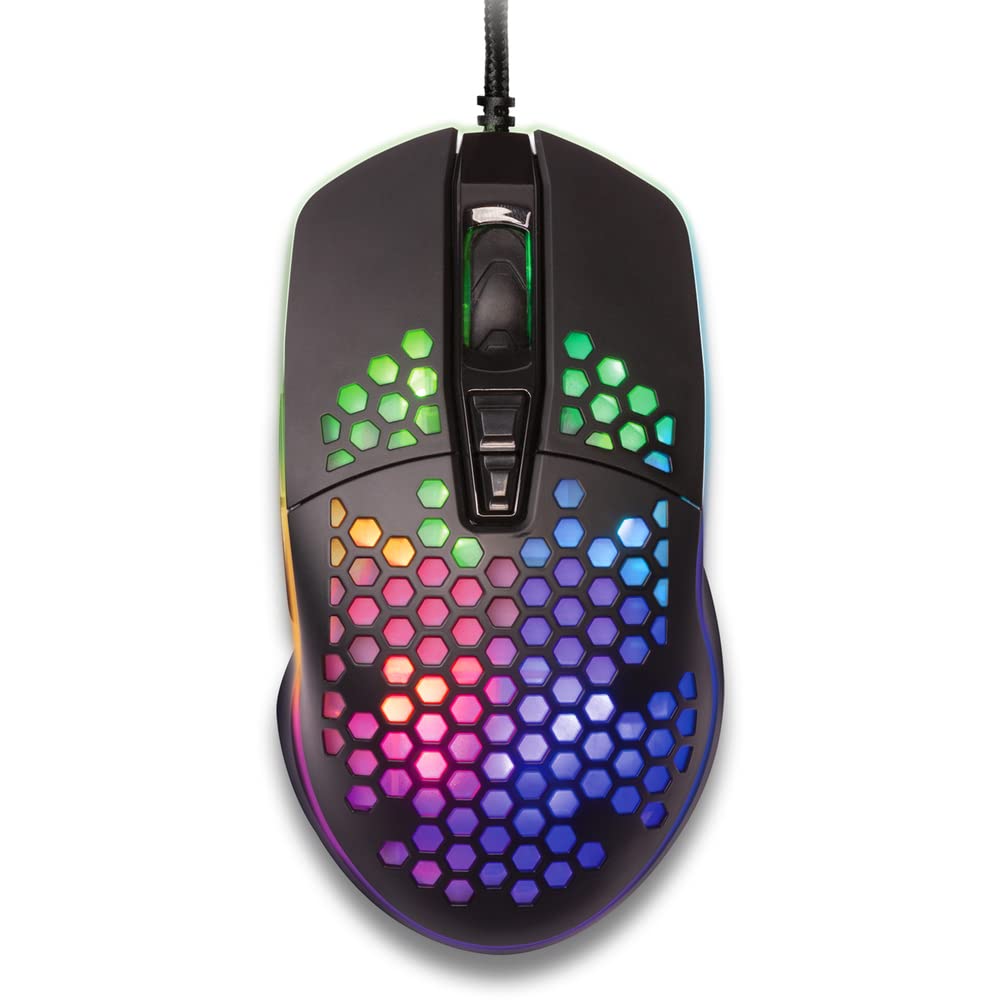
1-сурет: Жоғарыдан төменге view of the YENKEE YMS 3030BK RGB Gaming Mouse, highlighting its ultra-light perforated design and ergonomic contours.
4. Орнату
Follow these steps to set up your YENKEE YMS 3030BK gaming mouse:
- Тінтуірді қосыңыз: Тінтуірдің USB қосқышын компьютердегі қол жетімді USB портына қосыңыз.
- Драйверді орнату: Your operating system (Windows 7, 8, Vista, XP) should automatically detect and install the necessary drivers. No additional software installation is typically required for basic functionality.
- Қосымша бағдарламалық құрал: For advanced customization of RGB lighting and button assignments, please visit the official YENKEE website to check for any dedicated software for the YMS 3030BK model.
5. Пайдалану нұсқаулары
5.1 Негізгі операция
- Сол жақ түймені басыңыз: Бастапқы әрекет, таңдау.
- Тінтуірдің оң жақ түймешігі: Мәтінмәндік мәзір, қосымша әрекет.
- Айналдыру дөңгелегі: Scroll up/down, middle click for specific functions (e.g., opening links in new tabs).
- Бүйірлік түймелер: Default functions are typically 'Forward' and 'Backward' in web браузерлер немесе file explorers. These can often be customized via software.
5.2 DPI реттеуі
The YMS 3030BK mouse features an IC 6651 sensor with a maximum resolution of 6400 DPI. You can adjust the DPI (Dots Per Inch) sensitivity on-the-fly using the dedicated DPI button, usually located behind the scroll wheel. Pressing this button will cycle through preset DPI levels, indicated by changes in the mouse's RGB lighting color or pattern. Refer to the optional software for precise DPI level configuration and customization.
5.3 RGB жарықтандыруды теңшеу
The RGB backlight of your mouse can be customized to match your preferences. While some mice offer onboard controls for basic lighting effects, full customization of colors, patterns, and brightness is typically achieved through the dedicated YENKEE software (if available). Please download and install the software from the official YENKEE website for advanced lighting options.
6. Техникалық қызмет көрсету
To ensure the longevity and optimal performance of your gaming mouse, follow these maintenance guidelines:
- Тазалау: Use a soft, dry cloth to wipe the surface of the mouse. For perforated areas, a soft brush or compressed air can help remove dust. Avoid using harsh chemicals or abrasive materials.
- Сенсорды тазарту: Occasionally clean the optical sensor on the underside of the mouse with a cotton swab lightly dampened with isopropyl alcohol. Ensure it is completely dry before use.
- Кабельге күтім жасау: Зақым келтірмеу үшін USB кабелін қатты иілуден немесе шамадан тыс тартудан аулақ болыңыз.
- Сақтау орны: Тышқанды пайдаланбаған кезде таза, құрғақ ортада сақтаңыз.
7. Ақаулықтарды жою
If you encounter issues with your YENKEE YMS 3030BK mouse, refer to the table below for common problems and solutions:
| Мәселе | Ықтимал себебі | Шешім |
|---|---|---|
| Тінтуір жауап бермейді | Бос USB қосылымы, ақаулы USB порты, драйвер мәселесі. | Ensure USB cable is securely plugged in. Try a different USB port. Restart your computer. Check Device Manager for driver status. |
| Меңзер қозғалысы тұрақсыз немесе секіргіш | Оптикалық сенсор кір, тышқан төсенішінің жарамсыз беті. | Clean the optical sensor. Use a clean, uniform mouse pad. |
| DPI реттеуі жұмыс істемейді | Software conflict, button malfunction. | Ensure no conflicting software is running. If using custom software, check its settings. |
| RGB жарығы жұмыс істемейді немесе тұрып қалды | Бағдарламалық жасақтама мәселесі, қуат мәселесі. | Check the YENKEE software settings. Unplug and replug the mouse. Restart your computer. |
8. Техникалық сипаттамалар
| Ерекшелік | Мәлімет |
|---|---|
| Бренд | ЙЕНКИ |
| Үлгі нөмірі | YMS 3030BK |
| Қосылу технологиясы | USB (сымды электр) |
| Қозғалысты анықтау технологиясы | Optical (IC 6651 Sensor) |
| Максималды DPI | 6400н/д |
| Арнайы мүмкіндіктер | Ergonomic Design, Lightweight, Perforated Construction, RGB Backlight |
| Түс | Қара |
| Элемент салмағы | 4.2 унция (шамамен 119 грамм) |
| Өнім өлшемдері (LxWxH) | 5.43 x 2.44 x 9.06 дюйм (шамамен 13.8 x 6.2 x 23 см) |
| Аппараттық платформа | Ойын |
| Операциялық жүйенің үйлесімділігі | Windows 7, Windows 8, Windows Vista, Windows XP |
9. Кепілдік және қолдау
Кепілдік туралы ақпарат: For detailed warranty terms and conditions, please refer to the warranty card included with your product or visit the official YENKEE website. Warranty periods may vary by region and retailer.
Тұтынушыларды қолдау: If you require technical assistance or have questions regarding your YENKEE YMS 3030BK gaming mouse, please contact your retailer or visit the support section of the official YENKEE webбайланыс ақпараты мен жиі қойылатын сұрақтарға арналған сайт.