
Pknight CR011R-3pin
Pknight CR011R-3pin ArtNet DMX Ethernet жарықтандыру контроллерінің интерфейсі пайдаланушы нұсқаулығы
Model: CR011R-3pin
1. Кіріспе
This manual provides comprehensive instructions for the setup, operation, and maintenance of your Pknight CR011R-3pin ArtNet DMX Ethernet Lighting Controller Interface. This device facilitates bi-directional conversion between Art-Net and DMX512 protocols, offering a robust solution for professional lighting control applications.
2. Өнім аяқталдыview
The Pknight CR011R-3pin is a compact and durable ArtNet DMX node designed for reliable performance in various lighting environments. It features an OLED display for direct configuration and supports versatile power options.

1-сурет: Pknight CR011R-3pin ArtNet DMX Ethernet Lighting Controller Interface.
2.1 Негізгі мүмкіндіктер
- Bi-directional ArtNet/DMX Conversion: Supports both Art-Net to DMX and DMX to Art-Net modes.
- OLED Control System: Onboard display and buttons for direct device configuration.
- Versatile Power Solution: Compatible with 5V DC input and USB Power Delivery (PD) via USB-C.
- Қашықтан басқару конфигурациясы: Settings can be adjusted remotely using DMX Workshop software.
- Тұрақты құрылыс: Housed in a sturdy all-metal casing.
2.2 Құрылғының құрамдас бөліктері

2-сурет: Артқы view of the CR011R-3pin showing DMX In/Out, Ethernet, and DC5V ports.
- Көк жарық диодты индикатор:
- Stays off: Standby mode, waiting for DMX (in/out).
- Stays on (no blinking): DMX-out mode, converts ArtNet to DMX output.
- Blinks continuously: DMX-in mode, converts DMX input to ArtNet.
- Female XLR Port (3-Pin): DMX input/output connection.
- RJ45 Port (ArtNet In/Out): Ethernet connection for Art-Net data.
- Green LED (left): Link LED.
- Green LED (right): Activity LED (blinks fast for data activity, off for no data).
- Power Port (Type-C): 5V DC power input. Compatible with USB PD and third-party USB-C cables.
3. Орнату
3.1 Қуат қосылымы
Connect the device to a 5V DC power source using the provided USB-C cable. The device supports USB Power Delivery (PD) and can be powered by 5V adapters, PC USB ports, or power banks.
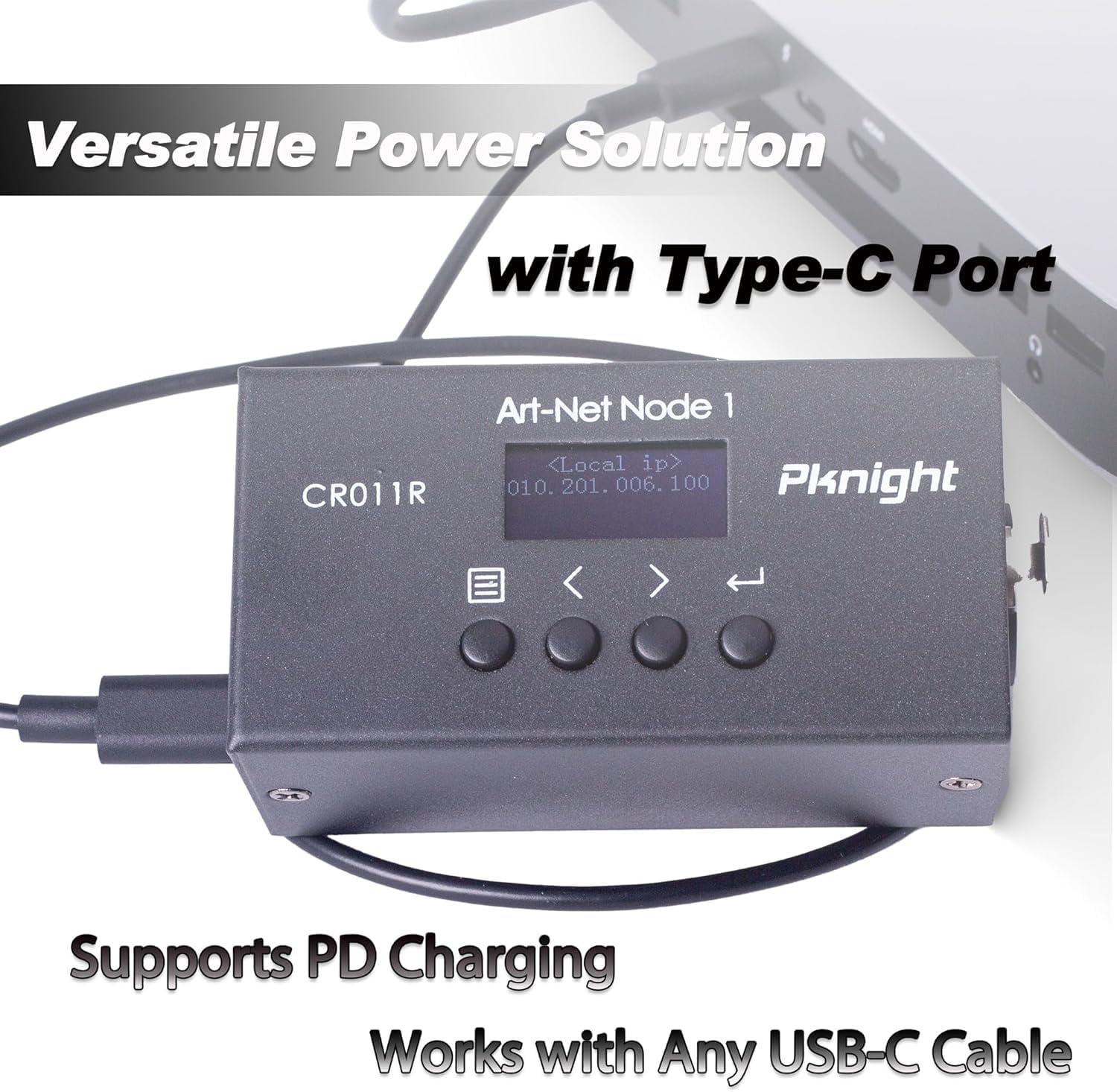
3-сурет: Powering the CR011R-3pin via its USB-C port.
3.2 Желіге қосылу
Connect the RJ45 Ethernet port to your network switch or directly to a computer using a standard Ethernet cable. Ensure your network settings are configured to allow Art-Net communication.
3.3 DMX қосылымы
Connect your DMX lighting fixtures or DMX controller to the 3-pin XLR DMX In/Out port. The device will automatically detect the DMX signal direction based on its configured transmit mode.
4. Configuration (OLED Control System)
The CR011R-3pin features an OLED display and four function buttons for direct configuration without external software.

4-сурет: OLED display and control buttons.
- OLED экраны: Displays current settings and menu options.
- Мәзір түймесі: Used to switch between menu options.
- Backward or Minus Button: Navigates backward or decreases a selected parameter.
- Forward or Plus Button: Navigates forward or increases a selected parameter.
- Енгізу түймесі: Clicks to choose a function or parameter. Press and hold for 3 seconds to submit changes.
4.1 Remote Configuration and Naming
You can remotely configure network parameters (IP address, subnet mask, net address, subnet address, port universe) and customize the startup display text using the DMX Workshop application.

5-сурет: Customizing the device name using DMX Workshop.

6-сурет: Diagram illustrating the configuration flow for network and Art-Net parameters.
5. Жұмыс режимдері
The CR011R-3pin supports bi-directional operation, allowing it to function as both an ArtNet to DMX converter and a DMX to ArtNet converter.
5.1 ArtNet to DMX (DMX Output Mode)
In this mode, the device receives Art-Net data over Ethernet and converts it into DMX512 signals, which are then output through the 3-pin XLR port to control DMX-compatible lighting fixtures. The blue LED indicator will stay on (no blinking).
5.2 DMX to ArtNet (DMX Input Mode)
When configured for DMX input, the device receives DMX512 signals from a DMX controller via the 3-pin XLR port and converts them into Art-Net data, which is then transmitted over Ethernet. This allows DMX consoles to control Art-Net compatible software or devices. The blue LED indicator will blink continuously.
To switch to DMX input mode, set the 'Transmit mode' to 'artnet <- dmx' via the OLED display or DMX Workshop.

7-сурет: Diagram illustrating DMX input mode, converting DMX to ArtNet for software control.
6. Қолданбалар
The Pknight CR011R-3pin is suitable for a variety of professional lighting applications, including:
- Stage жарықтандыруды басқару
- Pixel LED installations
- Architectural decoration lighting
- Fixed lighting installations

8-сурет: Көрнекі эксamples of the CR011R-3pin in various lighting applications.
7. Техникалық сипаттамалар
| Ерекшелік | Техникалық сипаттама |
|---|---|
| Үлгі нөмірі | CR011R-3pin |
| Элемент салмағы | 13.4 унция |
| Өнім өлшемдері | 4.53 x 2.76 x 2.36 дюйм |
| DMX порттары | 1 (3-pin XLR, bi-directional) |
| Ethernet порттары | 1 (RJ45, ArtNet In/Out) |
| Қуат кірісі | 5V DC via USB-C (supports USB PD) |
| Басқару интерфейсі | OLED display and 4 function buttons |
| Тұрғын үй материалы | Тұтастай металдан жасалған |
8. Ақаулықтарды жою
- No DMX Output/Input:
- Verify the 'Transmit mode' setting on the device or via DMX Workshop. Ensure it matches your intended operation (ArtNet to DMX or DMX to ArtNet).
- Check DMX cable connections and ensure they are secure.
- Confirm that the DMX universe setting on the device matches your lighting control software. Note that some software may label the first universe as '1' while the device may internally refer to it as '0'. Adjust accordingly.
- Желі қосылымы жоқ:
- Ensure the Ethernet cable is properly connected and the green Link LED on the RJ45 port is illuminated.
- Check the IP address, subnet mask, and other network parameters configured on the device and your computer/network. Art-Net typically uses a specific IP range (e.g., 2.x.x.x or 10.x.x.x) and subnet mask (e.g., 255.0.0.0).
- If connecting directly to a computer, manually configure your computer's network adapter to be in the same IP range as the device.
- Confirm that your network allows UDP traffic on Art-Net's default port (6454).
- Құрылғы қосылмаған:
- Ensure the USB-C power cable is securely connected to both the device and a functional 5V power source.
- Try a different USB-C cable and power adapter to rule out faulty accessories.
9. Техникалық қызмет көрсету
To ensure the longevity and optimal performance of your Pknight CR011R-3pin, follow these maintenance guidelines:
- Тазалау: Құрылғының сыртын тазалау үшін жұмсақ, құрғақ шүберекті пайдаланыңыз. Сұйық тазалағыштарды немесе еріткіштерді пайдаланбаңыз, себебі олар әрлеуді немесе ішкі құрамдастарды зақымдауы мүмкін.
- Сақтау орны: Қолданбаған кезде құрылғыны тікелей күн сәулесінен және төтенше температурадан алыс салқын, құрғақ жерде сақтаңыз.
- Кабельдерді басқару: Ensure all cables are routed properly to prevent strain on the connectors and accidental disconnections.
- Микробағдарламаны жаңарту: Мерзімді түрде өндірушіні тексеріңіз webқұрылғының ең соңғы мүмкіндіктері мен қателерді түзетулері бар екеніне көз жеткізу үшін кез келген қолжетімді микробағдарлама жаңартулары туралы сайт.
10. Кепілдік және қолдау
Pknight products are designed for reliability and performance. For specific warranty information, please refer to the warranty card included with your product or visit the official Pknight website. If you encounter any issues or require technical assistance, please contact Pknight customer support through their official channels.
Қатысты құжаттар - CR011R-3pin
 |
Pknight WIFI-DMX EasyNode пайдаланушы нұсқаулығы: Сымсыз DMX басқару Pknight WIFI-DMX EasyNode үшін толық пайдаланушы нұсқаулығы, орнату, жұмыс істеу, режимдер (Easylink, Router) және сымсыз DMX жарықтандыруды басқару ақауларын жою туралы егжей-тегжейлі. |
 |
Pknight CR011R Art-Net то DMX512 желілік конвертер пайдаланушы нұсқаулығы Pknight CR011R, Art-Net-тен DMX512-ге екі бағытты түрлендіргішке арналған толық пайдаланушы нұсқаулығы. Орнату, техникалық сипаттамалар, OLED басқаруы, алдыңғы/артқы панель мүмкіндіктері, параметрлер, желі параметрлері және ақаулықтарды жою туралы біліңіз. |
 |
Pknight CR011R Art-Net то DMX512 желілік конвертер пайдаланушы нұсқаулығы Pknight CR011R пайдаланушы нұсқаулығы, Art-Net-тен DMX512-ге екі бағытты түрлендіргіш. Жарықтандыруды кәсіби басқаруға арналған техникалық сипаттамалар, орнату, параметрлер, ақаулықтарды жою және «Досыңның атын ата» сияқты мүмкіндіктер туралы мәліметтер. |
 |
Tivoli VAST Cove Light - PALETTE: Specifications and Guide Detailed specifications, dimensions, accessories, and wiring diagrams for the Tivoli VAST Cove Light - PALETTE, an RGB+W LED cove lighting system with DMX/RDM control. |
 |
Tivoli VAST Cove Light - PALETTE: Өнім сипаттамалары және нұсқаулық Tivoli VAST Cove Light - PALETTE үшін егжей-тегжейлі сипаттамалар, мүмкіндіктер және тапсырыс ақпараты, әртүрлі CCT және конфигурацияларда қол жетімді DMX/RDM басқаруы бар RGB+W шұңқырды жарықтандыру шешімі. |
 |
Tivoli VAST Cove Light - PALETTE: RGB+W LED Specification and Control Guide Comprehensive specification guide for the Tivoli VAST Cove Light - PALETTE, detailing features, dimensions, order options, accessories, DMX control, network hardware, and commissioning services. |
Ask a question about this manual
Ask about setup, troubleshooting, compatibility, parts, safety, or missing instructions. Manuals+ will review the question and use this page’s manual context to help answer it.